 IP
IPWhat Is My IP Address? | Instant IPv4 & IPv6 Checker
Your public IPv4 and IPv6 addresses are detected automatically the moment this page loads — along with your ISP, location, and network details. Free, instant, no signup required.
Hero, guides, and sidebar links below work without JavaScript. The interactive checker needs JavaScript enabled in your browser.
What Is My IP Address?
Your IP address is the unique numerical label assigned to your internet connection by your Internet Service Provider (ISP). Every device that connects to the internet — phone, laptop, smart TV, or router — gets at least one IP address. When you visit a website, stream a video, or send an email, your IP address is the "return address" that tells servers where to deliver the data back to you.

Every device on the internet carries an IP address — your public IP is what all websites and servers see when you connect
This page shows your public IP address — the one the outside world sees when you connect to the internet. It is different from your private IP (such as 192.168.1.x or 10.0.0.x), which only exists within your local home or office network and is not visible to websites or external servers.
The IP shown at the top of this page is your real public IP — the one every website, server, and online service sees when you connect. If you are using a VPN, you will see the VPN server's IP instead of your home IP. Use this to verify whether your VPN tunnel is actually working.
How to Find My IP Address Instantly
The fastest way to find your IP address is already done — look at the result at the top of this page. Our tool detects your current public IPv4 and IPv6 addresses automatically when the page loads. No form to fill out, no button to click, no app to install.
If you want to find your IP address using other methods:
ipconfig → look for "IPv4 Address" under your active adapter
# macOS / Linux — Terminal (shows private IP)
ifconfig → look for "inet" under en0 (Wi-Fi) or eth0
ip addr show → Linux alternative
# Public IP from terminal (Linux/macOS)
curl ipapi.co/ip → returns your public IPv4
curl ifconfig.me → alternative public IP check
Important: Methods like ipconfig (Windows) and device Wi-Fi settings show your private local IP — the address your router assigned internally. They do not show the public IP that websites actually see. The tool on this page is the only reliable way to see your real public IP.
My IPv4 Address vs. My IPv6 Address — What Is the Difference?
There are two formats of IP addresses in active use today, and most modern devices are assigned both simultaneously:
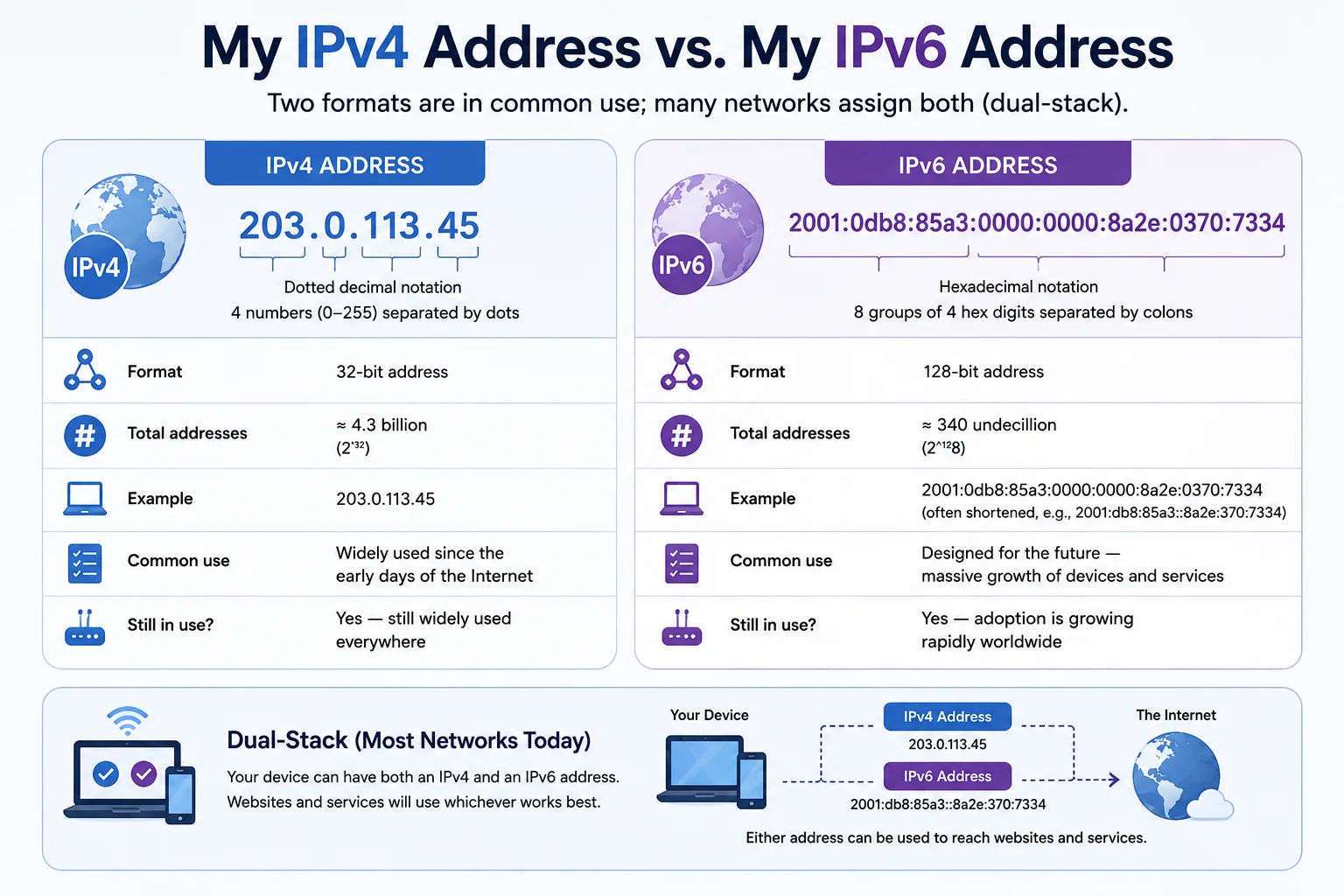
Most modern networks run dual-stack — both IPv4 and IPv6 active at the same time on every device
IPv4 — The Traditional Standard
Your IPv4 address follows the familiar four-number format such as 203.0.113.45. IPv4 has been the internet's backbone since the early 1980s and supports approximately 4.3 billion unique addresses. Because the world now has far more internet-connected devices than available IPv4 addresses, ISPs use a technique called NAT (Network Address Translation) — your router shares one public IPv4 with every device in your home, each getting their own private IP internally.
IPv6 — The Future-Proof Format
Your IPv6 address uses a hexadecimal format such as 2001:0db8:85a3::8a2e:0370:7334. IPv6 was designed to solve the address exhaustion problem permanently — it supports approximately 340 undecillion unique addresses, enough for every device on Earth for the foreseeable future. Most modern ISPs, mobile networks, and cloud providers now assign IPv6 alongside IPv4.
Our tool detects and displays both your IPv4 and IPv6 address simultaneously, so you always know exactly what each server sees when you connect — whether it prefers IPv4, IPv6, or negotiates automatically via dual-stack.
If you only see an IPv4 address on this page and no IPv6, your ISP or home router may not have IPv6 fully enabled yet. Indian ISPs including Jio and Airtel have been progressively rolling out IPv6, but many residential connections still default to IPv4-only.
What Is My IP Address Location?
IP geolocation is the process of estimating a physical location from an IP address. Our tool displays your approximate city, region, country, ISP, and a map pin based on your current IP. Here is how accurate IP location typically is:
| Accuracy Level | Typical Precision | Why It Varies |
|---|---|---|
| Country | ~99% accurate | IP blocks are registered by country — very reliable |
| State / Region | ~90% accurate | Large ISP blocks can span multiple states |
| City | 25–50 miles in most cases | ISPs often register blocks in hub cities like Mumbai or Delhi |
| Street address | Not possible | Only your ISP can map this with a legal order |
Your IP location is used by websites for many purposes: showing local content and language, enforcing streaming licenses by region, fraud detection, ad targeting, and compliance with regional laws. If your location appears incorrect, the most common reasons are:
- You are using a VPN — your apparent location becomes the VPN server's location
- Your ISP routes traffic through a hub city different from where you physically are (very common with Jio, BSNL, and Airtel in India)
- You are on a mobile data network — carrier IPs often show the carrier's regional hub city rather than your exact town
Why Does My IP Address Keep Changing?
Most home and mobile internet connections use dynamic IP addressing. Your ISP assigns IP addresses from a shared pool, and your specific IP can change when:
- Your router restarts or reconnects to the ISP
- Your DHCP lease expires — typically every 24–48 hours for home broadband connections
- You switch between Wi-Fi and mobile data
- Your ISP performs network maintenance or infrastructure upgrades
Dynamic IPs are completely normal for residential users. If you need an address that never changes — for hosting a server, remote desktop access, consistent whitelisting in a corporate firewall, or running a game server — you need a static IP, which most ISPs offer as a paid add-on.
This tool automatically refreshes your IP data every 10 minutes, so you will always see your current IP without manually reloading the page. If you toggle a VPN, switch networks, or reconnect your router, click the Refresh button above the results for an immediate update.
What Does My IP Address Reveal About Me?
Your IP address does not directly expose your name, phone number, or home address. However, it does publicly reveal:
- Your approximate geographic location — typically accurate to city or region level
- Your Internet Service Provider (ISP) name — Jio, Airtel, BSNL, ACT, etc.
- Whether you are on a residential, mobile, business, or datacentre connection
- Whether you appear to be using a VPN, proxy, or Tor exit node
- Your connection's Autonomous System Number (ASN) and network organisation
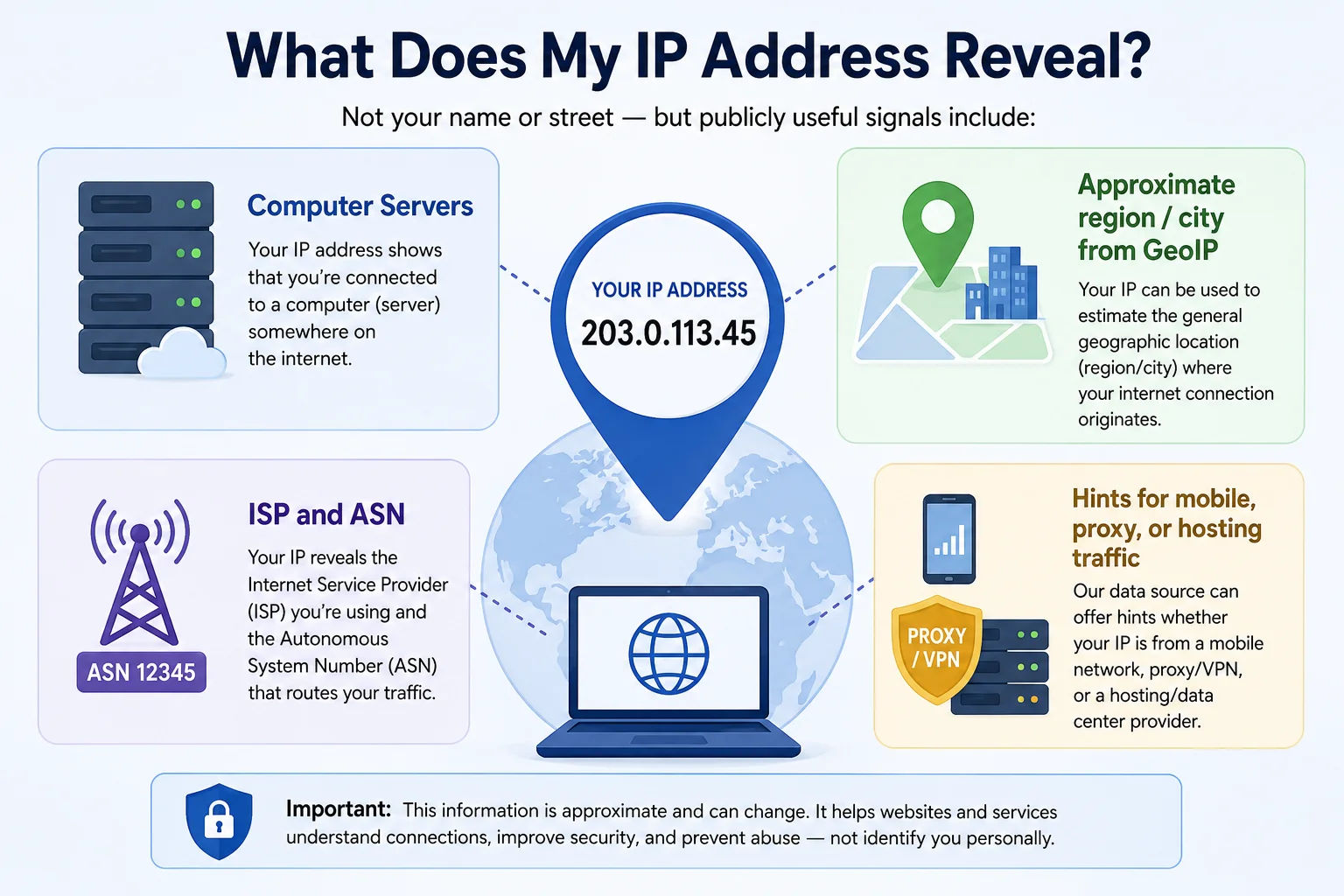
Websites routinely read your IP for personalisation, fraud detection, and regional compliance — here is exactly what they can see
Websites routinely use this information for content personalisation, ad targeting, security checks, and regional compliance. While your IP alone does not identify you as an individual, it can be combined with browser fingerprinting, cookies, and login data to build a detailed profile over time. Using a VPN replaces your real IP with the VPN server's IP, limiting what websites can infer about your location and network.
How to Hide My IP Address
If you want to mask your public IP address, there are three main methods — each with different trade-offs between speed, privacy, and complexity:
After connecting to any VPN, come back to this page and click Refresh to verify your IP has changed. If this page still shows your original IP while a VPN is active, your VPN has a leak. Use our VPN Detection tool to diagnose exactly what is leaking.
Public IP Address vs. Private IP Address
These two types of IP address serve completely different purposes. Understanding the distinction explains why checking your IP in device settings gives a different result than this page:
| Public IP | Private IP | |
|---|---|---|
| Who assigns it? | Your ISP | Your router (DHCP) |
| Who can see it? | The entire internet | Only devices on your local network |
| Example format | 203.0.113.45 | 192.168.1.x or 10.0.0.x |
| Globally unique? | ✓ Yes | ✗ No — millions share the same ranges |
| Shown on this page? | ✓ Yes | ✗ No |
Your router receives one public IP from your ISP and uses NAT (Network Address Translation) to assign private IPs to every device on your network — your phone, laptop, TV, and smart home devices. To the outside world, all of those devices appear to share a single public IP address.
Common Reasons to Check Your IP Address
People check their IP address for many different practical reasons. Here are the most common:
Frequently Asked Questions About IP Addresses
Clear answers to every common question about IP addresses, location accuracy, privacy, and how this tool works:
What is my IP address right now?
Your current public IP address is shown at the top of this page and is detected automatically when it loads. It is the IPv4 or IPv6 address your Internet Service Provider (ISP) has assigned to your connection right now. This is the address visible to all websites, servers, and online services you connect to — not the private IP shown in your device's Wi-Fi or network settings.
Is the IP address shown here my real public IP?
Yes. This tool shows your real public IP address — the one external servers see when you connect. If you are using a VPN, the IP shown will be your VPN server's address instead of your actual home or device IP. Use this page to confirm whether your VPN is working correctly by checking if your real IP is hidden after connecting.
What is the difference between IPv4 and IPv6?
IPv4 is the traditional 32-bit format (e.g., 203.0.113.1) supporting about 4.3 billion unique addresses. IPv6 is the newer 128-bit format (e.g., 2001:db8::1) supporting virtually unlimited addresses — designed to replace IPv4 as the internet runs out of IPv4 space. Most modern networks and devices use dual-stack connectivity, meaning they are assigned both simultaneously. This tool detects and displays both your IPv4 and IPv6 so you see exactly what each server encounters.
How do I find my IP address on Windows 11?
To find your IP on Windows 11, open Command Prompt and type ipconfig, then press Enter. Your private local IP appears next to "IPv4 Address" under your active network adapter. However, this is your internal network IP assigned by your router — not the public IP websites actually see. To find your public IP, use this page — it shows both your public IPv4 and IPv6 instantly without any steps.
How do I find my IP address on iPhone?
On iPhone, go to Settings → Wi-Fi → tap the (i) icon next to your connected network. The IP Address shown is your private local IP assigned by your router. To find your public IP address — the one visible to websites and online services — simply use this page. It detects your public IPv4 and IPv6 automatically without any navigation steps.
Why is my IP address showing the wrong city or location?
IP geolocation is an estimate based on where your IP block is registered — not GPS tracking. Your IP may show the wrong city because: your ISP routes traffic through a regional hub in a different city (very common with Jio, Airtel, and BSNL), you are on a mobile network which uses carrier hub IPs, or a VPN is routing your traffic through a server in another location. Country-level accuracy is about 99%, but city-level can be off by 25–50 miles or more.
Can someone find my exact home address from my IP?
No. An IP address only reveals your approximate geographic area — typically a city or region — not your exact street address. Only your ISP can link your IP to a specific household, and they are legally required to keep this private except under a valid court order or law enforcement request. Your name, phone number, and precise home location cannot be determined from your IP address alone by ordinary websites or individuals.
Why does my IP address keep changing?
Most home and mobile internet connections use dynamic IP addressing — your ISP assigns your IP from a shared pool, and it can change when your router restarts, your DHCP lease expires (typically every 24–48 hours), or you switch between networks. This is completely normal for residential users. If you need a consistent IP that never changes — for a home server, remote access setup, or firewall whitelisting — ask your ISP for a static IP address, which is usually available as a paid upgrade.
What is the difference between a public IP and a private IP?
Your public IP is assigned by your ISP and is visible to the entire internet — it is what this page detects. Your private IP (such as 192.168.1.x) is assigned by your router and only works within your local home or office network. Your router uses Network Address Translation (NAT) to map all the private IPs of your devices — phone, laptop, TV — to your single shared public IP address.
How do I hide my IP address?
The most reliable way to hide your IP is a VPN, which routes your traffic through a remote server so websites see the VPN's IP instead of yours. Other options include proxy servers for browser-level masking and the Tor network for stronger anonymity at the cost of speed. After connecting to a VPN, return to this page and click Refresh to confirm your IP has changed and the VPN is working correctly.
Can my employer see my IP address?
If you are working on a company network or using a company device with monitoring software installed, your employer can see your network IP and traffic logs. On a personal device using your home internet, your employer cannot directly see your IP address. However, any company services or corporate VPNs you log into may record your IP at the time of access as part of their access logs.
Why do I see both an IPv4 and an IPv6 address?
Many modern networks use dual-stack connectivity, meaning your device is assigned both an IPv4 and an IPv6 address simultaneously. Your device prefers IPv6 when the destination server supports it, but falls back to IPv4 automatically for compatibility with older systems. If you only see an IPv4 address on this page, your ISP or home router may not have IPv6 fully enabled yet — this is still common with some Indian ISPs and older routers.
Is 192.168.x.x my real IP address?
No. Addresses beginning with 192.168.x.x, 10.x.x.x, or 172.16.x.x are private IP addresses that only exist within your local network. They are not visible on the internet and are reused by millions of routers worldwide. Your real public IP — the one this page shows — is a completely different address assigned by your ISP, and it is the only one that is globally unique to your connection.
How often does this tool refresh my IP address?
This IP checker automatically re-detects your IP address every 10 minutes. If your IP changes — for example after toggling your VPN, reconnecting your router, or switching between Wi-Fi and mobile data — the updated address will appear without manually reloading the page. You can also click the Refresh button above the results panel for an immediate update at any time.
What is my IP address on mobile data vs. Wi-Fi?
Your IP address changes depending on which network you are connected to. On Wi-Fi, your public IP is assigned by your home or office ISP. On mobile data, it is assigned by your cellular carrier (Jio, Airtel, BSNL, etc.) and is typically a shared carrier-grade NAT IP. Switch between the two and click Refresh on this page to see both addresses and confirm which network you are currently using.
Explore More Free Network Tools
Combine "What Is My IP" with these free tools for a complete picture of your network and IP reputation: