
IP to ISP Lookup
Find the Internet Service Provider, network operator, Autonomous System Number (ASN), IP range, abuse contact, and connection type for any IPv4 or IPv6 address. Uses live WHOIS, RDAP, and routing data to identify the organisation that owns and operates any IP address - from residential ISPs (Jio, Airtel, BSNL) to cloud providers (AWS, Google, Cloudflare) to mobile carriers and enterprise networks.
What Is an IP to ISP Lookup?
An IP to ISP lookup identifies which Internet Service Provider (ISP) or network operator owns and routes a specific IP address. Every IP address on the internet is registered to an organisation - this could be a residential ISP like Jio or Airtel, a cloud provider like AWS or Google Cloud, a content delivery network like Cloudflare or Akamai, a mobile carrier, a university, a government agency, or a corporate enterprise. The lookup queries authoritative registration databases (RDAP and WHOIS at regional internet registries) and live BGP routing tables to return the current owner, the Autonomous System Number, the registered IP range, and abuse contact information.
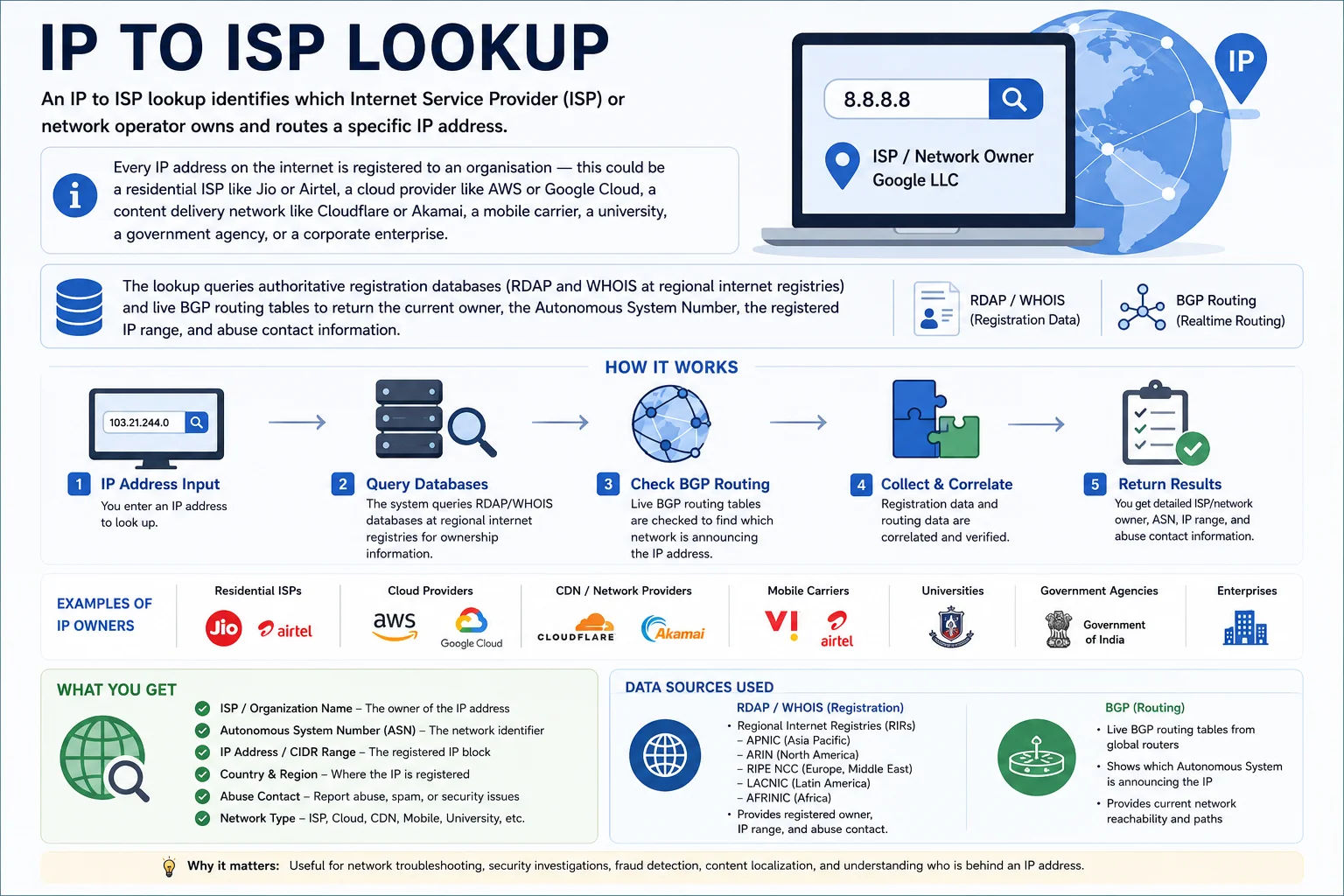
Every IP address traces back to a registered organisation - from the five Regional Internet Registries (ARIN, RIPE, APNIC, LACNIC, AFRINIC) through ISPs to the end user's connection
How IP Ownership Is Determined - The IP Registry Hierarchy
IP address ownership flows through a strict hierarchy of registration authorities:
└── Allocates large address blocks to 5 Regional Internet Registries (RIRs)
Regional Internet Registries (RIRs):
├── APNIC → Asia-Pacific (India, China, Australia...)
├── ARIN → North America
├── RIPE NCC → Europe, Middle East, Central Asia
├── LACNIC → Latin America & Caribbean
└── AFRINIC → Africa
└── RIRs allocate blocks to National Internet Registries (NIRs)
or directly to ISPs and large organisations
ISPs (Jio, Airtel, AWS, etc.)
└── Sub-allocate IPs to their customers
or use IPs directly for their infrastructure
# India falls under APNIC. Query APNIC for any Indian IP:
whois -h whois.apnic.net 49.32.10.1
curl https://rdap.apnic.net/ip/49.32.10.1 # Modern RDAP format (JSON)
ISP vs AS (Autonomous System) - Key Distinction
An ISP and an Autonomous System (AS) are related but not the same. An Autonomous System is a collection of IP networks and routers under the control of a single entity that presents a common routing policy to the internet. Large ISPs like Jio operate multiple ASes. A single AS can also belong to a company that is not a traditional ISP (like a large corporation managing its own network). The ASN (AS Number) is a globally unique identifier assigned by the RIR, used in BGP (Border Gateway Protocol) routing:
| Term | Definition | Example | Where to Look It Up |
|---|---|---|---|
| ISP | Internet Service Provider - sells internet access to customers | Reliance Jio Infocomm Ltd | WHOIS, RDAP, ipapi.co |
| ASN | Autonomous System Number - unique 16 or 32-bit routing identifier | AS55836 (Jio), AS24560 (Airtel) | bgp.he.net, RIPE STAT, ARIN |
| Org | Registered organisation that owns the IP block in WHOIS | Reliance Jio Infocomm Limited | RDAP: /entities endpoint |
| Prefix / CIDR | The specific IP range announced in BGP routing tables | 49.32.0.0/13 (Jio) | BGP.he.net/prefix, RIPE STAT |
| RIR | Regional Internet Registry that issued the block | APNIC (for all Indian IPs) | whois.apnic.net |
| Abuse contact | Email or role to report abuse from this IP range | [email protected] | WHOIS abuse-c field, RDAP |
Indian ISP ASN Directory - Jio, Airtel, BSNL & More
Every major Indian ISP has one or more Autonomous System Numbers. Knowing the ASN lets you look up routing announcements, check prefix delegations, and identify traffic sources in server logs. Here are the primary ASNs for major Indian internet providers:
Also uses: AS136787, AS134927, AS55644
IP ranges: 49.32.0.0/13, 2409:4000::/20 (IPv6)
Registry: APNIC
Type: Mobile + Fixed (JioFiber)
CGNAT: 100.64.0.0/10 on 4G mobile
Also uses: AS9498, AS131267, AS45609
IP ranges: 49.44.0.0/14, 115.240.0.0/14
Registry: APNIC
Type: Mobile + Broadband + Enterprise
Enterprise: AS9498 (Airtel Enterprise)
Also uses: AS45271, AS18101
IP ranges: 117.96.0.0/11, 59.88.0.0/13
Registry: APNIC
Type: Government ISP (fixed + mobile)
Note: One of India's oldest ASNs
Also uses: AS17908, AS24309
IP ranges: 103.83.128.0/18, 202.138.240.0/20
Registry: APNIC
Type: Mobile carrier
Note: Merged entity (Vodafone + Idea)
IP ranges: 49.204.0.0/14 (approx)
Registry: APNIC
Type: Fixed broadband (FTTH)
Markets: Bengaluru, Hyderabad, Chennai, Delhi
Also uses: AS4758, AS17660
IP ranges: 203.101.0.0/16, 210.212.0.0/14
Registry: APNIC
Type: Enterprise + Wholesale carrier
Note: Major Indian internet transit provider
IP ranges: 59.182.0.0/15, 175.100.0.0/14
Registry: APNIC
Type: Cable broadband (DOCSIS)
Markets: Major Indian metros
IP ranges: 164.100.0.0/16, 14.139.0.0/16
Registry: APNIC
Type: Government IT network
Note: .gov.in domains and government services
Cloud & CDN ASNs Frequently Seen in Server Logs
| ASN | Organisation | IP Ranges (examples) | Common Log Appearance |
|---|---|---|---|
| AS15169 | Google LLC | 8.8.0.0/16, 34.0.0.0/8, 35.0.0.0/8 | Googlebot, Google Cloud, Google DNS |
| AS13335 | Cloudflare Inc | 104.16.0.0/12, 172.64.0.0/13, 1.1.1.0/24 | CDN edge, Cloudflare Workers, 1.1.1.1 DNS |
| AS16509 | Amazon AWS (US) | 52.0.0.0/8, 54.0.0.0/8, 3.0.0.0/8 | EC2 instances, Lambda, S3 edge nodes |
| AS14618 | Amazon AWS (APAC) | 13.210.0.0/15, 54.206.0.0/15 | ap-southeast-1, ap-south-1 (Mumbai) |
| AS8075 | Microsoft Azure | 40.74.0.0/15, 20.0.0.0/8 | Azure VMs, Office 365, Teams |
| AS396982 | Google Cloud | 34.0.0.0/9, 35.184.0.0/13 | GCP Compute, GKE, App Engine |
| AS20940 | Akamai Technologies | 23.0.0.0/8, 184.24.0.0/13 | Akamai CDN edge nodes |
| AS32934 | Meta (Facebook) | 157.240.0.0/16, 31.13.0.0/16 | Facebook, Instagram, WhatsApp servers |
| AS714 | Apple Inc | 17.0.0.0/8 | iCloud, App Store, Apple CDN |
| AS2906 | Netflix | 45.57.0.0/17, 69.53.224.0/19 | Netflix streaming servers |
Who Uses an IP to ISP Lookup - 8 Real Use Cases
RDAP vs WHOIS - How IP Ownership Lookups Work
There are two main protocols for querying IP registration data - legacy WHOIS and modern RDAP (Registration Data Access Protocol). Understanding the difference helps you get the most accurate and structured data:
| Property | WHOIS (Legacy) | RDAP (Modern - RFC 7483) |
|---|---|---|
| Format | Free-text, inconsistent between RIRs | JSON - structured, machine-readable |
| Protocol | Plain text over TCP port 43 | HTTPS REST API - no special client needed |
| Authentication | None - anonymous | Optional - same base data free |
| Redirect | Manual - must know which RIR to query | Automatic - bootstrap from IANA registry |
| Internationalisation | ASCII only - Chinese/Arabic names garbled | Full Unicode support |
| Accuracy | Sometimes stale - updates slow | Authoritative, real-time from RIR |
| Rate limits | Strict - often blocked after 5–10 queries/min | Generous - HTTPS with proper headers |
| Best for | Quick manual checks, legacy tooling | Programmatic lookups, APIs, automation |
whois 49.32.10.1 # Auto-routes to APNIC for Indian IPs
whois -h whois.apnic.net 49.32.10.1 # Explicit APNIC query
whois AS55836 # ASN lookup
# RDAP lookup (modern JSON API - no special tools needed):
curl https://rdap.apnic.net/ip/49.32.10.1 # APNIC RDAP
curl https://rdap.arin.net/registry/ip/8.8.8.8 # ARIN RDAP
curl https://rdap.ripe.net/ip/185.100.0.1 # RIPE RDAP
# RDAP bootstrap (auto-selects correct RIR):
curl https://rdap.iana.org/ip/49.32.10.1 # IANA redirects to APNIC
# Python - programmatic ISP lookup via ipapi.co:
import requests
r = requests.get('https://ipapi.co/49.32.10.1/json/')
d = r.json()
print(d['org']) # 'AS55836 Reliance Jio Infocomm Ltd'
print(d['asn']) # 'AS55836'
print(d['isp']) # 'Reliance Jio Infocomm Ltd'
Understanding Your ISP Lookup Result
Connection Type Classification
The ISP lookup classifies the connection type based on the registered organisation type and known IP range characteristics. This classification is used in ad fraud detection, bot detection, and access control:
| Connection Type | Description | Common Sources | Trust Level |
|---|---|---|---|
| Residential | Home broadband or mobile connection from a residential ISP | Jio, Airtel, BSNL, Comcast, BT | High - real users |
| Mobile / Cellular | 4G or 5G mobile data connection | Jio 4G/5G, Airtel mobile, Vi | High - real users (often CGNAT) |
| Business / ISP | Commercial broadband or leased line | Airtel Enterprise, Tata Comm, NTT | High - business users |
| Hosting / Datacenter | Cloud VPS, dedicated server, or co-location | AWS, Google Cloud, DigitalOcean, Hetzner | Medium - bots and services common |
| CDN | Content Delivery Network edge node | Cloudflare, Akamai, Fastly, CloudFront | High - proxy for real users |
| VPN / Proxy | Commercial VPN service or anonymising proxy | NordVPN, ExpressVPN, Mullvad, PIA | Low - identity obfuscated |
| Tor Exit | Tor anonymity network exit node | Tor Project exit relays (e.g. AS60781) | Very low - anonymous |
| Education | University or research institution network | IIT Delhi, IISc, NUS, MIT | High - but high traffic volume |
Why the ISP Name May Differ from What You Expect
The WHOIS-registered organisation name is often the legal corporate entity, not the consumer brand. Some common discrepancies:
- Jio → Registered as "Reliance Jio Infocomm Ltd" or "Reliance Industries Ltd"
- Airtel → Registered as "Bharti Airtel Ltd" - some blocks show "Airtel Broadband" for FTTH vs "Airtel Mobile" for 4G
- Google → 8.8.8.8 shows "Google LLC" (AS15169) but Google Cloud IPs may show "Google Cloud" (AS396982) - different ASes for different services
- Cloudflare → 1.1.1.1 (DNS) and CDN IPs both show "Cloudflare Inc" but have different prefixes within AS13335
- AWS → Multiple ASNs - US is AS16509, APAC/India region is often AS14618; both are Amazon
Frequently Asked Questions - IP to ISP Lookup
Why does my ISP show as a different company than my internet provider?
WHOIS and RDAP show the legal entity that registered the IP block, which may be the parent company rather than the brand you know. Jio's blocks are registered to "Reliance Jio Infocomm Ltd" (a Reliance Industries subsidiary). Airtel's to "Bharti Airtel Ltd." For resellers - if your internet comes through a local ISP that resells Airtel or BSNL bandwidth, the lookup will show Airtel or BSNL as the ISP, not the local reseller, because Airtel/BSNL owns the IP block. Additionally, if you are using a VPN, the lookup will show the VPN provider's ISP, not your actual home ISP.
What is an Autonomous System Number (ASN) and why does it matter?
An Autonomous System Number (ASN) is a globally unique 16-bit or 32-bit number assigned by a Regional Internet Registry (RIR) to a network that has a distinct routing policy on the internet. Every ISP, cloud provider, and large corporation managing its own internet presence has at least one ASN. The ASN matters because: (1) BGP routing - the internet routes packets based on AS-level path selections; (2) Abuse reporting - abuse complaints should be sent to the abuse contact registered with the ASN's RIR; (3) Traffic analysis - identifying that traffic comes from AS13335 (Cloudflare) vs AS55836 (Jio) tells you whether it's CDN traffic vs residential; (4) Security - threat intelligence feeds often block or flag entire ASNs known for hosting malicious infrastructure.
How accurate is the ISP lookup? Can it be wrong?
ISP lookup accuracy depends on the freshness of registration data. RDAP/WHOIS data is authoritative but can lag behind real-world routing changes by days or weeks. Common inaccuracies: (1) Sub-allocated blocks - an ISP may allocate a sub-range to a corporate customer, but WHOIS still shows the ISP as the owner until the sub-allocation is registered separately. (2) IP transfer - when companies buy IP blocks, WHOIS may not be immediately updated. (3) CGNAT - a Jio 4G user appears as "Reliance Jio" but they share the IP with thousands of others - you cannot identify the individual. (4) VPNs - a user on a VPN appears as the VPN provider's ISP. For the highest accuracy, combine RDAP/WHOIS data with BGP routing table data from sources like RIPE STAT or BGP.he.net.
How do I look up the ISP for multiple IPs at once (bulk)?
from ipwhois import IPWhois; IPWhois('49.32.10.1').lookup_rdap(). (4) MaxMind GeoIP2 database - downloadable database for offline bulk lookups, ideal for log analysis of millions of IPs without API rate limits. (5) Team Cymru's IP-to-ASN mapping - free BGP-based service that maps IPs to ASNs via DNS: dig +short 1.10.32.49.origin.asn.cymru.com TXT.Can I find someone's identity from their ISP and IP address?
No - an IP to ISP lookup only reveals the organisation that owns the IP address range. It does NOT identify the individual subscriber. The subscriber-to-IP mapping is held privately by the ISP and is only disclosed to law enforcement with a valid legal order (court order, subpoena, or in India, a request under the IT Act). On CGNAT networks like Jio 4G, a single IP may be shared among thousands of users simultaneously - making individual identification impossible even for the ISP without timestamp correlation. The ISP lookup is appropriate for network security purposes (identifying whether traffic comes from a residential ISP, datacenter, or VPN) but cannot identify any individual person.
What is the abuse contact and how do I use it to report spam?
The abuse contact is the email address or role registered with the ISP in WHOIS under the "abuse-c" field. To report abuse from an IP: (1) Look up the abuse contact for that IP using this tool. (2) Email the abuse address with: the IP address, timestamp (with timezone), the nature of the abuse (spam, scanning, brute-force), and any relevant log entries. (3) Include your own IP/domain and the logs showing the offending activity. For Indian ISPs: Jio abuse contacts are typically [email protected] or the APNIC-registered abuse-c role. For cloud providers like AWS: [email protected] handles abuse reports, with a web form at aws.amazon.com/premiumsupport/knowledge-center/report-aws-abuse/. For Cloudflare IPs acting as a CDN: [email protected] - note that Cloudflare is just a proxy and will forward to the actual website owner.
Related Tools
Technical information
How this tool works, where data comes from, and known limitations. See also our methodology and accuracy & limitations pages.
How this tool works
Looks up organization/ISP fields for an IP using ipapi.co (and may resolve “my IP” via ipify first).
Data source
Limitations
ISP/org names come from registration and geolocation databases and may lag renumbers or reseller networks.
Content revision 2026-09 (aligned with current tool implementation in this codebase)