
WebRTC Leak Test
Detect if your browser is leaking your real IP address through WebRTC - a common privacy vulnerability that can reveal your real ISP-assigned IP even when using a VPN. This test checks all IPs your browser exposes via WebRTC including local network and public IPs.
Hero, guides, and sidebar links below work without JavaScript. The interactive checker needs JavaScript enabled in your browser.
What Is a WebRTC Leak?
WebRTC (Web Real-Time Communication) is a browser technology that enables peer-to-peer audio, video, and data sharing in web applications - used by Google Meet, Zoom web, Discord, and other real-time communication apps. To establish peer connections, WebRTC must discover the user's IP addresses - including local network IPs and public IPs - using the STUN (Session Traversal Utilities for NAT) protocol.
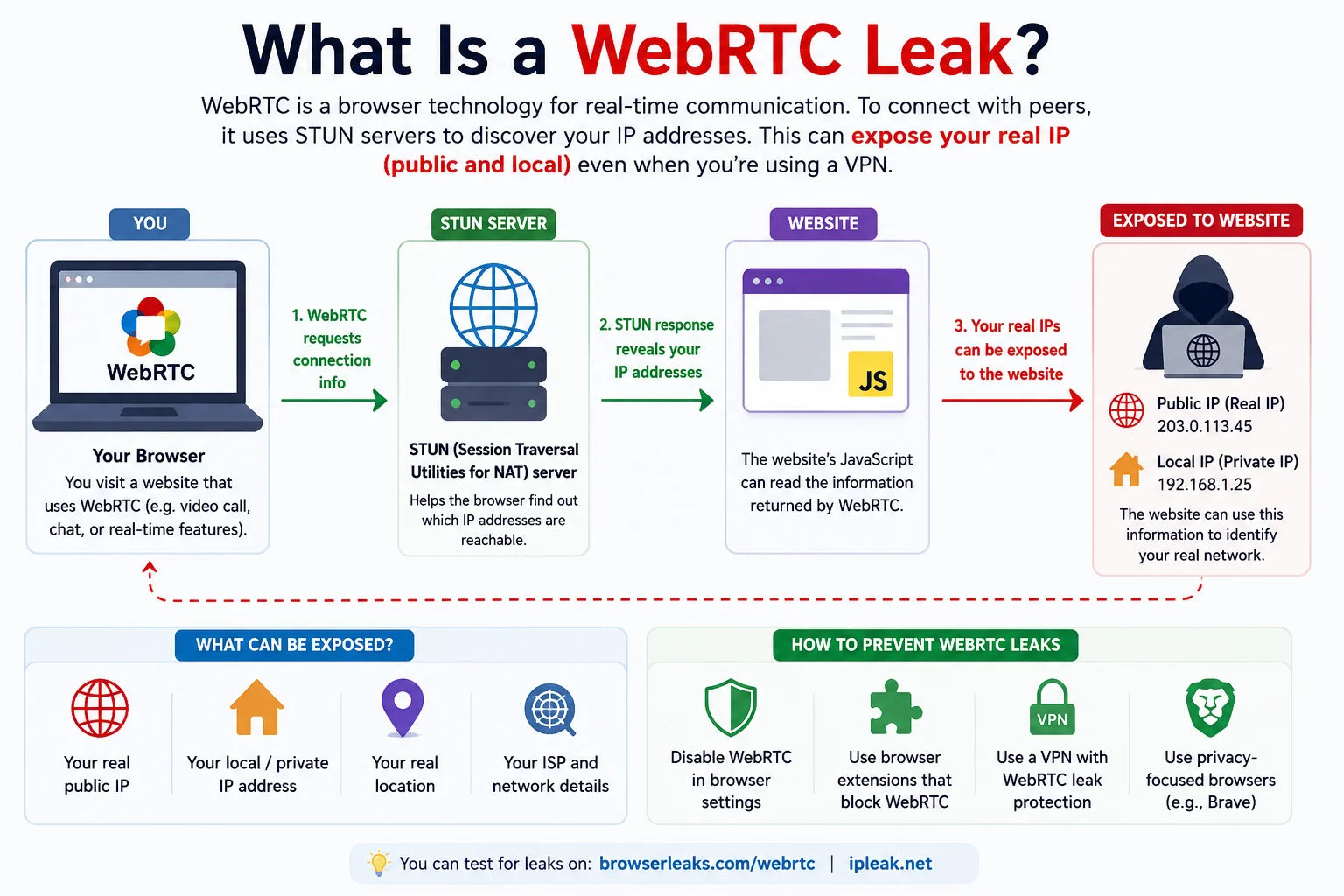
WebRTC can bypass VPN tunnels and reveal your real IP address - a significant privacy risk even when using a supposedly secure VPN
The WebRTC leak problem is that this IP discovery process happens outside the VPN tunnel - the STUN request goes directly to the STUN server (typically Google's stun.l.google.com), bypassing the VPN entirely. This means your real public IP address - assigned by your ISP - is revealed to any website using WebRTC, even if you're connected to a VPN.
Types of IPs Revealed by WebRTC
- Local IP (mDNS or 192.168.x.x): Your device's internal network IP. Modern browsers use mDNS obfuscation (showing a random .local address instead of 192.168.x.x), but older browsers expose the real local IP.
- Public IP: Your router's external IP - assigned by your ISP. This is the most serious leak - it reveals your real ISP IP even when connected to a VPN.
- VPN IP: If WebRTC routes through the VPN tunnel, this is what appears. This is the desired state when using a VPN for privacy.
How to Disable WebRTC and Fix Leaks
| Browser | Method | Instructions |
|---|---|---|
| Firefox | Built-in setting | about:config → media.peerconnection.enabled → false (disables WebRTC entirely) |
| Chrome / Edge | Extension | Install "uBlock Origin" (advanced settings) or "WebRTC Leak Prevent" extension |
| Brave | Built-in setting | Settings → Privacy and Security → WebRTC IP handling policy → Disable non-proxied UDP |
| Safari | Built-in | Safari limits WebRTC IP exposure by default - generally safe |
| Mobile Chrome | Extension needed | Android: install Bromite browser which has WebRTC control; iOS: use Safari or Firefox Focus |
Frequently Asked Questions
What is WebRTC and why does it leak IPs?
WebRTC is a browser API for real-time communication (video calls, peer-to-peer). To connect peers, it discovers IP addresses via STUN protocol - this discovery bypasses VPN tunnels, potentially revealing your real public IP to any website using WebRTC even when you're connected to a VPN.
How do I disable WebRTC in Firefox?
Go to about:config, search for media.peerconnection.enabled, and set it to false. This disables WebRTC entirely - video calls and peer-to-peer features in web apps will stop working, but all IP leaks via WebRTC will be prevented.
Does using a VPN prevent WebRTC leaks?
Not automatically. WebRTC STUN requests bypass the VPN tunnel by default. A VPN must explicitly handle WebRTC to prevent leaks. Some VPN clients block WebRTC traffic, others do not. Use this test to verify. For browser-level protection, use uBlock Origin with advanced WebRTC settings or the Brave browser.
What is the difference between a WebRTC leak and a DNS leak?
A WebRTC leak exposes your IP address via the browser's peer-to-peer connection API. A DNS leak exposes which websites you visit via DNS queries going outside the VPN tunnel. Both are VPN privacy failures but happen at different layers. Use our DNS Leak Test separately.
Is this WebRTC leak test free?
Yes - completely free, no signup. The test runs entirely in your browser using the RTCPeerConnection API to detect what IPs your browser exposes, then compares them to your actual public IP.
Related Tools
Technical information
How this tool works, where data comes from, and known limitations. See also our methodology and accuracy & limitations pages.
How this tool works
Uses WebRTC ICE candidate gathering in the browser and compares candidates with your public IP (via ipify) to highlight possible leaks.
Data source
- Browser WebRTC ICE candidates
- ipify (public IP comparison)
Limitations
Browser permissions and WebRTC policies vary. Local/LAN candidates are expected on many networks and are not always a “VPN failure.”
Content revision 2026-09 (aligned with current tool implementation in this codebase)