
Latency Test
Measure your internet connection's latency - the response time between your device and our server - in real time. See a live animated number updating every second, a scrolling chart of your latency history, and a full statistical summary with min, average, max, and jitter. Understand your connection quality for gaming, video calls, remote work, and everyday browsing.
Hero, guides, and sidebar links below work without JavaScript. The interactive checker needs JavaScript enabled in your browser.
What Is Internet Latency?
Internet latency is the time it takes for a packet of data to travel from your device to a destination server and receive a response - measured in milliseconds (ms). It is the most critical performance metric for any interactive internet activity: online gaming, video calls, live trading, remote desktop work, and even basic web browsing all feel faster or slower based on latency, not download speed.
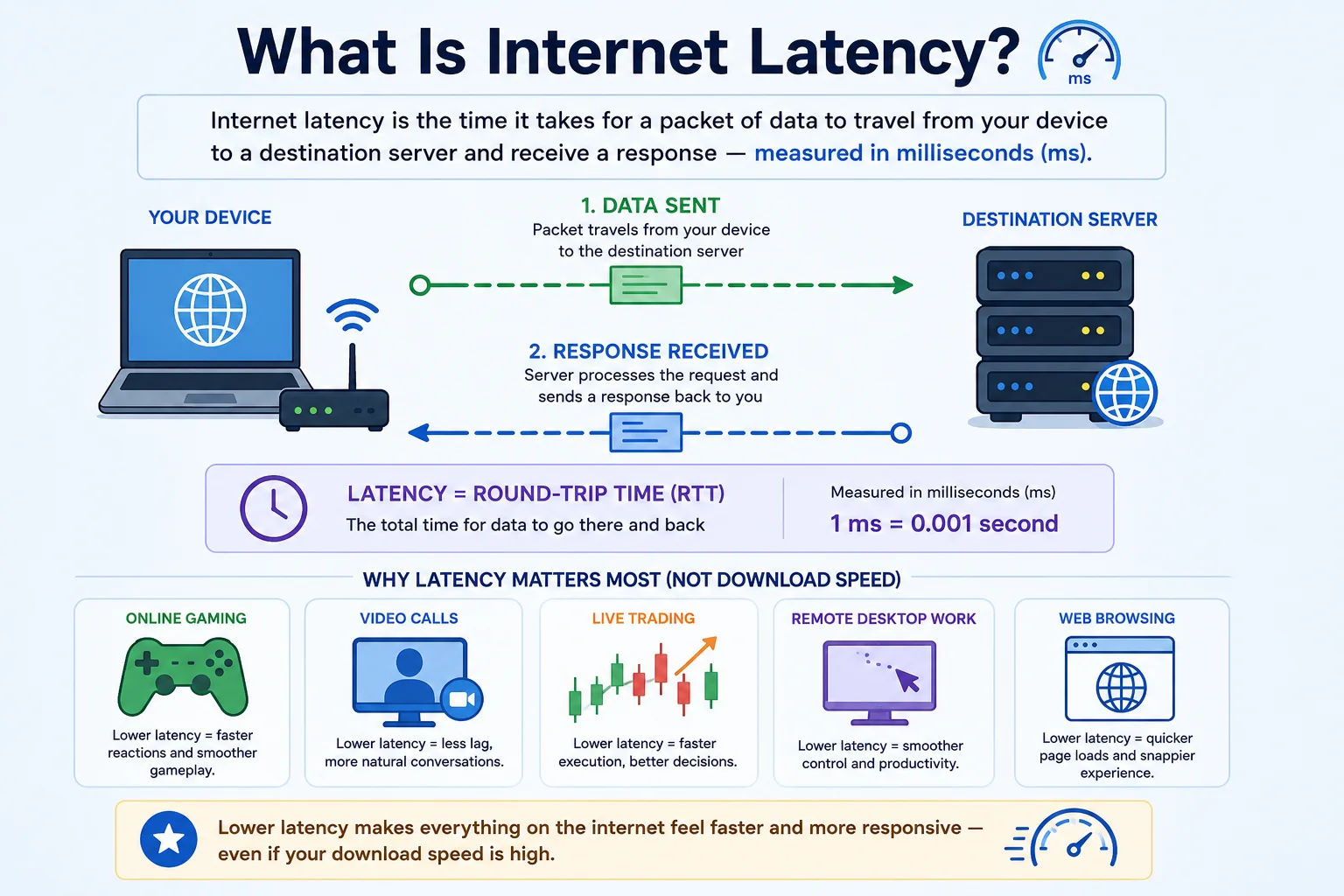
Latency measures how quickly your connection responds - low latency means fast, responsive internet; high latency creates the "lag" feeling even on fast connections
Latency is often confused with internet speed (bandwidth). A connection can have extremely high download speed (500 Mbps) but high latency (200ms), making it feel sluggish for gaming and video calls while still being fast for file downloads. Conversely, a lower-bandwidth connection (50 Mbps) with very low latency (10ms) feels snappier and more responsive for interactive tasks. For interactive applications, latency matters far more than download speed.
Latency vs ping: These terms are used interchangeably but have a subtle difference. Ping is the specific act of sending an ICMP Echo Request and measuring the round-trip time. Latency is the broader concept of any network delay. This tool measures HTTP/HTTPS round-trip latency - how long it takes your browser to make a request to our server and receive a response. This accurately reflects the latency your applications experience, not just raw ICMP ping which may be filtered by firewalls.
Latency Quality Guide - What Your Result Means
Not all latency numbers are equal. The acceptable range depends heavily on what you're doing. Here is a complete reference for interpreting your latency measurement:
Latency Requirements by Application Type
Different applications have dramatically different latency tolerance. Understanding these thresholds helps you set realistic expectations for your connection:
| Application | Ideal Latency | Acceptable | Problem Threshold |
|---|---|---|---|
| Competitive FPS / Battle Royale | < 20ms | < 50ms | > 80ms causes visible lag |
| Casual online gaming (MOBA, RPG) | < 50ms | < 100ms | > 150ms noticeable |
| VoIP / Phone calls (WhatsApp, Signal) | < 50ms | < 100ms | > 150ms causes echoes and delay |
| Video calls (Zoom, Teams, Meet) | < 50ms | < 150ms | > 200ms conversations become awkward |
| Live streaming (OBS, streaming to Twitch) | < 50ms | < 100ms | > 150ms upload disruption risk |
| Remote desktop (RDP, TeamViewer) | < 50ms | < 100ms | > 150ms cursor lag becomes frustrating |
| Web browsing | < 50ms | < 150ms | > 300ms pages feel sluggish to load |
| File download / upload (no real-time) | Not critical | Any | Does not affect throughput significantly |
| Online trading / HFT | < 5ms | < 20ms | Every millisecond matters |
What Affects Your Internet Latency - Every Factor Explained
Your latency reading is the cumulative sum of delays at every stage between your device and the destination server. Understanding each factor helps you identify which ones you can control and which are physical limits:
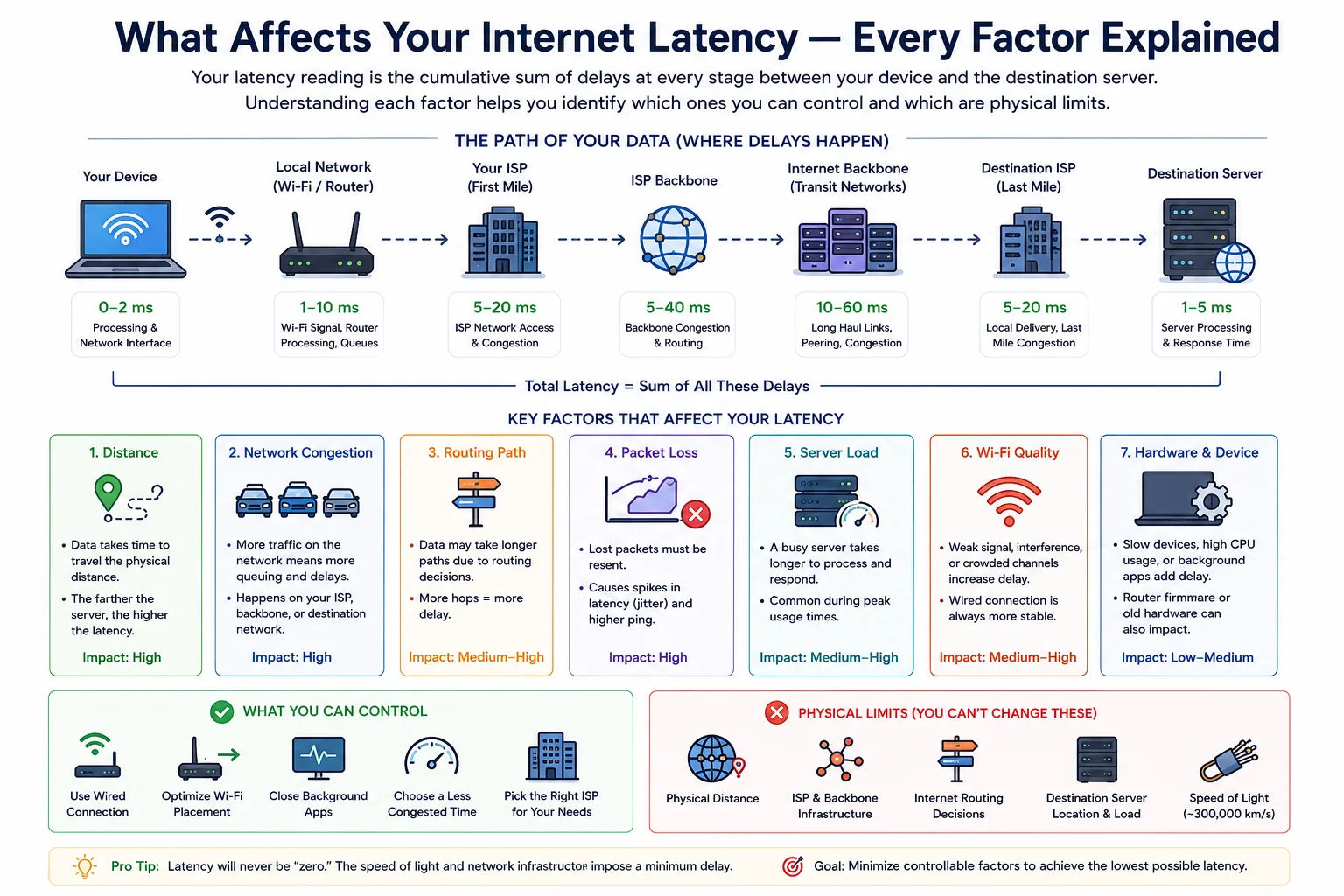
Latency accumulates at every point in the path - local hardware, Wi-Fi, ISP network, backbone routing, and finally the destination server
Expected Latency by Connection Type
Different internet connection technologies have inherently different latency profiles due to their physical properties. Use this as a benchmark to assess whether your connection is performing within expected ranges:
India ISP Latency Benchmarks
| ISP | Technology | Typical Latency (domestic) | Rating | Notes |
|---|---|---|---|---|
| Jio FTTH | FTTH Fibre | 5–15ms | Excellent | Excellent domestic latency. International latency (especially US) can be higher due to routing through Mumbai IX. |
| Airtel Xstream | FTTH / FTTB Fibre | 5–20ms | Excellent | Strong peering with international networks. Generally better international latency than Jio due to Tier-1 transit agreements. |
| ACT Fibernet | FTTH Fibre | 5–20ms | Excellent | Available in major metros (Bengaluru, Hyderabad, Chennai). Very competitive latency within coverage area. |
| BSNL Fibre | FTTH / ADSL | 15–50ms | Good | Variable quality depending on local infrastructure. BSNL FTTH is excellent where available; ADSL lines are significantly higher latency. |
| Jio 4G | 4G LTE | 35–70ms | Fair | Heavily depends on tower load. Peak hours (6–10 PM) may see 80–120ms. CGNAT adds slight overhead. |
| Airtel 4G | 4G LTE | 30–60ms | Fair | Generally more consistent than Jio 4G at peak hours. Airtel's 4G infrastructure handles congestion better in most markets. |
| Jio 5G | 5G NR (SA/NSA) | 10–25ms | Good | Available in major cities. True standalone (SA) 5G will further reduce latency as infrastructure matures. Currently better than 4G. |
When to Run a Latency Test - 8 Real-World Scenarios
How to Reduce Your Latency - Actionable Fixes
Many latency factors are within your control. Here are the most impactful improvements, organised by effort level:
- Plug an Ethernet cable directly from your router to your PC, gaming console, or Smart TV
- Eliminates Wi-Fi overhead - typically reduces latency by 5–30ms
- Eliminates wireless interference and connection drops that cause latency spikes
- Ethernet latency is consistent; Wi-Fi latency fluctuates with interference
- For devices that can't use Ethernet, a powerline adapter is a reliable alternative
- Switch to 5GHz band - lower interference, lower latency than 2.4GHz
- Move closer to the router - signal strength directly affects latency
- Change Wi-Fi channel to avoid interference from neighbours (use apps like WiFi Analyzer)
- Wi-Fi 6 (802.11ax) reduces latency under congestion via OFDMA and Target Wake Time
- Use a mesh network or Wi-Fi extender to maintain strong signal throughout your home
- Enable QoS (Quality of Service) - prioritises gaming and VoIP traffic over bulk downloads
- Disable SPI firewall if using a separate security layer (reduces CPU processing latency)
- Keep router firmware updated - manufacturers regularly improve latency in updates
- Reduce DNS lookup time by setting your router to use fast DNS resolvers (8.8.8.8 or 1.1.1.1)
- Restart your router periodically - memory leaks and NAT table overflow increase latency over time
- Close background applications consuming bandwidth (torrent clients, cloud sync, Windows Update)
- Disable automatic OS updates during gaming or call sessions
- Use a game-mode setting in your router or OS to reduce processing latency
- On Windows: disable "Receive Window Auto-Tuning" if experiencing consistent high latency
- Use a wired headset for VoIP - Bluetooth headsets add 30–300ms of audio latency
- Choose the VPN server geographically closest to you - minimises additional RTT
- Use WireGuard protocol instead of OpenVPN - significantly lower latency overhead
- Use split tunnelling to route only specific traffic through the VPN
- Test latency with each available VPN server and stick to the lowest-latency option
- If VPN is not required, disconnect it - every VPN adds latency regardless of server selection
- Upgrade from DSL/ADSL to fibre if available - the single biggest latency improvement possible
- Compare ISPs: Airtel FTTH typically offers better international latency than Jio FTTH due to peering
- For gaming, check if your ISP uses CGNAT (shared public IPs) - this adds latency and can cause issues
- Business plans often have better SLA and dedicated bandwidth with more consistent latency
- Contact your ISP with documented high-latency evidence - congestion issues are often escalatable
The single most impactful change: Switching from Wi-Fi to a wired Ethernet connection reduces latency by 5–30ms and eliminates latency spikes caused by wireless interference. This is free (just requires an Ethernet cable), takes 30 seconds, and for most people provides more improvement than any software or setting change.
Latency vs Bandwidth - Why Fast Internet Still Feels Slow
The most common misconception in home networking is that upgrading internet speed (bandwidth) will fix a laggy, unresponsive connection. In many cases, it won't - because the problem is latency, not bandwidth. Understanding the difference is fundamental to diagnosing any internet issue:
| Aspect | Bandwidth (Speed) | Latency (Response Time) |
|---|---|---|
| What it measures | Volume of data per second (Mbps) | Time for one packet to travel round-trip (ms) |
| Analogy | Width of a water pipe - how much flows at once | How long it takes for water to travel from tap to you |
| Affects gaming | Minimal - games use very little bandwidth (1–10 Mbps) | Critical - high latency = visible lag and input delay |
| Affects video calls | Moderate - HD video needs 3–8 Mbps per stream | High - latency causes conversation delay and echo |
| Affects file downloads | Directly proportional - more bandwidth = faster download | Minimal once download is underway |
| Affects web page load | Helpful for pages with many resources (images, scripts) | Critical - each HTTP request waits for a round-trip |
| How to improve | Upgrade your internet plan | Ethernet, closer server, better ISP, QoS |
The practical implication: A 100 Mbps fibre connection with 15ms latency will feel noticeably faster and more responsive for gaming, video calls, and web browsing than a 500 Mbps cable connection with 60ms latency - even though the cable connection is 5x "faster." This is why upgrading from 100 Mbps to 500 Mbps rarely "fixes" a laggy connection - the lag is latency, not bandwidth.
Frequently Asked Questions - Latency Test
What is internet latency and why does it matter?
Internet latency is the round-trip time (RTT) for a data packet to travel from your device to a server and back, measured in milliseconds. It is the most important metric for interactive internet use - gaming, video calls, remote desktop, live trading, and even web browsing all feel faster or slower based on latency, not download speed. A connection with 500 Mbps download but 150ms latency will feel slower for interactive tasks than a connection with 50 Mbps download and 15ms latency. Latency is determined by physical distance, the quality of your ISP's network, your connection type (fibre vs 4G vs Wi-Fi), and the number of routers your traffic passes through.
What is good latency for my internet connection?
Good latency depends on what you're doing. For competitive gaming (FPS, battle royale): under 50ms is required, under 20ms is excellent. For video calls (Zoom, Teams): under 100ms is good, under 50ms is excellent. For web browsing: under 100ms is fine. For VoIP calls: under 100ms is acceptable, above 150ms causes noticeable echo and delay. For remote desktop: under 50ms for a smooth experience. For file downloads and streaming: latency has minimal impact once the connection is established. If you're on Jio FTTH or Airtel fibre in India, you should typically see 5–20ms latency to domestic servers. On Jio or Airtel 4G, expect 30–80ms depending on tower load.
What causes high latency on my internet connection?
High latency has several common causes: (1) Physical distance - you cannot beat the speed of light. Connecting to a server on the other side of the world will always have 100–300ms minimum latency. (2) Wi-Fi overhead - wireless transmission adds 5–50ms of local latency. Switch to Ethernet to eliminate this. (3) ISP congestion - during peak hours (evenings in India), shared network infrastructure becomes congested. (4) Too many hops - each router between you and the destination adds latency. (5) VPN - adds the round-trip to the VPN server plus encryption overhead. (6) Poor router - budget routers under heavy load add latency from CPU processing. (7) Network congestion on your local connection - other devices downloading heavily increase your latency.
What is the difference between latency and ping?
Ping is a specific test (sending ICMP Echo Requests and measuring the round-trip time), while latency is the broader concept of any network delay. In common usage, the terms are interchangeable. The key difference is in how they're measured: Ping (ICMP) measures raw ICMP round-trip time, which may be blocked by firewalls. This latency test measures HTTP response time, which reflects what actual applications experience. Bandwidth tests (like Speedtest.net) also show "ping" which is measured via ICMP. Our dedicated Ping Test tool pings a specific host from our server; this Latency Test measures your connection's response to our server from your browser.
What is jitter and how does it affect my connection?
Jitter is the variation in latency between successive measurements - how consistent or erratic your latency is. For example: if your first 10 measurements are 20ms, 21ms, 19ms, 22ms - that's very low jitter (stable). If they're 20ms, 80ms, 25ms, 150ms - that's very high jitter (unstable), even though the average might seem OK. Jitter above 20ms causes audio artifacts in VoIP calls (words cut out, robotic voice). Jitter above 50ms makes gaming erratic - you might have good average latency but experience lag spikes. High jitter is often worse than consistently high latency because applications are optimised for consistent (predictable) latency.
How is this latency test different from a speed test?
A speed test (like Speedtest.net or Fast.com) measures bandwidth - how many megabits per second can be downloaded or uploaded simultaneously. It tests maximum throughput, which doesn't reflect interactive performance. This latency test measures response time - how quickly our server responds to a single request from your browser. Both metrics are important but for different purposes: bandwidth matters for streaming video and downloading large files; latency matters for gaming, video calls, web browsing, and any interactive application. An internet connection can have excellent speed but poor latency, or poor speed but good latency.
Why is my latency high even with a fast broadband connection?
Fast broadband does not guarantee low latency. Common causes of high latency despite good speed: (1) Wi-Fi - wireless adds latency regardless of your plan speed. Ethernet is always lower latency. (2) Distance to server - the latency test server may be geographically far from you. (3) Peak-hour ISP congestion - bandwidth is shared among subscribers; during evening hours, congestion increases latency while speed may still appear OK. (4) Router quality - a congested router CPU raises latency under load. (5) DNS latency - slow DNS resolution adds to page load time, often mistaken for high latency. (6) Too many devices on your network - a saturated connection increases latency for all devices.
What does the jitter value on this test show me?
The jitter value shown in this test's statistics panel is the mean deviation of your latency measurements from the average - the same formula used by the Linux ping command's "mdev" field. A low jitter value (under 5ms) means your connection is very stable and consistent. A moderate jitter (5–20ms) is normal for most broadband connections. A high jitter (above 20ms) suggests network instability - Wi-Fi interference, congested links, or router issues. For VoIP and gaming, jitter is arguably more important than absolute latency because real-time applications can compensate for consistent high latency (through buffering) but cannot cope with wildly variable latency.
How accurate is this latency test?
This test is highly accurate for measuring HTTP latency from your browser to our server. It uses the browser's Performance API (performance.now()) which has sub-millisecond precision. The test measures real end-to-end latency including DNS resolution time, TCP connection establishment, TLS handshake, and HTTP response time - exactly what your applications experience. However, it measures latency to our specific server, not to every server on the internet. Your latency to a gaming server or video call server may differ (usually higher if those servers are geographically farther). For server-to-server ping to a specific host, use our Ping Test tool.
Is this latency test free?
Yes - completely free, no account, no signup, no API key required. The test starts automatically when you load the page and continuously measures your latency to our server, updating every second with a live number, animated chart, and statistical summary. You can leave it running to monitor latency over time and observe changes during peak hours. We do not store any connection or location data from your test.
Related Network Tools
Technical information
How this tool works, where data comes from, and known limitations. See also our methodology and accuracy & limitations pages.
How this tool works
Measures round-trip timing from your browser/session against the configured latency endpoints and summarizes min/avg/max/jitter style metrics.
Data source
- Browser timing against configured latency endpoints
Limitations
Results are path-dependent and vary with Wi-Fi, VPN, CPU load, and temporary congestion. Not a lab-grade SLA measurement.
Content revision 2026-09 (aligned with current tool implementation in this codebase)