
CIDR Calculator
Two calculators in one: convert any CIDR notation (like 10.0.0.0/8) to subnet mask, wildcard mask, network address, broadcast address, host range, and usable host count - or convert any IP address range (start to end) into its minimal set of CIDR blocks. Includes interactive prefix slider, full CIDR reference, route aggregation guide, and cloud networking examples. Runs entirely in your browser.
Hero, guides, and sidebar links below work without JavaScript. The interactive checker needs JavaScript enabled in your browser.
What Is CIDR Notation?
CIDR (Classless Inter-Domain Routing, pronounced "cider") is the standard method for representing IP addresses and their associated network prefixes. Introduced in 1993 by RFC 1519 (later updated by RFC 4632), CIDR replaced the rigid classful addressing system (Class A/B/C) and became the universal language of IP networking, routing tables, firewall rules, and cloud infrastructure configuration worldwide.
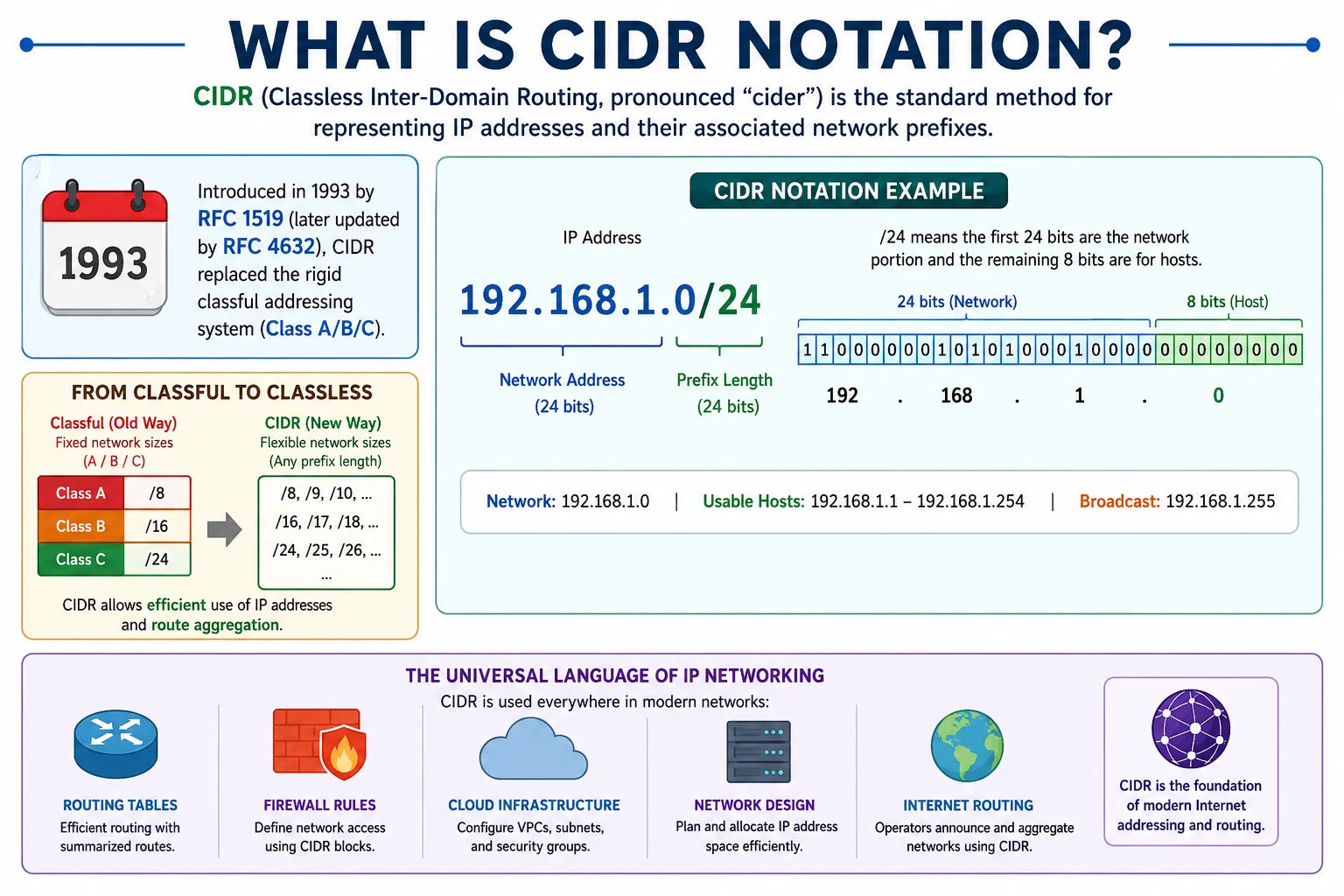
CIDR notation is written as IP address followed by a forward slash and the prefix length - for example, 10.0.0.0/8 represents all 16 million IP addresses starting with 10
A CIDR block is written as IP address / prefix length: for example, 192.168.1.0/24. The prefix length (the number after the slash) tells you how many bits of the 32-bit address are fixed as the network portion - the remaining bits identify individual hosts within that network. A /24 has 24 fixed network bits and 8 variable host bits, giving 2⁸ = 256 addresses (254 usable).
CIDR vs Subnet Calculator: Our Subnet Calculator takes an IP and CIDR prefix to compute all subnet details. This CIDR Calculator has an additional mode: it can take any arbitrary IP range (start IP to end IP) and compute the minimal set of CIDR blocks that exactly covers that range - a technique called route summarisation or CIDR aggregation.
How CIDR Notation Works - Complete Technical Explanation
CIDR notation encodes two pieces of information in one compact string: the network base address and the prefix length. Understanding both is essential for reading routing tables, configuring cloud VPCs, and writing firewall rules:
Reading a CIDR Block
IP address: 10.0.0.0
Prefix length: /8 → 8 bits are the network, 24 bits are hosts
Subnet mask: 11111111.00000000.00000000.00000000
255.0.0.0
Network range: 10.0.0.0 → 10.255.255.255
Total IPs: 2^24 = 16,777,216
Usable hosts: 16,777,214
Rule: an IP belongs to this block if its first 8 bits match 00001010 (= 10)
10.0.0.1 ✓ IN range
10.255.0.1 ✓ IN range
11.0.0.1 ✗ NOT in range (first octet = 11, not 10)
The Prefix Length Controls Granularity
Each increment in prefix length halves the number of available addresses and doubles the number of networks. This is the fundamental relationship that makes CIDR so flexible:
/16 → 1 network, 65,534 hosts (192.168.0.0 – 192.168.255.255)
/17 → 2 networks, 32,766 hosts each (192.168.0.0/17 + 192.168.128.0/17)
/18 → 4 networks, 16,382 hosts each
/19 → 8 networks, 8,190 hosts each
/20 → 16 networks, 4,094 hosts each
/21 → 32 networks, 2,046 hosts each
/22 → 64 networks, 1,022 hosts each
/23 → 128 networks, 510 hosts each
/24 → 256 networks, 254 hosts each ← most common subnet size
Checking if an IP Is in a CIDR Block
The mathematical test for "is IP X inside CIDR block Y/n?" is straightforward: apply the subnet mask (derived from prefix n) to both the IP and the network address. If they produce the same result, the IP is in the block:
10.1.5.200 AND 255.0.0.0 = 10.0.0.0
10.0.0.0 AND 255.0.0.0 = 10.0.0.0
Results match → YES, 10.1.5.200 is in 10.0.0.0/8
# Is 172.16.0.1 inside 10.0.0.0/8?
172.16.0.1 AND 255.0.0.0 = 172.0.0.0
10.0.0.0 AND 255.0.0.0 = 10.0.0.0
172.0.0.0 ≠ 10.0.0.0 → NO, not in 10.0.0.0/8
# Python one-liner:
import ipaddress
ipaddress.ip_address('10.1.5.200') in ipaddress.ip_network('10.0.0.0/8') # True
Converting an IP Range to CIDR Blocks - Route Aggregation Explained
One of the most powerful - and least documented - operations in IP networking is converting an arbitrary IP address range into its minimal CIDR representation. This is called route aggregation, supernetting, or CIDR summarisation. Use the IP Range → CIDR tab in the calculator above to do this automatically.
When You Need This
Real-world IP ranges from ISPs, RIRs (APNIC, ARIN, RIPE), cloud providers, and threat intelligence feeds are often expressed as a start and end address, not as a clean CIDR block. To use them in firewall rules, routing tables, or security group configurations, you need to convert them to CIDR blocks. Examples:
- APNIC allocates IP blocks that may span multiple CIDR prefixes
- Threat intel feeds list attacker IPs as ranges like 185.220.101.0 – 185.220.101.255
- Cloud provider IP ranges (AWS, Cloudflare) are published as start/end ranges that may not be clean /24 blocks
- You want to block a carrier's entire IP allocation that spans an irregular range
How Range-to-CIDR Conversion Works
192.168.1.0 (integer: 3232235776), End: 192.168.2.255 (integer: 3232236287)/23 covers 192.168.0.0–192.168.1.255 - but that doesn't start at 192.168.1.0. Try /24: covers 192.168.1.0–192.168.1.255 ✓192.168.1.0/24 covers 192.168.1.0 – 192.168.1.255. Remaining: 192.168.2.0 – 192.168.2.255192.168.2.0/24 exactly covers 192.168.2.0 – 192.168.2.255 ✓192.168.1.0/24 + 192.168.2.0/24If the range were 192.168.0.0 – 192.168.1.255, it would map to a single 192.168.0.0/23 block (a "clean" range). But most real-world ranges don't align on power-of-2 boundaries, requiring multiple CIDR blocks.
Route Aggregation - Merging Multiple CIDR Blocks
The reverse operation - aggregating multiple smaller CIDR blocks into a larger summary route - is the foundation of how BGP reduces the internet's routing table size. When an ISP receives IP blocks from ARIN, they summarise all their customer subnets into as few routes as possible to advertise to the rest of the internet:
| Individual Routes | Aggregated Summary | Why It Works |
|---|---|---|
| 192.168.0.0/24 + 192.168.1.0/24 | 192.168.0.0/23 | Both are contiguous halves of the /23 block |
| 10.0.0.0/24 + 10.0.1.0/24 + 10.0.2.0/24 + 10.0.3.0/24 | 10.0.0.0/22 | Four /24s contiguous in the /22 block |
| 172.16.0.0/24 + 172.16.1.0/24 + 172.16.2.0/24 | 172.16.0.0/23 + 172.16.2.0/24 | 3 routes - not power of 2, requires 2 CIDRs |
| 10.1.0.0/16 + 10.2.0.0/16 + 10.3.0.0/16 + 10.4.0.0/16 | Cannot aggregate | Not contiguous from a single base - different /14 halves |
CIDR in Cloud Networking - AWS, Azure, GCP Reference
Every major cloud provider uses CIDR notation as the primary way to define virtual network address spaces, subnets, and security group rules. Getting CIDR sizes right at the design stage is critical - VPC CIDR blocks cannot be resized after creation in AWS, and changing them in Azure requires recreating the VNet.
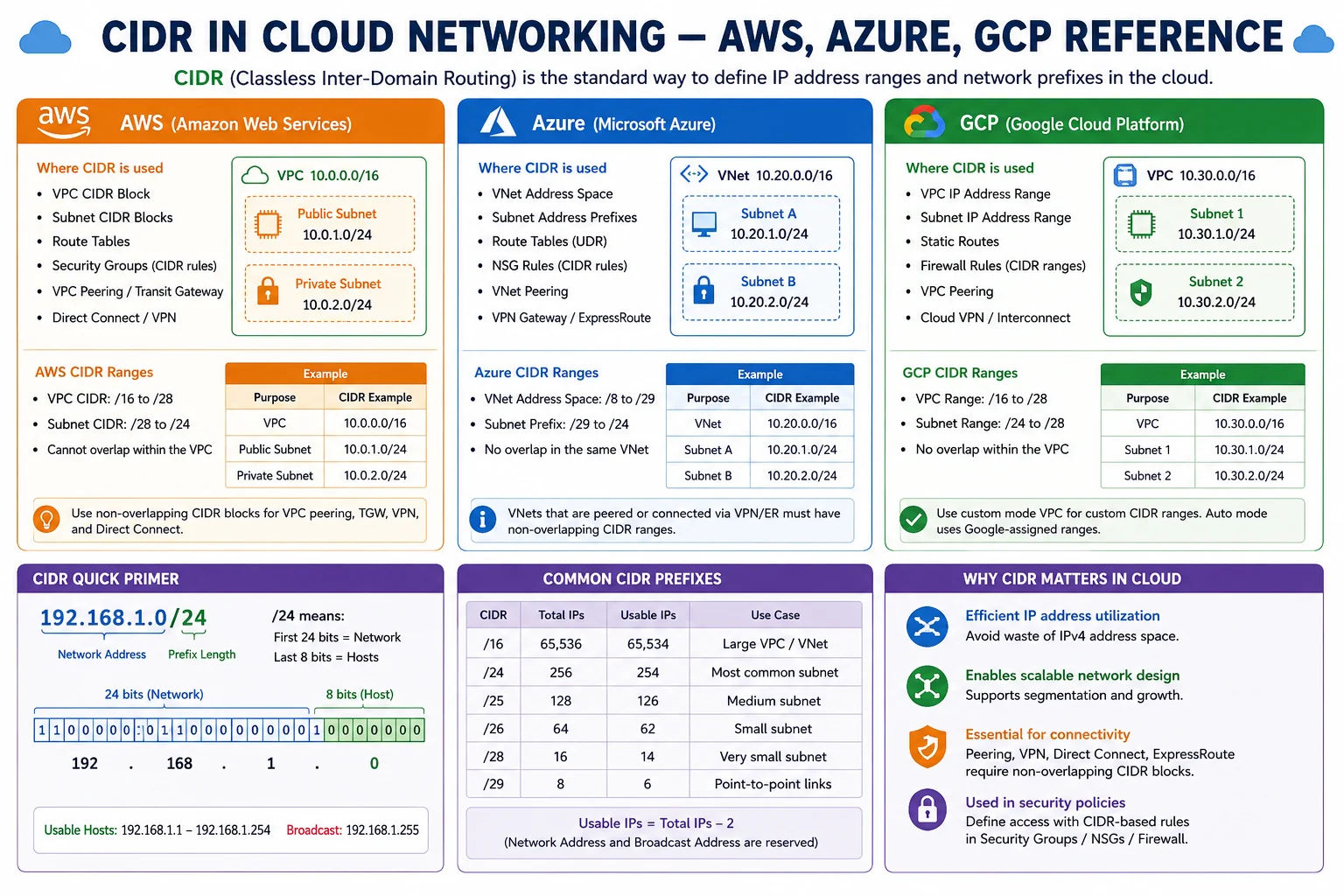
Cloud VPCs use CIDR blocks to define address spaces - choosing the right prefix size at the start prevents painful re-addressing later
| Cloud Platform | VPC/VNet CIDR | Subnet CIDR | Important Notes |
|---|---|---|---|
| AWS VPC | /16 to /28 | /16 to /28 | Default VPC uses 172.31.0.0/16. AWS reserves 5 IPs per subnet (network, VPC router, DNS, future, broadcast). VPC CIDR cannot be changed after creation - only additional CIDRs can be added. |
| Azure VNet | /8 to /29 | /8 to /29 | Azure reserves 5 IPs per subnet similar to AWS. VNets can span multiple address spaces. Subnets cannot overlap. Minimum recommended size: /27 (27 usable after Azure's 5 reserved IPs). |
| Google Cloud VPC | /8 to /29 | /8 to /29 | GCP is a global VPC - subnets are regional, not tied to availability zones. GCP reserves 4 IPs per subnet. Subnets can be expanded (CIDR expanded to larger) but not shrunk. |
| Kubernetes (Pod CIDR) | Typically /16 | Typically /24 per node | Each pod gets a unique IP. A /16 pod CIDR allows up to 65,534 pods. Each node gets a /24 (254 pods per node). 10.244.0.0/16 (Flannel), 192.168.0.0/16 (Calico), 10.96.0.0/12 (service CIDR). |
| Docker Bridge | 172.17.0.0/16 | /24 per network | Default Docker bridge uses 172.17.0.0/16. User-defined networks are /24 from 172.18.0.0 onwards. Can be customised in daemon.json with bip and default-address-pools settings. |
AWS Reserved IPs in Every Subnet
AWS reserves 5 IP addresses in every subnet, which is important when choosing subnet size:
- x.x.x.0 - Network address
- x.x.x.1 - VPC router
- x.x.x.2 - AWS DNS server
- x.x.x.3 - Reserved for future use
- x.x.x.255 - Broadcast address (not used but reserved)
So a /28 subnet (16 addresses) in AWS leaves only 11 usable IPs, not 14. A /27 (32 addresses) leaves 27 usable IPs. For production workloads, /24 (251 usable after AWS reservations) is the typical minimum recommendation.
VPC CIDR planning rule: Choose a VPC CIDR at least 2× larger than you think you need. A /16 gives 65,536 addresses across potentially 256 /24 subnets in multiple availability zones with room for growth. Using /24 for your VPC is a very common mistake that forces painful re-architecting when you scale.
When to Use a CIDR Calculator - 8 Real-World Scenarios
Key CIDR Concepts Every Network Professional Should Know
The History of CIDR - Why It Was Invented
Before CIDR, IPv4 addresses were allocated in fixed Classes A (/8), B (/16), and C (/24). This created two severe problems by the early 1990s: (1) Routing table explosion - the internet's routing tables grew exponentially as more organisations connected. (2) Address exhaustion - Class B allocations (65,534 hosts each) were given to organisations that only needed a few thousand addresses, wasting millions of IPs.
CIDR solved both: routing tables shrunk through aggregation, and IP allocation became precise - an organisation needing 1,000 hosts got a /22 (1,022 usable) rather than a Class B (65,534 usable). RFC 1519 standardised CIDR in September 1993, effectively saving IPv4 from running out in the mid-1990s - extending its useful life until the transition to IPv6.
Frequently Asked Questions - CIDR Calculator
What does CIDR stand for and what does it mean?
CIDR stands for Classless Inter-Domain Routing (pronounced "cider"). It is the standard notation for representing IP addresses and network prefixes, introduced in RFC 1519 in 1993. CIDR notation writes an IP address followed by a forward slash and the prefix length: for example, 192.168.1.0/24. The /24 means the first 24 bits are the network portion and the remaining 8 bits identify hosts within the network. CIDR replaced the older classful system (Class A/B/C) because it allows allocating IP blocks of any size - a /26 for 62 hosts, a /22 for 1,022 hosts - rather than being forced into fixed 256, 65,536, or 16 million address blocks.
How do I convert a CIDR block to subnet mask?
The subnet mask is derived directly from the prefix length: start with 32 bits of 0, then set the leftmost N bits to 1 (where N is the prefix length), then convert back to dotted-decimal. Common conversions: /8 = 255.0.0.0, /16 = 255.255.0.0, /24 = 255.255.255.0, /25 = 255.255.255.128, /26 = 255.255.255.192, /27 = 255.255.255.224, /28 = 255.255.255.240, /29 = 255.255.255.248, /30 = 255.255.255.252, /31 = 255.255.255.254, /32 = 255.255.255.255. The calculator above converts any CIDR prefix to its subnet mask, wildcard mask, and all other subnet properties instantly.
How do I convert an IP range to CIDR notation?
Use the "IP Range → CIDR" tab in the calculator above - enter the start and end IP addresses and it computes the minimal set of CIDR blocks. The algorithm works by repeatedly finding the largest valid CIDR block that starts at the current start address without exceeding the end address, emitting that block, then advancing the start address and repeating. An "easy" range like 192.168.0.0–192.168.1.255 maps to a single 192.168.0.0/23. A range that doesn't align on power-of-2 boundaries (like 192.168.1.0–192.168.2.255) requires multiple CIDR blocks (192.168.1.0/24 + 192.168.2.0/24 in this case).
What is the difference between /24 and 255.255.255.0?
They represent exactly the same thing in two different notations. /24 is CIDR notation - a compact way of saying "the network mask has 24 consecutive 1-bits." 255.255.255.0 is dotted-decimal subnet mask notation - the same mask written as four octets. Converting between them: count the number of 1-bits in the dotted-decimal mask from left to right to get the CIDR prefix. 255.255.255.0 = 11111111.11111111.11111111.00000000 = 24 ones = /24. 255.255.255.128 = 11111111.11111111.11111111.10000000 = 25 ones = /25. CIDR notation is used in modern systems, routing tables, and cloud platforms. Dotted-decimal is older and still appears in some legacy equipment and Windows ipconfig output.
What CIDR should I use for my AWS VPC?
AWS recommends using RFC 1918 private ranges for VPCs. For a production multi-AZ VPC, /16 is the most common choice - it gives 65,536 addresses that can be divided into 256 /24 subnets across multiple availability zones. A /16 VPC with /24 subnets is the AWS Well-Architected Framework's standard recommendation. Important: AWS reserves 5 IPs in every subnet (network, router, DNS, future use, broadcast), so a /24 gives 251 usable IPs, not 254. If you're connecting multiple VPCs via VPC Peering or Transit Gateway, ensure their CIDR ranges don't overlap - plan a non-overlapping addressing scheme across all your VPCs from the start.
What is route aggregation and how does it work?
Route aggregation (also called route summarisation or supernetting) is the process of combining multiple smaller CIDR blocks into a single larger CIDR announcement. For example, if you have 192.168.0.0/24 and 192.168.1.0/24, you can announce them as a single 192.168.0.0/23 route - one route instead of two. This works because /23 covers exactly both /24 blocks. For aggregation to work, the blocks must be contiguous and aligned - they must all start at a boundary divisible by the total size of the combined block. BGP routers on the internet use aggressive route aggregation to keep the global routing table manageable (currently around 1 million entries instead of the billions it would be without aggregation).
What does /32 mean in CIDR notation?
/32 is a host route - it represents exactly one single IP address. All 32 bits are the network portion, leaving zero bits for hosts. /32 is used in routing tables to create a specific route to a single host (often for loopback addresses or to force specific traffic to a particular path), in firewall rules to match a single IP address precisely, in AWS security groups for single-host allow/deny rules, and for anycast addresses where one IP needs to be reachable from multiple locations. When you add your own IP to an AWS security group allowlist, you typically use /32 - for example, 203.0.113.42/32 permits only that specific IP.
What is the largest CIDR block?
0.0.0.0/0 is the largest possible CIDR block - it represents all 4,294,967,296 IPv4 addresses. In routing, 0.0.0.0/0 is called the "default route" - it matches every IP address and is used to route all traffic not matched by a more specific route. In AWS security groups, 0.0.0.0/0 means "allow from any IP address." In Linux iptables, 0.0.0.0/0 matches all traffic. The next largest meaningful blocks are /8 (16,777,216 addresses) - Class A blocks like 10.0.0.0/8, and the /4 blocks assigned to IANA for special purposes like multicast.
How does CIDR notation work for IPv6?
IPv6 CIDR notation works identically to IPv4 but with 128-bit addresses instead of 32-bit. An IPv6 CIDR like 2001:db8::/32 means the first 32 bits are fixed and the remaining 96 bits are for host/subnet addressing. Common IPv6 prefix lengths: /48 is typically assigned to end sites (organisations) - giving 65,536 /64 subnets. /64 is the standard subnet size in IPv6 - all IPv6 subnets should be /64 for SLAAC (Stateless Address Autoconfiguration) to work. /128 is the IPv6 equivalent of /32 in IPv4 - a single host address. Our dedicated IPv6 Subnet Calculator handles IPv6 CIDR calculations.
Is this CIDR calculator free?
Yes - completely free, no signup required. The calculator has two modes: CIDR to subnet details (enter any CIDR notation to get subnet mask, wildcard, network address, broadcast, host range, and host count) and IP range to CIDR (enter any start/end IP pair to get the minimal CIDR representation). All calculations run in your browser using JavaScript - no data is ever sent to our servers. Safe to use with private and internal network addressing.