
IP List Validator
Paste up to 10,000 IP addresses - one per line - and instantly validate all of them. Identifies valid and invalid IPv4 and IPv6 addresses, CIDR notation, private vs public ranges, special-use addresses (loopback, CGNAT, APIPA), and duplicate entries. Filter, sort, and export clean results as CSV or JSON. Runs entirely in your browser - no data sent to any server.
Hero, guides, and sidebar links below work without JavaScript. The interactive checker needs JavaScript enabled in your browser.
What Is an IP List Validator?
An IP list validator checks whether each entry in a bulk list of IP addresses is a correctly formatted, valid IP address - and classifies it further as IPv4 or IPv6, private or public, a CIDR notation subnet, a special-use address, or an invalid entry. When working with large sets of IP addresses from server logs, firewall exports, threat intelligence feeds, or customer databases, manual validation is error-prone and time-consuming. Bulk validation immediately surfaces malformed entries, typos, and invalid formats that would cause problems in downstream systems.
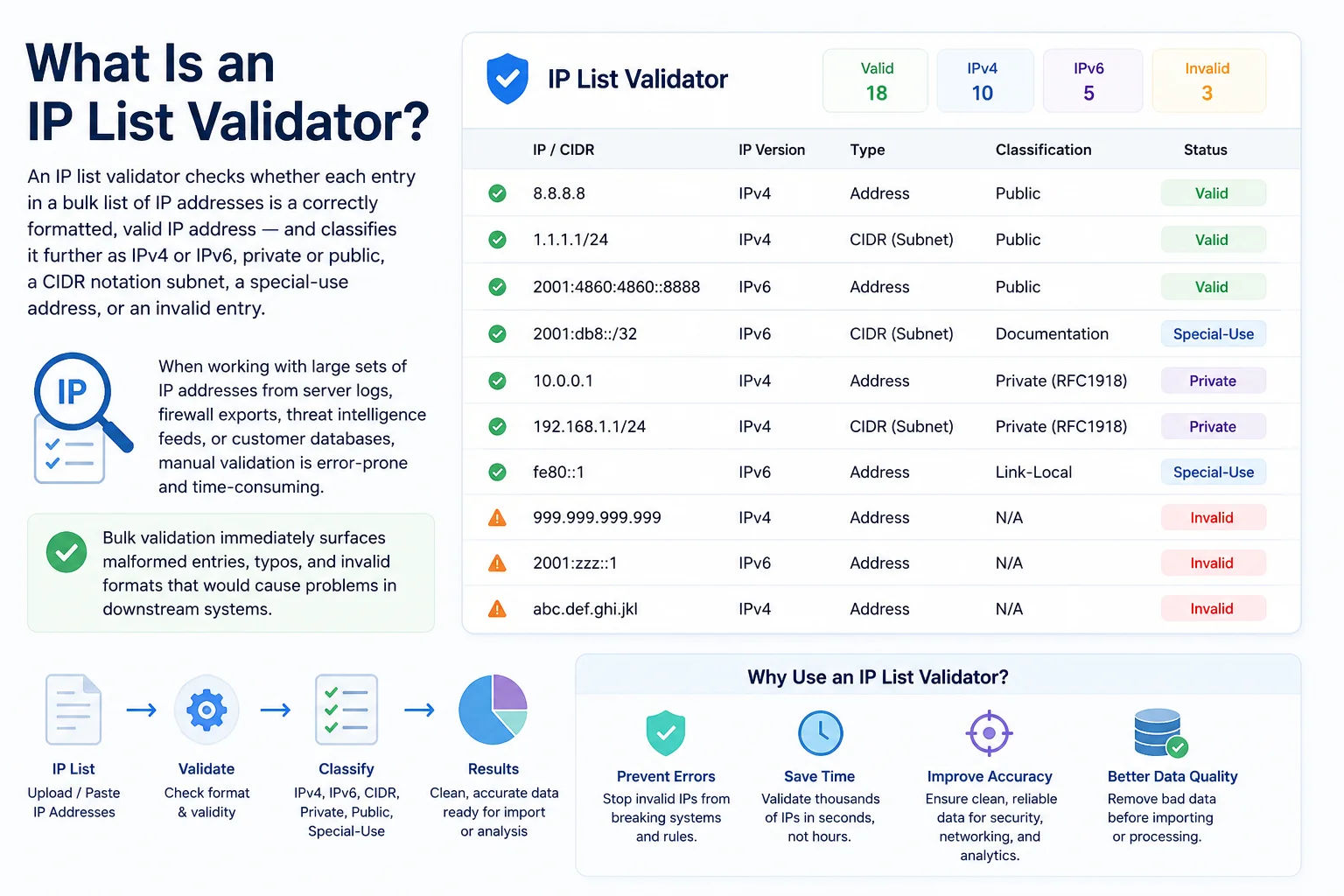
Server access logs, threat intelligence feeds, and firewall rule exports all generate large IP lists that need validation before processing - a single malformed entry can break automated pipelines
What Makes an IP Address Valid?
A valid IPv4 address has exactly four decimal numbers (octets) separated by dots, each in the range 0–255: 192.168.1.1 is valid; 192.168.1.256 is not (256 exceeds the maximum). A valid IPv6 address has eight groups of four hexadecimal digits separated by colons, with optional compression using ::. Common invalid formats include:
| Entry | Valid? | Issue |
|---|---|---|
| 192.168.1.1 | ✓ Valid IPv4 | - |
| 192.168.1.256 | ✗ Invalid | Last octet exceeds 255 |
| 192.168.1 | ✗ Invalid | Only 3 octets - missing fourth |
| 192.168.1.1.5 | ✗ Invalid | 5 octets - IPv4 has exactly 4 |
| 192.168.01.1 | ✗ Invalid (strict) | Leading zero - ambiguous octal vs decimal |
| 10.0.0.0/8 | ✓ Valid CIDR | Valid with CIDR option enabled |
| 2001:db8::1 | ✓ Valid IPv6 | Compressed notation - valid |
| 2001:db8:::1 | ✗ Invalid | Triple colon - only :: is valid |
| ::1 | ✓ Valid IPv6 | Loopback - valid compressed form |
| 192.168.1.1 extra | ✗ Invalid | Trailing text - not a clean IP |
| 192.168.1.1:8080 | ✗ Invalid | Port number appended - strip before validating |
| http://192.168.1.1 | ✗ Invalid | URL prefix - strip before validating |
IPv4 vs IPv6 Validation Rules
1. Exactly 4 octets separated by dots
2. Each octet: integer 0–255 (no leading zeros in strict mode)
3. No extra characters, spaces, or port numbers
Regex: ^(25[0-5]|2[0-4]\d|[01]?\d\d?)(\.(25[0-5]|2[0-4]\d|[01]?\d\d?)){3}$
# IPv6 validation rules:
1. Eight groups of 1–4 hex digits separated by colons
2. :: can replace one or more consecutive all-zero groups (used once only)
3. Optional prefix length /0–128 for CIDR notation
4. Case-insensitive: 2001:DB8:: = 2001:db8::
# Python validation (stdlib, no imports needed):
import ipaddress
try:
ipaddress.ip_address('192.168.1.1') # or ip_network() for CIDR
print('valid')
except ValueError:
print('invalid')
Private, Reserved & Special-Use IPs - What the Validator Detects
Beyond basic format validation, this tool classifies each valid IP into its address type. Understanding which IPs are private, public, or special-use is essential for firewall rule writing, log analysis, and security investigations:
| Range | Type | Routable? | Common Context |
|---|---|---|---|
| 10.0.0.0/8 | Private (RFC 1918) | No | Enterprise LANs, AWS VPC, Docker, Kubernetes pods |
| 172.16.0.0/12 | Private (RFC 1918) | No | Docker bridge (172.17.0.0/16), AWS default VPC (172.31.0.0/16) |
| 192.168.0.0/16 | Private (RFC 1918) | No | Home routers, SOHO networks - most commonly seen |
| 100.64.0.0/10 | CGNAT (RFC 6598) | No | Jio and other Indian ISPs - shared carrier NAT addresses |
| 127.0.0.0/8 | Loopback | No | 127.0.0.1 = localhost. Never appears in real network traffic. |
| 169.254.0.0/16 | APIPA / Link-local | No | Auto-assigned when DHCP fails. 169.254.169.254 = AWS metadata. |
| 0.0.0.0/8 | This network | No | Unspecified / default. 0.0.0.0 = "any interface" in socket bind. |
| 224.0.0.0/4 | Multicast | Limited | OSPF (224.0.0.5/6), RIP (224.0.0.9), IPTV multicast streams |
| 240.0.0.0/4 | Reserved (Class E) | No | Experimental. Seeing this in logs indicates spoofed/malformed traffic. |
| Everything else | Public | Yes | Internet-routable addresses assigned by IANA via RIRs |
Why Private IPs Matter in Bulk Validation
When you receive an IP list from external sources - threat intelligence feeds, partner firewall exports, or vulnerability scanners - private IP addresses in that list are almost always invalid data. A firewall rule targeting 192.168.1.0/24 received from an external threat feed is meaningless (that range is your own internal network). Bulk validation immediately flags these so you can investigate whether the data source is reliable before importing rules into production systems.
CGNAT and Indian ISPs: If you are analysing logs from users on Jio, Airtel, or BSNL mobile networks, you may see IPs in the 100.64.0.0/10 CGNAT range. These are not globally unique - multiple users share the same public-facing IP through carrier-grade NAT. Don't use CGNAT IPs alone to identify individual users. Our validator flags these as "CGNAT" so you can handle them correctly.
Who Uses a Bulk IP List Validator - 8 Real-World Use Cases
How to Extract IP Addresses from Common Log Formats
Before validating, you need to extract IP addresses from raw log files. Here are the command-line methods for the most common log formats - extract, paste into the validator above, and instantly see what's valid:
Apache / Nginx Access Logs
awk '{print $1}' /var/log/nginx/access.log | sort -u
# Extract IPs with request count (top talkers)
awk '{print $1}' /var/log/nginx/access.log | sort | uniq -c | sort -rn | head -50
# Extract only 4xx/5xx error IPs
awk '$9 >= 400 {print $1}' /var/log/nginx/access.log | sort -u
Linux auth.log / syslog (SSH brute force IPs)
grep "Failed password" /var/log/auth.log | grep -oE '([0-9]{1,3}.){3}[0-9]{1,3}' | sort -u
# Extract IPs from UFW firewall blocks
grep "UFW BLOCK" /var/log/ufw.log | grep -oE 'SRC=([0-9]{1,3}.){3}[0-9]{1,3}' | cut -d= -f2 | sort -u
Windows Event Log (PowerShell)
Get-WinEvent -FilterHashtable @{LogName='Security';Id=4625} |
ForEach-Object {$_.Properties[19].Value} | Sort-Object -Unique
Python - Extract IPs from Any Text File
pattern = r'\b(25[0-5]|2[0-4]\d|[01]?\d\d?)(\.(25[0-5]|2[0-4]\d|[01]?\d\d?)){3}\b'
with open('logfile.txt') as f:
ips = set(re.findall(pattern, f.read()))
print('\n'.join(''.join(ip) for ip in ips))
# Then paste the output into the validator above
Frequently Asked Questions - IP List Validator
This tool validates up to 10,000 IP addresses per batch. All processing happens locally in your browser using JavaScript - there are no server API calls, so performance depends on your device. On a modern computer, 10,000 IPs validate in under a second. For larger datasets (100,000+ IPs), use a server-side tool or the Python code example on this page with the ipaddress standard library module.
Yes - with the "Allow CIDR" option enabled (default: on), entries like 192.168.1.0/24, 10.0.0.0/8, and 2001:db8::/32 are treated as valid CIDR blocks. They are classified separately from individual host IPs. Enable "Strict mode" to reject CIDR notation and accept only individual IP addresses (useful when validating host-only fields in databases or configurations).
Private IP addresses (RFC 1918: 10.0.0.0/8, 172.16.0.0/12, 192.168.0.0/16) are not routable on the public internet and are used for internal networks. Public IP addresses are globally unique and internet-routable. When analysing threat intelligence or server logs, private IPs in an externally-sourced list indicate data quality problems - those IPs cannot be the source of internet traffic. The validator flags all private and special-use ranges including CGNAT (100.64.0.0/10, used by Jio in India), loopback (127.x.x.x), and link-local (169.254.x.x).
The validator flags entries with appended ports (192.168.1.1:8080) as invalid because 192.168.1.1:8080 is not a valid IP address - it's an IP:port combination. Strip the port before validating using sed on Linux: sed 's/:[0-9]*$//', or in Python: ip.rsplit(':',1)[0]. For IPv6 with ports in URL format like [2001:db8::1]:8080, strip the brackets and port separately.
Yes - use the "Valid IPs" export button to copy only the valid IP addresses to your clipboard, one per line. This is useful when you want to clean a list and pass only valid IPs to the next stage of a pipeline (WHOIS lookup, GeoIP enrichment, firewall import). Use the CSV or JSON export for full results including status, type, and classification for each entry.
No - all validation runs entirely in your browser using JavaScript regex and logic. Your IP list never leaves your device. This makes it safe to use with sensitive data: internal network address lists, customer IP logs, security incident data, or any IP list that shouldn't be transmitted to third-party servers.
A leading zero in an IP octet is ambiguous - in some systems, 010 is interpreted as octal (= decimal 8) while in others it's interpreted as decimal 10. So 010.0.0.1 could mean 8.0.0.1 or 10.0.0.1 depending on the parser. RFC 3986 prohibits leading zeros in IP literals. Strict mode rejects any octet with a leading zero (like 192.168.01.1), while non-strict mode accepts it (treating it as decimal).