
IP Blacklist Check
Instantly scan any IP address against 20 major spam DNSBLs - including Spamhaus ZEN, Barracuda, SpamCop, SORBS, CBL, and more. Diagnose email deliverability problems, check your mail server reputation, and get step-by-step delisting instructions if your IP is listed. Free, no signup.
Hero, guides, and sidebar links below work without JavaScript. The interactive checker needs JavaScript enabled in your browser.
What Is an IP Blacklist Check?
An IP blacklist check - also called a DNSBL (DNS-based Blackhole List) lookup or IP reputation check - queries a series of publicly maintained databases to determine whether a specific IP address has been flagged for sending spam, hosting malware, operating as an open proxy, participating in DDoS attacks, or engaging in other forms of internet abuse. When your IP is listed on a blacklist, email servers, firewalls, and security products worldwide can automatically block or filter connections from it in real time.
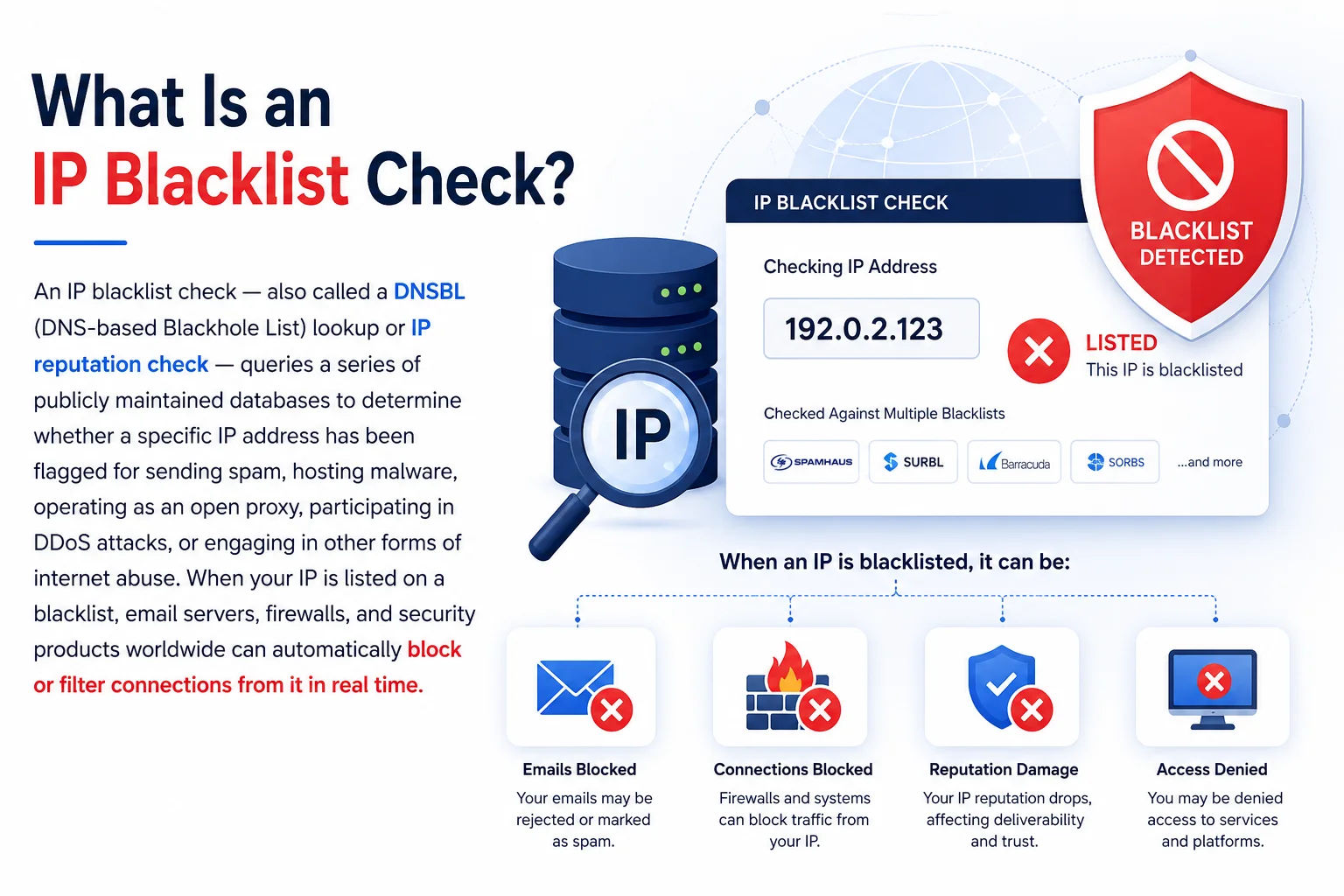
Email servers worldwide query DNSBL databases in real time for every incoming message - being listed means your emails are blocked before they reach the inbox
The DNS-based architecture means blacklist lookups are extraordinarily fast - a mail server typically checks 5–15 DNSBLs for every incoming email in under 50 milliseconds. The process is invisible to email senders but has enormous consequences: a single listing on Spamhaus ZEN can cause Gmail, Outlook, Yahoo Mail, and virtually every corporate mail server to reject your outgoing emails entirely - not send them to spam, but reject them with an SMTP 550 error before they even enter the recipient's mail system.
This tool performs the check externally: We query each DNSBL from our server using the standard reverse-IP DNS lookup method, then return the complete results. This is identical to what mail servers do when evaluating your IP - making it an accurate simulation of real-world mail server behaviour.
How DNSBL Lookup Works - The Technical Mechanics
Understanding how DNSBL queries work helps you interpret results correctly and troubleshoot listing issues more effectively. The mechanism is elegant in its simplicity:
Step 1 - Reverse the IP octets:
203.0.113.42 → 42.113.0.203
Step 2 - Append the DNSBL zone:
42.113.0.203 + .zen.spamhaus.org
→ query: 42.113.0.203.zen.spamhaus.org
Step 3 - DNS A record lookup:
If result = 127.0.0.x → IP is LISTED (x encodes the list type)
If result = NXDOMAIN → IP is CLEAN (not listed)
# Return codes from Spamhaus ZEN:
127.0.0.2 = SBL (direct spam source)
127.0.0.4 = XBL (exploited/bot IP)
127.0.0.10= PBL (residential/dynamic - should not send direct mail)
127.0.0.11= PBL (ISP-submitted - same as above)
The tool performs this DNS lookup for each of the 20 blacklists simultaneously using DNS-over-HTTPS via Google's resolver. This gives you a real-time snapshot of your IP's reputation across the most impactful blacklists - the same checks your recipients' mail servers run on every email you send.
Why Different Blacklists Have Different Weight
Not all DNSBL listings have equal impact. A listing on Spamhaus ZEN will cause immediate rejection at Gmail, Outlook, Yahoo, and most corporate mail servers. A listing on UCEPROTECT L2 or L3 may only affect a small number of servers. Understanding the severity and coverage of each blacklist helps you prioritise your delisting efforts when multiple blacklists are involved.
The 20 DNSBLs This Tool Checks - And Why Each Matters
We scan against 20 major blacklists that together cover the vast majority of real-world mail server filtering worldwide. Here is what each one is, who uses it, and why a listing there matters:
| DNSBL | Maintained By | What Gets Listed | Who Uses It | Severity |
|---|---|---|---|---|
| Spamhaus ZEN | Spamhaus (UK/CH) | Combined SBL+XBL+PBL - spam sources, exploited IPs, residential ranges | Gmail, Outlook, Yahoo, virtually all enterprise MTA solutions | Critical |
| Spamhaus SBL | Spamhaus | Direct spam-sending IPs observed by Spamhaus spam traps | Same as ZEN - ZEN includes SBL | Critical |
| Spamhaus XBL | Spamhaus / CBL | Hijacked PCs, open proxies, malware-infected hosts | Same as ZEN - botnet and malware detection | Critical |
| Spamhaus PBL | Spamhaus | Residential/dynamic IPs that should not send direct-to-MX email | Same as ZEN - affects home broadband senders | High |
| Barracuda BRBL | Barracuda Networks (US) | IPs sending spam detected by Barracuda spam traps | Barracuda Email Security Gateway - large SMB/enterprise install base | High |
| SpamCop BL | Cisco SpamCop | User-reported spam sources - self-cleaning, auto-expires | Many ISPs, hosting providers, Cisco IronPort | High |
| SORBS Combined | SORBS (AU) | Combined SORBS zone: spam, open relays, proxies, DUL | Hosting providers, ISPs, particularly Asia-Pacific region | High |
| SORBS SPAM | SORBS | IPs caught sending spam to SORBS spam traps | Subset of SORBS Combined zone | High |
| SORBS DUL | SORBS | Dynamic/residential IPs - not expected to send mail directly | Mail servers requiring dedicated IPs | Medium |
| CBL (ABUSEAT) | ABUSEAT / Spamhaus XBL | IPs detected with botnet/malware activity, spam-bot signatures | Feeds into Spamhaus XBL - widely propagated | Critical |
| UCEPROTECT L1 | UCEPROTECT (CH) | Only directly spamming IPs at individual level | Common in German/Swiss/Austrian mail infrastructure | Medium |
| Blocklist.de | Frank Bauer (DE) | Brute-force attackers (SSH, web, FTP) logged by server community | European hosting providers, ISPs - particularly Hetzner, OVH | Medium |
| PSBL | Surriel.com (US) | Spam trap hits - passive collection, auto-removes when spam stops | Mail servers using passive spam data | Medium |
| WPBL | WPBL.info | Weighted private block list based on spam pattern analysis | Private mail server operators | Info |
| DroneBL | DroneBL Project | Open resolvers, DDoS bots, spam bots - primarily IRC abuse | IRC networks, online services, some mail providers | Medium |
| GBUdb (Truncate) | Commtouch/GBUdb | Spam pattern scoring - "Truncate" zone for high-confidence spam IPs | SpamStopsHere, some hosted email providers | Medium |
| SURBL | SURBL.org | Domains in spam message bodies (not sending IPs directly) | Mail filters checking URLs in email content | High |
| Manitu NiX Spam | iX Magazine (DE) | German spam trap network - particularly relevant for German recipients | German ISPs and mail providers (T-Online, GMX, Web.de) | Medium |
| SpamRATS NoPtr | SpamRATS (CA) | IPs with no PTR record - missing reverse DNS is a deliverability red flag | Mail servers enforcing PTR requirements | Info |
| SpamRATS Spam | SpamRATS | Spam source IPs from SpamRATS spam traps | Mail providers using SpamRATS data | High |
Why Is Your IP Blacklisted? - 8 Common Causes
Being listed on a blacklist doesn't always mean you intentionally sent spam. Many legitimate senders get blacklisted through no fault of their own. Here are the eight most common causes:
What Happens When Your IP Is Blacklisted - The Real Impact
The consequences of a blacklist listing vary by which blacklist you're on, but they range from serious deliverability degradation to complete email rejection. Here is what each outcome looks like from a practical perspective:
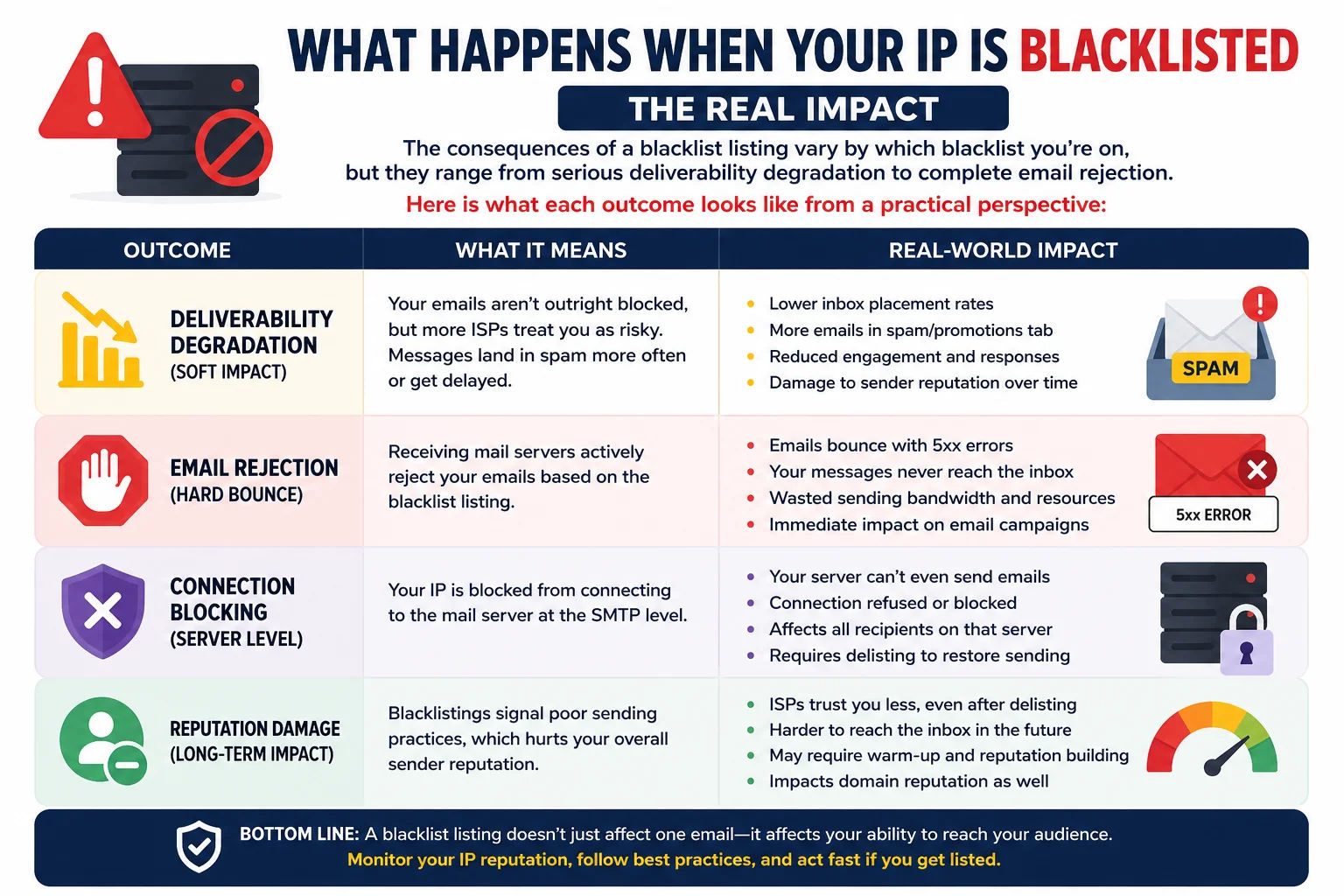
A Spamhaus ZEN listing causes hard email rejections at Gmail, Outlook, and Yahoo - your SMTP client receives a 550 error and the message is never delivered
The SMTP Bounce Code Explained
When your IP is blacklisted and a mail server rejects your email, you receive a bounce notification with a specific error code. Understanding these codes helps you diagnose the exact cause:
550 5.7.1 Service unavailable; Client host [203.0.113.42] blocked
using zen.spamhaus.org;
https://www.spamhaus.org/query/ip/203.0.113.42
550 5.7.1 Your IP [203.0.113.42] is listed in the Barracuda BRBL.
See: http://www.barracudacentral.org/rbl/removal
550-5.7.25 The IP address sending this message does not have a PTR record.
(Google - no reverse DNS)
554 Rejected: Listed at SpamCop
# Note: The bounce always includes a URL to the specific blacklist listing.
How to Get Removed from a Blacklist - Complete Delisting Guide
Getting delisted requires two things in the right order: fixing the root cause of the listing, then submitting a removal request. Requesting removal before fixing the underlying problem is pointless - you'll be relisted within hours. Follow this workflow exactly:
Repeat listings and permanent bans: Most blacklists give first-time listees a straightforward self-service removal process. However, repeated listings may result in extended hold periods or manual review requirements. Spamhaus CSS (Customer Service Spam) list may require direct communication with their team. Some blacklists (UCEPROTECT L2/L3) require payment for expedited removal - this is controversial in the anti-spam community and many experts advise against paying.
How to Prevent IP Blacklisting - Proactive Email Security
The best approach to blacklisting is prevention. These practices, implemented correctly, dramatically reduce the risk of your IP being listed - and ensure faster delisting if you are listed:
- Configure SPF record at your root domain listing all authorised sending IPs and services
- Set up DKIM signing on your mail server - generates cryptographic signatures verifying you sent the email
- Implement DMARC at p=quarantine or p=reject - tells providers what to do with failing email and sends you abuse reports
- Set PTR (reverse DNS) record on your mail server IP pointing to your mail hostname - required by Gmail and many ISPs
- Verify your DKIM selector is publishing the correct public key with our DNS Lookup tool
- Keep all server software updated - unpatched vulnerabilities are the primary vector for mail server compromise
- Configure your mail server to NOT be an open relay - test with
openrelay.ioor MXToolbox relay test - Monitor outbound SMTP traffic on port 25 - unexpected spikes indicate compromise
- Use a firewall to block port 25 outbound for all IPs except your designated mail server
- Enable 2FA on all server management accounts and cPanel/WHM/Plesk panels
- Review server processes and cron jobs weekly for unusual activity
- Use double opt-in for all mailing list signups - saves confirmation of genuine consent
- Remove hard bounces immediately after every campaign - sending to invalid addresses damages reputation
- Suppress unsubscribes within 24 hours (ideally immediately) - required by CAN-SPAM and GDPR
- Run re-engagement campaigns before purging inactive subscribers - better than sending to disengaged contacts
- Never purchase email lists - purchased lists contain spam traps and complainers at extremely high rates
- Monitor Google Postmaster Tools for your domain's spam rate and IP reputation dashboard
- Sign up for Microsoft SNDS (Smart Network Data Services) for Outlook/Hotmail deliverability data
- Enrol in Yahoo/AOL Feedback Loop to receive spam complaint notifications
- Run this blacklist check weekly if you operate a mail server - catch listings early before they cause widespread delivery failures
- Use a dedicated sending IP separate from your web hosting IP - isolates mail reputation from web server reputation
Frequently Asked Questions - IP Blacklist Check
What is an IP blacklist and how does it affect email?
An IP blacklist (DNSBL) is a database of IP addresses flagged for spam, malware, or abuse that mail servers query in real time. When a mail server receives an incoming connection, it checks the sender's IP against major DNSBLs in milliseconds. If the IP is listed, the mail server can reject the email outright (550 error), route it to spam, or throttle delivery. Being listed on Spamhaus ZEN - the most widely used DNSBL - causes hard rejection at Gmail, Outlook, Yahoo, and virtually all enterprise mail servers. This means your emails don't just go to spam; they bounce back to you with an error message before the recipient ever has a chance to see them.
How do I get my IP removed from Spamhaus?
The Spamhaus delisting process depends on which Spamhaus list you're on. For SBL (direct spam source): visit spamhaus.org/lookup, look up your IP, and follow the removal request form - requires proving you've stopped the spam and fixed the underlying cause. For XBL (malware/botnet): the listing usually comes from CBL (abuseat.org) - visit abuseat.org/lookup.cgi, acknowledge the issue, and CBL will notify Spamhaus to remove you (typically within a few hours). For PBL (residential/dynamic IP): this is a policy listing, not a spam listing - you cannot remove a home broadband IP from PBL. Instead, configure your email client to send via your ISP's SMTP server (port 587) rather than directly to mail servers. For CSS (customer service spam): requires direct communication with Spamhaus.
Why is my IP blacklisted if I never sent spam?
Several situations can lead to a legitimate IP being blacklisted without intentional spam: (1) Compromised server - malware or a botnet running on your server sends spam without your knowledge. Check running processes and SMTP logs. (2) Shared hosting - another customer on the same IP sends spam, affecting everyone. (3) Residential IP - Spamhaus PBL lists residential ranges by design to prevent direct-to-MX sending. (4) Spam traps in your list - you may have sent to an old email address that became a spam trap. (5) Previously blacklisted IP reassigned to you - common with newly allocated cloud server IPs. (6) High bounce rate - sending to many invalid addresses damages reputation and can trigger listings.
How long does it take to get removed from a blacklist?
Removal timelines vary significantly by blacklist: Spamhaus ZEN/SBL/XBL: typically 1–6 hours after a successful removal request. CBL (ABUSEAT): usually within 1–3 hours after acknowledging the issue. Barracuda BRBL: their site says 12 hours but often faster; requires no new spam reports. SpamCop: automatically expires 24 hours after the last spam report - no manual removal needed, just stop the spam. SORBS: 24–48 hours after submitting their removal form. UCEPROTECT L1: claims instant removal after payment (free removal after 1–2 weeks). Blocklist.de: typically auto-removes after a set period with no new attack reports. The key point: all these timelines assume the root cause has been fixed before requesting removal.
What is the difference between Spamhaus SBL, XBL, and PBL?
These are three distinct Spamhaus lists with different meanings: SBL (Spamhaus Blocklist) - IPs from which Spamhaus has observed spam being sent. This is a direct spam source listing and the most serious. XBL (Exploits Blocklist) - IPs of hijacked PCs, open proxies, and malware-infected hosts. Your IP may appear here because it's compromised, not because you intentionally sent spam. The underlying data comes from the CBL (Composite Blocking List). PBL (Policy Blocklist) - IPs that should not be sending email directly to mail servers. Includes residential ISP ranges, dynamic IPs, and IP blocks where the ISP has requested listing. This is not a spam listing - it's a policy listing. Being on PBL means your IP is in a range that shouldn't be sending direct-to-MX mail. Use port 587 via your ISP's mail server. The ZEN list combines all three.
Does my IP need to be blacklist-free for email to work?
Not necessarily - the impact depends on which blacklist and the mail provider you're sending to. Being on Spamhaus ZEN is extremely serious and will cause rejection at most major providers. Being on UCEPROTECT L3 or WPBL may have minimal real-world impact as few providers use those lists. The critical blacklists to be clean on are: Spamhaus ZEN (covers SBL+XBL+PBL), Barracuda BRBL, SpamCop, SORBS, and CBL. If those are all clean, most mainstream email will deliver normally. Secondary blacklists (DroneBL, WPBL, PSBL) generally affect a smaller proportion of recipients and are lower priority for remediation.
How do I check if my email server IP has a PTR record?
Use our Reverse IP Lookup tool to check the PTR record of your mail server IP. Enter your server's IP and look at the Hostname / PTR field. If it shows "No PTR record," you need to set one with your hosting provider (not your domain registrar - PTR records are controlled by the IP block owner). Most hosting providers offer PTR configuration in their control panel or via a support request. The PTR should resolve to your mail hostname (e.g., mail.yourdomain.com), and that hostname should have an A record pointing back to the same IP. This bidirectional consistency is called FCrDNS and is required for deliverability to Gmail and many enterprise mail systems.
Can a domain be blacklisted as well as an IP?
Yes - domain blacklisting is separate from IP blacklisting and works differently. SURBL (Spam URI Real-time Blocklist) and URIBL list domains that appear in spam message bodies - the domain you're sending from, or domains you link to in your emails. Domain blacklisting is checked by content filters rather than connection-level filters. Your domain can be blacklisted even if your sending IP is clean. Additionally, Google, Microsoft, and Yahoo maintain their own internal domain reputation scores. Sending consistently low-engagement email (low open rates, high spam reports) will degrade your domain reputation even without a formal DNSBL listing.
What is the difference between an IP blacklist and an email blacklist?
An IP blacklist lists IP addresses - it's checked at the connection level when a mail server connects to deliver email. An email blacklist (or domain blacklist like SURBL/URIBL) lists domain names or email addresses - it's checked by content filters after the email is accepted. Both can prevent delivery but at different stages. IP blacklisting causes connection-level rejection (before the email content is even transmitted). Domain blacklisting causes content-level filtering (the email may be accepted but then filtered based on domain reputation). You need to be clean on both for reliable email deliverability.
Is this blacklist check tool free?
Yes - completely free, no signup, no account, no API key required. The tool scans your IP against 20 major DNSBLs simultaneously and returns results with severity ratings and direct links to each blacklist's delisting page. We do not store, log, or share the IP addresses you check. Privacy is by default. The check takes approximately 20–30 seconds to query all 20 blacklists and collate results.
Related Tools - Complete Email & Server Reputation Workflow
Technical information
How this tool works, where data comes from, and known limitations. See also our methodology and accuracy & limitations pages.
How this tool works
Checks the IP against DNS-based block lists (DNSBLs) and related reputation lookups configured for this tool.
Data source
- Public DNSBL / reputation list queries used by the blacklist checker
Limitations
List membership changes frequently and differs by operator. A listing on one list does not imply listing on all lists.
Content revision 2026-09 (aligned with current tool implementation in this codebase)