
IPv6 to IPv4 Converter
Extract the embedded IPv4 address from any IPv4-mapped IPv6 (::ffff:192.168.1.1), 6to4 (2002:c0a8:0101::), NAT64 (64:ff9b::), or IPv4-compatible address. Includes Python, Node.js, PHP, and Go code examples for normalising IP addresses in server applications.
Hero, guides, and sidebar links below work without JavaScript. The interactive checker needs JavaScript enabled in your browser.
What Is IPv6 to IPv4 Conversion?
IPv6 to IPv4 conversion extracts the embedded IPv4 address from specific IPv6 address formats that contain IPv4 information - primarily IPv4-mapped addresses (::ffff:x.x.x.x), 6to4 addresses (2002::/16), and NAT64 addresses (64:ff9b::/96). This is a common task in network programming: server applications that listen on IPv6 sockets need to extract the real IPv4 address from incoming connections to perform GeoIP lookups, access control, rate limiting, and logging.
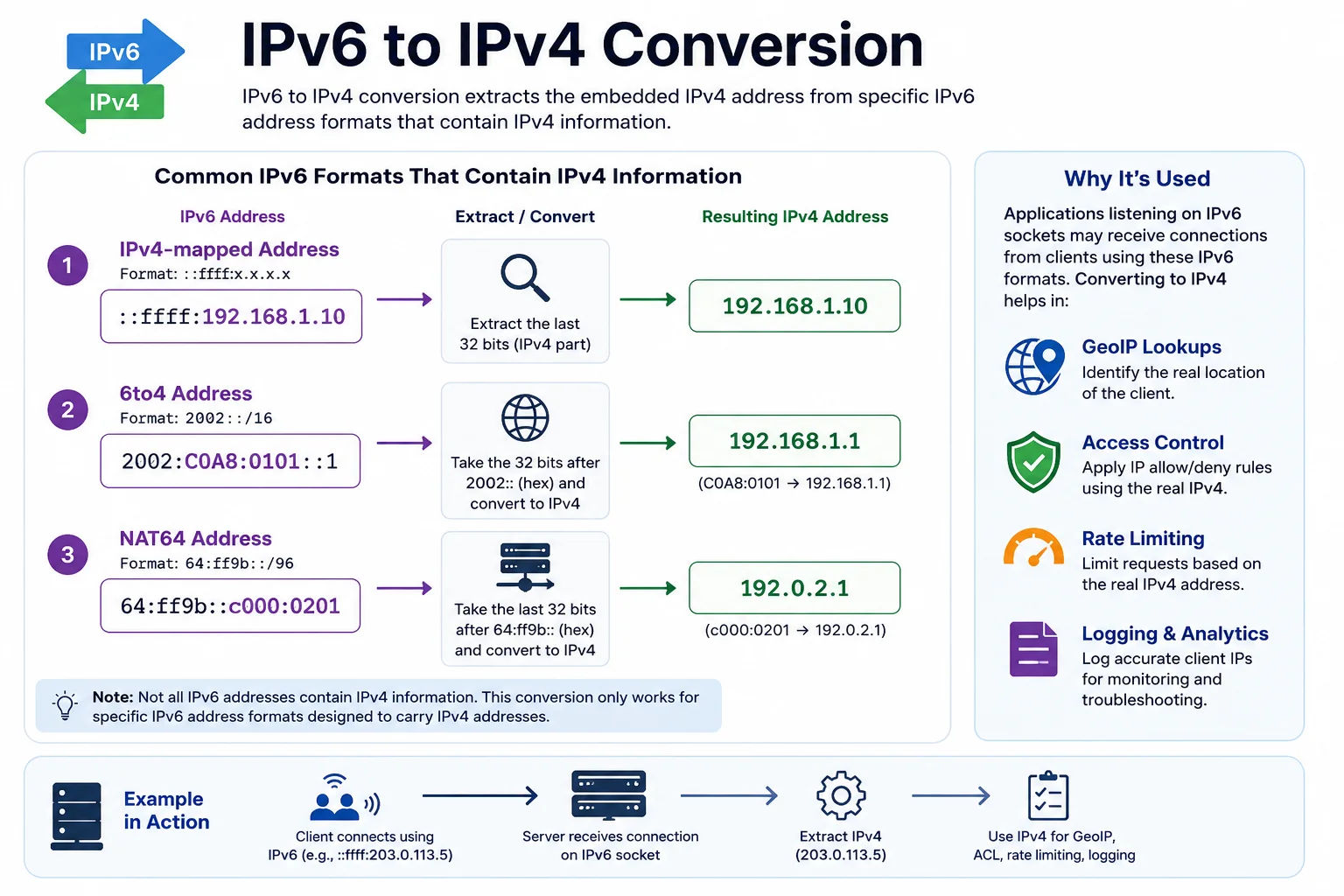
When a server listens on an IPv6 socket, all client connections - including those from IPv4 clients - appear as IPv6 addresses in the ::ffff: format, requiring conversion back to IPv4
Which IPv6 Addresses Contain IPv4?
| IPv6 Format | IPv4 Extractable? | How to Extract | Example |
|---|---|---|---|
| ::ffff:a.b.c.d (IPv4-mapped, dotted) | ✓ Yes | Strip ::ffff: prefix | ::ffff:192.168.1.1 → 192.168.1.1 |
| ::ffff:xxyy:zzww (IPv4-mapped, hex) | ✓ Yes | Last 32 bits as 4 octets | ::ffff:c0a8:0101 → 192.168.1.1 |
| ::a.b.c.d (IPv4-compatible, deprecated) | ✓ Yes | Strip :: prefix | ::192.168.1.1 → 192.168.1.1 |
| 2002:xxyy:zzww:: (6to4) | ✓ Yes | Bits 17–48 (groups 2 and 3) | 2002:c0a8:0101:: → 192.168.1.1 |
| 64:ff9b::a.b.c.d (NAT64) | ✓ Yes | Last 32 bits | 64:ff9b::c0a8:0101 → 192.168.1.1 |
| 2001::/32 (Teredo) | ✓ Partial | Bits 97–128 XOR 0xFFFFFFFF (obfuscated client IP) | Complex - see Teredo RFC 4380 |
| 2000::/3 (Global Unicast) | ✗ No | Not applicable - pure IPv6 | 2001:db8::1 - no IPv4 embedded |
| fc00::/7 (ULA) | ✗ No | Not applicable - private IPv6 | fd00::1 - no IPv4 embedded |
| fe80::/10 (Link-local) | ✗ No | Not applicable | fe80::1 - no IPv4 embedded |
Extracting IPv4 from ::ffff: Mapped Addresses in Code
import ipaddress
def extract_ipv4(addr_str):
addr = ipaddress.ip_address(addr_str)
if isinstance(addr, ipaddress.IPv6Address):
if addr.ipv4_mapped: return str(addr.ipv4_mapped) # ::ffff: mapped
if addr.sixtofour: return str(addr.sixtofour) # 2002:: 6to4
return str(addr) # Pure IPv6 - return as-is
return str(addr) # Already IPv4
# Node.js - most common case:
function normaliseIP(ip) {
if (ip.startsWith('::ffff:')) return ip.slice(7); // IPv4-mapped
if (ip === '::1') return '127.0.0.1'; // loopback
return ip; // pure IPv6
}
# PHP:
$ip = $_SERVER['REMOTE_ADDR'];
if (substr($ip, 0, 7) === '::ffff:') $ip = substr($ip, 7);
# Go:
func normaliseIP(ip net.IP) net.IP {
if v4 := ip.To4(); v4 != nil { return v4 } // converts ::ffff: mapped
return ip
}
Extracting IPv4 from 6to4 Addresses
A 6to4 address has the format 2002:xxyy:zzww::/48 where xxyy and zzww are the hex representation of the embedded IPv4 address. To extract:
Groups 2 and 3 (after 2002:): c0a8 and 0101
c0 = 192, a8 = 168, 01 = 1, 01 = 1
→ IPv4: 192.168.1.1
# Python - extract IPv4 from 6to4:
import ipaddress
addr = ipaddress.ip_address('2002:c0a8:0101::')
print(addr.sixtofour) # IPv4Address('192.168.1.1')
When IPv6-to-IPv4 Extraction Is Critical in Production
Failing to correctly extract IPv4 from mapped IPv6 addresses causes real application bugs that can be hard to diagnose:
- GeoIP lookups return wrong location: If you pass ::ffff:1.2.3.4 to a GeoIP API, many APIs will fail or return the wrong result. Always extract the IPv4 address before GeoIP queries.
- Rate limiting breaks: A rate limiter keying on the raw socket address will see ::ffff:1.2.3.4 and 1.2.3.4 as different keys - same client bypasses rate limiting by forcing an IPv4 or IPv6 connection.
- Access control fails: IP allowlist/blocklist rules written as 192.168.1.1 won't match ::ffff:192.168.1.1. Your server may let blocked IPs through or block allowed IPs.
- Logging is confusing: Access logs full of ::ffff: prefixes are harder to read and analyse. Normalise IPs to their canonical form before logging.
- Session tracking breaks: If a user reconnects via IPv4 after an IPv6 session, they'll appear as a new user if you key sessions on the raw address without normalisation.
Best practice: Always normalise IP addresses at the ingress point of your application - the very first thing after accepting a connection or reading the X-Forwarded-For header. Write a single normalise_ip() function used everywhere, rather than handling the mapping conversion in each individual feature.