
DNS Leak Test
Check which DNS servers your browser queries and detect DNS leaks when using a VPN. A DNS leak means your ISP can see your browsing activity even when connected to a VPN. Instantly shows your current DNS resolver, ISP, and whether your DNS traffic is protected.
Hero, guides, and sidebar links below work without JavaScript. The interactive checker needs JavaScript enabled in your browser.
What Is a DNS Leak?
A DNS leak occurs when your device sends DNS queries outside the encrypted VPN tunnel to your ISP's DNS servers, even when you're connected to a VPN. Since DNS queries reveal every website you visit, a DNS leak effectively defeats the privacy purpose of using a VPN - your ISP (and potentially government agencies) can see your complete browsing history despite your VPN connection.
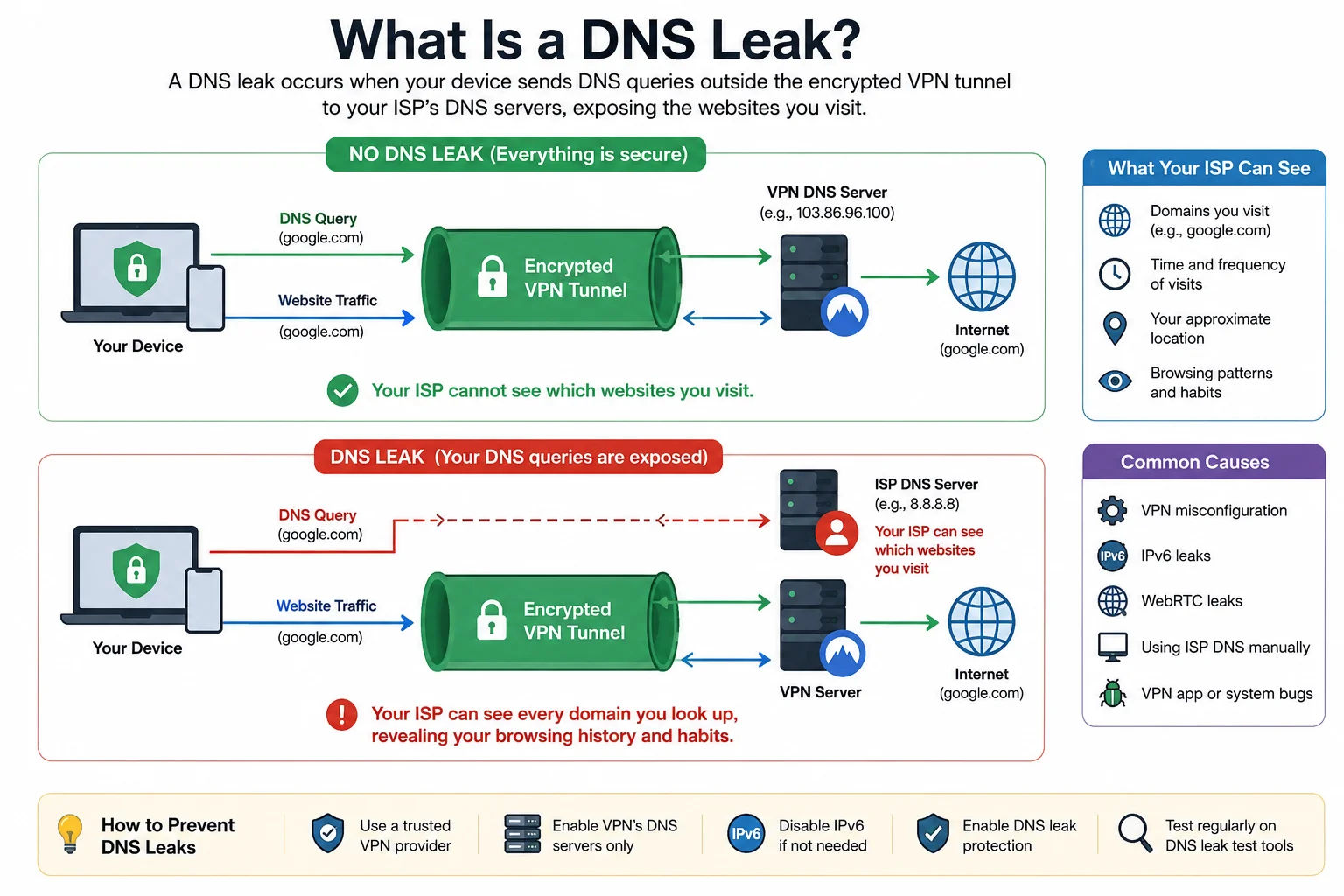
A DNS leak means your browsing history is visible to your ISP even while using a VPN - every website visit is exposed through unprotected DNS queries
How DNS Leaks Happen
When you connect to a VPN, your traffic should route through the VPN tunnel including DNS queries. DNS leaks occur when:
- OS-level DNS bypass: Windows 10/11 with Smart Multi-Homed Name Resolution sends DNS queries to all available DNS servers simultaneously - including your ISP's DNS - for faster resolution. VPN software must explicitly disable this.
- IPv6 DNS leaks: If your VPN only tunnels IPv4 traffic, IPv6 DNS queries may route outside the tunnel to your ISP's IPv6 DNS server.
- WebRTC leaks: Browser WebRTC connections can bypass VPN tunnels and reveal your real IP and DNS. Use our WebRTC Leak Test separately.
- DHCP DNS override: Your router may push its own DNS server via DHCP, which takes precedence over VPN DNS in poorly configured setups.
- Split-tunnelling misconfiguration: VPN split-tunnelling that excludes DNS traffic from the tunnel.
How to Fix DNS Leaks
- Use a VPN with DNS leak protection: Most modern VPNs (ProtonVPN, Mullvad, ExpressVPN) include built-in DNS leak protection.
- Windows: disable Smart Multi-Homed Name Resolution: Group Policy → Computer Configuration → Administrative Templates → Network → DNS Client → Turn off Smart Multi-Homed Name Resolution → Enabled
- Set DNS manually: Configure your VPN's DNS servers explicitly (e.g. ProtonVPN uses 10.8.0.1, Mullvad uses 10.64.0.1) rather than relying on automatic assignment.
- Use DNS-over-HTTPS (DoH) or DNS-over-TLS: Even if queries leave the tunnel, DoH/DoT encrypts them preventing eavesdropping by your ISP.
| What DNS Leak Test Shows | Meaning | Action |
|---|---|---|
| Your ISP's DNS (e.g. Jio, Airtel, BSNL) | DNS leak - your ISP can see your queries | Enable VPN DNS leak protection or change DNS to 1.1.1.1 |
| VPN provider's DNS (e.g. ProtonVPN) | No leak - VPN is routing DNS correctly | No action needed |
| Google DNS (8.8.8.8) | Using public DNS - no ISP leak but Google can see queries | Consider DNS-over-HTTPS or a privacy-focused DNS |
| Cloudflare DNS (1.1.1.1) | Using Cloudflare DNS - no ISP leak | Good choice for privacy and speed |
Frequently Asked Questions
What is a DNS leak?
A DNS leak occurs when DNS queries go to your ISP's DNS server instead of your VPN's DNS server, even when connected to a VPN. This exposes your browsing history to your ISP. Every website you visit generates DNS queries - if those go outside the VPN tunnel, your ISP can log them.
How do I fix a DNS leak on Windows?
Windows's Smart Multi-Homed Name Resolution feature sends DNS to all available servers. Disable it via Group Policy: Computer Configuration > Administrative Templates > Network > DNS Client > Turn off Smart Multi-Homed Name Resolution. Also set your VPN DNS servers manually in adapter settings.
What DNS should I use to prevent leaks?
Cloudflare's 1.1.1.1 (with DNS-over-HTTPS) or Quad9's 9.9.9.9 are privacy-focused public DNS servers. Your VPN provider's DNS is best when connected to VPN. Enable DNS-over-HTTPS in your browser or OS to encrypt DNS queries even outside the VPN.
Is Jio DNS safe to use?
Jio's default DNS servers (typically assigned via DHCP) can log your DNS queries as part of their network operations. For privacy, use an encrypted DNS provider like Cloudflare (1.1.1.1 with DoH) instead of your ISP's DNS. Enable DoH in Chrome: Settings > Privacy > Security > Use secure DNS.
Is this DNS leak test free?
Yes - completely free, no signup. Tests which DNS resolver your browser uses by querying multiple DNS services. Shows your current IP, ISP, DNS resolver, and VPN detection status instantly.
Related Tools
Technical information
How this tool works, where data comes from, and known limitations. See also our methodology and accuracy & limitations pages.
How this tool works
Triggers resolver-identification requests from your browser and reports which DNS resolvers answered, optionally with geo enrichment.
Data source
- Browser DNS leak probe endpoints
- ipapi.co (optional enrichment)
Limitations
Browser, OS, and VPN “DNS leak protection” settings affect results. A clean result here does not prove a VPN is correctly configured for every app.
Content revision 2026-09 (aligned with current tool implementation in this codebase)