
SSL Certificate Checker
Verify that HTTPS is working for any domain and check SSL/TLS certificate configuration. Detects whether HTTPS is accessible, HTTP is being redirected, HSTS is configured, and the certificate is being accepted by browsers. Essential for web administrators and security audits.
Hero, guides, and sidebar links below work without JavaScript. The interactive checker needs JavaScript enabled in your browser.
What Does an SSL Certificate Checker Verify?
An SSL/TLS certificate checker verifies that a website's HTTPS security certificate is valid, properly configured, and not expired. SSL certificates are the cryptographic foundation of secure web browsing - they authenticate the server's identity and establish an encrypted connection between your browser and the server, preventing eavesdropping, man-in-the-middle attacks, and data tampering.
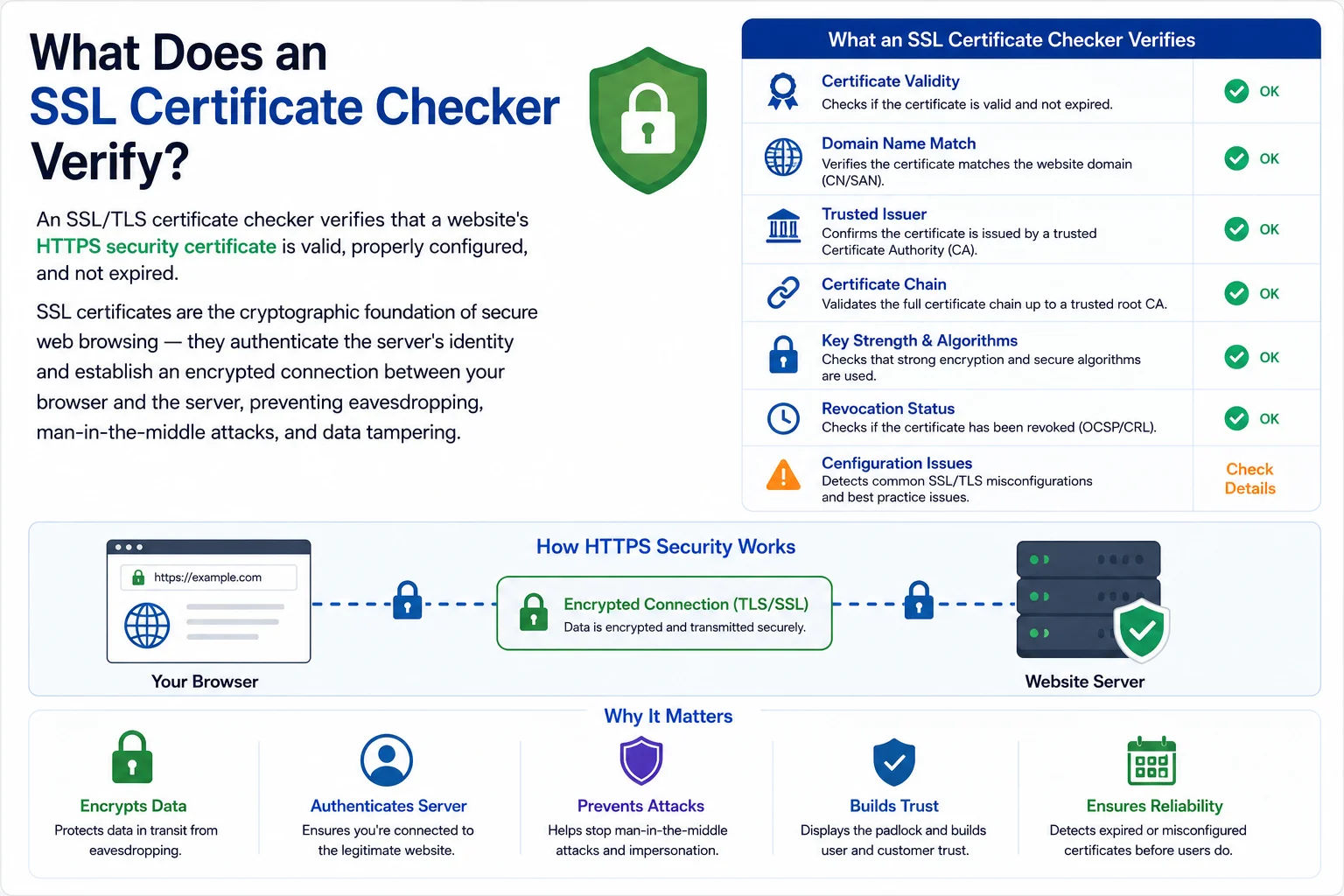
An expired or misconfigured SSL certificate causes browser security warnings that drive users away - regular monitoring prevents unexpected downtime
Common SSL Certificate Issues
| Issue | Browser Error | How to Fix |
|---|---|---|
| Expired certificate | ERR_CERT_DATE_INVALID, NET::ERR_CERT_DATE_INVALID | Renew the certificate. Let's Encrypt certificates are free and expire every 90 days - automate renewal with certbot. |
| Certificate for wrong domain | ERR_CERT_COMMON_NAME_INVALID | Ensure the certificate's Common Name or SAN (Subject Alternative Name) matches the domain exactly, including www vs non-www. |
| Self-signed certificate | ERR_CERT_AUTHORITY_INVALID | Browsers don't trust self-signed certs for production. Get a certificate from a trusted CA: Let's Encrypt (free), DigiCert, Sectigo. |
| Incomplete certificate chain | ERR_CERT_AUTHORITY_INVALID | Include intermediate CA certificates in your server's certificate bundle. Most CA providers supply a "fullchain" file. |
| HTTP not redirecting to HTTPS | Mixed content warnings | Add 301 redirect from HTTP to HTTPS. Add HSTS header: Strict-Transport-Security: max-age=31536000 |
| Mixed content (HTTP resources on HTTPS page) | Shield icon / security warnings | Ensure all images, scripts, stylesheets load via HTTPS. Update any hardcoded http:// URLs in your HTML/CSS. |
Let's Encrypt - Free SSL Certificates
Let's Encrypt (operated by the non-profit Internet Security Research Group) provides free, automated, and open SSL/TLS certificates. Over 300 million websites use Let's Encrypt certificates. Key facts:
- Cost: Completely free - no payment required
- Validity: 90 days - must be renewed every 90 days (automation via certbot is strongly recommended)
- Automation: certbot on Linux automates renewal with a cron job or systemd timer
- Supported by: All major browsers, operating systems, and applications
- Wildcard support: *.yourdomain.com wildcards available via DNS-01 validation
- India hosting: Works on all Indian hosting providers including those using cPanel/WHM
Frequently Asked Questions
How do I get a free SSL certificate?
Use Let's Encrypt - it provides free SSL/TLS certificates trusted by all major browsers. On Linux servers, install certbot (sudo apt install certbot python3-certbot-nginx) and run certbot --nginx. It automatically configures Nginx and sets up auto-renewal. Certificates are valid for 90 days and auto-renew.
Why is my SSL certificate showing as invalid?
Common causes: (1) Certificate expired - Let's Encrypt certs expire every 90 days, automate renewal. (2) Wrong domain - certificate must match the exact domain including www. (3) Self-signed certificate - not trusted by browsers. (4) Incomplete certificate chain - missing intermediate CA. (5) DNS not pointing to certificate-served server.
What is HSTS?
HTTP Strict Transport Security (HSTS) is a security header that tells browsers to only connect via HTTPS for a specified time period. Prevents SSL stripping attacks. Add to your server: Strict-Transport-Security: max-age=31536000; includeSubDomains; preload
What is the difference between SSL and TLS?
SSL (Secure Sockets Layer) is the older protocol - SSL 2.0, 3.0 are deprecated and insecure. TLS (Transport Layer Security) is the modern replacement - TLS 1.2 and 1.3 are current. Modern servers use TLS but the term 'SSL certificate' persists colloquially. Ensure your server has SSLv3 and TLS 1.0/1.1 disabled.
Is this SSL checker free?
Yes - completely free, no signup required. Tests HTTPS connectivity, browser-accepted certificate status, response time, and HSTS configuration for any domain instantly.
Related Tools
Technical information
How this tool works, where data comes from, and known limitations. See also our methodology and accuracy & limitations pages.
How this tool works
Connects to the host/IP over TLS and inspects certificate and HTTPS-related details returned for that connection.
Data source
- Live TLS handshake / certificate inspection from the checker path
Limitations
SNI, CDN anycast, and certificate automation can make results differ by region or hostname. A check from our vantage point may not match every client.
Content revision 2026-09 (aligned with current tool implementation in this codebase)