
IP Address Lookup
Find the location, ISP, ASN, hostname, and VPN/proxy status for any IPv4 address, IPv6 address, or domain name - instantly, with an interactive map. Free, no signup, no limits.
Hero, guides, and sidebar links below work without JavaScript. The interactive checker needs JavaScript enabled in your browser.
What Is IP Address Lookup?
An IP address lookup takes a numeric identifier - such as 103.21.244.10 (IPv4) or 2404:6800:4009::200e (IPv6) - and queries multiple public databases simultaneously to surface everything publicly known about it. The result combines three independent data sources: a live reverse DNS query to retrieve the hostname, a GeoIP database lookup to map the IP block to a country, region, and city, and an ASN registry query to identify the Internet Service Provider and autonomous system that owns and routes that IP block.
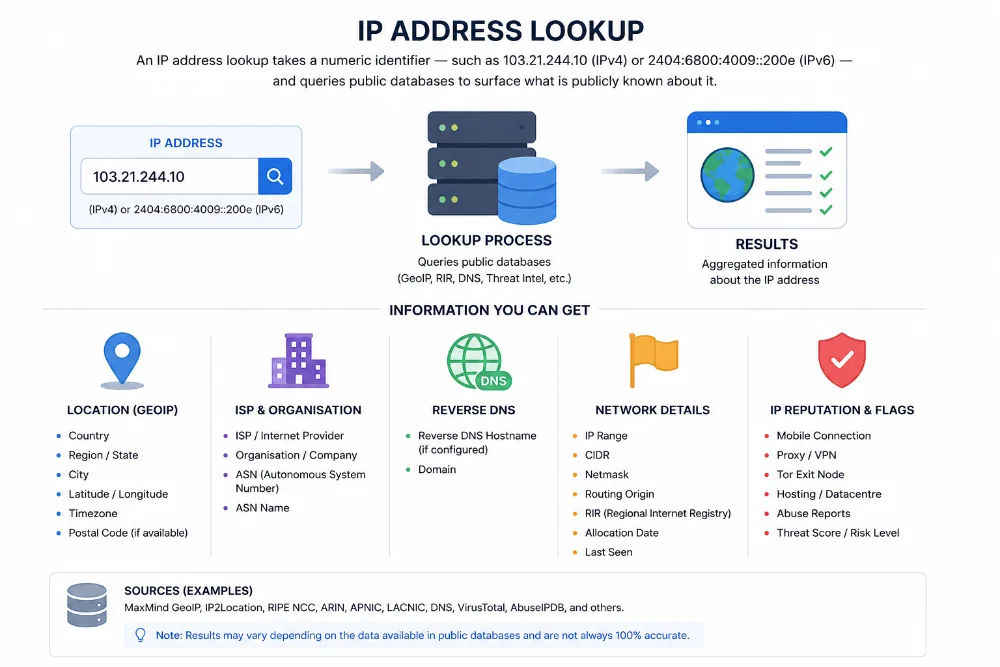
Every IP address is registered to an organisation in a specific country - IP geolocation maps those registrations to approximate physical locations
This tool accepts any valid IPv4 address, IPv6 address, or domain name. When you enter a domain like example.com, the tool first resolves it to its current IP address via a DNS A record query, then performs the full lookup. Leave the search field blank and click Get IP Details to instantly look up your own public IP - the address every website sees when you connect.
What this tool reveals: Where a network is registered, which ISP owns it, and whether traffic is residential, corporate, cloud-hosted, or anonymised via VPN. What it cannot reveal: A specific person's name, phone number, or street address - that data is private to the ISP and only accessible under a valid court order.
How to Use the IP Address Lookup Tool
The tool returns complete results in under three seconds. Here is exactly what each input type does and how to get the most from each lookup:
- IPv4 address (e.g.
8.8.8.8) - the most common use. Paste any IP from a server log, email header, firewall alert, suspicious login notification, or access report. - IPv6 address (e.g.
2001:4860:4860::8888) - full IPv6 support. Geolocation, ISP, ASN, and PTR record are all returned identically to IPv4 lookup. - Domain name (e.g.
cloudflare.comoramazon.in) - the tool automatically resolves the domain to its primary IP via DNS, then runs the full lookup. Useful for identifying hosting providers, CDNs, and server locations. - Blank field - leave the input empty and click Get IP Details to look up your own current public IP address, including your ISP, location, and whether you appear to be using a VPN.
Pro workflow: After a lookup, use the quick-action buttons directly below the result to chain into a Blacklist Check (is this IP flagged for spam?), WHOIS Lookup (who officially owns the IP block?), or Reverse IP Lookup (what hostname is configured?). All are pre-filled with the IP you just looked up - zero extra typing.
Understanding Your IP Lookup Results - Every Field Explained
Each field in the result panel comes from a different data source. Here is a plain-language explanation of what every field means, where it originates, and how to interpret it correctly:
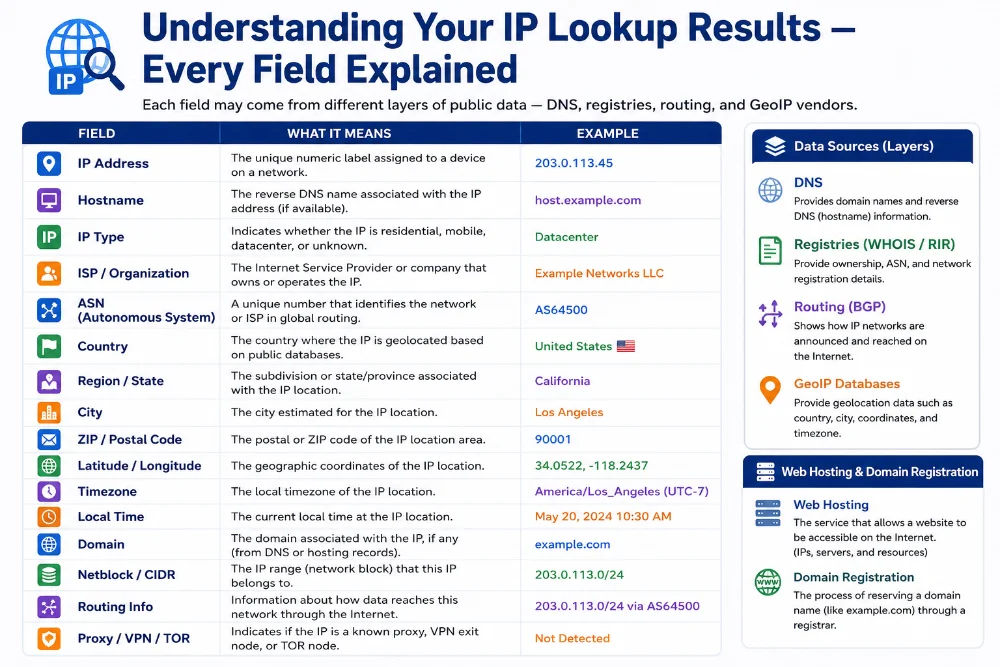
Each result field is sourced independently - from live DNS, RIR registries, BGP routing tables, and GeoIP databases updated daily
Country, Region & City
Sourced from GeoIP databases (MaxMind, DB-IP, IPinfo) that map IP blocks to locations based on where they are registered with the Regional Internet Registry (RIR) - APNIC for Asia-Pacific, ARIN for North America, RIPE NCC for Europe. Country accuracy is ~98–99%. Region is ~85–90%. City-level accuracy varies from 50–75% - a Jio or Airtel residential IP in Chandigarh may geolocate to Mumbai because the block is registered at Jio's Mumbai HQ. This is expected behaviour, not an error.
ISP (Internet Service Provider)
The organisation assigned this IP block by the RIR. In India: Reliance Jio (AS55836), Airtel (AS24560), BSNL (AS9829), MTNL, ACT Fibernet, Hathway. Globally: Amazon Web Services (AS16509), Google LLC (AS15169), Cloudflare (AS13335), Microsoft Azure (AS8075). The ISP field immediately tells you whether you're dealing with a home connection, a mobile network, a corporate office, or a cloud-hosted server.
ASN (Autonomous System Number)
A globally unique routing identifier assigned to every independently routed network. All IP blocks belonging to Jio share AS55836; all Google IPs share AS15169 (with a few additional ASNs). Security teams use ASNs to build firewall rules blocking entire providers at once, and to correlate attack traffic - dozens of IPs from one ASN almost certainly originate from the same operator's infrastructure.
Hostname (PTR Record)
The reverse DNS hostname the IP owner has configured. Examples: dns.google for 8.8.8.8, ec2-52-66-xx.ap-south-1.compute.amazonaws.com for an AWS Mumbai instance, broadband.airtel.net for an Airtel residential line. If no PTR is set, the field shows "No PTR record" - normal for most residential and dynamic IPs.
VPN / Proxy / Data Centre Flags
Based on ASN type classification and threat intelligence feeds. A Residential badge means traffic comes from a genuine ISP customer connection. A Data Centre badge means the IP belongs to a hosting/cloud provider - traffic likely automated. A VPN/Proxy badge means the IP is operated by a known anonymisation service, hiding the real user's location and ISP.
Coordinates & Map Pin
Latitude/longitude corresponding to the city or region centroid of the GeoIP result. These are not GPS coordinates of a device - they are the geometric centre of the city where the IP block is registered. The map pin should be treated as "somewhere in this metropolitan area," not a precise address.
How Accurate Is IP Geolocation? The Honest Answer
IP geolocation is the most misunderstood capability of IP lookup tools. It does not use GPS, it does not track devices, and it cannot identify individuals. It maps IP address blocks to locations based on where those blocks were registered - and several real-world factors affect precision:
Common Causes of Inaccurate City Results
- ISP hub registration - Jio and Airtel register millions of residential IPs under Mumbai/Delhi HQ, regardless of where the subscriber actually is
- Mobile carrier IPs - mobile networks route through regional gateways that may be hundreds of km from the subscriber
- VPN or proxy - shows the VPN server's location, completely unrelated to the user's physical location
- Corporate WAN - branch office traffic may exit through a head-office IP in a different city
- Satellite internet - Starlink registers IP blocks centrally regardless of dish placement
- CDN edge nodes - Cloudflare, Akamai, and Fastly IPs show the nearest edge node to you, not the origin server
Critical reminder: IP geolocation cannot identify a specific person. It reveals where a network is registered - not where an individual lives. Courts and investigators never rely on IP geolocation alone for identification. Only the ISP holds the IP-to-customer mapping and requires valid legal process to disclose it.
Who Uses IP Address Lookup - and For What Purpose?
IP lookup is one of the most broadly used network tools available. From everyday users confirming their VPN works, to enterprise security teams triaging incidents - here are eight real-world scenarios where an IP lookup provides immediate, actionable intelligence:
VPN, Proxy & Data Centre Detection - What Each Flag Means
One of the most practically valuable signals in an IP lookup result is the connection type. Here is precisely what each flag means and how to act on it:
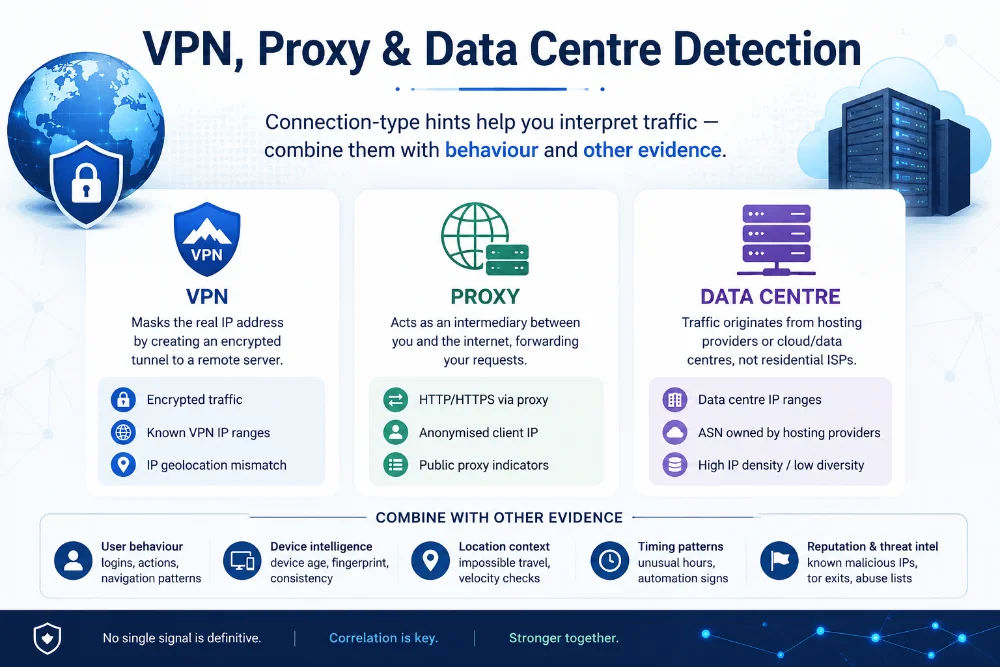
Connection type detection uses ASN classification and threat intelligence databases to distinguish residential connections from anonymising infrastructure
🟢 Residential / ISP
The IP is assigned directly to a home broadband or mobile customer by a standard ISP. In India: Jio, Airtel, BSNL, ACT, Hathway. Globally: Comcast, BT, Deutsche Telekom, etc. This is the most common type for genuine human users. No anonymisation flags. The geolocation shows the ISP's registered hub for that IP block.
⚪ Data Centre / Cloud
The IP belongs to a cloud hosting or server provider - AWS, Google Cloud, DigitalOcean, Hetzner, Linode (Akamai), Vultr, OVH. These are classified by ASN type. A data centre IP in server logs means the traffic originated from a script, bot, crawler, or automated process - not a human browsing from home. Legitimate corporate load balancers and company proxy servers also fall here.
🟡 VPN / Proxy / Tor
The IP is operated by a known commercial VPN provider (NordVPN, ExpressVPN, ProtonVPN, Surfshark) or is a listed Tor exit node or proxy server. Detection uses ASN ownership records and continuously updated VPN/Tor provider IP lists. The real user's location and ISP are completely hidden behind this server. Cannot determine the user's true location from this IP alone.
False positive awareness: Legitimate corporate offices, university networks, and cloud-hosted applications use data centre IPs for outbound traffic. A data centre flag does not automatically indicate malicious intent - always combine IP type with request patterns, login behaviour, and other contextual signals before drawing conclusions or taking action.
IP Lookup by Domain Name - How It Works
You do not need to know an IP address to use this tool. Entering a domain name like cloudflare.com, amazon.in, or youtube.com works identically - the tool automatically resolves the domain to its primary IP address via DNS, then performs the full geolocation and network lookup on that IP. This is useful for:
- Verifying where a website's server infrastructure is hosted (country, region, data centre)
- Identifying which CDN or cloud provider is serving a website (Cloudflare, Akamai, AWS CloudFront, Google Cloud)
- Investigating a suspicious link or domain before clicking it - check the hosting details first
- Confirming that a DNS change has propagated and the new server IP is now active globally
- Checking whether a domain recently pointed to a known malicious hosting provider
youtube.com → DNS A record → 142.250.195.46
GeoIP lookup: 142.250.195.46 → Google LLC · AS15169 · Mountain View · US
# How to find a domain's IP manually (Linux/macOS)
dig youtube.com A +short → returns IP
host cloudflare.com → resolves to IP
# Windows
nslookup amazon.in → resolves to IP
CDN caveat: Domains served through Cloudflare, Akamai, Fastly, or AWS CloudFront return an edge node IP near your location - not the origin server's IP. The geolocation will show Cloudflare's or Akamai's nearest data centre to you. CDNs intentionally hide the origin server IP for security. If you need the origin IP, it must be found through DNS records the CDN has not yet masked (e.g. checking historical DNS records or MX records).
How IP Geolocation Works - The Technical Reality
IP geolocation is not GPS and not magic. It is a multi-step process combining several independent public data sources to produce a location estimate. Understanding the mechanics explains both why it is useful and where its limits lie:
Block 14.139.x.x registered by ERNET India via APNIC
Record → Country: IN · Org: ERNET India · Region: Delhi
Step 2 - BGP / ASN Routing Tables
Block 14.139.0.0/16 announced by AS1668 (ERNET)
Confirms ISP identity and validates country assignment
Step 3 - GeoIP Database Refinement
MaxMind + DB-IP refine to City: New Delhi · Coords: 28.61, 77.20
Step 4 - Live PTR / Reverse DNS Query
dig -x 14.139.x.x → hostname.ernet.in
Which GeoIP Databases Power This Tool
The geolocation data returned by this tool is sourced from commercial and open databases that continuously monitor IP block registrations and routing changes. The most widely deployed are MaxMind GeoLite2 / GeoIP2 - the industry standard used by millions of applications including Apache, Nginx, and major CDNs - DB-IP with strong Asia-Pacific and Indian ISP coverage, and IPinfo for accurate ASN and carrier data. These databases update daily to reflect new ISP allocations, block reassignments, and routing changes.
Why Different IP Lookup Tools Show Different City Results
If you compare results across different lookup tools for the same IP, you may see slightly different cities or coordinates. This is because each tool uses a different underlying GeoIP database, and each has slightly different city-level mappings for the same block. Country and ASN are almost always identical - they come from authoritative RIR data. City-level differences of 50–200km between tools are normal and expected. No single tool is "more correct" at city level - all are estimates.
Frequently Asked Questions - IP Address Lookup
Clear answers to every common question about IP lookup, geolocation accuracy, data sources, domain lookup, and privacy:
What is an IP address lookup?
An IP address lookup queries geolocation and network databases to find publicly available information about any IP address - the approximate country, region, and city where the IP block is registered, the ISP that owns it, the Autonomous System Number (ASN), the reverse DNS hostname, and whether the IP belongs to a VPN, proxy, data centre, or residential connection. This tool runs all queries simultaneously and returns a combined result with an interactive map, requiring no signup or API key.
How accurate is IP geolocation?
Country-level accuracy is approximately 98–99% for most IP ranges. Region or state accuracy is around 85–90%. City-level accuracy varies from 50–75% globally - lower for large Indian ISPs like Jio or Airtel whose millions of residential IPs are registered under a single hub city like Mumbai. Street-level precision is impossible through IP lookup alone - that data is private to the ISP and never publicly available. GeoIP databases including MaxMind, DB-IP, and IPinfo update daily, but city-level data should always be treated as an approximation.
Can I look up any IP address?
Yes - any public IPv4 or IPv6 address, or any domain name. Private IP ranges (192.168.x.x, 10.x.x.x, 172.16–31.x.x, 127.x.x.x) cannot be looked up because they are not routable on the public internet and have no public GeoIP data. The tool is completely free, with no rate limits on the public interface. For bulk lookups of hundreds or thousands of IPs, use our dedicated Bulk IP Lookup tool.
Can I look up a domain name instead of an IP address?
Yes. Enter any domain name - such as example.com, amazon.in, or youtube.com - and the tool automatically performs a DNS A record lookup to resolve it to an IP address, then runs the full geolocation and network lookup on that IP. This is useful for checking where a website is hosted, which CDN is serving it, and which country its server infrastructure is registered in. Note: domains behind Cloudflare, Akamai, or AWS CloudFront CDNs will return the CDN's edge node IP rather than the origin server IP - the geolocation will show the CDN provider's nearest location to you.
What information does IP lookup provide?
Our IP lookup returns: the resolved IP address, country (with flag), region, city, postal code, latitude and longitude (for the map), ISP name, organisation name, ASN, hostname (PTR record from live reverse DNS), timezone, continent, and connection type flags (residential, data centre, or VPN/proxy). All data comes from publicly available sources - RIR registries, BGP routing tables, GeoIP databases, and live DNS queries - and reflects publicly known network information, not any private user data.
Why does the IP location show the wrong city?
IP geolocation shows where an IP block is registered - not where the end user is physically located. The most common reasons: your ISP (like Jio or Airtel) registers all their residential IP blocks under a hub city like Mumbai or Delhi; you are on mobile data and your carrier routes traffic through a regional hub; you are using a VPN whose exit server is in a different city; or your corporate network exits through a head-office IP. Country-level data is almost always correct; city-level should always be treated as approximate, especially for Indian ISPs and mobile carrier IPs.
Can IP lookup reveal someone's identity or home address?
No. An IP address reveals network-level information only - the ISP, the approximate region, and the type of connection. It cannot reveal a person's name, email address, phone number, or precise home address. The mapping between a specific IP address and the customer it was assigned to at a given point in time is private data held by the ISP. ISPs are legally required to protect this data and only disclose it under a valid court order or law enforcement request with proper legal authority.
What does the VPN / proxy / data centre flag mean?
These flags indicate the type of network the IP belongs to. A VPN flag means the IP is owned by a commercial VPN provider - the real user's location is hidden. A proxy/Tor flag means the IP is known to forward traffic on behalf of other devices. A data centre flag means the IP belongs to a hosting or cloud provider (AWS, Google Cloud, DigitalOcean, Hetzner) - traffic likely came from a server, bot, or automated process rather than a human user at home. Detection uses ASN type classification and continuously updated VPN and Tor provider IP lists.
Is this IP lookup tool free?
Yes - completely free, unlimited lookups, no account, no API key, and no signup required. Lookups run over HTTPS to return results. We do not keep a personal lookup history in the app; see our Privacy Policy for analytics, security, and third-party processing. For programmatic access or bulk lookups in applications, this tool is for manual use - contact us for API options or use the Bulk IP Lookup tool for batch processing.
How do I find the IP address of a website to look up?
The easiest method: simply enter the domain name directly into this tool - it resolves the IP automatically. Alternatively: on Windows, open Command Prompt and run nslookup example.com or ping example.com. On macOS or Linux, run dig example.com A +short or host example.com in Terminal. Any of these returns the IP address, which you can then paste into this tool for a complete geolocation and network lookup including ISP, ASN, hostname, and approximate location.
Related Network Tools
Combine IP Lookup with these free tools for a complete network investigation workflow - all pre-fillable with the IP from your lookup result:
Technical information
How this tool works, where data comes from, and known limitations. See also our methodology and accuracy & limitations pages.
How this tool works
Resolves the IP or domain you enter, then requests geolocation and network fields from our IP lookup API path (ip-api.com via same-origin proxy, with ipapi.co as a documented fallback).
Data source
Limitations
Geolocation is an estimate from commercial/registry-derived databases, not a street address. VPNs, mobile carriers, and CGNAT can place the IP far from the user’s physical location. Results can differ between providers.
Content revision 2026-09 (aligned with current tool implementation in this codebase)