
Wildcard Mask Calculator
Convert between subnet masks (255.255.255.0), wildcard masks (0.0.0.255), and CIDR prefixes (/24) in any direction. Enter a subnet mask, wildcard mask, or CIDR prefix and instantly get all three formats plus binary representations. Essential for Cisco ACL and OSPF configuration.
Hero, guides, and sidebar links below work without JavaScript. The interactive checker needs JavaScript enabled in your browser.
What Is a Wildcard Mask?
A wildcard mask (also called an inverse mask or access control mask) is the bitwise complement of a subnet mask. Where the subnet mask has 1s (network bits - match these exactly), the wildcard mask has 0s. Where the subnet mask has 0s (host bits - variable), the wildcard mask has 1s. This inverted representation is used in Cisco IOS access control lists (ACLs), OSPF network statements, BGP prefix lists, and other contexts where you need to specify which bits of an IP address must match exactly and which can be anything.
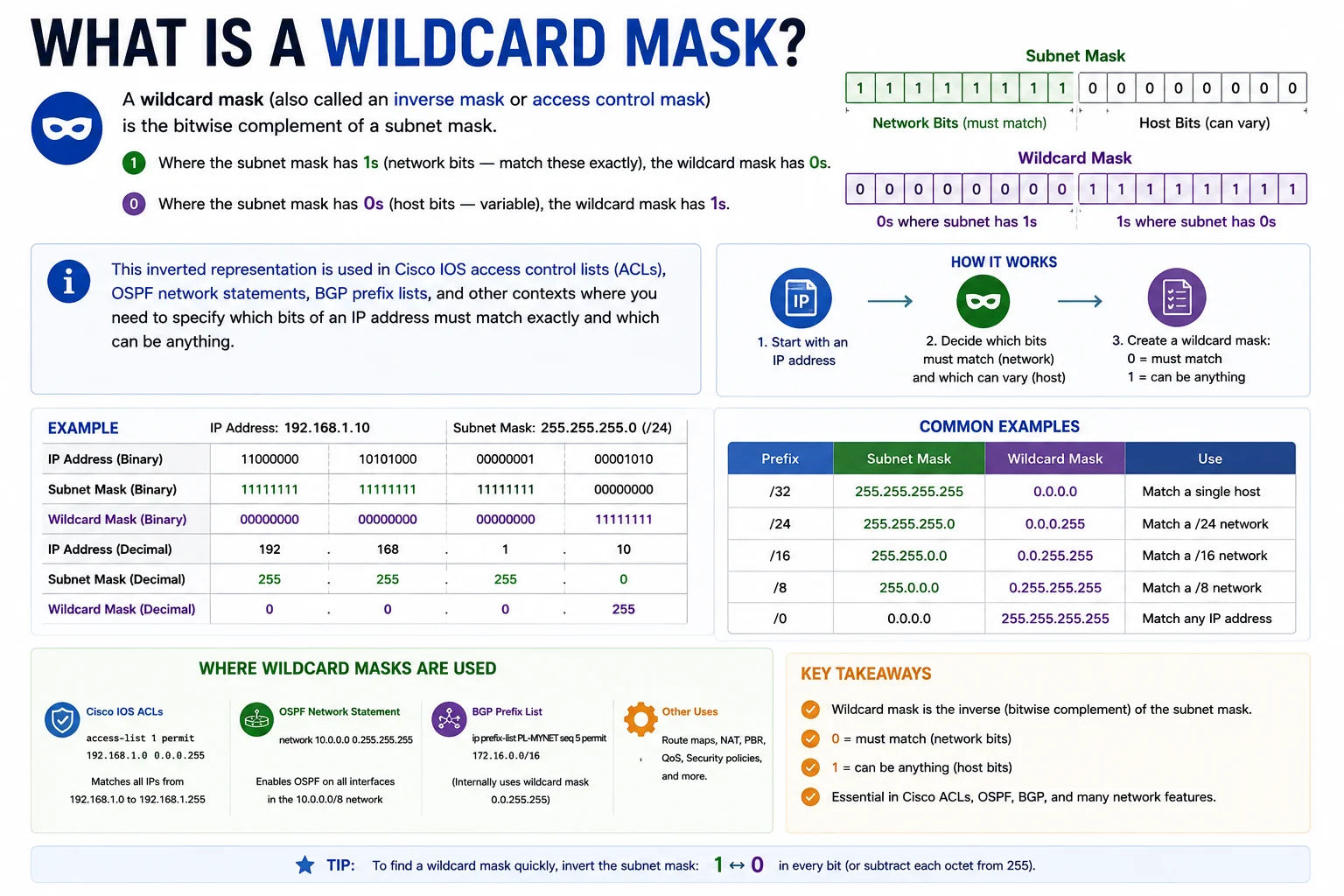
Wildcard masks are the language of Cisco ACLs and OSPF - they specify which bits must match and which to ignore when filtering IP traffic
Wildcard Mask vs Subnet Mask
Subnet mask: 255.255.255.0 = 11111111.11111111.11111111.00000000
Wildcard mask: 0.0.0.255 = 00000000.00000000.00000000.11111111
/16 subnet:
Subnet mask: 255.255.0.0 = 11111111.11111111.00000000.00000000
Wildcard mask: 0.0.255.255 = 00000000.00000000.11111111.11111111
Formula: Wildcard = NOT(Subnet mask) = 255.255.255.255 - Subnet mask
255.255.255.255 - 255.255.255.0 = 0.0.0.255 ✓
Wildcard Masks in Cisco ACLs
In Cisco IOS, wildcard masks are used in access control lists to define which IP addresses or subnets to permit or deny:
access-list 10 permit 192.168.1.0 0.0.0.255
# Permit only even-numbered IPs in 10.0.0.0/24 (0 in last bit)
access-list 10 permit 10.0.0.0 0.0.0.254
# Permit entire 10.0.0.0/8 block
access-list 10 permit 10.0.0.0 0.255.255.255
# OSPF - advertise 172.16.0.0/12 into area 0
router ospf 1
network 172.16.0.0 0.15.255.255 area 0
# Special wildcards:
0.0.0.0 = match exactly this one IP (/32 equivalent)
255.255.255.255 = match any IP (0.0.0.0/0 equivalent)
Complete Wildcard Mask Reference
| CIDR | Subnet Mask | Wildcard Mask | Cisco ACL Usage |
|---|---|---|---|
| /8 | 255.0.0.0 | 0.255.255.255 | Permit entire Class A block |
| /16 | 255.255.0.0 | 0.0.255.255 | Permit entire /16 block |
| /24 | 255.255.255.0 | 0.0.0.255 | Permit all hosts in a /24 subnet |
| /25 | 255.255.255.128 | 0.0.0.127 | Permit lower half of /24 |
| /26 | 255.255.255.192 | 0.0.0.63 | Permit one /26 quarter-subnet |
| /27 | 255.255.255.224 | 0.0.0.31 | Permit one /27 (30 hosts) |
| /28 | 255.255.255.240 | 0.0.0.15 | Permit one /28 (14 hosts) |
| /30 | 255.255.255.252 | 0.0.0.3 | Permit point-to-point /30 link |
| /32 | 255.255.255.255 | 0.0.0.0 | Permit exactly one IP address |
Frequently Asked Questions
What is a wildcard mask and how does it differ from a subnet mask?
A wildcard mask is the bitwise inverse of a subnet mask. The subnet mask has 1s in the network portion (bits that must match) and 0s in the host portion. The wildcard mask has 0s where bits must match and 1s where bits can be anything. Wildcard masks are used in Cisco IOS ACLs and OSPF network statements. Subnet masks are used in routing tables, interface configuration, and most modern systems. They represent the same prefix length information in opposite polarity.
How do I convert a subnet mask to a wildcard mask?
Subtract the subnet mask from 255.255.255.255. For 255.255.255.0: 255.255.255.255 − 255.255.255.0 = 0.0.0.255 (wildcard). Or use bitwise NOT on the subnet mask. The calculator above accepts any subnet mask, CIDR prefix, or wildcard mask and converts between all three instantly.
What does 0.0.0.0 mean as a wildcard mask?
A wildcard mask of 0.0.0.0 means all bits must match exactly - it is equivalent to /32 or specifying a single host. Used in Cisco ACLs to permit or deny exactly one IP: "permit 10.0.0.1 0.0.0.0" allows only 10.0.0.1 and nothing else. The "host" keyword in Cisco IOS is shorthand for this: "permit host 10.0.0.1" is identical to "permit 10.0.0.1 0.0.0.0".
What does 255.255.255.255 mean as a wildcard mask?
A wildcard mask of 255.255.255.255 means all bits are ignored - it matches any IP address. This is equivalent to 0.0.0.0/0 (the default route). In Cisco ACLs, "permit any" is shorthand for "permit 0.0.0.0 255.255.255.255". It matches all traffic regardless of source or destination IP.
Is this wildcard mask calculator free?
Yes - completely free, no signup required. Accepts subnet masks, CIDR prefixes, or wildcard masks as input and instantly converts between all three formats, including binary representation of both masks.