
Subnet Calculator
Enter any IPv4 address and CIDR prefix to instantly get every subnet property: network address, broadcast address, subnet mask, wildcard mask, first and last usable host, total host count, IP class, private/public status - plus a 32-bit binary visualizer and an interactive subnet splitter. Runs entirely in your browser. No data sent anywhere.
Hero, guides, and sidebar links below work without JavaScript. The interactive checker needs JavaScript enabled in your browser.
What Is a Subnet Calculator?
A subnet calculator takes an IPv4 address and subnet mask (in CIDR notation like /24) and computes every critical property of that network: the network address, broadcast address, usable host range, subnet mask, wildcard mask, host count, and IP class. It eliminates the need for manual binary arithmetic - which is tedious and error-prone - making network design, firewall rule creation, cloud infrastructure planning, and certification exam practice dramatically faster.
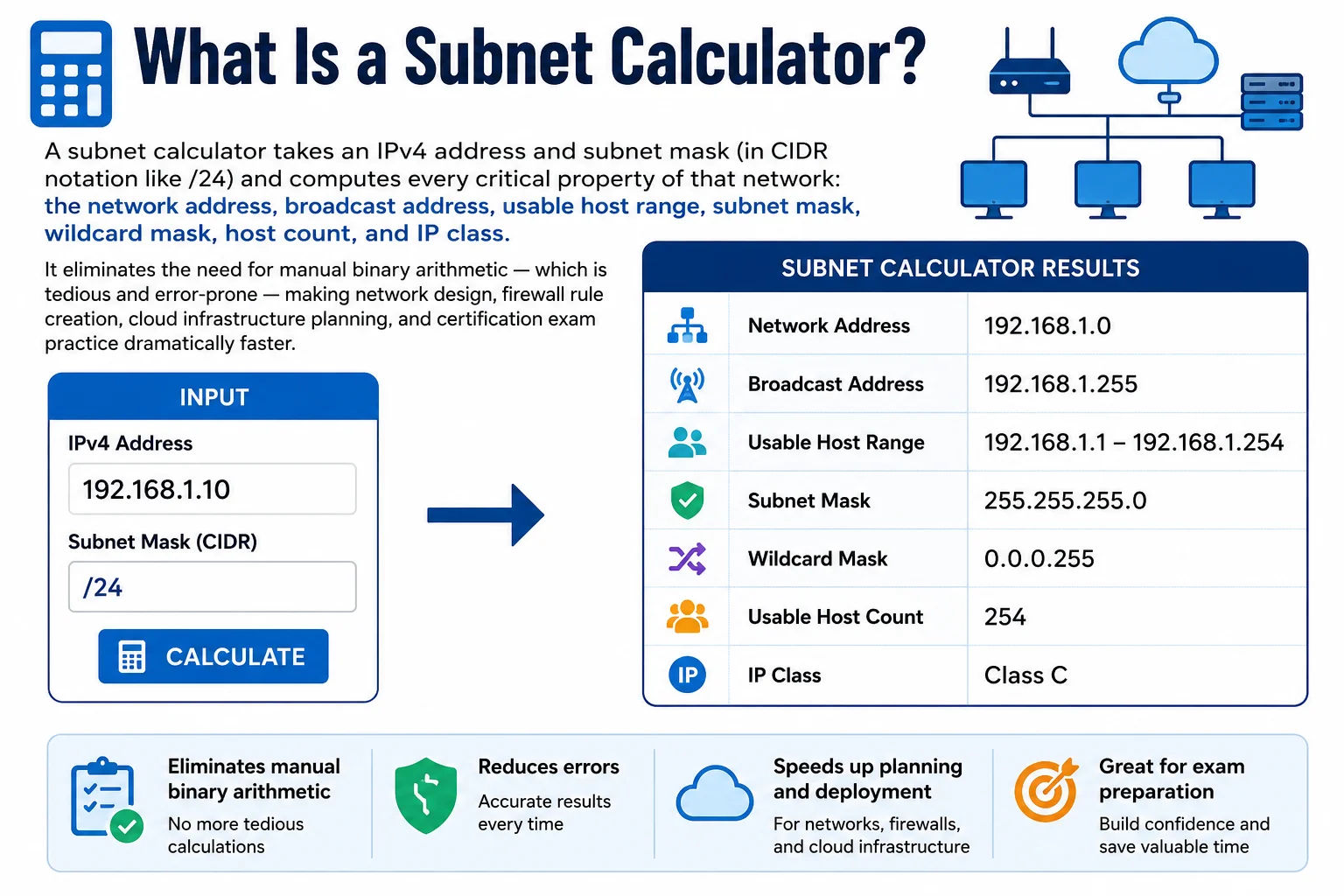
Subnetting divides a large IP address space into smaller, manageable network segments - each with its own network address, broadcast address, and range of assignable host addresses
Every device connected to the internet or any local network has an IP address that belongs to a specific subnet. The subnet determines which devices can communicate directly with each other (without routing) and how many devices can exist in that network segment. Correct subnet planning is the foundation of network design, cloud VPC architecture, VLAN configuration, firewall rule writing, and security segmentation.
Privacy note: This calculator runs entirely in your browser using JavaScript bitwise operations. Your IP addresses and network configurations are never transmitted to our servers. Safe to use with sensitive internal addressing schemes.
How Subnetting Works - The Binary Foundation
Subnetting is fundamentally a binary operation. An IPv4 address is 32 bits. A subnet mask is also 32 bits - with consecutive 1s on the left (the network portion) and 0s on the right (the host portion). The CIDR prefix number (/24) tells you how many of those 32 bits are 1s in the mask. Understanding this binary foundation lets you calculate any subnet property without a calculator.
The AND Operation - Finding the Network Address
IP Address: 192.168.1.100
Binary: 11000000.10101000.00000001.01100100
────────────────────────── ────────
Network (24 bits) Host (8 bits)
Subnet Mask: 255.255.255.0
Binary: 11111111.11111111.11111111.00000000
IP AND Mask → Network Address:
11000000.10101000.00000001.00000000 = 192.168.1.0
Broadcast (all host bits = 1):
11000000.10101000.00000001.11111111 = 192.168.1.255
Usable hosts = 2^8 - 2 = 256 - 2 = 254 (192.168.1.1 → 192.168.1.254)
Why 2 Addresses Are Always Reserved
Every subnet reserves its first and last IP addresses for special purposes:
- Network address (all host bits = 0) - identifies the subnet itself in routing tables. For 192.168.1.0/24, this is 192.168.1.0. Cannot be assigned to a device.
- Broadcast address (all host bits = 1) - sends a packet to every device on the subnet simultaneously. For 192.168.1.0/24, this is 192.168.1.255. Cannot be assigned to a device.
Exception: /31 subnets (RFC 3021) have no reserved addresses - both IPs are usable for point-to-point router links. /32 is a single host route with 1 usable address.
Subnet Mask and Wildcard Mask
The subnet mask has 1s in the network portion and 0s in the host portion. The wildcard mask (inverse mask) is the bitwise complement - used in Cisco ACLs, OSPF network statements, and firewall rules where you specify which bits to match and which to ignore:
Wildcard mask: 0.0.0.255 = 00000000.00000000.00000000.11111111
# Cisco ACL - permit entire 192.168.1.0/24 subnet:
access-list 1 permit 192.168.1.0 0.0.0.255
# OSPF network statement - advertise 10.0.0.0/8 into area 0:
network 10.0.0.0 0.255.255.255 area 0
# Formula: Wildcard = 255.255.255.255 - Subnet Mask
255.255.255.255 - 255.255.255.0 = 0.0.0.255 ✓
Complete CIDR Reference Table - /0 to /32
Every CIDR prefix from /0 (entire internet) to /32 (single host route). Click any CIDR row to load it into the calculator above. Includes subnet mask, wildcard, total addresses, usable hosts, and typical use case with colour-coded badges:
| CIDR | Subnet Mask | Wildcard Mask | Total Addresses | Usable Hosts | Block Size | Typical Use |
|---|---|---|---|---|---|---|
| /0 | 0.0.0.0 | 255.255.255.255 | 4,294,967,296 | 4,294,967,294 | 4,294,967,296 | Default route (all traffic) |
| /8 | 255.0.0.0 | 0.255.255.255 | 16,777,216 | 16,777,214 | 16,777,216 | ISP block / Class A private |
| /16 | 255.255.0.0 | 0.0.255.255 | 65,536 | 65,534 | 65,536 | AWS VPC, large enterprise |
| /17 | 255.255.128.0 | 0.0.127.255 | 32,768 | 32,766 | 32,768 | Half a /16 |
| /18 | 255.255.192.0 | 0.0.63.255 | 16,384 | 16,382 | 16,384 | Large campus |
| /19 | 255.255.224.0 | 0.0.31.255 | 8,192 | 8,190 | 8,192 | Medium enterprise |
| /20 | 255.255.240.0 | 0.0.15.255 | 4,096 | 4,094 | 4,096 | Medium enterprise |
| /21 | 255.255.248.0 | 0.0.7.255 | 2,048 | 2,046 | 2,048 | Medium enterprise |
| /22 | 255.255.252.0 | 0.0.3.255 | 1,024 | 1,022 | 1,024 | Large office |
| /23 | 255.255.254.0 | 0.0.1.255 | 512 | 510 | 512 | Two /24s merged |
| /24 | 255.255.255.0 | 0.0.0.255 | 256 | 254 | 256 | Standard office / VLAN |
| /25 | 255.255.255.128 | 0.0.0.127 | 128 | 126 | 128 | Half a /24 |
| /26 | 255.255.255.192 | 0.0.0.63 | 64 | 62 | 64 | Department subnet |
| /27 | 255.255.255.224 | 0.0.0.31 | 32 | 30 | 32 | Small team |
| /28 | 255.255.255.240 | 0.0.0.15 | 16 | 14 | 16 | Small segment |
| /29 | 255.255.255.248 | 0.0.0.7 | 8 | 6 | 8 | 6-host segment |
| /30 | 255.255.255.252 | 0.0.0.3 | 4 | 2 | 4 | P2P WAN link |
| /31 | 255.255.255.254 | 0.0.0.1 | 2 | 2* | 2 | P2P RFC 3021 |
| /32 | 255.255.255.255 | 0.0.0.0 | 1 | 1** | 1 | Single host route |
* /31 per RFC 3021 - no network/broadcast reserved; both addresses usable for point-to-point links. Click any row to load that prefix into the calculator.
Private IP Address Ranges - RFC 1918 & Special-Use Reference
Three address ranges are reserved for private networks by RFC 1918 and cannot be routed on the public internet. Additional ranges are reserved for loopback, CGNAT, link-local, and documentation purposes:
| Range | CIDR | Total Addresses | Common Use |
|---|---|---|---|
| 10.0.0.0 – 10.255.255.255 | 10.0.0.0/8 | 16,777,216 | Large enterprise networks, cloud VPCs, data centre internal. AWS VPCs often use 10.x.x.x ranges. Docker custom networks use 10.x subnets. |
| 172.16.0.0 – 172.31.255.255 | 172.16.0.0/12 | 1,048,576 | Docker default bridge (172.17.0.0/16), AWS default VPC (172.31.0.0/16), medium enterprise LANs. |
| 192.168.0.0 – 192.168.255.255 | 192.168.0.0/16 | 65,536 | Home routers (192.168.0.0/24 or 192.168.1.0/24), SOHO networks, most commonly seen private range. |
| 127.0.0.0 – 127.255.255.255 | 127.0.0.0/8 | 16,777,216 | Loopback - 127.0.0.1 is "localhost". Traffic never leaves the device. Never appears on physical networks. |
| 169.254.0.0 – 169.254.255.255 | 169.254.0.0/16 | 65,536 | APIPA - auto-assigned when DHCP fails. Also used for AWS instance metadata endpoint (169.254.169.254). |
| 100.64.0.0 – 100.127.255.255 | 100.64.0.0/10 | 4,194,304 | CGNAT (RFC 6598) - used by ISPs including Jio in India for shared public IP addressing. Multiple customers share one public IP. Cannot be used for servers or port forwarding. |
| 192.0.2.0, 198.51.100.0, 203.0.113.0 | /24 each | 768 | Documentation ranges (RFC 5737) - used only in examples, textbooks, and tech documentation. Never on live networks. This website uses these in examples. |
Subnetting Worked Examples - Step by Step
Three complete worked examples covering standard /24 subnetting, dividing a network into equal subnets, and identifying the network for a host IP - the three question types most commonly seen in CCNA exams and real-world network troubleshooting:
Example 1: Standard /24 Subnet Calculation
255.255.255.0 (24 ones, 8 zeros)192.168.10.0 AND 255.255.255.0 = 192.168.10.0192.168.10.0 OR 0.0.0.255 = 192.168.10.255192.168.10.1192.168.10.254254 hostsExample 2: Divide 10.0.0.0/24 into 4 Equal Subnets
/2662 usable hosts10.0.0.0/26 → hosts 10.0.0.1–10.0.0.62, broadcast 10.0.0.6310.0.0.64/26 → hosts 10.0.0.65–10.0.0.126, broadcast 10.0.0.12710.0.0.128/26 → hosts 10.0.0.129–10.0.0.190, broadcast 10.0.0.19110.0.0.192/26 → hosts 10.0.0.193–10.0.0.254, broadcast 10.0.0.255Example 3: Find the Subnet for a Host IP
255.255.240.0 (20 ones: 11111111.11111111.11110000.00000000)00101101 AND 11110000 =
00100000 = 32172.16.32.0/20172.16.47.255172.16.32.1 – 172.16.47.254 (4,094 usable hosts)VLSM - Variable Length Subnet Masking
VLSM (Variable Length Subnet Masking) uses differently-sized subnets within the same parent network block to match actual host requirements. Instead of allocating identical /24 subnets to every department regardless of size, VLSM allocates exactly what each segment needs - eliminating address waste and the primary technique used in modern enterprise network design.
VLSM Example: Design a network for 192.168.1.0/24
Requirements: Engineering (100 hosts), Sales (50 hosts), Reception (25 hosts), Data Centre WAN link (2 hosts).
| Segment | Hosts Needed | CIDR Chosen | Hosts Available | Network | Broadcast |
|---|---|---|---|---|---|
| Engineering | 100 | /25 | 126 | 192.168.1.0/25 | 192.168.1.127 |
| Sales | 50 | /26 | 62 | 192.168.1.128/26 | 192.168.1.191 |
| Reception | 25 | /27 | 30 | 192.168.1.192/27 | 192.168.1.223 |
| DC WAN link | 2 | /30 | 2 | 192.168.1.224/30 | 192.168.1.227 |
| Total used from /24 (256 addresses) | 228 allocated · 28 remaining for growth | ||||
Compare this to allocating four /24 subnets for the same requirements - that would consume 4 × 256 = 1,024 addresses for work that VLSM handles in a single /24 with 28 addresses still available. VLSM is essential for AWS VPC subnet design, enterprise VLAN planning, and CCNA/CCNP routing design questions.
VLSM design rule: Always allocate the largest subnet first, then work downward in size. This keeps subnets contiguous and prevents overlaps. In the example above: /25 first at offset 0, then /26 at offset 128, then /27 at offset 192, then /30 at offset 224.
IPv4 Address Classes - Classful vs Classless Networking
Before CIDR (1993), IPv4 addresses were divided into rigid classes. This classful system explains why the RFC 1918 private ranges are the sizes they are and why CIDR was invented to replace them:
| Class | First Octet | Leading Bits | Default Mask | Networks | Hosts/Network | Private Range |
|---|---|---|---|---|---|---|
| A | 1–126 | 0xxxxxxx | /8 (255.0.0.0) | 128 | 16,777,214 | 10.0.0.0/8 |
| B | 128–191 | 10xxxxxx | /16 (255.255.0.0) | 16,384 | 65,534 | 172.16.0.0/12 |
| C | 192–223 | 110xxxxx | /24 (255.255.255.0) | 2,097,152 | 254 | 192.168.0.0/16 |
| D | 224–239 | 1110xxxx | N/A - Multicast | N/A | N/A | N/A |
| E | 240–255 | 11110xxx | N/A - Reserved | N/A | N/A | N/A |
CIDR (Classless Inter-Domain Routing, RFC 1519, 1993) solved classful addressing's critical flaw: an organisation needing 1,000 hosts had to choose between Class C (254 hosts - too small) or Class B (65,534 - massive waste). CIDR allows allocating exactly a /22 (1,022 usable hosts). This precision dramatically slowed IPv4 exhaustion and reduced the internet's routing table size through aggregation.
Who Uses a Subnet Calculator - 8 Real-World Scenarios
Frequently Asked Questions - Subnet Calculator
What is a subnet and why does it matter?
A subnet (subnetwork) is a logical division of an IP network into smaller, isolated segments. Subnets matter for three reasons: (1) Routing efficiency - routers use subnet information to forward packets to the correct network segment without needing to know every individual host IP. (2) Security segmentation - devices in different subnets cannot communicate directly without passing through a router or firewall, enabling access control between segments. (3) Broadcast containment - layer-2 broadcasts are contained within their subnet, preventing broadcast storms that would cripple a large flat network. A /24 subnet of 254 hosts generates a manageable broadcast domain; a single flat network of 10,000 devices would be unmanageable.
What is CIDR notation and how do I read it?
CIDR (Classless Inter-Domain Routing) notation represents an IP address and its routing prefix as IP/prefix-length - for example, 192.168.1.0/24. The /24 means the first 24 of 32 bits are the network portion (equivalent to subnet mask 255.255.255.0), leaving 8 bits for hosts (256 total addresses, 254 usable). The prefix can be any number from /0 (covers all 4 billion IPv4 addresses, the default route) to /32 (covers exactly one IP address, a host route). CIDR replaced the older classful A/B/C system because it allows allocating any size block - a /22 for 1,022 hosts, a /28 for 14 hosts - rather than being forced into 256 or 65,536.
How do I calculate the network address from any host IP?
Perform a bitwise AND between the IP address and the subnet mask. Both must be in 32-bit binary form. For 192.168.1.100 with subnet mask 255.255.255.0: wherever the mask has a 1, keep the IP's bit; wherever the mask has a 0, set to 0. This gives 192.168.1.0 - the network address. Our calculator accepts any host IP (e.g. 192.168.1.100/24) and automatically computes the network address for you - the binary visualizer shows exactly which bits are the network portion (blue) and which are the host portion (grey).
Why are 2 IP addresses reserved in every subnet?
Every subnet reserves its first and last addresses. The first address (all host bits = 0) is the network address - it identifies the subnet itself and is used in routing tables. For 192.168.1.0/24, this is 192.168.1.0. The last address (all host bits = 1) is the broadcast address - sending a packet here reaches every device on the subnet simultaneously. For 192.168.1.0/24, this is 192.168.1.255. Neither can be assigned to a device. Therefore /24 has 254 usable hosts. Exception: /31 subnets per RFC 3021 have no reserved addresses and are used for point-to-point router links where no broadcast is needed. /32 is a single-host route with 1 usable address.
How many hosts does each common CIDR prefix support?
The formula is 2^(32−prefix) − 2: /24 = 254 hosts (256 − 2), /25 = 126 hosts (128 − 2), /26 = 62 hosts, /27 = 30 hosts, /28 = 14 hosts, /29 = 6 hosts, /30 = 2 hosts (standard for WAN point-to-point), /31 = 2 hosts with 0 reserved (RFC 3021), /32 = 1 address (single host route). For larger networks: /23 = 510, /22 = 1,022, /21 = 2,046, /20 = 4,094, /16 = 65,534, /8 = 16,777,214. In AWS, subtract 5 additional IPs per subnet (AWS reserves 5 addresses in every subnet for its infrastructure).
What is a wildcard mask and where is it used?
A wildcard mask is the bitwise complement (inverse) of the subnet mask - calculated as 255.255.255.255 minus the subnet mask. For /24 (mask 255.255.255.0), the wildcard is 0.0.0.255. Wildcard masks specify which bits must match (0 = must match) and which can be anything (1 = ignore). They are used in: Cisco IOS ACLs (access-list 10 permit 192.168.1.0 0.0.0.255 - permit entire /24 subnet), OSPF network statements (network 10.0.0.0 0.255.255.255 area 0), BGP prefix-list, and Cisco IOS extended ping. AWS Security Groups and iptables use CIDR notation instead.
What is VLSM and when should I use it?
VLSM (Variable Length Subnet Masking) uses different-sized subnets within the same parent block to match actual host requirements rather than wasting space with identically-sized subnets. Use VLSM when different segments need different numbers of hosts - /25 for 100 hosts, /27 for 25 hosts, /30 for a WAN point-to-point link. VLSM is supported by all modern routing protocols (OSPF, EIGRP, BGP, RIP v2) and is the standard for modern network design. RIP v1 is the only protocol that doesn't support VLSM - it requires all subnets to use the same mask (called "classful" routing).
What is the difference between /30 and /31 for point-to-point links?
Both serve point-to-point router links but differ in efficiency. /30 has 4 addresses: network, 2 usable hosts, broadcast - wasting 2 of 4 addresses (50%). /31 per RFC 3021 has 2 addresses with no network or broadcast reservation - both addresses are usable, giving zero waste. /31 is more efficient and is recommended for modern networks. Most current Cisco, Juniper, and Linux implementations support RFC 3021. /30 is still common due to legacy equipment compatibility. The practical difference: a /30 WAN link uses 4 IPs from your addressing scheme; a /31 uses only 2.
What does /32 mean and when is it used?
/32 is a host route - it represents exactly one single IP address (all 32 bits are the network portion, zero host bits). /32 is used in: routing tables to create a specific route to a single host (often for loopback addresses or policy-based routing), firewall rules to permit or deny exactly one IP address, AWS security group rules (203.0.113.42/32 allows only that one IP), anycast configurations where one IP needs to be reachable from multiple locations, and load balancer virtual IPs. In a routing table, /32 has the highest specificity and always wins over less-specific routes by the longest-prefix-match rule.
Is this subnet calculator free and does it send my data anywhere?
Yes - completely free, no signup, no account required. All calculations run entirely in your browser using JavaScript bitwise operations. No IP addresses, network configurations, or any input data is transmitted to our servers - there are no API calls to any external service. This makes it completely safe to use with sensitive internal network addressing schemes, corporate infrastructure planning, or any private IP ranges. Results are available instantly as you type, with no page reloads.