
IPv6 Compatibility Test
Instantly test whether your device and ISP support IPv6. Detects your IPv6 address, identifies the address type (Global Unicast, ULA, Teredo, 6to4, CGNAT), tests dual-stack connectivity, checks DNS64/NAT64 translation, validates DNSSEC support, and produces an IPv6 readiness score. Works across all ISPs - Jio, Airtel, BSNL, ACT, and international providers.
Hero, guides, and sidebar links below work without JavaScript. The interactive checker needs JavaScript enabled in your browser.
What Is the IPv6 Compatibility Test?
The IPv6 compatibility test checks eight aspects of your network's IPv6 readiness: whether you have a real globally-routable IPv6 address, whether IPv4 is still working (dual-stack), the type and quality of your IPv6 address, whether your ISP uses DNS64/NAT64 translation for backward compatibility, whether your DNS resolver validates DNSSEC, and whether DNS-over-HTTPS is in use. Together these checks produce an IPv6 readiness score that tells you how prepared your connection is for an IPv6-first internet.
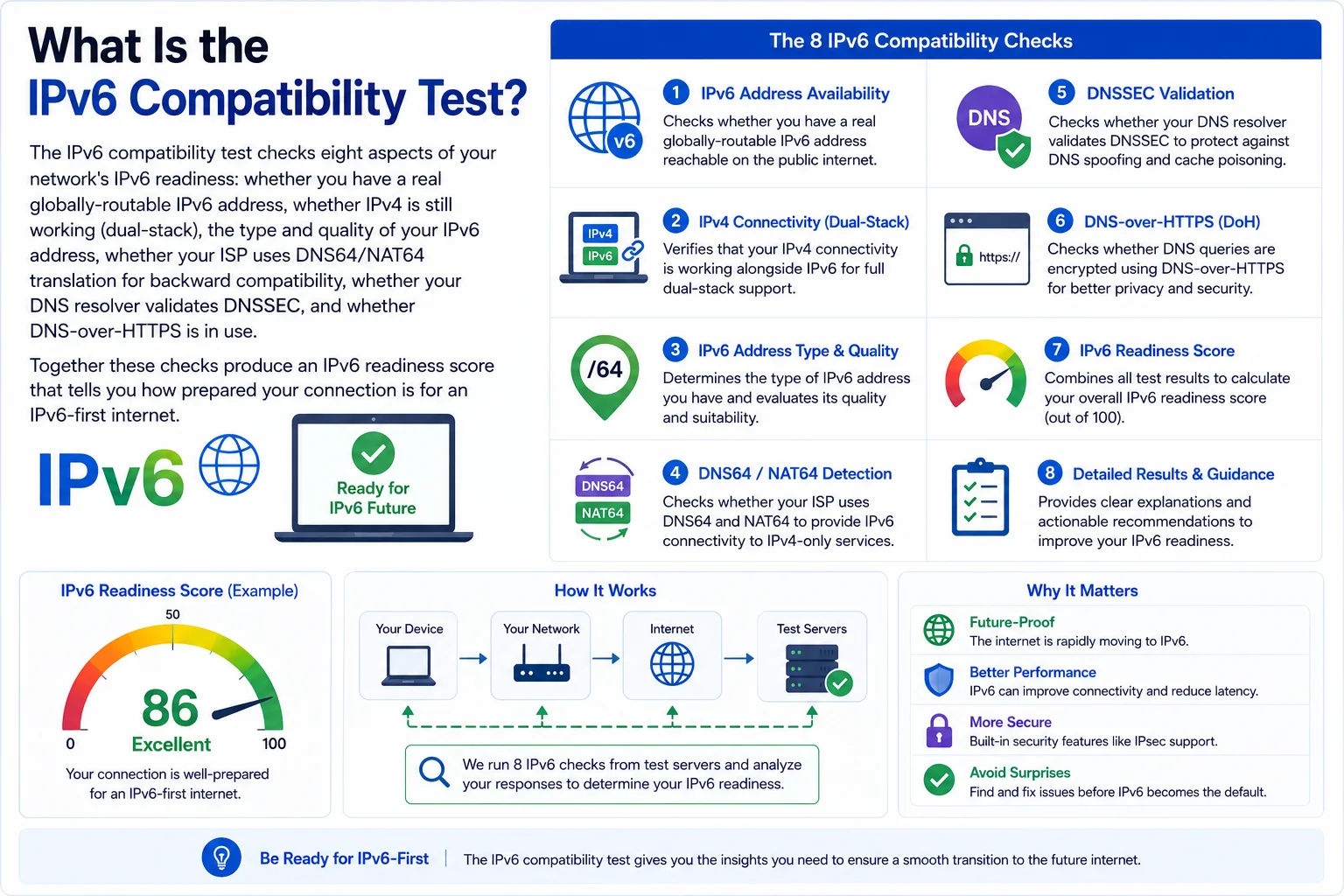
IPv6 adoption has accelerated dramatically - as of 2024 over 45% of Google traffic uses IPv6. Testing your connection reveals what your ISP actually provides and whether your applications will work correctly on an IPv6-first network
IPv6 Address Types - What Your Result Means
| Address Type | Format | What It Means | Score Impact |
|---|---|---|---|
| Global Unicast | 2000::/3 | Real, internet-routable IPv6 address. Your ISP has assigned you a genuine IPv6 address. Websites that are IPv6-only are directly reachable. Best possible result. | +40 points |
| Dual-Stack Global | IPv4 + 2000::/3 | Both IPv4 and IPv6 are active. The browser prefers IPv6 for AAAA-capable sites (Happy Eyeballs RFC 6555). Ideal configuration - no compatibility loss during transition. | +40 points |
| Teredo (2001:0::/32) | 2001:0:*/32 | IPv6 over IPv4 tunnel. Windows' automatic IPv6 through NAT. Unreliable - depends on Teredo servers, poor performance, often blocked. Not a substitute for native IPv6. | +10 points |
| 6to4 (2002::/16) | 2002:*/16 | Deprecated automatic tunnel embedding IPv4 in IPv6. Unreliable relay infrastructure. Rarely seen today - indicates very old network configuration. | +5 points |
| ULA (fc00::/7) | fc00:: or fd00:: | Unique Local Address - IPv6 equivalent of RFC 1918 private ranges. Only works on local network, not internet-routable. Router assigns ULA but no ISP IPv6 prefix received. | +5 points |
| Link-local only (fe80::/10) | fe80:: | Every IPv6 device has a link-local address - this is automatically assigned and only works on the local segment. Having only link-local means no ISP IPv6 support at all. | +0 points |
| No IPv6 | - | No IPv6 connectivity. IPv4-only connection. You are on the diminishing side of the internet - some IPv6-only services and content will be unreachable. | +0 points |
Indian ISP IPv6 Support - Jio, Airtel, BSNL & ACT
India has one of the world's fastest-growing IPv6 deployment rates, driven primarily by Jio's mobile network which uses IPv6-only addressing with NAT64 for backward compatibility. Here is the current state of IPv6 support across major Indian ISPs:
JioFiber (home broadband): Dual-stack (IPv4 + IPv6). Global unicast IPv6 from 2409: prefix. Both addresses are real and routable.
Airtel Broadband/Xstream: IPv6 available in some circles but not universally deployed. Users in metro areas more likely to have IPv6. Contact Airtel support to request IPv6 if not present.
Mobile: 4G network is theoretically IPv6-capable but penetration is low. Check this tool to see your actual status - there is wide variation by circle.
Status: If you are on ACT and this test shows no IPv6, contact ACT support - your CPE (router/ONT) may need a firmware update or IPv6 needs to be enabled on the account.
Checking Your ISP's IPv6 Status from the Command Line
ip -6 addr show # Linux: all IPv6 addresses
ifconfig | grep inet6 # Mac: IPv6 addresses on all interfaces
# Windows - check IPv6:
ipconfig | findstr IPv6 # Show IPv6 addresses
netsh interface ipv6 show addresses # Detailed IPv6 info
# Test IPv6 connectivity:
ping6 ipv6.google.com # Linux/Mac
ping ipv6.google.com # Windows (ping resolves IPv6 if AAAA exists)
curl -6 https://ipv6.google.com # HTTP test via IPv6
# Android (Jio/Airtel) - check IPv6:
Settings → About Phone → Status → IP Address
Look for a 2409: or 2404: address = Jio native IPv6
# Check if your router has IPv6:
ping6 -I eth0 fe80::1 # Gateway link-local (Linux)
traceroute6 ipv6.google.com # IPv6 path to Google
DNS64 and NAT64 - How IPv6-Only Networks Reach IPv4 Servers
When your ISP gives you an IPv6-only connection (common on Jio 4G/5G mobile networks), you can still reach IPv4-only websites through a translation mechanism called DNS64 + NAT64:
1. Your phone has only IPv6: 2409:4063:408f:1234::1
2. You visit example.com (IPv4-only, A record: 93.184.216.34)
3. Your DNS resolver (DNS64-enabled, e.g. Jio's resolver):
- Queries example.com AAAA → NXDOMAIN (no IPv6 record)
- Synthesises a fake AAAA from the A record:
64:ff9b::93.184.216.34 (NAT64 prefix + IPv4)
- Returns this synthesised AAAA to your phone
4. Your phone sends IPv6 packet to 64:ff9b::93.184.216.34
5. NAT64 gateway (at Jio's network): translates IPv6→IPv4
Strips 64:ff9b:: prefix → sends IPv4 to 93.184.216.34
6. Response comes back, NAT64 translates IPv4→IPv6
7. Your phone receives response - seamlessly
# Detect DNS64/NAT64 from command line:
dig AAAA ipv4only.arpa # Should return 64:ff9b::/96 prefixed address
dig AAAA example.com @your-resolver # Compare with dig A example.com
# If AAAA returns 64:ff9b:: + ipv4: your resolver uses DNS64
NAT64 Detection - The ipv4only.arpa Trick
RFC 7050 defines a standard way to detect NAT64: query the AAAA record for ipv4only.arpa - a domain that is intentionally IPv4-only. If your DNS resolver is DNS64-enabled, it will synthesise a AAAA response embedding the IPv4 address 192.0.0.170 (and 192.0.0.171) in the NAT64 prefix. The prefix in the response reveals your ISP's NAT64 prefix:
dig AAAA ipv4only.arpa
# On a NAT64 network (e.g. Jio 4G):
ipv4only.arpa. AAAA 64:ff9b::c000:00aa
# 64:ff9b:: is the Well-Known Prefix (WKP) from RFC 6052
# c000:00aa = 192.0.0.170 in hex (the embedded IPv4)
# Some ISPs use provider-specific NAT64 prefixes:
2409:4000:0:1::c000:00aa ← Jio's own NAT64 prefix (example)
# iOS and macOS also use this RFC to auto-configure NAT64
DNSSEC - Why DNS Security Matters for IPv6 Networks
DNSSEC (DNS Security Extensions) adds cryptographic signatures to DNS responses, preventing attackers from injecting false DNS answers (DNS cache poisoning). On IPv6 networks, DNSSEC is especially important because the extended address space makes manual verification of IP addresses more difficult - a fake AAAA record pointing your traffic to a malicious IPv6 address is much harder to spot than a fake A record.
| DNSSEC Status | What It Means | How to Enable |
|---|---|---|
| Validating ✓ | Your DNS resolver checks DNSSEC signatures. Tampered DNS responses are rejected - you get SERVFAIL for DNSSEC-broken domains, protecting against cache poisoning attacks. | You are already protected. No action needed. |
| Not validating ✗ | Your DNS resolver does not check signatures. A compromised resolver or network can return fake AAAA records. Attackers on the same network can redirect your traffic. | Switch to a DNSSEC-validating resolver: 1.1.1.1, 8.8.8.8, 9.9.9.9 (Quad9). Or configure your own Unbound resolver. |
| Broken validation ⚠ | Your resolver attempts DNSSEC validation but something in the chain is wrong - typically a misconfigured zone. You may fail to resolve legitimate DNSSEC-signed domains. | Check if your resolver is correctly configured. Test individual domains at dnssec-analyzer.verisignlabs.com. |
dig +dnssec sigfail.verteiltesysteme.net
# If DNSSEC validating: returns SERVFAIL (correctly rejects bad sig)
# If NOT validating: returns NOERROR with forged records (dangerous)
dig +dnssec isc.org | grep -E 'RRSIG|AD'
# AD flag in response = Authenticated Data = DNSSEC validated
# Switch to DNSSEC-validating resolver on Linux:
echo "nameserver 9.9.9.9" | sudo tee /etc/resolv.conf
echo "nameserver 149.112.112.112" | sudo tee -a /etc/resolv.conf
# Configure DNSSEC validation in Unbound:
server:
module-config: "validator iterator"
auto-trust-anchor-file: "/etc/unbound/root.key"
Happy Eyeballs - How Browsers Choose IPv4 vs IPv6
When a website has both A (IPv4) and AAAA (IPv6) records, modern browsers use the Happy Eyeballs algorithm (RFC 6555, updated by RFC 8305) to choose the fastest connection. Understanding this explains why you might be using IPv6 without knowing it - or why having IPv6 doesn't always mean you use it:
1. DNS resolver returns both A and AAAA records simultaneously
2. Browser initiates IPv6 connection attempt to AAAA address
3. After 50ms (if IPv6 hasn't connected), browser also starts IPv4
4. Whichever connects first - browser uses that connection
5. Preference: IPv6 gets a 50ms head start (RFC 6555 was 150ms)
# Result: if your IPv6 is working but slow (e.g. tunnel), browser
# may prefer IPv4. Only native IPv6 reliably wins Happy Eyeballs.
# Check which protocol Chrome is using:
chrome://net-internals/#dns → Shows DNS resolution results
chrome://net-internals/#sockets → Shows active connections + protocol
# Force IPv6 in curl to test:
curl -6 https://www.google.com -I # Force IPv6
curl -4 https://www.google.com -I # Force IPv4 (compare)
IPv6 vs IPv4 - Performance in Practice
| Metric | IPv4 | IPv6 (Native) | IPv6 (Tunnel) |
|---|---|---|---|
| Latency | Baseline | Equal or better (more direct routing) | Higher (extra encapsulation hop) |
| NAT | CGNAT on most mobile, adds 1–5ms | No NAT needed - end-to-end | No NAT (but encapsulation overhead) |
| Routing | Mature, well-optimised paths | Generally well-optimised on native | Routes through tunnel server |
| Happy Eyeballs | Falls back to IPv4 on IPv6 failure | 50ms head start, preferred by browsers | Often loses to IPv4 due to latency |
| Header size | 20–60 bytes | 40 bytes fixed (simpler processing) | 40 + outer header bytes |
| Fragmentation | Routers and hosts can fragment | Only source host fragments (faster routers) | Depends on tunnel MTU |
Who Needs IPv6 Testing - Real Scenarios
Frequently Asked Questions - IPv6 Compatibility Test
Do I need IPv6? Will the internet stop working without it?
The internet won't stop working immediately, but IPv6 is increasingly important. IPv4 addresses exhausted at IANA level in 2011 and at all regional registries by 2020. New cloud services, CDNs, and modern platforms are increasingly IPv6-native. Apple has required apps to support IPv6-only networks since 2016. In practice, without IPv6 you may experience: slower connections to IPv6-preferring sites (Happy Eyeballs degrades IPv4 performance when IPv6 is preferred), inability to reach IPv6-only services, and continued CGNAT penalties (shared IPs, no port forwarding, unreliable gaming). IPv6 adoption is at ~45% of Google traffic globally and growing - having IPv6 now means better performance, direct connectivity, and future-proofing.
I'm on Jio 4G - why does this test show no public IPv4 address?
Jio 4G (and 5G) uses an IPv6-only architecture with NAT64 for backward compatibility. Your device gets a genuine IPv6 address (2409: or 2404: prefix) and a CGNAT IPv4 address in the 100.64.0.0/10 range. The CGNAT address is not a public IP - it's shared among thousands of Jio users. This means: port forwarding doesn't work (you can't host servers), your "public IPv4" is not uniquely yours (privacy and legal identification issues), but browsing and apps work fine because NAT64 translates IPv6 to IPv4 for IPv4-only sites. If you need a unique public IPv4 or port forwarding, upgrade to JioFiber home broadband which uses dual-stack (real IPv4 + IPv6).
What is SLAAC and how does it differ from DHCPv6?
SLAAC (Stateless Address Autoconfiguration, RFC 4862) allows devices to automatically generate their own IPv6 address from the network prefix advertised by the router (Router Advertisement) combined with a 64-bit Interface Identifier derived from the MAC address or generated randomly (RFC 8981 privacy extensions). No DHCP server is needed. DHCPv6 (RFC 3315) works like DHCP for IPv4 - a server assigns specific IPv6 addresses to devices, giving the network administrator more control and visibility. In practice: most home/mobile networks use SLAAC (simpler), most enterprise networks use DHCPv6 (centrally managed address assignment and logging). Some networks use "stateless DHCPv6" - SLAAC for the address + DHCPv6 only to distribute DNS server information.
Why does my IPv6 address change regularly?
IPv6 Privacy Extensions (RFC 8981, formerly RFC 4941) cause devices to generate a new, random IPv6 address every few hours or days. This prevents websites from tracking you by IPv6 address across sessions - a privacy feature that doesn't exist in IPv4 because NAT already provides some anonymity. Your device actually has multiple IPv6 addresses simultaneously: a stable address based on your MAC (or a stable random EUI-64), temporary privacy addresses that rotate, and a permanent link-local address (fe80::). Most outbound connections use the temporary privacy address. Your /64 prefix (the first 64 bits) stays the same - only the last 64 bits rotate. This is normal behaviour on iOS, Android, macOS, Windows 10/11, and modern Linux.
My router has IPv6 but my devices don't - what's wrong?
netsh interface ipv6 set privacy state=disabled.What is the IPv6 prefix length and why does it matter?
The prefix length (e.g. /64, /56, /48) defines how much of your IPv6 address is the network portion assigned by your ISP vs the interface portion you control. For end devices: you always get a /64 - the first 64 bits are the network prefix, the last 64 bits are the interface ID. For routers/CPE: ISPs typically delegate /48, /56, or /64. A /48 gives you 65,536 /64 subnets to distribute across your network. A /56 gives 256 /64 subnets. A /64 gives 1 subnet - enough for a simple home network. The IPv6 standard (RFC 4291) requires that subnets always be /64 - the last 64 bits are needed for EUI-64 and SLAAC. Never subnet below /64. An ISP delegating only /64 to a home router means you can't properly subnet your LAN (technically you need /63 minimum to get two /64s). Ask your ISP for a /56 or /48 delegation.
Apple App Store requires IPv6 support - how do I test my iOS app?
Apple requires all App Store apps to function on IPv6-only networks (enforced since June 2016). The standard test method is: Connect your Mac to a Wi-Fi network. Enable "Create NAT64 Network" in Sharing → Internet Sharing (this creates a local DNS64/NAT64 test environment). Connect your iPhone to this shared Wi-Fi. Your phone gets IPv6-only addressing - the Mac's NAT64 handles IPv4 translation. Test your app normally - any IPv4 hardcoding, AF_INET socket creation, or ipv4only code will fail here. Common failure causes: hardcoded IPv4 literals (use hostnames instead), using AF_INET instead of AF_INET6 for TCP sockets, not using getaddrinfo() for DNS resolution. This tool's test gives you a real-world check of whether your actual device/ISP provides the same environment as App Store review.