
VPN Detection Tool
Instantly check if your current IP address is behind a VPN, proxy server, Tor exit node, or commercial data centre. Verify your VPN is actually working, see all signals websites use to detect you, and understand exactly what your connection reveals. Free, no signup.
Hero, guides, and sidebar links below work without JavaScript. The interactive checker needs JavaScript enabled in your browser.
What Is VPN Detection and How Does It Work?
VPN detection is the process of determining whether an IP address is associated with a Virtual Private Network server, proxy service, Tor exit node, or commercial data centre - rather than a genuine residential or business internet connection. When you visit a website, it can see your public IP address. Based on that IP alone, it can determine a surprising amount about your connection - including whether you are hiding behind anonymising infrastructure.
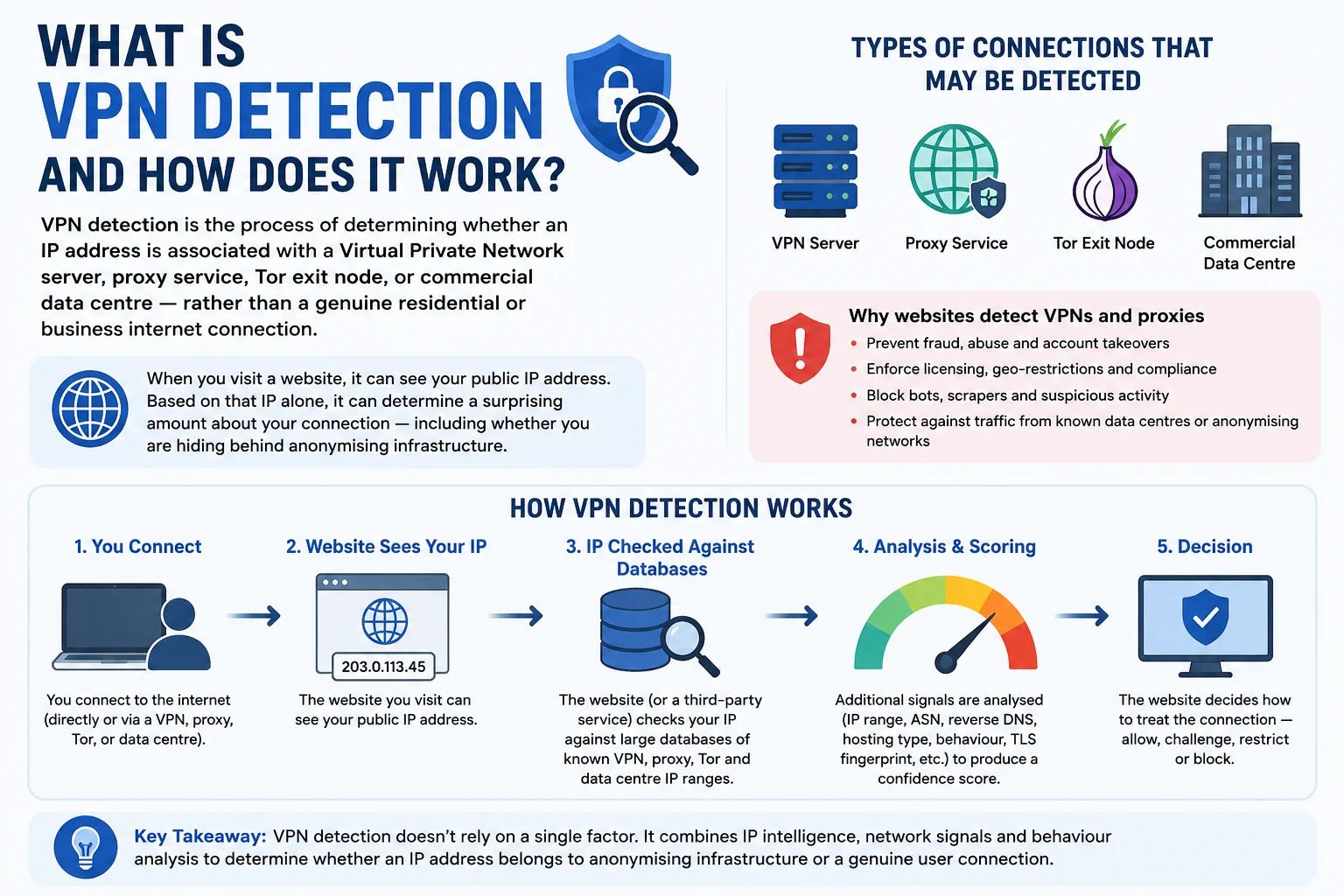
Every website you visit can see your public IP address and cross-reference it against VPN, proxy, and data centre databases in milliseconds
Our VPN detection tool runs several independent checks against your current IP simultaneously: it queries the IP's Autonomous System Number (ASN) to identify whether the owning organisation is a known VPN provider, hosting company, or residential ISP; it cross-references against curated databases of known VPN server IP ranges; it checks whether the IP belongs to a Tor exit node from the Tor Project's publicly maintained exit node list; and it evaluates whether the connection type flags indicate proxy or tunnel infrastructure. The combined result gives you a comprehensive picture of how your connection appears to the internet.
Why this matters: If you're using a VPN for privacy, you need to verify it's actually working - that your real IP is hidden and the VPN server's IP is what websites see. If you're a business, you need to understand that not all VPN-flagged IPs are malicious. Corporate leased lines, cloud-hosted applications, and legitimate B2B traffic all use data centre IPs that may trigger VPN/proxy flags.
How Websites Detect VPN and Proxy Connections - 6 Methods
Detection is not a single check - it's a combination of signals that websites, streaming services, banks, and fraud prevention systems evaluate together. Here is a precise explanation of every method used:
check.torproject.org/torbulkexitlist. Detection of Tor is essentially 100% reliable for exit nodes since the list is public. Tor relay and guard nodes are typically not exit nodes and may not be detected.Detection is not infallible: Residential VPN services - providers that route traffic through actual home broadband connections (like Luminati/Bright Data's residential proxies) - can be extremely difficult to detect because their IPs look identical to normal users. These services are expensive but effectively invisible to standard VPN detection methods.
VPN Leaks Explained - Every Type That Can Expose Your Real IP
A VPN leak occurs when your real IP address or DNS requests are exposed to websites or networks despite being connected to a VPN. Many users believe that connecting to a VPN means they are completely hidden - but several technical failure modes can undermine this completely. Here are all the leak types you should know about:
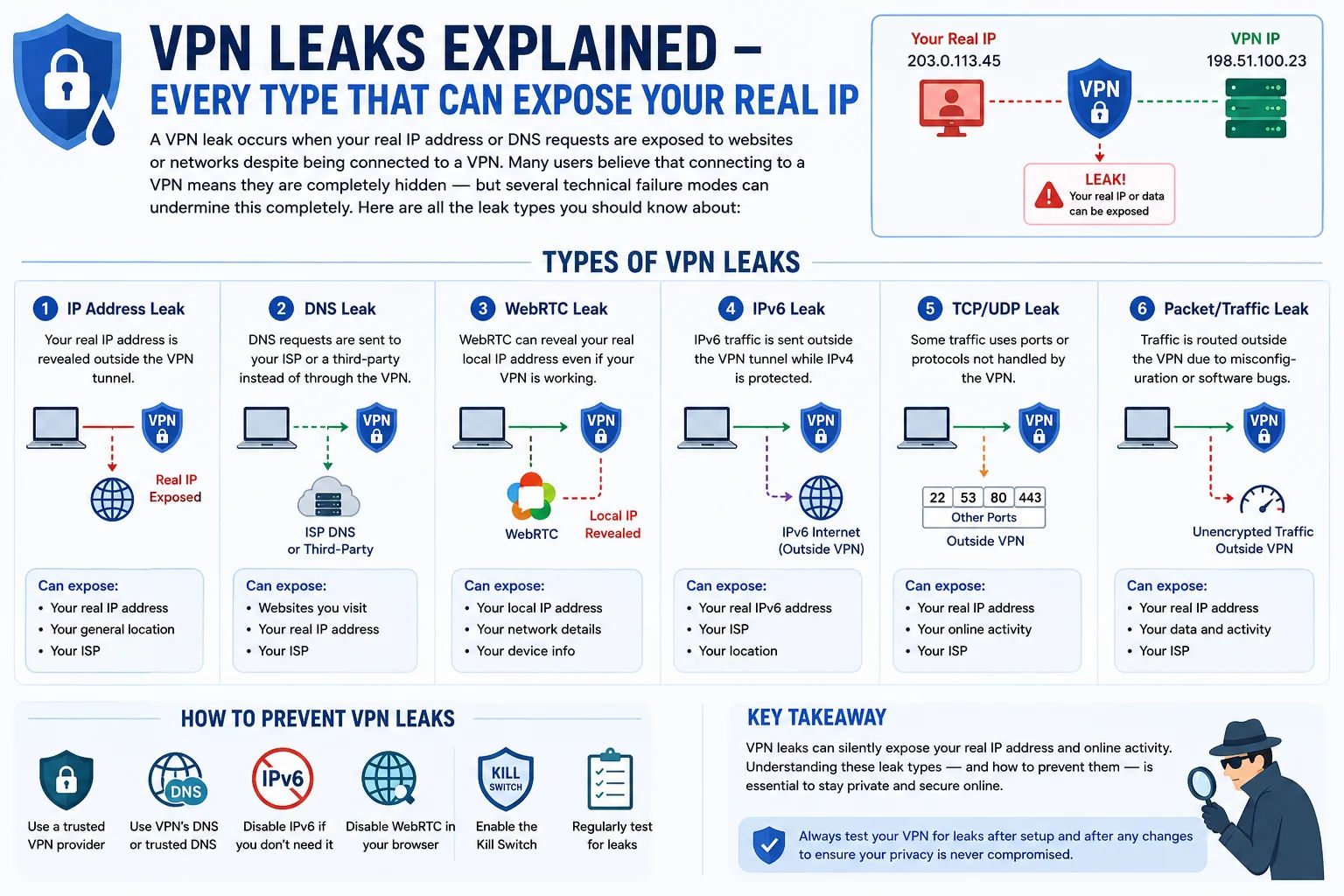
Even with a VPN connected, your real IP can leak through several technical failure modes - each requires a different fix
| Leak Type | How It Happens | What It Exposes | Severity | How to Fix |
|---|---|---|---|---|
| DNS Leak | VPN fails to capture DNS queries, sending them to your real ISP's DNS resolver instead of the VPN provider's | Your real ISP identity, approximate location, and browsing activity (domains queried) | High | Enable DNS leak protection in VPN settings; use a VPN with its own DNS resolver; check with our DNS Leak Test |
| WebRTC Leak | Browser's WebRTC implementation sends STUN requests outside the VPN tunnel, exposing the real local and public IP | Your real public IP address and local network IP | High | Enable WebRTC leak protection in VPN; disable WebRTC in browser settings; install a WebRTC-blocking browser extension; check with our WebRTC Leak Test |
| IPv6 Leak | VPN tunnels only IPv4 traffic while IPv6 packets travel directly to the destination, bypassing the VPN entirely | Your real IPv6 address assigned by your ISP | High | Disable IPv6 in your OS network settings; enable IPv6 leak protection in your VPN client; choose a VPN that tunnels both IPv4 and IPv6 |
| VPN Disconnect / Kill Switch Failure | VPN connection drops and internet traffic continues unprotected through your real ISP connection | Your real IP address and all traffic until VPN reconnects | High | Enable kill switch in VPN settings (disconnects internet if VPN drops); verify kill switch is actually working after testing |
| Split Tunneling Misconfiguration | Intentional split tunneling set up incorrectly routes sensitive traffic outside the VPN tunnel | Real IP for whichever applications bypass the tunnel | Medium | Review split tunneling rules carefully; use full-tunnel mode for maximum privacy; only split tunnel non-sensitive applications |
| Timezone / Browser Fingerprint Mismatch | Browser timezone, language, and other fingerprint data doesn't match VPN exit server's location | Approximate real location (not IP address) | Medium | Set browser language and timezone to match VPN server location; use browser privacy extensions; use privacy-focused browsers like Firefox or Brave |
| SMTP / Email Header Leak | Email clients send messages revealing the originating IP in email headers before the VPN connects, or via SMTP relay outside the tunnel | Real IP address in email metadata | Low | Use webmail (Gmail, ProtonMail) rather than native email clients; ensure SMTP connections go through the VPN tunnel |
Complete VPN leak test workflow: (1) Connect your VPN → (2) Check VPN status here → (3) Run our DNS Leak Test → (4) Run our WebRTC Leak Test → (5) Check your IPv6 address. All four together give you complete confidence your VPN is working.
VPN Protocols Compared - Detectability and Privacy
Different VPN protocols have dramatically different detectability profiles. If avoiding detection by websites, firewalls, or ISPs is important to you, understanding these differences helps you choose the right protocol and provider:
Protocol vs IP detection: Even with a hard-to-detect protocol, your exit IP address can still be flagged if it belongs to a known VPN provider's ASN. Protocol obfuscation prevents traffic analysis and DPI detection - it does not prevent IP-based detection at the destination. Residential IP VPNs solve the IP detection problem; obfuscated protocols solve the traffic analysis problem.
Who Detects VPNs - and Why
VPN detection is used across dozens of industries and platforms for a wide variety of purposes - some legitimate, some controversial. Understanding who detects VPNs and why helps you make informed decisions about when and how to use one:
When to Use This VPN Detection Tool - 8 Practical Scenarios
This tool is useful both for VPN users who want to verify their privacy, and for professionals who need to understand whether traffic is anonymised:
VPN vs Proxy vs Tor - Privacy and Detection Comparison
Not all anonymisation tools are equal. Understanding the differences between VPNs, proxy servers, and Tor is essential for choosing the right tool for your privacy needs:
| Feature | VPN | HTTP/SOCKS Proxy | Tor Network | Residential VPN |
|---|---|---|---|---|
| Encrypts traffic | ✓ Full tunnel | ✗ Usually not | ✓ 3 layers | ✓ Full tunnel |
| Hides real IP | ✓ | ✓ | ✓ | ✓ |
| Detectable by ASN | ✓ Often yes | ✓ Often yes | ✓ Yes (public list) | ✗ Looks residential |
| Speed | Fast | Fast | Very slow | Moderate |
| Covers all apps | ✓ | ✗ Per-app | ≈ Browser only | ✓ |
| Kill switch | ✓ Most VPNs | ✗ | ✗ | ≈ Some |
| DNS leak risk | ≈ If misconfigured | ✓ High | ✗ Low | ≈ If misconfigured |
| WebRTC leak risk | ≈ Some providers | ✓ Yes | ≈ Browser-dependent | ≈ Some |
| Bypasses geo-blocks | ✓ Usually | ✓ Sometimes | ≈ Often blocked | ✓ Most reliable |
| Best for | Privacy, streaming, security | Scraping, simple geo-bypass | Anonymity, dark web | Bypassing VPN detection |
How to Avoid VPN Detection - What Actually Works
If your VPN is being detected and blocked by streaming services, websites, or fraud systems, here are the approaches that actually work - from easiest to most technical:
1. Switch to a Residential IP VPN Provider
The most effective solution for bypassing VPN detection at streaming services and e-commerce platforms is to use a VPN service that routes traffic through real residential IP addresses. These IPs are leased from actual home broadband subscribers and are indistinguishable from genuine user traffic. Providers like Bright Data, Oxylabs, and Smartproxy offer residential proxy networks. Note: these are primarily B2B services and are significantly more expensive than commercial VPNs.
2. Use VPN Obfuscation / Stealth Mode
Many commercial VPN providers offer "stealth" or "obfuscated" server options that disguise VPN traffic as regular HTTPS. NordVPN's obfuscated servers, Mullvad's obfs4 proxy mode, and ExpressVPN's Lightway protocol with obfuscation all make traffic pattern analysis much harder. This helps bypass ISP-level blocking and DPI but does not help if the issue is IP-based detection (the server's IP is still in a VPN ASN).
3. Try Different Server Locations
VPN detection databases are not perfectly comprehensive. Some VPN server IPs, particularly in less common locations or from smaller VPN providers, may not yet be in major detection databases. Try switching to a different server or location - the exit IP changes and may not be flagged.
4. Enable IPv6 Leak Protection
If your VPN is being detected despite appearing to use a VPN IP, check your IPv6 address. If your VPN isn't tunnelling IPv6, websites may see your real ISP's IPv6 address alongside your VPN's IPv4 address - an immediate detection signal. Disable IPv6 in your OS settings or enable IPv6 leak protection in your VPN client.
5. Fix DNS Leaks
Run our DNS Leak Test to check whether your DNS queries are going through your real ISP's resolvers. If they are, your VPN is configured incorrectly. Enable the "DNS leak protection" option in your VPN client settings, or manually configure your DNS to use the VPN provider's resolvers (typically provided in their documentation).
6. Disable WebRTC in Browser
WebRTC is the most common way a VPN user's real IP leaks to websites. Run our WebRTC Leak Test to check if your browser is exposing your real IP. To fix: in Firefox, go to about:config and set media.peerconnection.enabled to false. In Chrome, install a WebRTC Control extension. Most commercial VPN apps have a built-in WebRTC blocking option in their settings.
Realistic expectations: No VPN solution is 100% undetectable by all systems all the time. Detection technology evolves as quickly as evasion techniques. For most casual privacy use cases, a reputable commercial VPN with obfuscation and leak protection is more than sufficient. Only advanced use cases - bypassing state-level censorship or defeating enterprise fraud systems - require residential IPs or more sophisticated methods.
Frequently Asked Questions - VPN Detection
Complete answers to every common question about VPN detection, leaks, protocols, and how to use this tool:
How can I tell if my VPN is working?
The fastest way: connect your VPN and visit this page. The tool auto-detects your connection on load. If it shows your connection as "VPN Detected" and the ISP shown matches your VPN provider (NordVPN, ExpressVPN, Mullvad, etc.) rather than your real ISP (Jio, Airtel, BSNL, etc.), your VPN is working correctly. Also verify the location shown matches your VPN server's country - not your actual location. For a complete check, also run our DNS Leak Test and WebRTC Leak Test.
Why does this tool say I'm using a VPN when I'm not?
Several legitimate scenarios can trigger a false positive VPN/proxy detection: (1) You are on a corporate or university network that routes traffic through a shared data centre IP - common for large organisations. (2) Your ISP uses carrier-grade NAT (CGNAT) and routes multiple customers through shared infrastructure IPs that overlap with hosting provider ranges. (3) You are connected via a mobile carrier that uses shared IP ranges for load balancing. (4) Your ISP's IP block is incorrectly categorised in a GeoIP or ASN database. These false positives are real and affect legitimate users.
What is a DNS leak and how does it expose my real IP?
A DNS leak occurs when your DNS queries (the requests that resolve domain names like google.com to IP addresses) are sent to your real ISP's DNS servers rather than the VPN provider's DNS servers. Even though your web traffic goes through the VPN tunnel, the DNS queries go directly to your ISP - and that ISP's DNS servers reveal your real ISP identity. Websites and DNS monitoring services can then see that your DNS resolver is Jio's or Airtel's even while your connection IP shows a VPN server in another country. Check for DNS leaks using our dedicated DNS Leak Test tool.
What is a WebRTC leak and why is it dangerous?
WebRTC is a browser feature that enables peer-to-peer communication (video calls, file sharing, online games). The WebRTC specification requires browsers to discover network interfaces to establish direct connections - and this discovery process can expose both your local network IP (e.g. 192.168.1.x) and your real public IP address, even when you're behind a VPN. The leak happens because WebRTC uses STUN protocol to discover IPs, and some VPN implementations don't intercept these STUN requests. The result: a website can see your real IP alongside your VPN IP simultaneously. Use our WebRTC Leak Test to check if your browser is affected.
Can websites detect all VPNs?
No - detection depends entirely on whether the VPN's exit IP is in the detection database. The most reliable VPN detection applies to: commercial VPN providers (NordVPN, ExpressVPN, Surfshark, etc.) whose entire IP allocations are known and catalogued; data centre IPs from cloud providers (AWS, Hetzner, DigitalOcean) used to self-host VPNs; and Tor exit nodes (publicly listed). The hardest to detect are: residential proxy networks using real home broadband IPs; new VPN servers with freshly allocated IPs not yet in databases; and obfuscated VPN traffic that disguises itself as HTTPS. Detection technology and VPN evasion are in a continuous arms race.
What is the difference between a VPN and a proxy?
A VPN (Virtual Private Network) encrypts all your internet traffic at the OS level and routes it through a VPN server before reaching the destination. This covers every application on your device. A proxy server only redirects traffic from a specific application (usually the browser) without encrypting it. Proxies are faster but provide no security - they just change your visible IP for that one application. A VPN is the appropriate choice for privacy and security. A proxy is typically used for simple tasks like web scraping or bypassing basic geo-restrictions where encryption isn't needed.
What is Tor and how does it differ from a VPN?
Tor (The Onion Router) routes your traffic through three volunteer-operated relay nodes in sequence - each knowing only the previous and next hop, never the full path. This provides strong anonymity because no single node knows both who you are and what you're accessing. However, Tor is significantly slower than a VPN (due to three relay hops), exit nodes are publicly listed (making Tor easy to detect), and many websites actively block Tor exit IPs. VPNs are better for everyday privacy, streaming, and speed. Tor is better for situations requiring strong anonymity where speed is not critical.
Is using a VPN legal in India?
Yes - VPN use is legal in India for personal privacy, security on public Wi-Fi, accessing content, and professional remote work. However, India's CERT-In (Computer Emergency Response Team) issued directives in 2022 requiring VPN providers operating in India to collect and store user data (name, email, IP addresses, activity logs) for 5 years. Many international VPN providers (NordVPN, ExpressVPN, Surfshark) responded by removing their India-based servers while continuing to offer Indian users servers in nearby countries like Singapore and the UK. Using a VPN for illegal activities remains illegal regardless of the VPN - the VPN doesn't grant legal protection for unlawful actions.
My VPN is connected but this tool shows my real ISP - what's wrong?
If this tool shows your real ISP (e.g. Jio, Airtel) with your VPN connected, one of these is happening: (1) VPN split tunnelling is active and browser traffic is going outside the tunnel - disable split tunnelling. (2) The VPN is connected but not functioning correctly - try disconnecting and reconnecting. (3) Your VPN client has a bug - restart the application and try a different server. (4) You have an IPv6 leak - your VPN is tunnelling IPv4 but your ISP's IPv6 address is still visible. (5) The VPN app shows "connected" but the tunnel isn't established - check your VPN provider's status page. Always test with this tool after connecting to confirm.
Does a VPN protect me from all tracking?
No - a VPN protects only your IP address and encrypts your internet traffic between your device and the VPN server. It does not protect against: (1) Browser cookies and tracking pixels that identify you regardless of IP; (2) Browser fingerprinting - websites can identify you by your browser's unique configuration (fonts, screen resolution, user agent, plugins); (3) Login tracking - when you log into Google, Facebook, or any account, they can track your activity regardless of your IP; (4) Device fingerprinting; (5) DNS leaks and WebRTC leaks if not configured correctly. A VPN is one layer of privacy - not complete anonymity.
Is this VPN detection tool free?
Yes - completely free, no signup, no account, and no API key required. The tool automatically detects your connection on page load and runs all checks instantly. We do not store, log, or share your IP address or any other data from the detection. Privacy is by default. If you want to recheck after switching VPN servers or toggling your VPN on and off, simply click the Re-check button.
Related Privacy & Network Tools
Combine VPN detection with these tools for a complete privacy and connection health check:
Technical information
How this tool works, where data comes from, and known limitations. See also our methodology and accuracy & limitations pages.
How this tool works
Evaluates signals associated with the visitor or entered IP (including provider/network indicators available to the tool) to suggest VPN/proxy likelihood.
Data source
- IP / network reputation signals used by the VPN check tool
Limitations
Detection is probabilistic. Legitimate corporate NATs, mobile carriers, and hosting ranges can look similar to VPN exits. Not a definitive legal or security determination.
Content revision 2026-09 (aligned with current tool implementation in this codebase)