
IP Range Calculator
Enter a start and end IPv4 address to instantly calculate the total number of IPs in that range, the number of usable host addresses, whether it maps to a clean CIDR block, and the integer representations of both endpoints. Runs entirely in your browser - no data sent to any server.
Hero, guides, and sidebar links below work without JavaScript. The interactive checker needs JavaScript enabled in your browser.
What Is an IP Range Calculator?
An IP range calculator takes a start and end IPv4 address and computes all key properties of that address range: the total number of IP addresses it contains, the number of usable host addresses, whether it maps to a clean CIDR block, and the integer representation of both endpoints. It is the essential tool for working with IP allocations, firewall rules, and network planning when address ranges don't align neatly to CIDR boundaries.
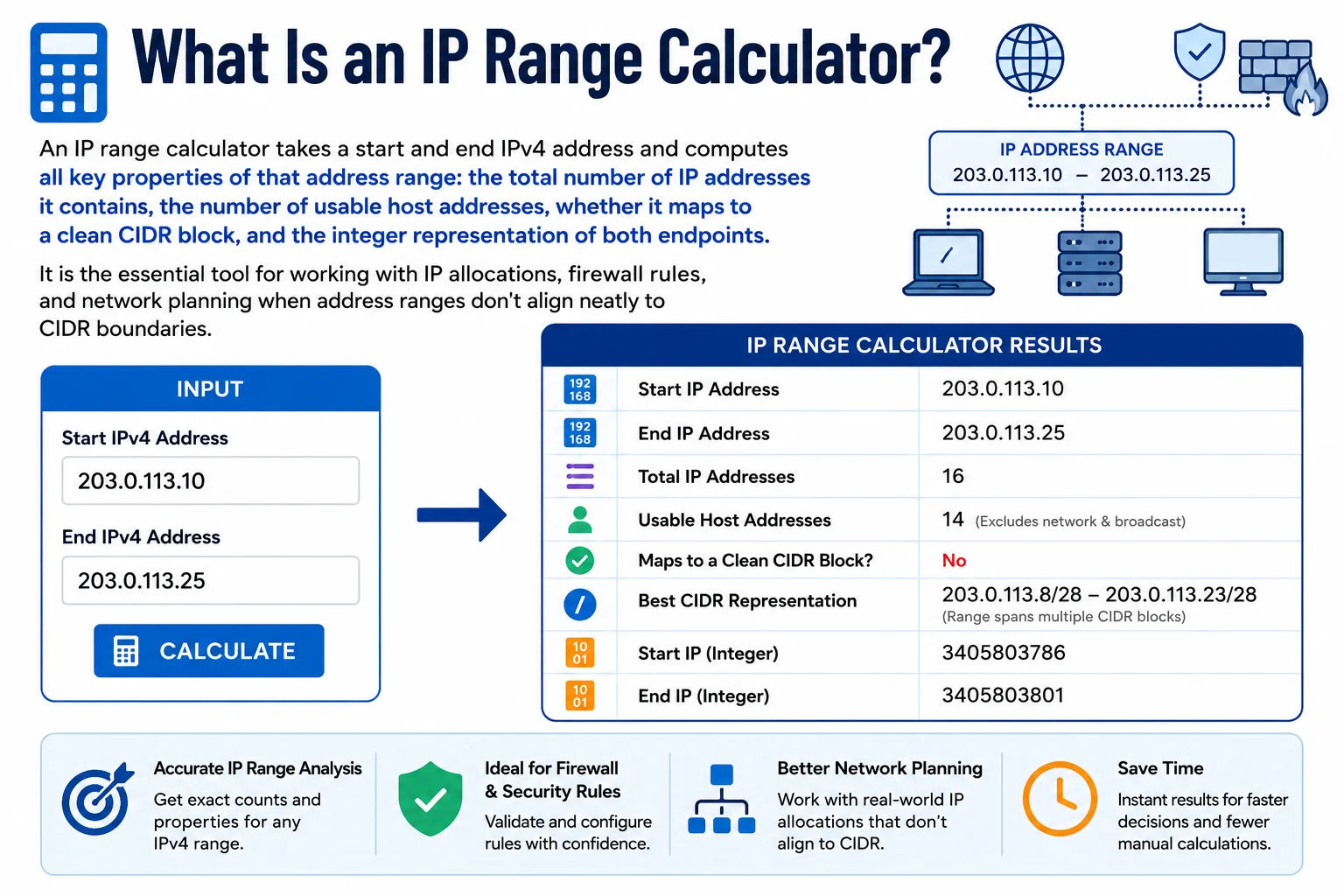
IP ranges define the boundaries of network allocations - calculating their size, CIDR representation, and host count is fundamental to network administration
When IP Ranges Don't Align to CIDR Blocks
A "clean" CIDR block always has a start address aligned to a power-of-2 boundary. For example, 192.168.0.0/24 starts at 0 (which is divisible by 256) and ends at 255. But real-world IP allocations from ISPs and RIRs often don't align this neatly - a provider may allocate 192.168.1.64 to 192.168.1.191, which covers 128 addresses but is actually two /25 blocks (192.168.1.64/26 + 192.168.1.128/26). The IP Range Calculator instantly tells you what CIDR blocks cover a given range - if multiple blocks are required, use our CIDR Calculator's IP Range → CIDR mode for the exact conversion.
IP Range Arithmetic - How Count Is Calculated
Start IP: 10.0.0.0 → integer: 167772160
End IP: 10.0.0.255 → integer: 167772415
Count = End − Start + 1 = 167772415 − 167772160 + 1 = 256
# Python equivalent:
import ipaddress
start = ipaddress.ip_address('10.0.0.0')
end = ipaddress.ip_address('10.0.0.255')
count = int(end) - int(start) + 1 # = 256
Common IP Range Sizes Reference
| Range Size | Example | CIDR | Usable Hosts | Typical Use |
|---|---|---|---|---|
| 256 | 192.168.1.0–192.168.1.255 | /24 | 254 | Standard office/VLAN subnet |
| 512 | 192.168.0.0–192.168.1.255 | /23 | 510 | Larger department or floor |
| 1,024 | 10.0.0.0–10.0.3.255 | /22 | 1,022 | Medium site subnet |
| 65,536 | 10.0.0.0–10.0.255.255 | /16 | 65,534 | AWS VPC, large enterprise LAN |
| 16,777,216 | 10.0.0.0–10.255.255.255 | /8 | 16,777,214 | Class A private range (RFC 1918) |
IP Range Use Cases in Networking and Security
IP ranges appear throughout networking - from ISP allocations to cloud security groups. Here are the most common situations where an IP range calculator saves time:
- Cloud security groups: AWS security groups, Azure NSGs, and GCP firewall rules can accept both CIDR notation and individual IP ranges. Knowing the exact range your corporate office or vendor occupies lets you write precise allow rules.
- Threat intelligence feeds: Many threat intel feeds (Spamhaus, APNIC, country-level IP lists) publish ranges as start/end pairs. Converting them to CIDR blocks is necessary before they can be used in firewalls or routing ACLs.
- ISP IP allocation audits: ISPs allocate IP blocks in ranges. Verifying that your allocation falls within the expected range, has no gaps, and matches the expected CIDR size requires range arithmetic.
- DHCP pool sizing: A DHCP pool assigns addresses between a start and end IP. The IP Range Calculator instantly shows how many devices the pool can serve before it exhausts its allocation.
- Firewall rule consolidation: Multiple allow rules for individual IPs in the same range can be collapsed into a single CIDR rule - the IP range calculator confirms the range size and boundary alignment before consolidation.
Frequently Asked Questions
How do I calculate the number of IPs in a range?
Subtract the start IP integer from the end IP integer and add 1. Convert each IP to a 32-bit integer first: multiply each octet by its positional value (first × 16,777,216, second × 65,536, third × 256, fourth × 1) and sum them. Then count = end_integer − start_integer + 1.
What is the difference between total IPs and usable hosts?
Total IPs includes the network address (first IP) and broadcast address (last IP), which cannot be assigned to devices. Usable hosts = total IPs − 2. Exception: for /31 subnets per RFC 3021, both addresses are usable for point-to-point links.
What if my IP range does not align to a CIDR block?
If the range doesn't start and end on a power-of-2 boundary, it cannot be expressed as a single CIDR block. Use our CIDR Calculator's IP Range to CIDR mode to convert it to the minimal set of CIDR blocks that exactly covers the range.
What is 10.0.0.0 to 10.255.255.255 in CIDR?
This is 10.0.0.0/8 - the entire Class A private range defined by RFC 1918. It contains 16,777,216 total addresses (16,777,214 usable). This is the largest private IP block and is commonly used in large enterprise networks, cloud VPCs, and data centre internal addressing.
Is this IP range calculator free?
Yes - completely free, no signup required. All calculations run entirely in your browser using JavaScript integer arithmetic - no data is sent to any server. Safe to use with private and internal network addressing.