
Private vs Public IP Checker
Instantly determine whether any IPv4 address is private (RFC 1918), public, CGNAT, loopback, link-local, multicast, or reserved. Covers all special-use ranges including Jio's CGNAT (100.64.0.0/10), AWS metadata (169.254.169.254), and Docker networking ranges.
Hero, guides, and sidebar links below work without JavaScript. The interactive checker needs JavaScript enabled in your browser.
Private vs Public IP Addresses - Complete Guide
Every IPv4 address is either a private address (used only on internal networks, not routable on the public internet) or a public address (globally unique, routable worldwide). Understanding the difference is fundamental to network administration, security configuration, and troubleshooting connectivity issues.
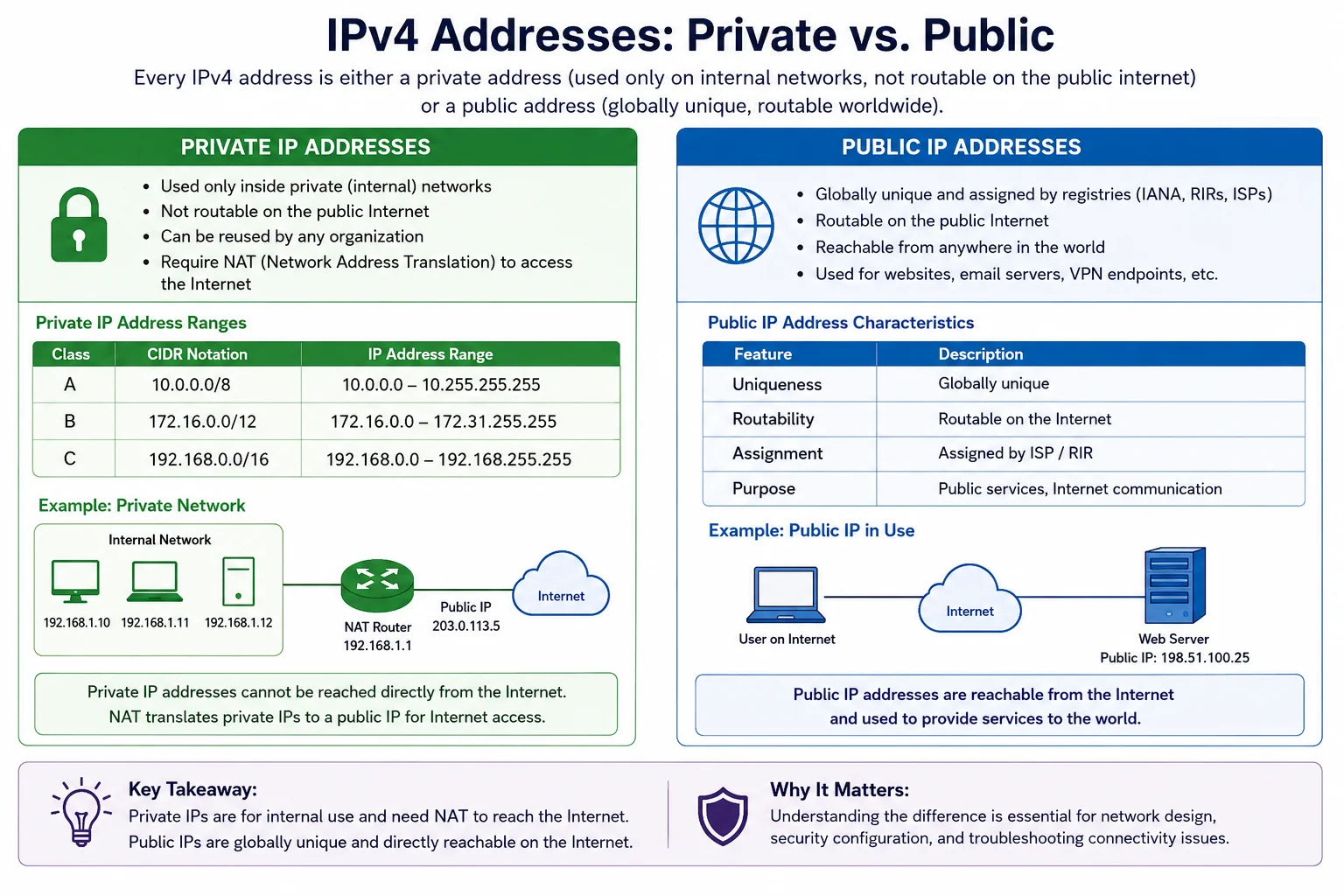
NAT (Network Address Translation) allows millions of devices with private IPs to share a much smaller pool of public IPs - the mechanism that extended IPv4's useful life by decades
RFC 1918 Private Address Ranges
| Range | CIDR | Addresses | Common Use |
|---|---|---|---|
| 10.0.0.0 – 10.255.255.255 | 10.0.0.0/8 | 16,777,216 | Enterprise LANs, cloud VPCs (AWS, GCP), data centre internal, container networking |
| 172.16.0.0 – 172.31.255.255 | 172.16.0.0/12 | 1,048,576 | Docker bridge (172.17.0.0/16), AWS default VPC (172.31.0.0/16), medium enterprise networks |
| 192.168.0.0 – 192.168.255.255 | 192.168.0.0/16 | 65,536 | Home routers, SOHO networks - the most recognisable private range |
How NAT Enables Private IPs to Reach the Internet
Private IP addresses cannot be routed on the public internet - if a packet with source IP 192.168.1.100 reaches an internet backbone router, it will be dropped. NAT (Network Address Translation) is the solution: your home router or corporate firewall has one public IP address, and it translates all outbound traffic from private IPs to its public IP before sending it to the internet. Return traffic comes back to the public IP, and the NAT table maps it back to the original private IP. This is how billions of devices worldwide share a limited pool of public IPv4 addresses.
CGNAT - Carrier-Grade NAT
Many ISPs - including Jio in India - use an additional layer of NAT called CGNAT (Carrier-Grade NAT, RFC 6598). The CGNAT range 100.64.0.0/10 is assigned between the ISP and the customer, meaning customers don't even get a unique public IP - hundreds of customers share one public IP address. CGNAT creates issues for: port forwarding (you can't open ports for servers), VPN protocols that require unique public IPs, peer-to-peer applications, and some online games. If you have an IP in the 100.64.0.0/10 range (Jio's residential connections frequently use this), you are behind CGNAT.
All Special-Use IP Ranges
| Range | CIDR | Purpose | Routable? |
|---|---|---|---|
| 0.0.0.0/8 | /8 | This network - unspecified/default address | No |
| 10.0.0.0/8 | /8 | RFC 1918 private Class A | No |
| 100.64.0.0/10 | /10 | CGNAT (RFC 6598) - Jio and ISP internal | No |
| 127.0.0.0/8 | /8 | Loopback (localhost = 127.0.0.1) | No |
| 169.254.0.0/16 | /16 | APIPA / link-local, AWS metadata | No |
| 172.16.0.0/12 | /12 | RFC 1918 private Class B (Docker, AWS) | No |
| 192.0.2.0/24 | /24 | TEST-NET-1 (documentation, RFC 5737) | No |
| 192.168.0.0/16 | /16 | RFC 1918 private Class C (home networks) | No |
| 224.0.0.0/4 | /4 | Multicast (Class D) | Limited |
| 240.0.0.0/4 | /4 | Reserved Class E | No |
Frequently Asked Questions
What is a private IP address?
A private IP address is one from the three RFC 1918 ranges: 10.0.0.0/8, 172.16.0.0/12, or 192.168.0.0/16. These are not routable on the public internet - routers drop packets with private source IPs that arrive from external networks. Private IPs are used for internal networks (home, office, cloud VPC) and require NAT to communicate with the public internet.
How do I know if my IP is private or public?
If your IP starts with 10., 172.16–31., or 192.168., it is private. If it starts with 100.64–127., it is CGNAT (assigned by your ISP but still not directly internet-routable). Any other IP is typically public. Use this checker to identify any IP instantly, including CGNAT ranges used by Jio and other Indian ISPs.
What is CGNAT and does Jio use it?
CGNAT (Carrier-Grade NAT, RFC 6598) uses the 100.64.0.0/10 range. ISPs assign customers IPs from this range instead of real public IPs, then NAT multiple customers to a single public IP. Jio's residential connections frequently use CGNAT, which is why Jio users cannot easily run home servers, forward ports, or use some VPN configurations. Jio's business plans typically provide a dedicated public IP.
What is the difference between 127.0.0.1 and 192.168.x.x?
127.0.0.1 (localhost/loopback) is special - it refers to the device itself. Traffic sent to 127.0.0.1 never leaves the network stack and goes back to the same device. 192.168.x.x is a private network address - it refers to other devices on your local network. When you access localhost on your computer, you are accessing 127.0.0.1. When you access another device on your home network, you use its 192.168.x.x address.
Is this private/public IP checker free?
Yes - completely free, no signup required. Runs entirely in your browser - no data sent to any server. Checks all RFC 1918 private ranges, loopback, link-local APIPA, CGNAT, multicast, and reserved ranges with detailed descriptions for each.