
Bulk Reverse DNS
Get the hostname (reverse DNS / PTR) for several IP addresses in one go. Paste up to 10 IPs, one per line, and see the PTR record for each. Useful for mail server checks, log analysis, or cleaning up a list of IPs with their names - free, no signup.
Hero, guides, and sidebar links below work without JavaScript. The interactive checker needs JavaScript enabled in your browser.
What Is Bulk Reverse DNS?
Reverse DNS (rDNS) answers the question "what hostname is tied to this IP?" - the opposite of normal DNS, which turns a hostname into an IP. Bulk reverse DNS does that for many IPs at once. You paste a list of IPs and get back the PTR (pointer) record for each, which is the hostname that the owner of the IP block has set. Not every IP has one; home connections and many mobile IPs don't. Mail and server IPs often do.
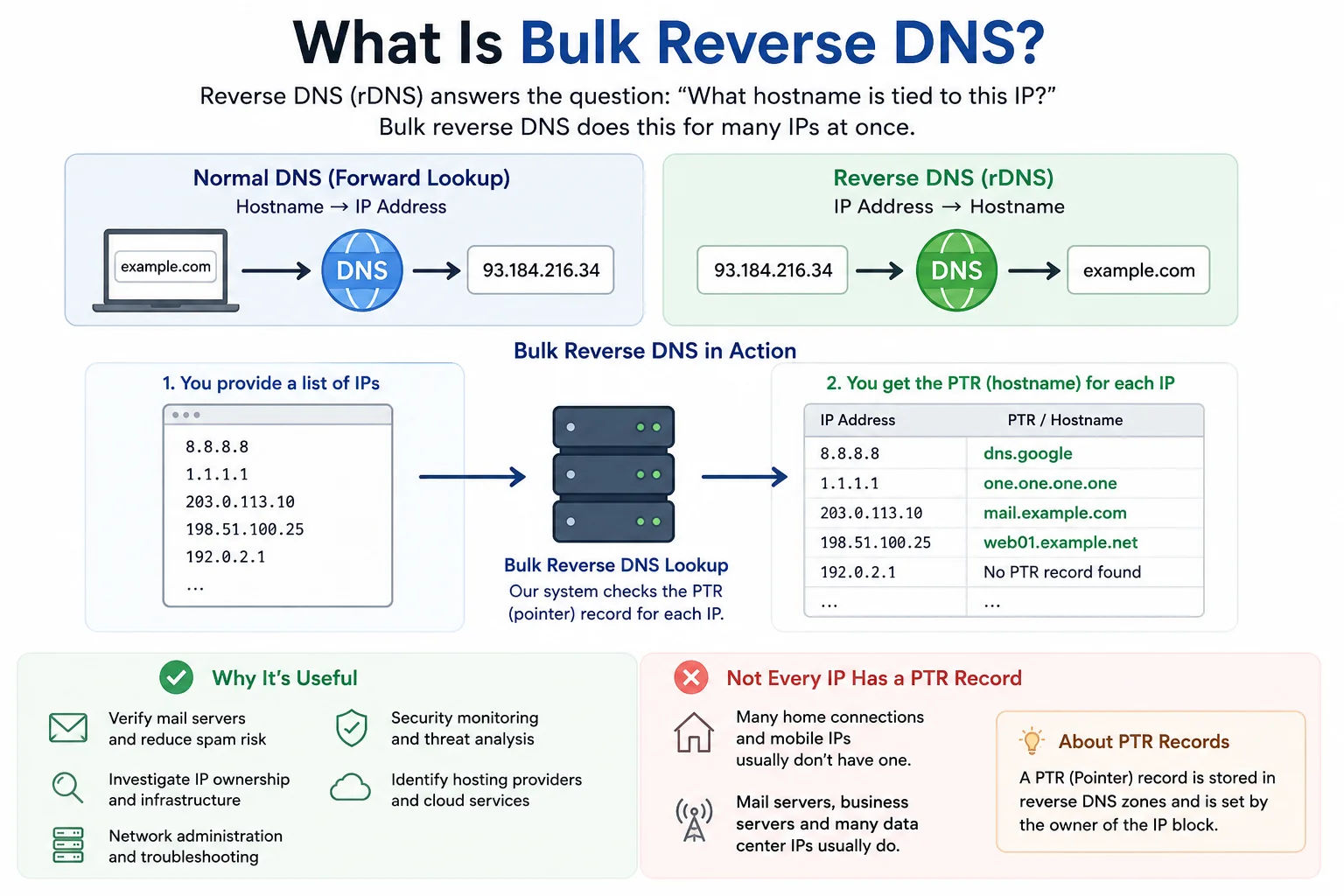
Mail administrators and security teams often need PTR records for entire lists of IPs from logs or exports - bulk reverse DNS returns every hostname in one table
We use the same data as our single reverse DNS lookup and IP lookup (which also shows reverse DNS). For a single IP's hostname, use reverse DNS lookup. For full details (country, ISP, etc.) on multiple IPs, use our bulk IP lookup.
PTR records are optional. If an IP shows "Not set", the owner has not published a reverse DNS name for that address - this is normal for consumer broadband and mobile networks.
How to Use Bulk Reverse DNS
Enter one IP address per line in the text box. IPv4 and IPv6 are both supported. Don't paste domains - use our DNS lookup for that. Click "Look Up All IPs" and wait a few seconds. You'll see each IP with its hostname (or "Not set" if there's no PTR). For one-off checks, use reverse DNS lookup or IP lookup to see hostname plus location and ISP.
Features
- Up to 10 IPs per run
- Shows PTR (hostname) for each IP
- Same data as single reverse DNS lookup
- Export results to CSV
- Free; we don't store your list
Why Use This Tool
Mail admins check that sending IPs have sensible PTR records. Security teams run through lists of IPs to see which hostnames they resolve to. You might have a list from logs or a IP range generator. Validate the list first with IP list validator, then run bulk reverse DNS. For latency or path, use ping test or traceroute.
Frequently Asked Questions - Bulk Reverse DNS
Common questions about PTR limits, what "Not set" means, and when to use this tool versus DNS lookup:
How many IPs can I check in bulk reverse DNS?
Up to 10 IPs per run. Each one is looked up for its PTR (hostname) record. For more, run the tool again or use our single reverse DNS lookup.
What is reverse DNS?
Reverse DNS (rDNS) maps an IP to a hostname using PTR records. Normal DNS maps name to IP; reverse DNS does the opposite. Mail servers often use it for reputation.
Why do some IPs show "Not set"?
Not every IP has a PTR record. Many home and mobile connections don’t. Only the organization that owns the IP block can set PTR records.
Is bulk reverse DNS free?
Yes. The tool is free. We don’t store your list. We limit to 10 IPs per run to keep the service fast and within fair use.
Can I use this for domains?
No. This tool expects IP addresses. For domain-to-IP and other records, use our DNS lookup. For one IP’s hostname, use reverse DNS lookup.
Related Tools - PTR, DNS & IP Investigation
Pair bulk reverse DNS with these tools for hostname resolution, validation, and deeper IP context: