
WHOIS Lookup
Check domain registration details, owner information, creation and expiry dates, registrar, name servers, and status codes for any domain name or IP address. Instant results, no signup required.
Hero, guides, and sidebar links below work without JavaScript. The interactive checker needs JavaScript enabled in your browser.
What Is WHOIS Lookup?
WHOIS (pronounced "who is") is a public query protocol that gives anyone access to the registration records of domain names and IP address blocks. It was created in 1982 by Elizabeth Feinler at the Stanford Research Institute as a simple directory for tracking early internet hosts, and it has evolved into the foundational registration transparency system that keeps the internet accountable today. When someone registers a domain name or an ISP is allocated an IP address block, their registration details are submitted to the relevant registry - and those details are queryable through WHOIS.
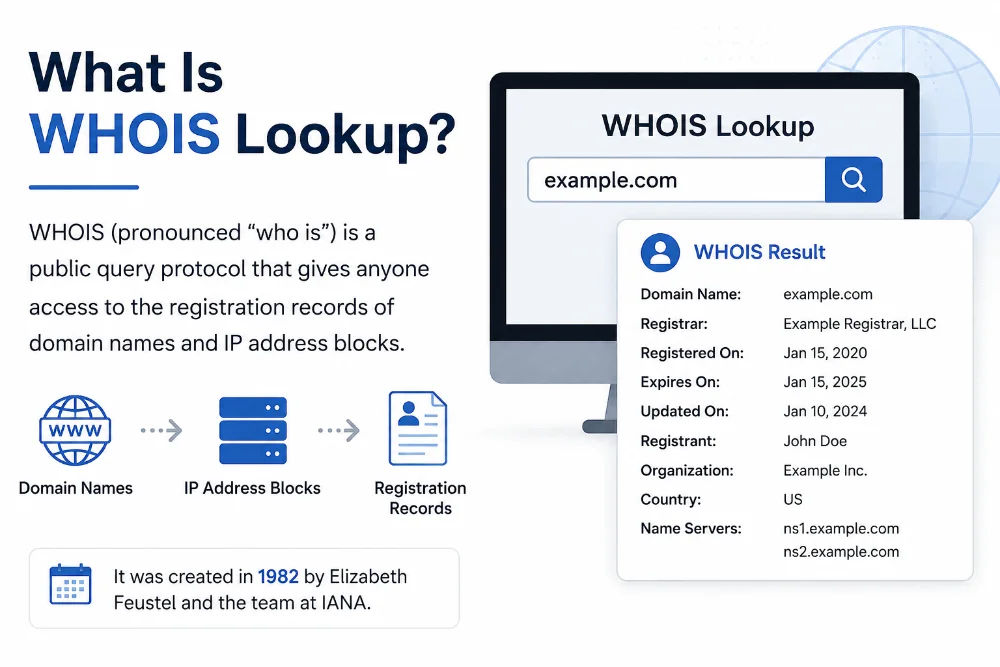
Every registered domain and IP address block has a corresponding WHOIS record maintained by the registrar or Regional Internet Registry
A domain WHOIS lookup queries the registry for that domain's TLD (top-level domain) - for .com domains this is Verisign's registry; for .in domains it is the National Internet Exchange of India (NIXI). For IP addresses, WHOIS queries the Regional Internet Registry (RIR) that manages the IP block - APNIC for Asia-Pacific, ARIN for North America, RIPE NCC for Europe, LACNIC for Latin America, and AFRINIC for Africa.
Important privacy note: Since GDPR came into effect in May 2018, registrars are required to redact personal data for EU-based registrants. For most .com, .net, and .org domains registered by individuals, you will see "REDACTED FOR PRIVACY" in the registrant name and address fields. Despite this, the registrar, creation date, expiry date, name servers, and domain status codes remain public and are always shown.
What Information Does WHOIS Lookup Show?
A complete WHOIS result for a domain name contains up to twelve distinct data fields, each serving a different investigative or administrative purpose. Here is what every field means in plain language:
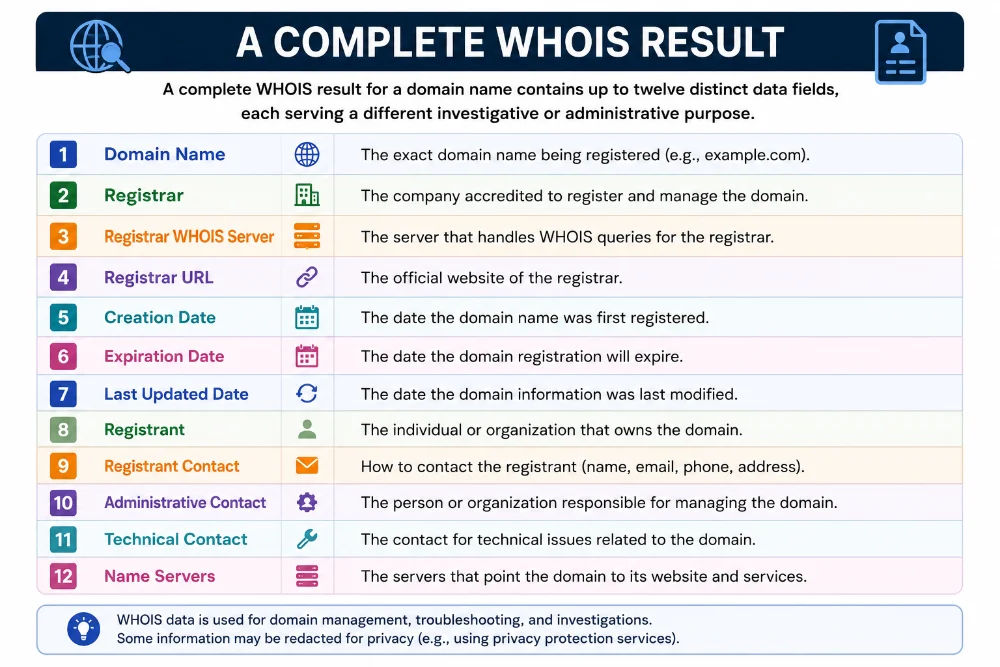
A full WHOIS record contains registration history, ownership details (where not redacted), technical configuration, and domain protection status
Domain & Registrar Information
Domain Name - The registered domain exactly as queried. Registrar - The accredited company through which the domain was purchased (GoDaddy, Namecheap, BigRock, Google Domains, etc.). IANA Registrar ID - The Internet Assigned Numbers Authority's unique numeric ID for that registrar. Registrar WHOIS Server - The WHOIS server maintained by the registrar for thin registry queries.
Critical Dates
Creation Date - The exact date the domain was first registered. This is the domain's "birthday" and cannot be changed - it persists even through ownership transfers. Updated Date - The last time the registration record was modified (name server changes, contact updates, renewals). Registry Expiry Date - The date on which the domain registration will lapse and the domain will become available for re-registration if not renewed. Critically important for domain acquisition planning and monitoring competitive domains.
Name Servers
The authoritative DNS servers for the domain - the servers that answer DNS queries for the domain's A, MX, CNAME, and other records. Typically a pair of servers from the DNS provider (Cloudflare, Route53, Google Cloud DNS, ns1.com, etc.). Checking name servers tells you which DNS provider the domain uses and whether a recent migration is reflected in WHOIS.
Domain Status Codes
ICANN-standardised codes describing the current state of the domain. Common codes include clientTransferProhibited (registrar-level lock preventing unauthorised transfers), serverDeleteProhibited (registry-level lock), clientUpdateProhibited (contact information is locked), and pendingDelete (the domain is in the deletion grace period after expiry).
Registrant / Contacts (when not privacy-protected)
For domains where the owner has not enabled WHOIS privacy, you may see the registrant name, organisation, country, email, and phone number. Country-code TLDs (.in, .uk, .de) sometimes still show contact details depending on the registry policy. Corporate domains registered to a company rather than an individual often show the organisation's details even with privacy protection enabled.
IP Address WHOIS Lookup - How It Differs from Domain WHOIS
When you enter an IP address instead of a domain name, the lookup queries a completely different system - the Regional Internet Registry (RIR) that manages IP address allocations for that geographic region. Unlike domain WHOIS (which tracks who registered a domain), IP WHOIS tracks who owns and operates a block of IP addresses - the ISP, hosting provider, or organisation assigned that IP range by their RIR.
| Registry | Region | Covers | Website |
|---|---|---|---|
| APNIC | Asia-Pacific | India, China, Australia, Japan, SE Asia | apnic.net |
| ARIN | North America | USA, Canada, and many Caribbean nations | arin.net |
| RIPE NCC | Europe / Middle East / Central Asia | EU, UK, Russia, Turkey, Israel | ripe.net |
| LACNIC | Latin America & Caribbean | Brazil, Mexico, Argentina, Colombia | lacnic.net |
| AFRINIC | Africa | All African nations | afrinic.net |
An IP WHOIS result typically includes: the network block (e.g. 14.96.0.0/13), the organisation name (e.g. Reliance Jio), the country of registration, the abuse contact email for reporting spam or attacks, the technical contact, and the allocation date. This information is invaluable for abuse reporting, network investigation, and understanding which organisation is responsible for a specific IP range.
For Indian IPs: APNIC manages IP allocations for India. Major Indian ISP WHOIS records - Jio (AS55836), Airtel (AS24560), BSNL (AS9829), MTNL - are all registered with APNIC. If you need the exact abuse contact for a malicious IP from an Indian ISP, the APNIC WHOIS record will always have the correct abuse-mailbox field to use in your report.
WHOIS Privacy Protection and GDPR - Why Owner Data Is Often Hidden
Before 2018, a WHOIS lookup for almost any domain would show the registrant's full name, address, email, and phone number. The implementation of GDPR (General Data Protection Regulation) in the European Union in May 2018, combined with expanding privacy protection services from registrars worldwide, fundamentally changed what WHOIS reveals. Understanding these changes helps you interpret results correctly.
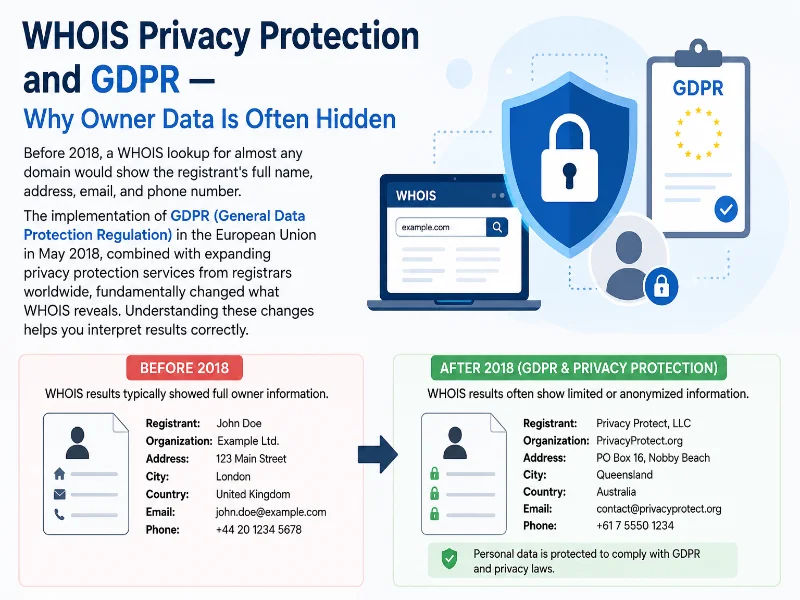
GDPR changed WHOIS forever - most personal data is now redacted, but technical registration details always remain public
What GDPR Changed
ICANN (the governing body for domain names) issued temporary specifications requiring registrars to redact natural persons' (individuals') personal data from public WHOIS. This means registrant name, organisation (for individuals), address, phone, and email are replaced with "REDACTED FOR PRIVACY" or a privacy proxy service's contact details for most .com, .net, and .org domains registered by individuals in the EU and many other regions.
What Still Shows Regardless of Privacy
The following fields are always publicly available regardless of privacy protection or GDPR redaction: registrar name, creation date, last updated date, expiry date, name servers, domain status codes, and IANA registrar ID. These fields are sufficient for most legitimate WHOIS use cases - checking domain availability, verifying expiry, auditing DNS configuration, and identifying the responsible registrar for abuse or legal notices.
How to Find Ownership When Data Is Redacted
When personal data is redacted, registrars are required to provide a legal and abuse contact mechanism - typically a web form or a privacy-proxy email that forwards to the domain owner. If you have a legitimate legal reason (trademark infringement, cybersquatting, fraud investigation), you can contact ICANN's Centralized Zone Data Service (CZDS) or the registrar's abuse team to request registrant disclosure. Law enforcement can obtain full registrant data through formal legal requests to the registrar.
Domain Status Codes Explained - What Every EPP Code Means
Domain status codes (formally called EPP status codes - Extensible Provisioning Protocol) appear in every WHOIS record and describe the current state and protections applied to a domain. Understanding these codes is essential for domain owners, SEO professionals, and security researchers:
Who Uses WHOIS Lookup - Real-World Use Cases
WHOIS lookup serves professionals across domains (no pun intended) from domain investment to cybersecurity. Here are the eight most common real-world scenarios where WHOIS provides immediate, actionable intelligence:
WHOIS vs DNS Lookup - Understanding the Critical Difference
WHOIS and DNS are often confused because both provide information about domains. They serve completely different purposes and query entirely different systems. Using the wrong tool for an investigation leads to dead ends - here is exactly when to use each:
| Aspect | WHOIS Lookup | DNS Lookup |
|---|---|---|
| This tool - WHOIS | Registration records from the domain registry or RIR | - |
| What it answers | Who registered this domain/IP, when, expiry, registrar | Where does this domain resolve? What are its mail servers? |
| Data source | Registrar / Registry / RIR WHOIS database | DNS zone files via authoritative name servers |
| Records returned | Registrant, dates, name servers, status codes, contacts | A, AAAA, MX, CNAME, TXT, NS, SOA, PTR records |
| Updates immediately? | Registration changes: yes. Contact changes: ~24h | DNS propagation: minutes to 48h (TTL-dependent) |
| Use for | Ownership, expiry, abuse contacts, domain history | IP resolution, mail server config, TXT record verification |
| WHOIS + DNS + IP Lookup = complete domain investigation picture | ||
Complete domain investigation workflow: (1) Run WHOIS for ownership, registrar, and expiry dates → (2) Run DNS Lookup for A, MX, and TXT records → (3) Run IP Lookup on the resolved IP for hosting provider and location → (4) Run Blacklist Check to verify the mail server IP isn't flagged for spam. Four tools, complete picture.
How to Use the WHOIS Lookup Tool
This tool returns complete WHOIS data in under five seconds. Here is exactly how to use it for every scenario:
- Domain lookup: Enter any domain name including the extension -
example.com,mysite.in,company.co.uk,startup.io. Do not includehttps://or any path - just the bare domain. The tool queries the authoritative WHOIS server for that TLD automatically. - IP address WHOIS: Enter any public IPv4 address (e.g.
103.21.244.10) to query the RIR WHOIS record. Returns the organisation, IP block range, country, and abuse contact information. - Read the structured results: Registration details, critical dates (created / updated / expires), name servers, and domain status codes are displayed in clearly labelled sections. The expiry date is highlighted with colour coding - green for active, amber for expiring within 30 days.
- Use the quick-action links: After the result, one-click buttons let you run a DNS Lookup, IP Lookup, Blacklist Check, or Reverse DNS on the same domain - all pre-filled. No re-typing needed.
- View raw WHOIS data: Click "Show raw WHOIS data" to see the unprocessed response from the registry WHOIS server - useful when you need to see fields the structured view doesn't display, or to compare against your own WHOIS tool output.
Quick tip for domain investors: Check the expiry date and pendingDelete or redemptionPeriod status. If a domain is in redemptionPeriod, the current owner has about 30 days to restore it (for a fee). If it moves to pendingDelete, it will be released within 5 days. Set a reminder and use a drop-catching service to acquire valuable expiring domains.
Frequently Asked Questions - WHOIS Lookup
Definitive answers to every common question about WHOIS data, privacy, domain expiry, and how the protocol works:
What does WHOIS stand for?
WHOIS is not technically an acronym - it derives from the question "Who is responsible for this domain or IP address?" The protocol was created in 1982 by Elizabeth Feinler at the Stanford Research Institute's Network Information Center to help early internet administrators identify and contact the people responsible for specific network resources. It has since been standardised by ICANN and the IETF as the foundational registration transparency mechanism for the entire internet.
Can I find out who owns a domain with WHOIS?
Sometimes, depending on the domain owner's privacy settings and the registry's GDPR compliance policy. If the domain owner has not enabled WHOIS privacy protection and is not an EU resident subject to GDPR redaction, their registrant name, organisation, and contact details will be visible in the WHOIS record. For most .com, .net, and .org domains registered by individuals after 2018, personal data is redacted. However, organisations registering domains as a company (rather than as individuals) often still have their company name and contact visible. Country-code TLDs like .in, .uk, and .de have their own policies - some show more data than gTLDs.
Is WHOIS lookup free?
Yes - completely free with no registration or API key required. You can perform unlimited WHOIS lookups for both domains and IP addresses at no cost. We query the authoritative WHOIS servers for each TLD and RIR directly and return the parsed result. We do not keep a personal WHOIS lookup history in the app; see our Privacy Policy for analytics, security, and third-party processing. For bulk WHOIS lookups across hundreds of domains, contact us for API access details.
How do I check when a domain expires?
Run a WHOIS lookup on the domain - the result will display the "Registry Expiry Date" (also called "Expiration Date" or "Paid-till" depending on the registry). This is the date the current registration period ends. If the domain is not renewed before this date, it enters a Renewal Grace Period (typically 30 days), then a Redemption Grace Period (30 days), and finally a Pending Delete period (5 days) before being released for anyone to register. Our tool highlights the expiry date prominently and shows how many days remain.
What do domain status codes in WHOIS mean?
Domain status codes (EPP status codes) describe the current operational state and protections on a domain. The most common is "clientTransferProhibited" - a registrar-level lock preventing unauthorised transfers. "serverDeleteProhibited" and "serverTransferProhibited" are registry-level locks that cannot be overridden by the registrar. "pendingDelete" means the domain has expired and will be released within 5 days. "redemptionPeriod" means the owner has ~30 days to restore it. "ok" means the domain is fully active with no restrictions. See the detailed status code guide in this page for all 12 codes.
Why does WHOIS show "REDACTED FOR PRIVACY"?
Since GDPR came into effect in May 2018, registrars are required to redact personal data (name, address, phone, email) for individual registrants in public WHOIS records. Additionally, most registrars now offer free WHOIS privacy protection (also called domain privacy or proxy registration) that replaces your personal details with the privacy service's contact information. Despite this, the registrar name, creation date, expiry date, name servers, and domain status codes are always publicly visible regardless of privacy protection settings.
What is the difference between WHOIS and RDAP?
RDAP (Registration Data Access Protocol) is the modern, structured replacement for the traditional WHOIS protocol. While traditional WHOIS returns plain text that must be parsed manually, RDAP returns JSON-formatted data that is machine-readable, supports authentication for accessing non-redacted data by authorised parties, and has standardised field names across all registries. ICANN mandated RDAP support for all registrars starting in 2019. Our tool queries the most appropriate WHOIS or RDAP source for each TLD to ensure the most complete and current data is returned.
How accurate and up-to-date is WHOIS data?
WHOIS data for domain registrations is generally updated in real-time when changes are made through the registrar - name server changes, contact updates, and renewals typically reflect within minutes to a few hours. New domain registrations appear in WHOIS within minutes of purchase. However, registrars have up to 24 hours to update the registry WHOIS after a change. IP WHOIS data maintained by RIRs (APNIC, ARIN, RIPE, etc.) is similarly updated promptly, but IP block reassignments and delegation changes can sometimes take days to propagate to all regional databases.
Can I run WHOIS from the command line?
Yes. On Linux and macOS, the whois command is typically pre-installed. Run whois example.com or whois 8.8.8.8 in your terminal to query the WHOIS server directly. On Windows, WHOIS is not built-in but can be installed via Windows Subsystem for Linux (WSL) or by downloading Sysinternals WHOIS from Microsoft. The command-line tool returns raw WHOIS text - our web tool adds structured parsing, date highlighting, and quick-action integrations with other network tools.
What is WHOIS privacy protection and should I use it?
WHOIS privacy protection (also called domain privacy or proxy registration) is an optional service offered by virtually all registrars - often free - that replaces your personal contact information in the public WHOIS record with the privacy service provider's generic contact details. When someone looks up your domain, they see the provider's address and a forwarding email rather than your name and personal address. If you are an individual registering a personal domain, enabling WHOIS privacy is strongly recommended to prevent spam, doxxing, and unwanted contact. For business domains registered under a company name, it is less critical since company information is generally public anyway.
Related Tools - Complete Your Domain Investigation
WHOIS is most powerful when combined with these complementary tools for a full domain and network analysis:
Technical information
How this tool works, where data comes from, and known limitations. See also our methodology and accuracy & limitations pages.
How this tool works
Queries public registration data for domains and IP resources using WHOIS/RDAP-style lookups available to the tool implementation.
Data source
Limitations
Personal registrant fields are often redacted (privacy services / GDPR). Data freshness depends on registries and RIRs. Not legal advice.
Content revision 2026-09 (aligned with current tool implementation in this codebase)