
DNS Lookup
Check every DNS record type - A, AAAA, MX, CNAME, TXT, NS, SOA, PTR, SRV, CAA - for any domain. Verify email authentication (SPF, DKIM, DMARC), troubleshoot DNS propagation, debug website failures, and confirm CDN configuration. Instant live results from Google DNS and Cloudflare. Free, no signup.
What Is DNS Lookup?
DNS lookup is the process of querying the Domain Name System to retrieve the records associated with a domain name. The DNS is the internet's distributed directory - a global network of servers that translates human-readable domain names like google.com into machine-readable IP addresses, mail server hostnames, security verification strings, and other critical configuration data. Without DNS, every website address would need to be a raw IP number, and the modern internet would not function.
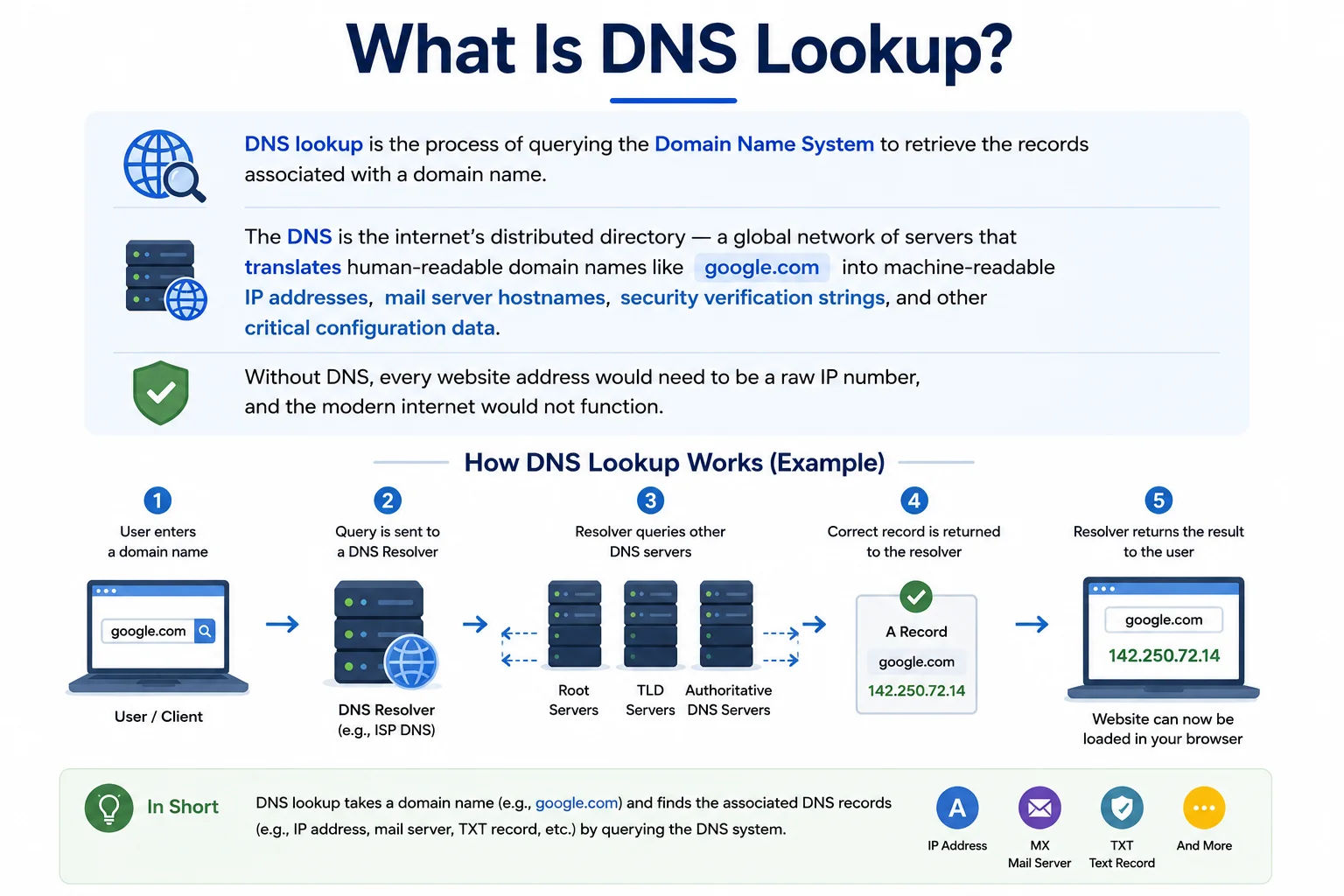
The DNS is a globally distributed database spanning thousands of servers - every domain lookup travels through this hierarchy in milliseconds
Our tool performs live DNS queries against Google's public DNS (8.8.8.8) and Cloudflare's DNS (1.1.1.1) using DNS-over-HTTPS (DoH), returning results directly from the authoritative source rather than relying on cached data. This means you see the current, real DNS configuration for any domain - identical to what a browser, mail server, or any other internet service would see when resolving that domain right now.
The DNS Resolution Process - What Happens in Milliseconds
│
├─▶ TLD nameserver (.com operated by Verisign · .in by NIXI · .net by Verisign)
│ │
│ └─▶ Authoritative nameserver (your DNS provider: Cloudflare, Route53, GoDaddy)
│ │
│ └─▶ DNS record returned (A, MX, TXT, CNAME, etc.)
│
Resolver cache stores result for TTL seconds → faster repeat lookups
Authoritative vs recursive DNS: When you type a domain in your browser, your device asks a recursive resolver (your ISP's DNS or 8.8.8.8) which works through the hierarchy above to find the answer. An authoritative nameserver is the definitive source for a specific domain's records - it's where the actual DNS configuration lives. Our tool queries both Google and Cloudflare recursive resolvers to give you the freshest possible result.
All DNS Record Types Explained - Complete Reference
DNS supports over 80 record types, but 10 cover the vast majority of real-world use cases. Here is a complete explanation of every record type this tool supports, with exact examples of what each looks like in the real world:
www.example.com → 93.184.216.34
TTL: 3600
Priority 5 → alt1.aspmx.l.google.com
blog.example.com → example.ghost.io
cdn.site.com → site.cloudfront.net
v=DMARC1; p=reject; rua=mailto:[email protected]
google-site-verification=abc123
example.com NS → ns2.cloudflare.com
Responsible: hostmaster.provider.com
Serial: 2024010101 · TTL: 3600
220.168.166.35 → broadband.airtel.net
Priority: 10 · Port: 5060
Target: sip.provider.com
example.com CAA 0 issue "digicert.com"
example.com CAA 0 iodef "mailto:[email protected]"
MX Record Lookup - Checking Your Mail Server Setup
What is an MX record?
MX stands for Mail Exchanger. It tells other mail servers which server handles incoming email for your domain, and in what order. Each MX record has a priority number, and lower numbers are tried first.
example.com MX 20 mail2.example.com
Without an MX record, a domain can't receive email at all, even if the website itself works fine.
How to check your MX record
Run this domain through the checker above and look at the MX section, or query it directly:
If nothing comes back, no MX record is set. If it returns a record but email still isn't arriving, the record may be pointing to the wrong mail server, or the mail server itself may be down.
Setting up MX records for common providers
Most email providers give you exact MX values to add at your DNS host:
- Google Workspace uses a single MX record pointing to
smtp.google.com. - Microsoft 365 points to a record like
yourdomain-com.mail.protection.outlook.com. - Namecheap Private Email and similar hosted providers give their own specific MX hostnames, added the same way through your domain's DNS management panel.
Always copy the exact value and priority your provider gives you. A typo in the hostname or a mismatched priority order is the most common reason mail stops arriving after switching providers.
MX record not working: quick checks
- Confirm there's no leftover MX record from a previous provider still active alongside the new one — having both can cause mail to bounce between them unpredictably.
- Check the priority numbers make sense — the lowest number should point to your primary mail server.
- Remember MX records must point to a hostname, never directly to an IP address.
- If mail is arriving but landing in spam, the MX record itself is fine — check your SPF, DKIM, and DMARC records instead, since those handle authentication rather than delivery.
DNS Records for Email - SPF, DKIM, DMARC, and MX Explained
Email deliverability depends on four DNS records working together correctly. If any one of them is wrong, emails land in spam or are rejected entirely. This is the most common reason people use a DNS lookup tool - diagnosing why emails aren't being delivered.
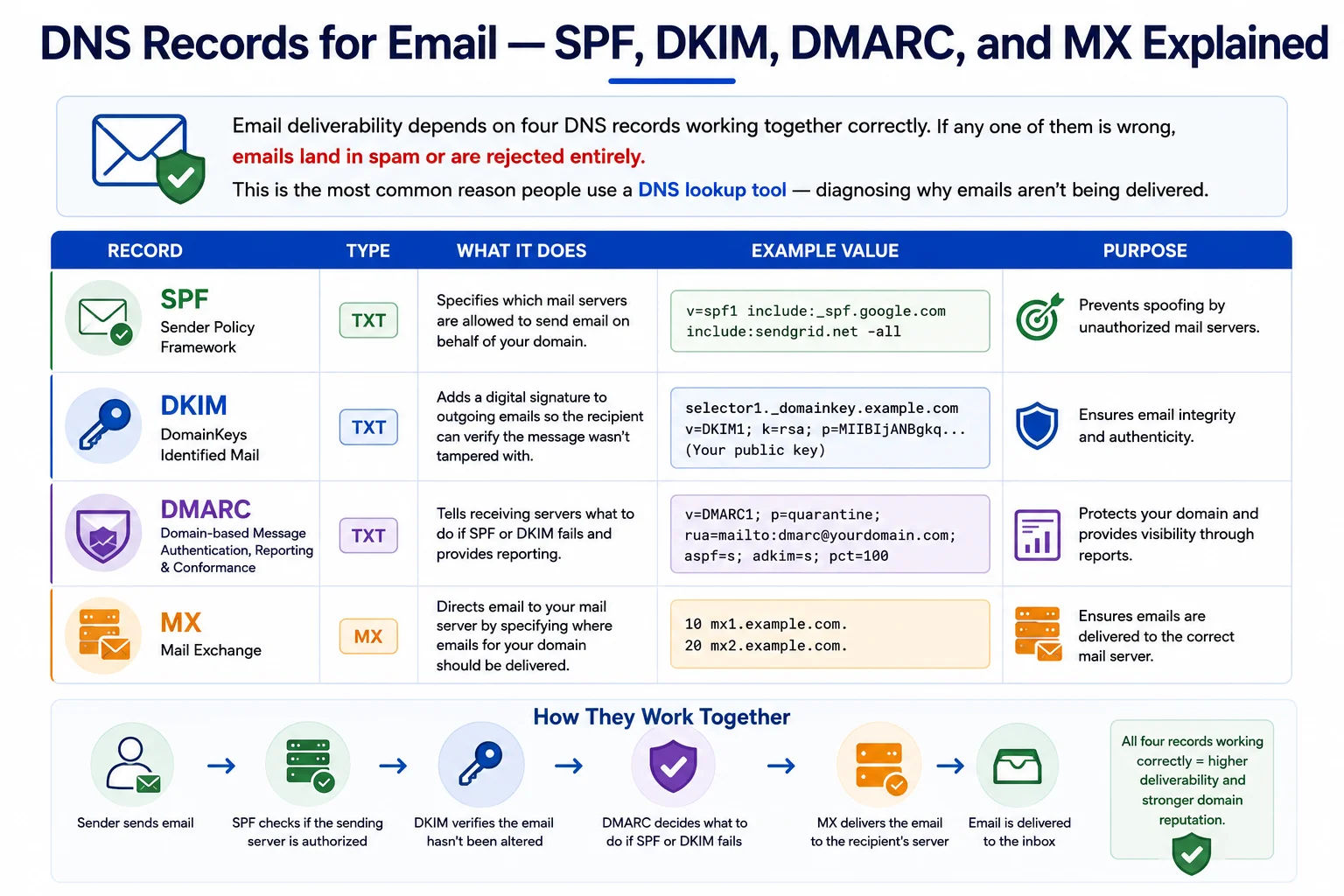
Four DNS records work together to authenticate email - a mistake in any one causes delivery failures to Gmail, Outlook, and Yahoo Mail
(Verify: mail.example.com → 203.0.113.10)
Diagnosing Email Delivery Problems with DNS Lookup
When email stops working or lands in spam, run a DNS lookup on your domain and check:
- Check MX records - do they point to the correct mail server? Are there multiple for redundancy?
- Check SPF TXT record - does it exist? Does it include all sending services (Google Workspace, SendGrid, Mailchimp)?
- Check DKIM TXT record - look up
selector._domainkey.yourdomain.comwhere selector is from your email provider - Check DMARC TXT record - look up
_dmarc.yourdomain.comand verify the policy - Check PTR records - use our Reverse IP Lookup to verify your mail server IP has a PTR pointing to your mail hostname
DNS Propagation and TTL - Why Changes Take Time
One of the most common frustrations with DNS is that changes don't appear immediately. Understanding why - and how to manage it - saves hours of confusion after making DNS updates.
What Is TTL (Time To Live)?
Every DNS record has a TTL value - the number of seconds that record can be cached by resolvers before they must re-query the authoritative nameserver. A record with TTL 3600 can be cached for 1 hour. During that hour, users whose resolver has cached the old value will see outdated information even though you've already updated the record.
Typical TTL Values and Propagation Times
The Correct Approach to DNS Migrations
- One week before migration: Lower the TTL on all records you plan to change (A, MX, CNAME) to 300 seconds (5 minutes). This ensures the old TTL has expired before you make the actual change.
- On migration day: Update the DNS records. With TTL at 300 seconds, changes propagate to most resolvers within 5–10 minutes rather than hours.
- After confirming everything works (wait at least 24–48 hours): Raise the TTL back to 3600 seconds or higher to reduce DNS query load on your nameservers.
- For NS record changes (moving to a different DNS provider): These take the longest - up to 48 hours. Keep both old and new DNS providers configured in parallel until propagation is complete.
NS record propagation is different: NS record TTLs are controlled by the parent zone (the TLD registry), not by your DNS provider. Even if you set your NS TTL to 300 seconds, ICANN's root servers may cache your NS records for 24–48 hours. Always plan NS changes well in advance and keep both old and new configurations working during the transition.
DNS Troubleshooting Guide - Fix Every Common Problem
DNS issues are the root cause of the majority of "website not loading" and "email not working" reports. Here is the complete troubleshooting guide for every common scenario:
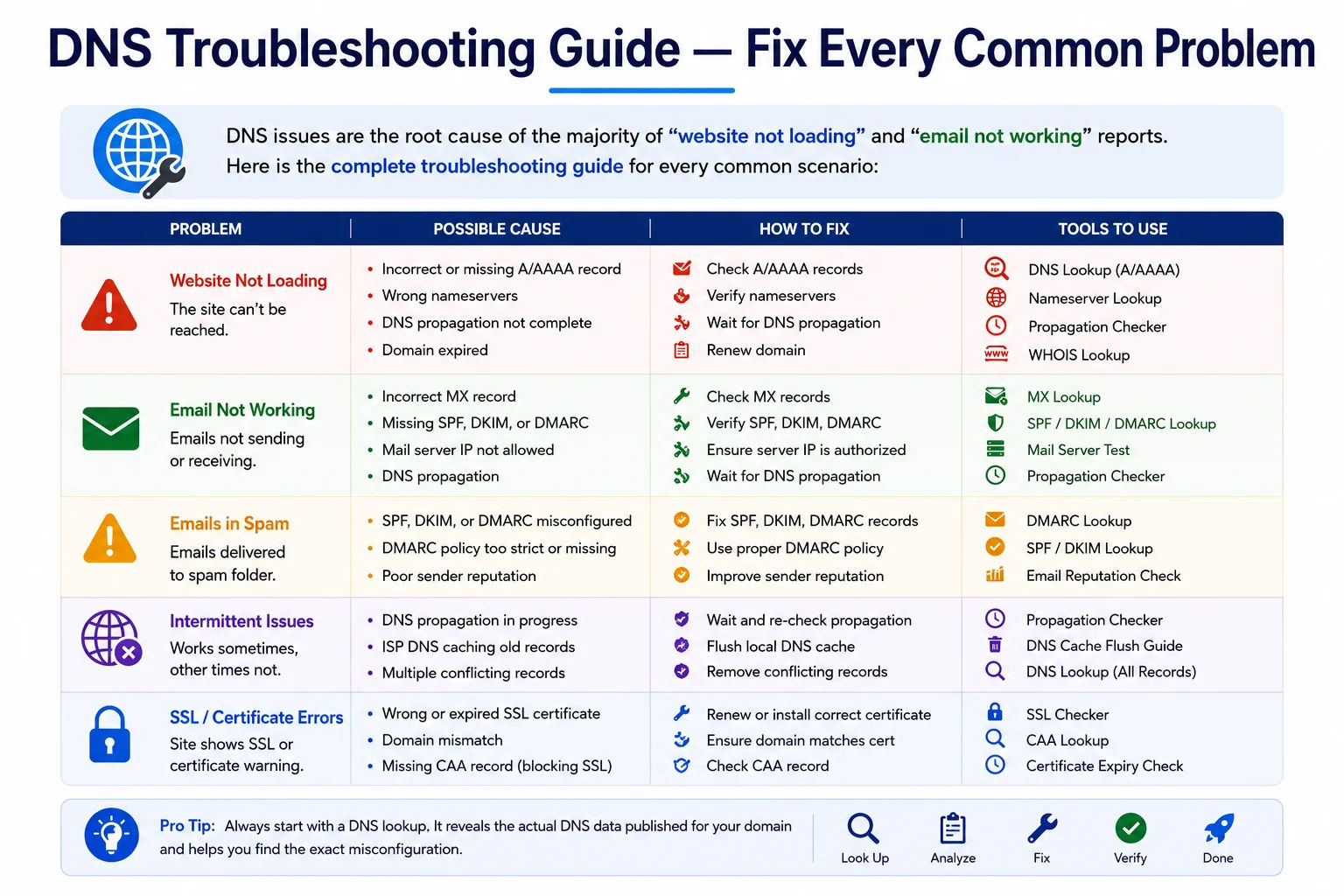
Most website and email failures trace back to a DNS misconfiguration - a DNS lookup is always the first diagnostic step
- Run DNS lookup - check the A record. Does it show the correct IP for your hosting server?
- If A record is missing, DNS is not configured - add it at your DNS provider.
- If A record shows wrong IP, update it to your server's current IP address.
- If A record is correct, the problem is at the server - use our Ping Test and Port Checker (port 80/443).
- If ping works but HTTPS doesn't, run SSL via IP Checker - certificate may be expired.
- Check MX records - missing MX = no email delivery. Wrong MX = email to wrong server.
- Check SPF TXT record at root domain - is your sending service included?
- Check DKIM TXT record at
selector._domainkey.yourdomain.com. - Check DMARC at
_dmarc.yourdomain.com- p=none for monitoring, p=reject to block forgeries. - Use our Blacklist Check on your mail server IP - if blacklisted, providers will reject your email.
- Check the current TTL in results - if high (86400 = 24h), old value may be cached that long.
- Flush local DNS cache:
ipconfig /flushdns(Windows) orsudo dscacheutil -flushcache(macOS). - Test from multiple resolvers - run lookup here (Google DNS) and compare with Cloudflare (1.1.1.1).
- If NS records changed, propagation can take up to 48 hours regardless of TTL.
- Verify changes are saved at the correct DNS provider - check which NS records are shown and edit the right provider.
- Confirm the A record points to the correct server IP where the certificate is installed.
- Let's Encrypt requires port 80 to be open and A record pointing to your server - verify both.
- Check CAA record - does it allow your certificate authority (Let's Encrypt, DigiCert)?
- Wildcard certs require a _acme-challenge TXT record for DNS-01 validation.
- After fixing DNS, certificate issuance may take a few minutes for Let's Encrypt to validate.
- Proxied (orange cloud) records in Cloudflare show Cloudflare's IP, not your origin - this is correct.
- If A record shows a Cloudflare IP but you expected your server IP, the record is proxied in Cloudflare.
- DNS-only (grey cloud) records show your real server IP.
- Verify CNAME flattening is working at root domain - some providers use ALIAS or ANAME records.
- For SSL issues with Cloudflare, check SSL/TLS mode setting matches your origin server configuration.
- Before changing NS records, recreate ALL DNS records at the new provider first.
- Lower TTL on all records to 300s at least 24 hours before changing NS records.
- Update NS records at your domain registrar - not at your current DNS provider.
- NS propagation takes up to 48 hours. Keep the old DNS provider active during this period.
- Use this tool to check NS records from multiple resolvers to confirm propagation.
DNS Lookup from the Command Line - dig, nslookup, and host
While our online tool is the fastest option for most use cases, command-line DNS tools are essential for server administrators and developers. Here are the key commands for every platform:
dig - The Most Powerful DNS Tool (Linux / macOS)
dig example.com A
# Lookup specific record types
dig example.com MX # Mail servers
dig example.com TXT # SPF, DKIM, DMARC
dig example.com NS # Nameservers
dig example.com SOA # Zone authority
dig example.com CAA # Certificate authority
dig example.com ANY # All record types
# Query a specific DNS resolver
dig @8.8.8.8 example.com A # Google DNS
dig @1.1.1.1 example.com MX # Cloudflare DNS
dig @9.9.9.9 example.com TXT # Quad9 DNS
# Short output (just the answer)
dig example.com A +short
# DKIM record lookup (replace 'google' with your selector)
dig google._domainkey.example.com TXT +short
# DMARC record
dig _dmarc.example.com TXT +short
# Reverse DNS (PTR record)
dig -x 8.8.8.8 # PTR lookup for 8.8.8.8
nslookup - Windows and Cross-Platform
nslookup example.com # Default A record
nslookup -type=MX example.com # MX records
nslookup -type=TXT example.com # TXT records
nslookup -type=NS example.com # Nameservers
nslookup example.com 8.8.8.8 # Ask Google DNS
nslookup example.com 1.1.1.1 # Ask Cloudflare DNS
nslookup 8.8.8.8 # PTR / reverse lookup
Comparing DNS Command-Line Tools
| Tool | Platform | Best For | Output Style |
|---|---|---|---|
| dig | Linux, macOS | Detailed analysis, scripting, TTL inspection, authoritative queries | Detailed with query time, server, and full answer section |
| nslookup | Windows, Linux, macOS | Quick lookups, interactive mode for exploring multiple record types | Simple answer format, interactive mode available |
| host | Linux, macOS | Quick simple lookups, human-readable output | Minimal, one-line answers per record |
| Resolve-DnsName | Windows PowerShell | Windows automation and scripting | PowerShell object output, scriptable |
| drill | Linux (ldns) | DNSSEC validation, alternative to dig | Similar to dig with better DNSSEC support |
When to Use DNS Lookup - 8 Real-World Scenarios
DNS lookup is a daily tool for developers, system administrators, domain owners, and marketers. Here are the eight scenarios where it delivers immediate value:
DNSSEC - DNS Security Extensions Explained
DNSSEC (DNS Security Extensions) adds cryptographic signatures to DNS records, allowing resolvers to verify that the records they receive haven't been tampered with in transit. It protects against DNS cache poisoning and man-in-the-middle attacks where an attacker substitutes malicious IP addresses.
How DNSSEC Works
The domain owner signs each DNS record with a private key. The corresponding public key is published in a DNSKEY record. Resolvers check the signature on each record against the published key - if the signature doesn't match, the resolver rejects the response as potentially tampered. This chain of trust extends from the root DNS servers down through TLD registries to individual domain zones.
DNSSEC Record Types
- DNSKEY - contains the public key used to verify signatures in the zone
- RRSIG - the cryptographic signature over a set of DNS records
- DS (Delegation Signer) - stored in the parent zone, links to the child zone's DNSKEY
- NSEC / NSEC3 - proves that a record does NOT exist (prevents enumeration)
Should You Enable DNSSEC?
DNSSEC is strongly recommended for high-value domains (financial services, healthcare, government) where DNS hijacking would be catastrophic. For most personal and small business websites, the risk of operational errors from DNSSEC misconfiguration outweighs the security benefit unless you have experienced DNS administrators. Major DNS providers (Cloudflare, AWS Route53, Google Cloud DNS) all support DNSSEC and simplify its management considerably.
Frequently Asked Questions - DNS Lookup
Complete answers to every common question about DNS records, ports, propagation, email configuration, and how the DNS system works:
What is a DNS lookup?
A DNS lookup is the process of querying the Domain Name System to retrieve the records associated with a domain name. DNS is the internet's distributed directory that translates human-readable domain names into IP addresses, mail server hostnames, security verification strings, and other configuration data that internet services need to function. When you run a DNS lookup, you're reading the publicly published configuration for a domain - the same data your browser, mail server, and every other internet service uses to connect to that domain.
What is the difference between an A record and a CNAME record?
An A record maps a domain name directly to an IPv4 address (e.g., example.com → 93.184.216.34). A CNAME (Canonical Name) record creates an alias from one name to another name - not to an IP address (e.g., www.example.com → example.com). Key rules: (1) A CNAME can only point to another hostname, never to an IP. (2) The root domain apex cannot have a CNAME - only subdomains can use CNAME. (3) A CNAME cannot coexist with other record types for the same name. This is why many DNS providers offer ALIAS or ANAME records as CNAME-like alternatives at the root domain.
How long does DNS propagation take?
DNS propagation time depends entirely on the TTL (Time To Live) of the record being changed. If your A record has a TTL of 3600 seconds, resolvers can cache the old value for up to 1 hour. For standard records (A, MX, TXT, CNAME) with typical TTLs of 300–3600 seconds, changes are visible to most users within 15 minutes to a few hours. For NS record changes, propagation can take 24–48 hours because the parent TLD zone controls caching behaviour. The best practice is to lower your TTL to 300 seconds at least 24 hours before major changes.
What DNS records do I need for email?
For email to work correctly, you need: (1) MX records - tells other mail servers where to deliver email. Without MX records, your domain cannot receive email. (2) SPF TXT record at your root domain - lists authorised sending servers. (3) DKIM TXT record at selector._domainkey.yourdomain.com - cryptographic signature for authentication. (4) DMARC TXT record at _dmarc.yourdomain.com - policy for handling failures. Additionally, your mail server IP should have a PTR record (set by your hosting provider) pointing to your mail hostname, as Gmail and Outlook check this with FCrDNS.
What is TTL in DNS and what should I set it to?
TTL (Time To Live) is the number of seconds a DNS record can be cached by resolvers before they must re-query the authoritative nameserver. A lower TTL means changes propagate faster but generates more DNS queries. For most stable records (A, MX, NS), 3600 seconds (1 hour) is reasonable. If you're planning DNS changes, lower it to 300 seconds (5 minutes) at least 24 hours beforehand. For records that frequently change, 300–900 seconds is appropriate. For NS records and SOA, 86400 (24 hours) is standard.
What is the difference between SPF, DKIM, and DMARC?
SPF (Sender Policy Framework) is a TXT record listing IP addresses authorised to send email from your domain. DKIM (DomainKeys Identified Mail) adds a cryptographic signature to each outgoing email verified against a public key in DNS - prevents spoofing. DMARC (Domain-based Message Authentication) ties SPF and DKIM together and tells receiving servers what to do when both fail - monitor (p=none), quarantine to spam (p=quarantine), or reject (p=reject). It also provides aggregate reporting. All three work together - DMARC is ineffective without SPF and DKIM configured correctly.
Why do different DNS lookup tools show different results?
Different DNS lookup tools may query different DNS resolvers, and each resolver may have different cached values based on when it last queried the authoritative nameserver. If you recently updated a DNS record, some resolvers will show the new value immediately while others still show the old value. Our tool queries both Google DNS (8.8.8.8) and Cloudflare DNS (1.1.1.1) directly. For the most authoritative result, query the domain's own nameservers directly using dig @nameserver domain.com A on the command line.
How do I check if my DNS changes have propagated?
Run a DNS lookup on this tool and compare the result with what you expect. For command-line checks: dig @8.8.8.8 domain.com A +short queries Google DNS directly; dig @1.1.1.1 domain.com A +short queries Cloudflare. To query the authoritative nameserver directly: dig NS domain.com +short gets the nameservers, then dig @ns1.yourprovider.com domain.com A queries them directly - this shows the definitive current record. Clear your local DNS cache with ipconfig /flushdns (Windows) or sudo dscacheutil -flushcache (macOS) before testing locally.
What is a wildcard DNS record?
A wildcard DNS record matches any subdomain that doesn't have its own explicit record, using an asterisk: *.example.com A 93.184.216.34. This means that anything.example.com, test.example.com, and random123.example.com all resolve to that IP unless there's a more specific record. Wildcard records are commonly used by SaaS platforms giving each customer a custom subdomain, multi-tenant applications, and Let's Encrypt wildcard certificates (requiring DNS-01 challenge validation via a TXT record).
What port does DNS use?
DNS uses port 53 for both queries and responses. UDP is used for standard lookups, since they're small and fast, while TCP on the same port handles larger transfers like zone transfers between DNS servers or responses that exceed the UDP size limit. Newer encrypted DNS methods use different ports: DNS over HTTPS uses port 443, and DNS over TLS uses port 853.
What is port 53 used for?
Port 53 is the standard port for DNS traffic. When your device looks up a domain name, it sends a query to a DNS server on port 53 and gets the IP address back on the same port. If port 53 is blocked on a network, either by a firewall or an ISP, DNS lookups fail entirely and no domains will resolve, even though the rest of your internet connection may work fine.
Is DNS TCP or UDP?
Both. Most everyday lookups use UDP on port 53 because it's faster and the query and response are small. DNS falls back to TCP on port 53 when the response is too large for a single UDP packet, which happens with zone transfers, DNSSEC-signed responses, or records with unusually large TXT values.
How do I check if port 53 is open?
Is this DNS lookup tool free?
Yes - completely free, unlimited lookups, no account or signup required. All DNS queries are performed over DNS-over-HTTPS (DoH) directly against Google and Cloudflare DNS resolvers. We do not store, log, or share your queries or the domains you look up. The tool supports all 10 major DNS record types (A, AAAA, MX, CNAME, TXT, NS, SOA, PTR, SRV, CAA) and can fetch all record types simultaneously with the ALL option.
Related Tools - Complete Your Domain Investigation
DNS lookup is most powerful when combined with these complementary tools for complete domain, email, and network analysis:
Technical information
How this tool works, where data comes from, and known limitations. See also our methodology and accuracy & limitations pages.
How this tool works
Queries DNS over HTTPS for the selected record type(s) using public resolvers, then displays answers returned by those resolvers.
Data source
Limitations
Results reflect what those resolvers currently return and may differ during propagation or when authoritative servers disagree. This is not a substitute for querying your authoritative nameservers directly.
Content revision 2026-09 (aligned with current tool implementation in this codebase)