
Bulk IP Lookup
Look up geolocation, ISP, ASN, and VPN/proxy status for up to 20 IP addresses at once. Paste your list, get a full results table, and export to CSV - in seconds, completely free.
Hero, guides, and sidebar links below work without JavaScript. The interactive checker needs JavaScript enabled in your browser.
What Is Bulk IP Lookup?
Bulk IP lookup is the process of running geolocation and network intelligence queries for multiple IP addresses in a single operation - rather than entering them one by one into a single-IP lookup tool. Instead of spending minutes or hours manually checking each address, you paste your entire list and receive a structured results table with country, region, city, ISP, ASN, and connection type (residential, data centre, or VPN/proxy) for every IP simultaneously.
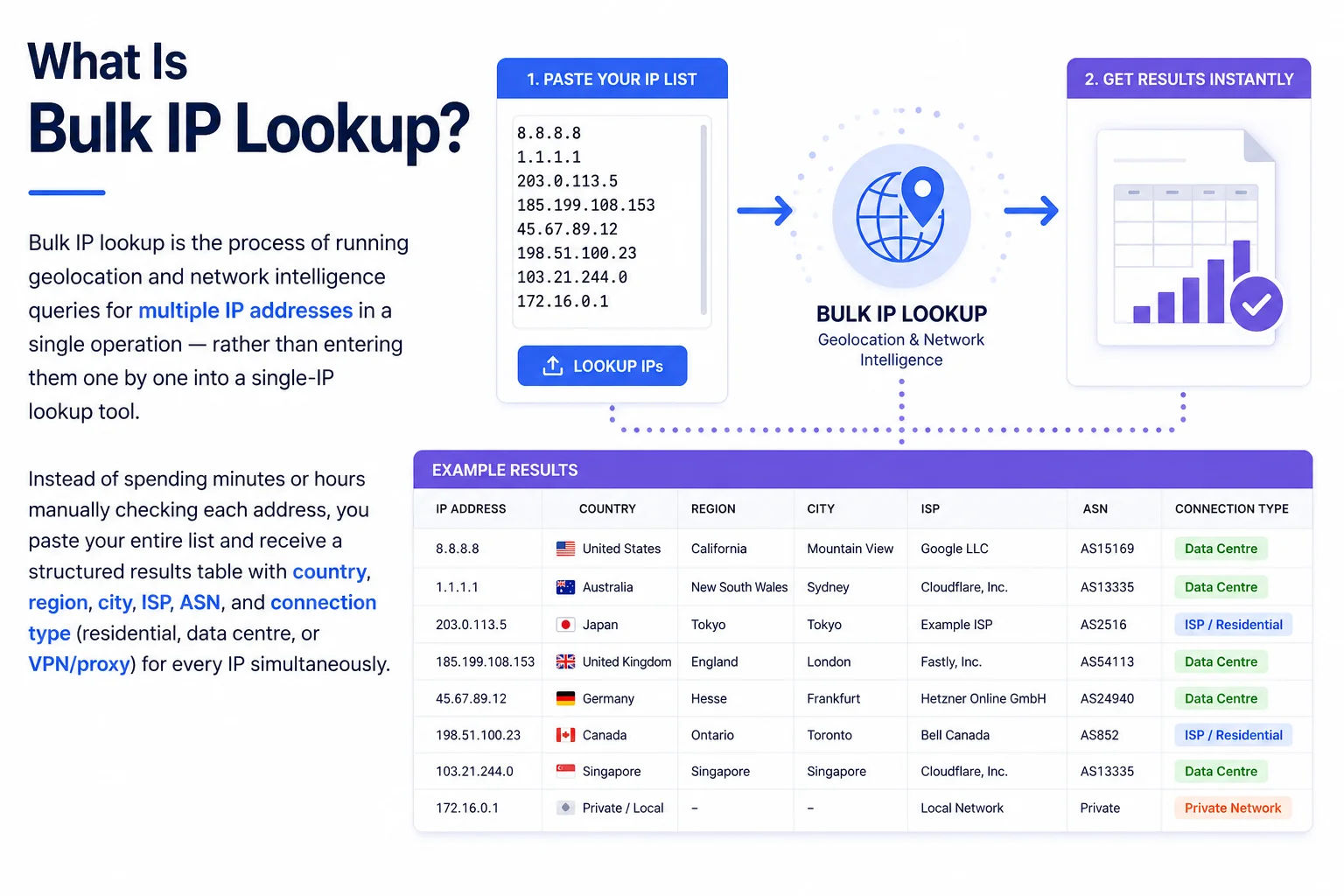
Server access logs, firewall alerts, and analytics exports routinely contain dozens to hundreds of IP addresses that need investigation - bulk lookup processes them all at once
The tool above accepts up to 20 public IPv4 or IPv6 addresses, one per line. It queries each IP against GeoIP and ASN databases in parallel, displays the results in a sortable table, and lets you export everything as a CSV file for use in spreadsheets, SIEM platforms, or log analysis workflows. This is the same geolocation data returned by our single IP Lookup tool - delivered in batch for maximum efficiency.
Free limit: This tool processes up to 20 IPs per run to ensure fast, reliable results for everyone. For ongoing large-scale IP enrichment (thousands of IPs), consider a GeoIP API integration - we explain the options in the API section below. For most manual investigations, 20 IPs per run is sufficient to process an entire server log incident, a spam campaign's source IPs, or a suspicious login wave.
Supported Input Formats
The tool is intentionally flexible about input. It accepts IP addresses in any of the following formats - one IP per line, with leading/trailing whitespace stripped automatically:
1.1.1.1
103.21.244.10
203.0.113.42
2606:4700:4700::1111
2001:db8::1
::1 (loopback)
2001:4860:4860::8888
1.1.1.1
2606:4700::1111
CIDR ranges: 8.8.8.0/24
Private IPs: 192.168.x.x
URLs: https://example.com
Before you paste: Remove any private IP ranges (10.x.x.x, 192.168.x.x, 172.16–31.x.x, 127.x.x.x) and loopback addresses from your list - they have no public geolocation data and will return an error row. Use our IP List Validator to clean and validate your list first if it comes from an unfiltered log file.
Who Uses Bulk IP Lookup - 8 Real-World Workflows
Bulk IP lookup is one of the most practically useful tools in a network or security professional's arsenal. Here are eight scenarios where processing a list of IPs in batch saves significant time and surfaces insights that single-IP lookups would miss:
How to Use Bulk IP Lookup - Step-by-Step
The tool is designed to return a complete results table in under 30 seconds for a full list of 20 IPs. Here is exactly how to use it for maximum efficiency:
Understanding the Bulk Lookup Results
Each column in the results table has a specific meaning. Here is what to look for in each field and how to interpret patterns across the full list:
Country
The country where the IP block is registered. Country-level accuracy is approximately 98–99% for most IP ranges. When looking at a bulk result, scan the country column first - a cluster of IPs all geolocating to the same country suggests a geographically targeted or nationally-focused operation. Conversely, IPs spread across 10+ countries in seconds suggests a globally distributed botnet.
Region & City
The state/province and city associated with the IP block's RIR registration. City-level accuracy is approximately 50–75% - it reflects where the IP block is registered, not necessarily where the device or server is physically located. For Indian ISPs (Jio, Airtel, BSNL), most IPs geolocate to major hub cities like Mumbai or Delhi even for subscribers in other cities.
ISP / Organisation
The Internet Service Provider or hosting company assigned this IP block. When reviewing a bulk list, the ISP column is often the most revealing field. If all attacking IPs belong to a single hosting provider (e.g. all from Hetzner or DigitalOcean), the traffic is almost certainly from automated scripts on rented servers. If ISPs are all major residential telecoms, the traffic may be from compromised home devices (botnet).
ASN (Autonomous System Number)
All IPs sharing the same ASN belong to the same operator. In a bulk result, grouping by ASN is more reliable than grouping by ISP name (which can vary in format) - if 8 out of 20 IPs share AS15169, all 8 are definitively Google infrastructure. This is particularly useful when building firewall rules - block the entire ASN instead of individual IPs.
Connection Type Badge
The three connection types - Residential, Data Centre, VPN/Proxy - are the most actionable signals for security use cases. A mixed list with mostly Data Centre IPs suggests automated scripted traffic. A list with mostly VPN/Proxy IPs suggests a deliberate anonymisation strategy. A list of exclusively Residential IPs from diverse ISPs suggests a botnet of compromised home devices.
Bulk IP Lookup vs. Single IP Lookup - When to Use Each
Both tools query the same underlying geolocation and ASN databases. The choice between them depends on your workflow and how many IPs you need to investigate:
| Feature | Single IP Lookup | Bulk IP Lookup (this tool) |
|---|---|---|
| Number of IPs | One at a time | Up to 20 per run |
| Best for | Deep investigation of one IP | Processing lists from logs, SIEMs, reports |
| Interactive map | ✓ Yes | ✗ No (click Details to open) |
| PTR / hostname | ✓ Yes | Via Details link per IP |
| Timezone & coordinates | ✓ Yes | Via Details link per IP |
| CSV export | ✗ No | ✓ Yes - one click |
| Pattern analysis | ✗ No | ✓ Summary stats (types, countries) |
| Speed for 10 IPs | ~5 min (manual) | ~15–20 seconds |
| Domain name input | ✓ Auto-resolves | ✗ IPs only |
| Quick-action links | WHOIS, Blacklist, DNS, Reverse IP | Details link → opens single lookup |
Recommended workflow: Use bulk lookup first to screen a full list and identify the IPs worth investigating further. Then open the single IP Lookup for the specific IPs that show unusual patterns - to see the full map, hostname (PTR record), WHOIS, and blacklist status.
How to Extract IP Addresses from Common Log Sources
The most common task before using bulk IP lookup is extracting the IP addresses from wherever they live. Here are ready-to-use commands for the most common sources:
Nginx / Apache Access Logs
awk '{print $1}' /var/log/nginx/access.log | sort -u | head -20
# Extract IPs making more than 100 requests (potential bots)
awk '{print $1}' /var/log/nginx/access.log | sort | uniq -c | sort -rn | head -20 | awk '{print $2}'
# Filter for specific HTTP status code (e.g. 403 Forbidden)
grep ' 403 ' /var/log/nginx/access.log | awk '{print $1}' | sort -u | head -20
Email Headers (Gmail, Outlook)
# Look for "Received: from" lines - the first external IP is the sender
Received: from mail.attacker.com (203.0.113.42 [203.0.113.42])
by mx.google.com with ESMTP
# Extract all IPs from email headers (Linux)
grep -oE '[0-9]{1,3}(\.[0-9]{1,3}){3}' email_headers.txt | sort -u
Firewall / UFW Logs
grep "BLOCK" /var/log/ufw.log | grep -oE 'SRC=[0-9.]+' | sed 's/SRC=//' | sort -u | head -20
# iptables - recent drops
dmesg | grep "IN=.*SRC=" | grep -oE 'SRC=[0-9.]+' | sed 's/SRC=//' | sort -u | head -20
Windows Event Viewer (Remote Desktop / RDP)
Get-WinEvent -FilterHashtable @{LogName='Security';Id=4625} | ForEach-Object { $_.Properties[19].Value } | Sort-Object -Unique | Select-Object -First 20
After extracting your IPs, paste them directly into the textarea above. The tool automatically strips whitespace, skips blank lines, and validates each entry before lookup - you don't need to pre-clean the list manually.
Bulk IP Lookup CSV Export - Field Reference
The exported CSV contains one row per IP with the following columns. This reference is useful when integrating the CSV into a spreadsheet analysis, SIEM import, or custom script:
| CSV Column | Description | Example |
|---|---|---|
| # | Row number in original input order | 1 |
| IP Address | The input IP address as entered | 8.8.8.8 |
| Country | Country name from GeoIP database | United States |
| Country Code | ISO 3166-1 alpha-2 country code | US |
| Region | State or province | California |
| City | Closest city from GeoIP | Mountain View |
| ISP / Org | ISP or organisation name from ASN registry | Google LLC |
| ASN | Autonomous System Number | AS15169 |
| Timezone | IANA timezone identifier | America/Los_Angeles |
| Type | Connection type: Residential, Data Centre, or VPN/Proxy | Data Centre |
| Status | OK or error message if lookup failed | OK |
Frequently Asked Questions - Bulk IP Lookup
Answers to every common question about bulk IP lookup, limits, accuracy, CSV export, and input format:
How many IP addresses can I look up at once?
This tool processes up to 20 IP addresses per run - significantly more than most free bulk IP lookup tools which cap at 5 or 10. The limit exists to ensure reliable response times for all users and to stay within the fair-use rate limits of our geolocation data providers. For most manual investigation workflows - log incident analysis, spam campaign triage, traceroute hop identification - 20 IPs per run is sufficient. If you need to process more, simply run the tool again with the next batch of IPs.
What information does bulk IP lookup return for each IP?
For each IP address, the tool returns: country (with flag), region/state, city, ISP and organisation name, Autonomous System Number (ASN), timezone, and a connection type classification (Residential / ISP, Data Centre / Cloud, or VPN / Proxy). All data comes from GeoIP databases (MaxMind, DB-IP) and ASN registries. For deeper details on a specific IP - including PTR hostname, coordinates, and an interactive map - click the "Details" link next to any row to open the full single-IP Lookup tool pre-filled with that address.
Can I export bulk IP lookup results to a spreadsheet?
Yes - click the "Export CSV" button that appears above the results table after a lookup completes. This downloads a CSV file containing all looked-up IPs with their country, country code, region, city, ISP, ASN, timezone, connection type, and lookup status. Open it in Microsoft Excel, Google Sheets, LibreOffice Calc, or import it into your SIEM, log analysis platform, or database directly. The CSV uses standard comma-delimited format with a header row.
Can I enter domain names instead of IP addresses?
No - this tool requires raw IP addresses only (IPv4 or IPv6). It does not accept domain names or hostnames. To look up a domain, use our single IP Address Lookup tool which automatically resolves a domain to its IP via DNS before performing the geolocation lookup. Alternatively, use our DNS Lookup tool to resolve your domains to IP addresses first, then paste those IPs into this bulk lookup tool.
Why did some IP addresses return an error?
The most common reasons for a lookup failure are: (1) Private or reserved IP ranges - addresses like 192.168.x.x, 10.x.x.x, 172.16–31.x.x, and 127.x.x.x are not routable on the public internet and have no GeoIP data. (2) Invalid format - the line contains something other than a valid IPv4 or IPv6 address (domain name, URL, CIDR notation). (3) Temporary API rate limiting - if you run multiple consecutive large lookups, wait 30 seconds and try again. The tool marks failed rows in red and continues processing the remaining IPs rather than stopping.
Is bulk IP lookup free? Does it require signup?
Yes - completely free with no account, API key, or signup required. IP Tracker Tools provides this bulk IP lookup tool at no cost for manual use. All lookups are performed over HTTPS. We do not store, log, or share the IP addresses you enter or the results returned. Privacy is by default. The tool is limited to 20 IPs per run as a fair-use measure; there is no daily cap on how many runs you can perform.
How accurate is the geolocation data in bulk results?
The same accuracy that applies to single IP lookup applies to bulk results: country-level accuracy is approximately 98–99%, region/state accuracy is around 85–90%, and city-level accuracy varies from 50–75% globally. For Indian ISPs (Jio, Airtel, BSNL), many residential IP blocks geolocate to the ISP's hub city (Mumbai, Delhi) rather than the subscriber's actual city - this is expected behaviour, not an error. ASN data is exact, as it comes directly from BGP routing registries.
What is the difference between bulk IP lookup and bulk reverse DNS?
Bulk IP lookup returns geolocation and ISP data - country, city, organisation, ASN, and connection type - for each IP by querying GeoIP databases. Bulk Reverse DNS lookup performs a PTR record query for each IP to retrieve the hostname the IP owner has configured in DNS (e.g., dns.google for 8.8.8.8). They complement each other: use bulk IP lookup to understand where and who, and bulk reverse DNS to find what hostname each IP resolves to. Run both together for a complete picture of a list of IPs.
Can I use this tool programmatically or via API?
This web tool is designed for manual, interactive use. For programmatic access - integrating IP geolocation into your application, pipeline, or SIEM - you would need a GeoIP API. Popular options include ipapi.co (which powers this tool), ipinfo.io, and MaxMind GeoIP2 (the industry standard for high-volume commercial use). All offer free tiers sufficient for small-scale development and paid tiers for production workloads. Contact us if you have specific API requirements and we can advise on the best option for your use case.
Related Tools - Complete Your IP Investigation Workflow
Combine bulk IP lookup with these tools for end-to-end IP address investigation and network analysis:
Technical information
How this tool works, where data comes from, and known limitations. See also our methodology and accuracy & limitations pages.
How this tool works
Looks up multiple IPs in sequence/batches using the same geolocation API path as single IP lookup tools.
Data source
Limitations
Subject to provider rate limits. Geolocation accuracy limits of single lookups also apply to each row.
Content revision 2026-09 (aligned with current tool implementation in this codebase)