
Network Address Calculator
Instantly find the network address for any IPv4 host address. Enter any IP address (even a host IP in the middle of a subnet) and its CIDR prefix - the calculator performs the bitwise AND to find the exact network address, broadcast, subnet mask, wildcard, and host range.
Hero, guides, and sidebar links below work without JavaScript. The interactive checker needs JavaScript enabled in your browser.
What Is the Network Address?
The network address (also called the network ID or subnet ID) is the first address in a subnet - the one where all host bits are set to 0. It identifies the subnet itself in routing tables and cannot be assigned to any device. Every IP address on the internet belongs to exactly one subnet, and the network address of that subnet is what routers use to forward packets to the right network segment.
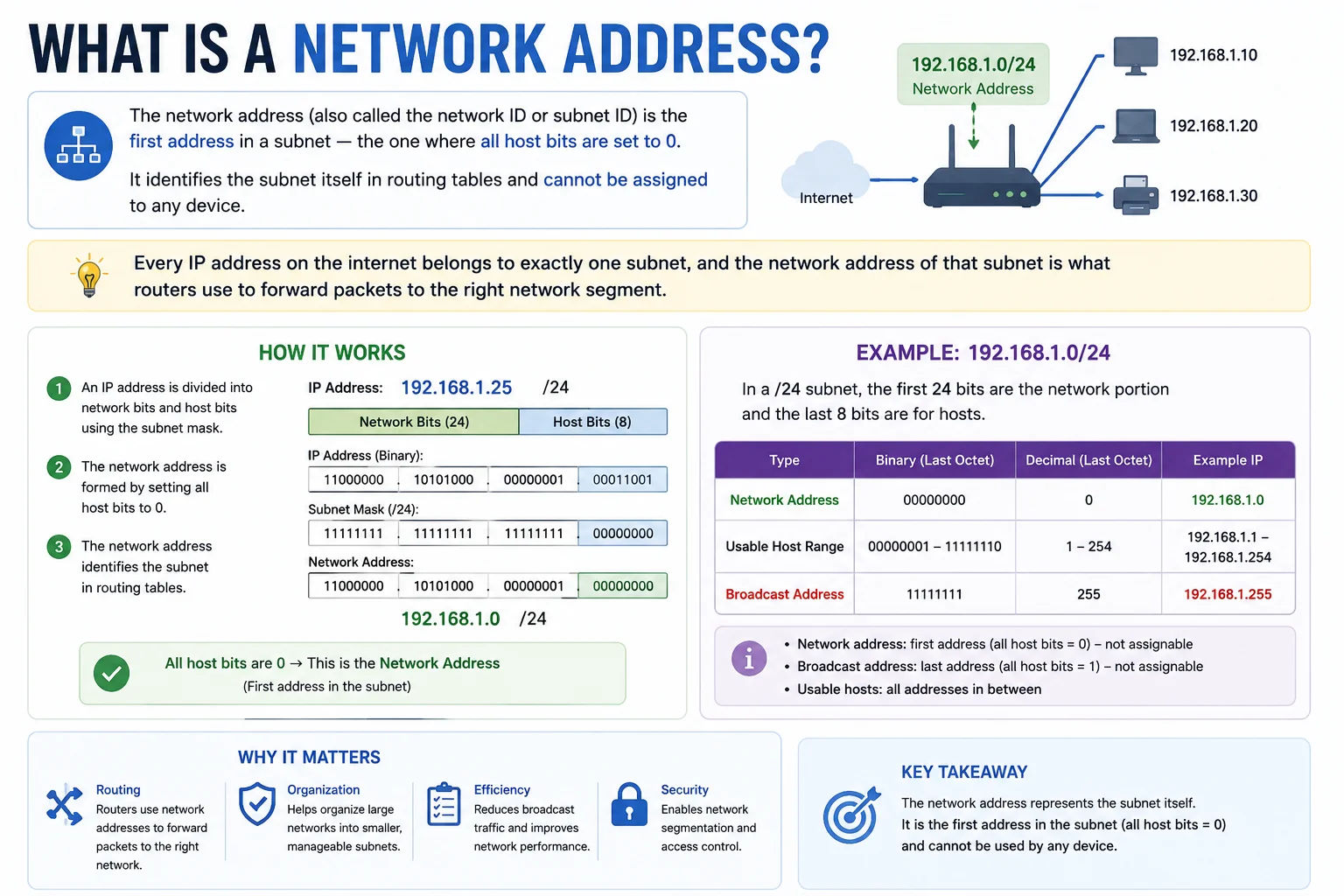
The network address is the foundation of IP routing - every routing table entry points to a network address, telling routers which subnet to send traffic to
Calculating the Network Address from Any Host IP
The most important use of a network address calculator is finding which subnet a given host IP belongs to. This is done with a bitwise AND between the host IP and the subnet mask:
Subnet Mask: 255.255.255.0 = 11111111.11111111.11111111.00000000
AND operation: 11000000.10101000.00000001.00000000
Network Address: 192.168.1.0
# This works for ANY host IP - the network address is always the same
# 192.168.1.1, 192.168.1.100, 192.168.1.254 all belong to 192.168.1.0/24
Why Network Addresses Matter in Routing
Every router maintains a routing table mapping network addresses to outbound interfaces or next-hop routers. When a packet arrives, the router performs AND operations between the destination IP and each subnet mask in its table, then forwards the packet via the interface associated with the most specific matching network address (longest prefix match). Without network addresses, IP routing would be impossible.
| Any Host IP | CIDR | Network Address | In Range |
|---|---|---|---|
| 192.168.1.100 | /24 | 192.168.1.0 | 192.168.1.0 – 192.168.1.255 |
| 10.5.12.200 | /8 | 10.0.0.0 | 10.0.0.0 – 10.255.255.255 |
| 172.31.45.10 | /16 | 172.31.0.0 | 172.31.0.0 – 172.31.255.255 |
| 192.168.10.130 | /25 | 192.168.10.128 | 192.168.10.128 – 192.168.10.255 |
| 10.0.0.5 | /30 | 10.0.0.4 | 10.0.0.4 – 10.0.0.7 (2 hosts) |
Frequently Asked Questions
What is a network address and how is it different from an IP address?
An IP address identifies a specific device (host) on a network. A network address identifies the subnet (network segment) itself - it is the first address in the subnet where all host bits are 0. For example, in 192.168.1.0/24, the network address is 192.168.1.0 while individual hosts use 192.168.1.1 through 192.168.1.254. The network address appears in routing tables to represent the entire subnet.
How do I find which network an IP belongs to?
Perform a bitwise AND between the IP address and the subnet mask. For 192.168.1.100 with mask 255.255.255.0: AND gives 192.168.1.0 - this is the network address. Our calculator does this automatically. Enter any host IP and CIDR prefix to instantly see which network it belongs to.
Can I ping the network address?
Most operating systems and routers will not respond to pings sent to the network address (all host bits = 0). It is a reserved address used only for routing purposes. Some older equipment may respond, but this is non-standard behaviour. If you want to check if any device is on the subnet, ping the broadcast address - though most modern systems block broadcast ping responses.
What is the difference between network address and loopback address?
The network address (like 192.168.1.0) identifies a subnet and appears in routing tables. The loopback address (127.0.0.1) is a special address that routes back to the local device - packets sent to 127.0.0.1 never leave the device. The entire 127.0.0.0/8 range is reserved for loopback. They serve completely different purposes.
Is this network address calculator free?
Yes - completely free, no signup required. Runs entirely in your browser. Enter any host IP and CIDR to instantly get the network address, broadcast address, subnet mask, and complete subnet details.