
Reverse IP Lookup
Find the hostname (PTR record), ISP, organization, and geographic location for any IPv4 or IPv6 address - instantly, for free, no account needed.
Hero, guides, and sidebar links below work without JavaScript. The interactive checker needs JavaScript enabled in your browser.
What Is Reverse IP Lookup?
Every device connected to the internet carries a numeric IP address - a unique identifier like 203.0.113.42. When you look up a domain name such as example.com, your browser asks a DNS server to translate it into that number. Reverse IP lookup flips this entirely: you start with the number and ask the internet what it knows - the hostname assigned to it, the company that owns the IP block, the network it routes through, and the country it originates from.
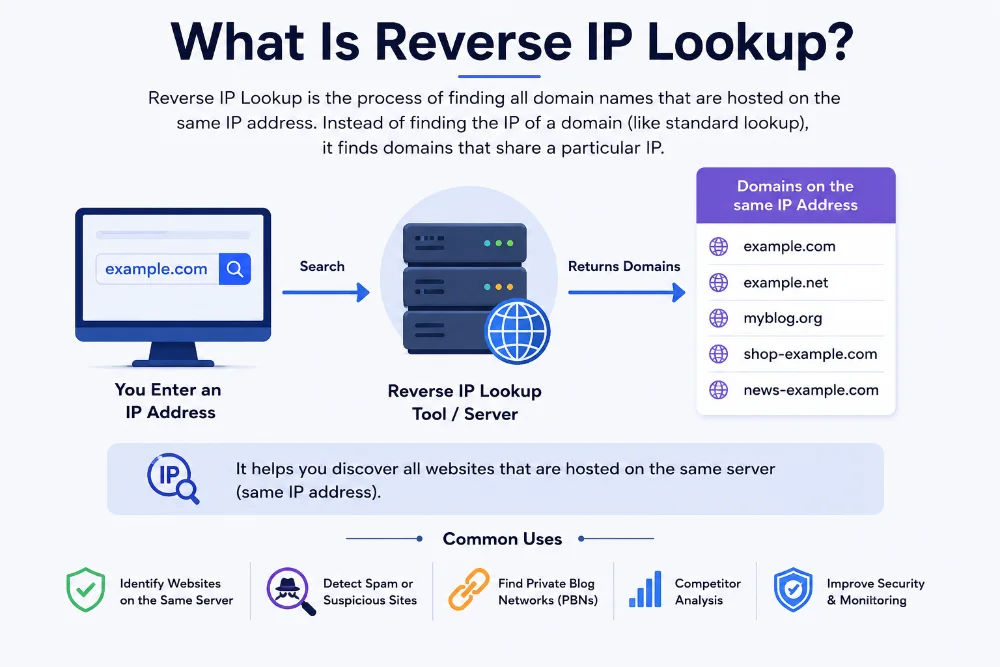
Every server in a data centre has an IP address - reverse lookup reveals who owns it, what hostname it carries, and which network it belongs to
Under the hood, our tool runs two parallel queries the moment you click Look Up. The first is a PTR record query - it reaches into a special DNS zone called in-addr.arpa (or ip6.arpa for IPv6 addresses) and asks: "What hostname has the owner of this IP registered?" The second is an ASN and GeoIP lookup against regional IP allocation databases, pulling the ISP name, autonomous system number, country, region, and city tied to that IP block. Both results land in your browser within seconds, no page reload needed.
Think of it like a phone directory in reverse. A normal directory lets you search by name to find a number. Reverse IP lookup lets you search by number to find the name - and much more besides. For network engineers diagnosing a suspicious connection, a server admin verifying their mail setup, or a security analyst investigating an incident, this "reverse directory" is an indispensable daily tool.
Reverse IP lookup: IP address → hostname + ISP + location + ASN
Example - Google DNS:
PTR query: 8.8.8.8.in-addr.arpa → dns.google
GeoIP/ASN: 8.8.8.8 → Google LLC · AS15169 · Mountain View · US
Important distinction: The PTR hostname is set by whoever owns the IP block - your ISP or hosting provider - not by the website owner. If you host yoursite.com on a DigitalOcean droplet, the PTR might read 188-166-xx-xx.lon01.digitalocean.com until you request a custom PTR through your provider's control panel. This is why the hostname in reverse lookup results often looks different from the domain you expect.
How to Use This Reverse IP Lookup Tool
You don't need any technical knowledge to use this tool. The entire process takes less than five seconds - here's exactly what to do:
- Enter the IP address you want to investigate in the input box above. You can type it manually, paste it from a log file or email header, or click "Use my current IP" to instantly load your own public IP address.
- Click Look Up or simply press Enter on your keyboard. The tool immediately fires a live PTR DNS query and a real-time GeoIP + ASN lookup in parallel - there is no waiting for a page reload.
- Read the results. You'll see the hostname (PTR record), ISP name, ASN, country, region, city, and timezone displayed in a clear results grid. If no PTR record is configured for that IP, the hostname field will show "No PTR record" - this is completely normal for many addresses.
- Go deeper from the results panel. Click the quick-action links to open full geolocation with a map, check the IP against spam and abuse blacklists, query the official WHOIS registry, or run a complete DNS lookup on the hostname - all without leaving this page.
How to Find an IP Address to Look Up
Not sure which IP to enter? Here are the most common sources where people find IP addresses they need to investigate:
- Web server access logs - every visitor's IP appears in your Apache, Nginx, or LiteSpeed log files
- Email headers - open a suspicious email, view its raw source, and look for the
Received: fromlines to extract the sending IP - Firewall or WAF alerts - any blocked request will carry the attacker's source IP
- Traceroute results - each hop in a traceroute reveals an intermediate router IP you can reverse-look up
- Your own server IP - verify your PTR and ISP assignment after migrating hosts or changing providers
Private IPs won't work: Ranges like 10.x.x.x, 192.168.x.x, 172.16–31.x.x, and 127.x.x.x are reserved for local/internal networks and have no public PTR records or GeoIP data. Use these ranges only for internal diagnostics on your own network.
What Information Does Reverse IP Lookup Return?
A single reverse IP lookup surfaces up to eight distinct data fields, each sourced from different publicly available databases. Here is what every field means in plain language - and why each one is actually useful:
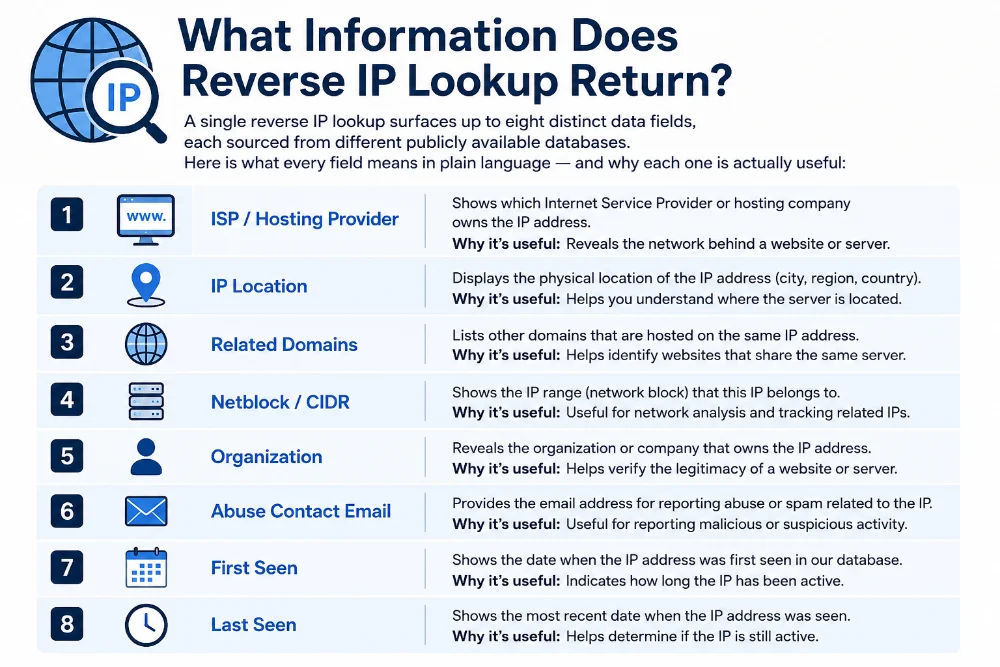
Each result field comes from a different data source - live DNS zones, RIR registries, and GeoIP databases queried in parallel
Hostname (PTR Record)
This is the DNS name the IP owner has configured in the in-addr.arpa zone. It tells you how the server identifies itself on the network. A hostname like mail.company.com signals a dedicated mail server. broadband.airtel.net reveals a residential Airtel connection. ec2-52-66-xx-xx.ap-south-1.compute.amazonaws.com immediately identifies an AWS instance in the Mumbai region. When no PTR is set, you see "No PTR record" - not an error, simply a missing configuration.
ISP (Internet Service Provider)
The organisation assigned this IP block by a Regional Internet Registry (RIR) such as APNIC (covering Asia-Pacific), ARIN (North America), or RIPE NCC (Europe). In India, common ISPs are Reliance Jio (AS55836), Airtel (AS24560), BSNL (AS9829), MTNL, and Vodafone Idea. For cloud workloads you will see Amazon Web Services (AS16509), Google Cloud (AS396982), or Microsoft Azure (AS8075). The ISP field alone tells you whether you are dealing with a home broadband line, a corporate office network, or a data centre host.
ASN (Autonomous System Number)
Every ISP and large organisation controls one or more autonomous systems - independent routing blocks with a globally unique ASN. AS15169 is Google, AS55836 is Jio, AS13335 is Cloudflare. Security teams use ASNs to write firewall rules that block or allow entire providers at once, and to correlate attack campaigns - if dozens of different IPs share one ASN, they almost certainly originate from the same operator's infrastructure.
Country, Region & City
GeoIP databases map IP blocks to locations based on where the block was registered with the RIR. Country accuracy is high (95–99%). Region (state or province) is usually reliable. City-level data is an approximation - a Jio residential IP may show Mumbai even when the subscriber is physically in Pune, because Jio registers its blocks centrally. Cloud providers can show cities entirely different from where their data centres sit. Treat city data as a guide, not a precise address.
Timezone
Derived from the GeoIP location. Practically useful when correlating log timestamps: a login attempt showing 3 AM server time from an IP that geolocates to IST (UTC+5:30) actually occurred at 8:30 AM local time - potentially a normal working-hours activity rather than a midnight intrusion, which completely changes how you triage the alert.
Who Uses Reverse IP Lookup - and for What?
This tool is not just for large enterprises or network specialists. Developers, small business owners, bloggers, and cybersecurity students reach for it every day. Here are six real-world situations where a reverse IP lookup solves a concrete problem in seconds:
Whether you are investigating a suspicious login, debugging email delivery, or profiling a traceroute hop - reverse IP lookup takes five seconds and replaces what would otherwise require three or four separate tools
Reverse IP vs. Reverse DNS vs. IP Lookup - Knowing Which Tool to Use
These three terms appear together constantly and cause genuine confusion. The table below explains what each actually does, what data it returns, and when you should reach for it. Knowing the difference saves time and prevents you from using the wrong tool for the job:
| Tool | What it queries | Data returned | Use when you need to… |
|---|---|---|---|
| Reverse DNS Lookup | DNS PTR record only (live query) | Hostname only - e.g. dns.google | Quickly verify a PTR record is set, or confirm FCrDNS passes before sending email |
| Reverse IP Lookup ← This tool | PTR query + GeoIP database + ASN registry | Hostname, ISP name, ASN, country, region, city, timezone - all in one result | Get a complete picture of any IP address: who owns it, where it is, and what it resolves to |
| IP Geolocation / IP Lookup | GeoIP database + interactive map render | Full geolocation with a clickable map, coordinates, and postal code | Visualise where an IP is located, or embed a map-based location result in a dashboard |
| WHOIS Lookup | RIR WHOIS registry (ARIN, RIPE, APNIC…) | Legal registrant name, abuse contact email, allocation date, network range | File an official abuse report, verify IP block ownership, or research IP history |
| IP Blacklist Check | 50+ spam and abuse blacklist databases | Blacklist status across Spamhaus, SORBS, Barracuda, and others | Check whether an IP is blocked by major spam filters - critical before email sends |
Recommended investigation sequence: Start here with Reverse IP Lookup to identify the owner and hostname → run Blacklist Check to see if it's flagged for spam or abuse → finish with WHOIS Lookup for the official abuse contact and allocation details. Three tools, ninety seconds, complete picture.
PTR Records Explained - How Reverse DNS Actually Works
A PTR (Pointer) record is the specific DNS record type that makes reverse IP lookup possible. While everyone who builds websites knows about A records (domain → IP), PTR records work in the opposite direction and are managed entirely differently - by the IP block owner, not the domain owner. Most web developers never need to touch one, but server administrators encounter them constantly.
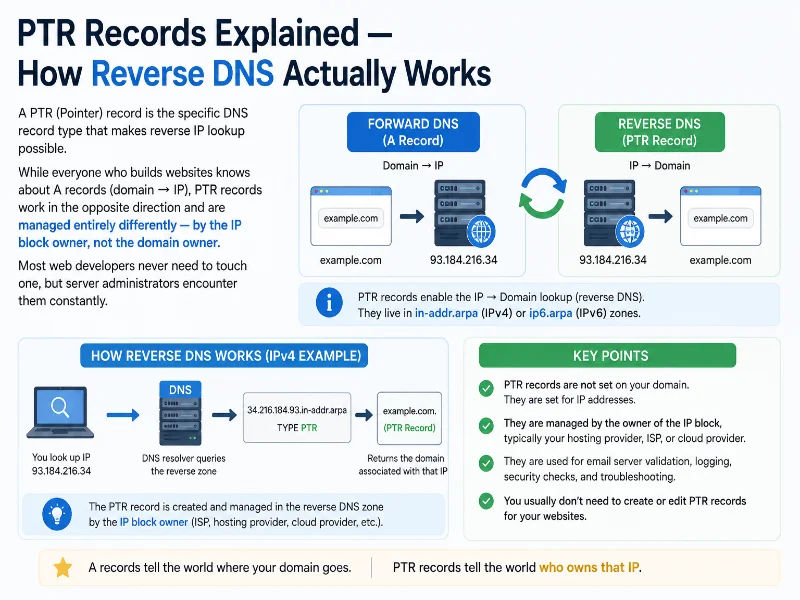
PTR records live in the in-addr.arpa DNS zone, which is maintained by IP block owners - your hosting provider or ISP controls this, not your domain registrar
The Technical Mechanics of a PTR Lookup
When our tool looks up the PTR for 103.21.244.10, it does not query a normal DNS zone. Instead it reverses the octets of the IP address and appends .in-addr.arpa, forming the query string 10.244.21.103.in-addr.arpa. This query travels to the authoritative DNS server for that reversed range, which returns the PTR record value - a hostname like cloudflare.com. For IPv6 addresses, the same reversal applies but uses ip6.arpa and reverses the hex nibbles of the full address.
Query: 10.244.21.103.in-addr.arpa → cloudflare.com
# IPv6 PTR lookup - hex nibbles reversed + ip6.arpa appended
Query: 8.8.8.8.0.6.8.4.0.6.8.4.1.0.0.2.ip6.arpa → dns.google
# Manual check on Linux/macOS:
dig -x 8.8.8.8 # shows PTR for IPv4
nslookup 8.8.8.8 # Windows equivalent
Why Your PTR Record Directly Affects Email Delivery
If you run any kind of email sending - newsletters, transactional emails, OTPs, support replies - your PTR record matters more than almost any other DNS setting. Major mail providers including Gmail, Outlook, Yahoo, and Zoho Mail perform a check called Forward-Confirmed Reverse DNS (FCrDNS) on every inbound connection. The check works in two steps: first, look up the PTR for the connecting IP; second, verify that the resulting hostname has an A (or AAAA) record that resolves back to the same IP. If either step fails, your message is flagged as suspicious and risks landing in the spam folder or being rejected entirely.
Setting up FCrDNS correctly requires two things: (1) a PTR record set by your hosting provider pointing your IP to your mail hostname (e.g. mail.yourdomain.com), and (2) an A record in your domain's DNS pointing mail.yourdomain.com back to that same IP. Both must match. You can verify this using the tool above - enter your mail server IP and confirm the hostname shown matches what you configured.
When an IP Has No PTR Record - And When It Matters
The majority of public IP addresses have no PTR record at all - this is normal and expected. Residential broadband connections from Jio, Airtel, or BSNL almost never have PTR records. Cloud VPS instances get a default PTR set by the provider (like ec2-xx-xx.compute.amazonaws.com), but you can replace it with a custom hostname via your provider's control panel - DigitalOcean, Vultr, Hetzner, and Linode all support this at no extra charge. The absence of a PTR is only a problem when you are sending outbound email. For every other use case - web hosting, APIs, games, VPNs - a missing PTR has no practical effect whatsoever.
Quick checklist for mail server PTR setup: (1) Log into your hosting control panel and set a custom reverse DNS (rDNS) for your server IP pointing to mail.yourdomain.com. (2) Add an A record in your domain DNS: mail.yourdomain.com → your server IP. (3) Use the tool above to verify the PTR shows correctly. (4) Run a blacklist check to confirm your IP is not listed before sending. Allow up to 24 hours for PTR changes to propagate globally.
Reverse IP Lookup - Frequently Asked Questions
Clear answers to the questions people actually ask about this tool, PTR records, and how reverse IP lookup works in practice:
What exactly is reverse IP lookup?
Reverse IP lookup is the process of taking a numeric IP address and discovering everything publicly known about it: the hostname (PTR record) the IP owner has configured in DNS, the ISP or organisation that owns the IP block, the autonomous system number (ASN), and the approximate geographic location from GeoIP databases. Our tool runs all of these queries simultaneously and returns the combined result in a single view - no switching between tools.
How do I find all domains or websites hosted on an IP address?
There is no single authoritative public database that lists every domain on a given IP. The PTR record only returns the hostname the IP owner has configured - typically one hostname per IP. Shared hosting environments assign many domains to a single IP, but tracking all of them requires a commercial reverse IP hosting database that continuously crawls the web and cross-references DNS A records. Our tool provides the PTR hostname, ISP, and organisation from public data. For a broader domain investigation, combine this with a WHOIS lookup on the IP block.
Is reverse IP lookup the same as reverse DNS?
Not quite. Reverse DNS lookup is a specific technical operation - it queries the DNS PTR record for an IP address and returns only the hostname. Reverse IP lookup is a broader concept that combines the PTR query with GeoIP and ASN database lookups, returning the hostname plus ISP, organisation, country, city, and timezone. This tool does both at once: it performs a live PTR query AND queries GeoIP data, giving you the full picture in a single result.
Why does my IP address show no hostname or PTR record?
Most IP addresses have no PTR record - this is completely normal and not an error. Residential broadband connections from providers like Jio, Airtel, or BSNL rarely configure PTR records for customer IPs. Cloud VPS instances get a generic provider PTR by default unless you configure a custom one. The only situation where a missing PTR is actually a problem is outbound email: mail servers that lack a valid PTR pointing to a real hostname often see their messages flagged as spam or rejected. For web hosting, APIs, or any non-email use, a missing PTR has zero practical impact whatsoever.
Is this reverse IP lookup tool completely free?
Yes - free, unlimited, and with no account or signup required. IP Tracker Tools runs reverse IP lookups at no cost, with no rate limits on the public tool. If you need PTR results only, use our dedicated Reverse DNS Lookup tool. For a visual geolocation map use the IP Lookup tool. For official ownership and abuse contacts use WHOIS Lookup. All tools on this site are free, always.
Does this tool support IPv6 addresses?
Yes, fully. Enter any IPv6 address in full or abbreviated form - for example 2001:4860:4860::8888 - and the tool performs a PTR lookup in the ip6.arpa DNS zone alongside a GeoIP and ASN lookup, exactly as it does for IPv4. Results include the hostname, ISP, organisation, ASN, and location for the IPv6 address. As the internet continues its IPv4-to-IPv6 transition, being able to reverse-look up IPv6 addresses from cloud providers and mobile networks is increasingly important.
What is an ASN and why does it appear in my lookup results?
An Autonomous System Number (ASN) is a globally unique identifier for an independently routed network on the internet. Think of it as the "company ID" for an ISP or large organisation. Google's primary ASN is AS15169. Cloudflare uses AS13335. In India, Jio is AS55836 and Airtel is AS24560. Knowing the ASN of an IP is useful because a single operator can own thousands of IPs across many different ranges - the ASN ties them all together. Security teams use ASNs to block or monitor entire providers at the firewall level, and to correlate attacks originating from the same operator's infrastructure.
How accurate is the geolocation data in the results?
Country-level accuracy is typically 95–99% for most IP ranges. Region (state or province) accuracy is around 85–90%. City-level precision varies considerably - it is usually accurate for dedicated corporate IP blocks, but can be off by hundreds of kilometres for large residential ISP ranges. This happens because GeoIP data reflects where an IP block is registered with the Regional Internet Registry, not necessarily where the device or server is physically located. Indian ISP allocations, mobile carrier IPs, and cloud provider ranges are particularly prone to city-level discrepancies. Always treat city data as an approximation rather than a precise location.
Can I do a reverse IP lookup from the command line without using a website?
Yes. On Linux or macOS, use dig -x <IP> or host <IP> to perform a PTR query from the terminal. On Windows, open Command Prompt and run nslookup <IP>. These commands return only the PTR record hostname. For ISP, ASN, and geolocation data from the command line, use whois <IP> or query an API such as ipapi.co/<IP>/json. The tool on this page combines all of these lookups automatically and presents the results in a readable format - no terminal required.
Related Tools
Combine reverse IP lookup with these free tools for a complete network and security investigation workflow: