
Reverse DNS Lookup
Find the PTR hostname assigned to any IPv4 or IPv6 address. Verify your mail server's reverse DNS for email deliverability, identify servers from IP addresses in logs, run FCrDNS checks, and troubleshoot rDNS configuration. Instant results using live DNS-over-HTTPS queries. Free, no signup.
Hero, guides, and sidebar links below work without JavaScript. The interactive checker needs JavaScript enabled in your browser.
What Is Reverse DNS Lookup?
Reverse DNS lookup - also called rDNS, reverse IP lookup, or PTR record lookup - is the process of finding the hostname that has been assigned to an IP address. Normal (forward) DNS answers "what IP address does this domain name point to?" Reverse DNS answers the opposite question: "what hostname has the owner of this IP address configured for it?" The two lookups use entirely separate parts of the DNS system and serve very different purposes.
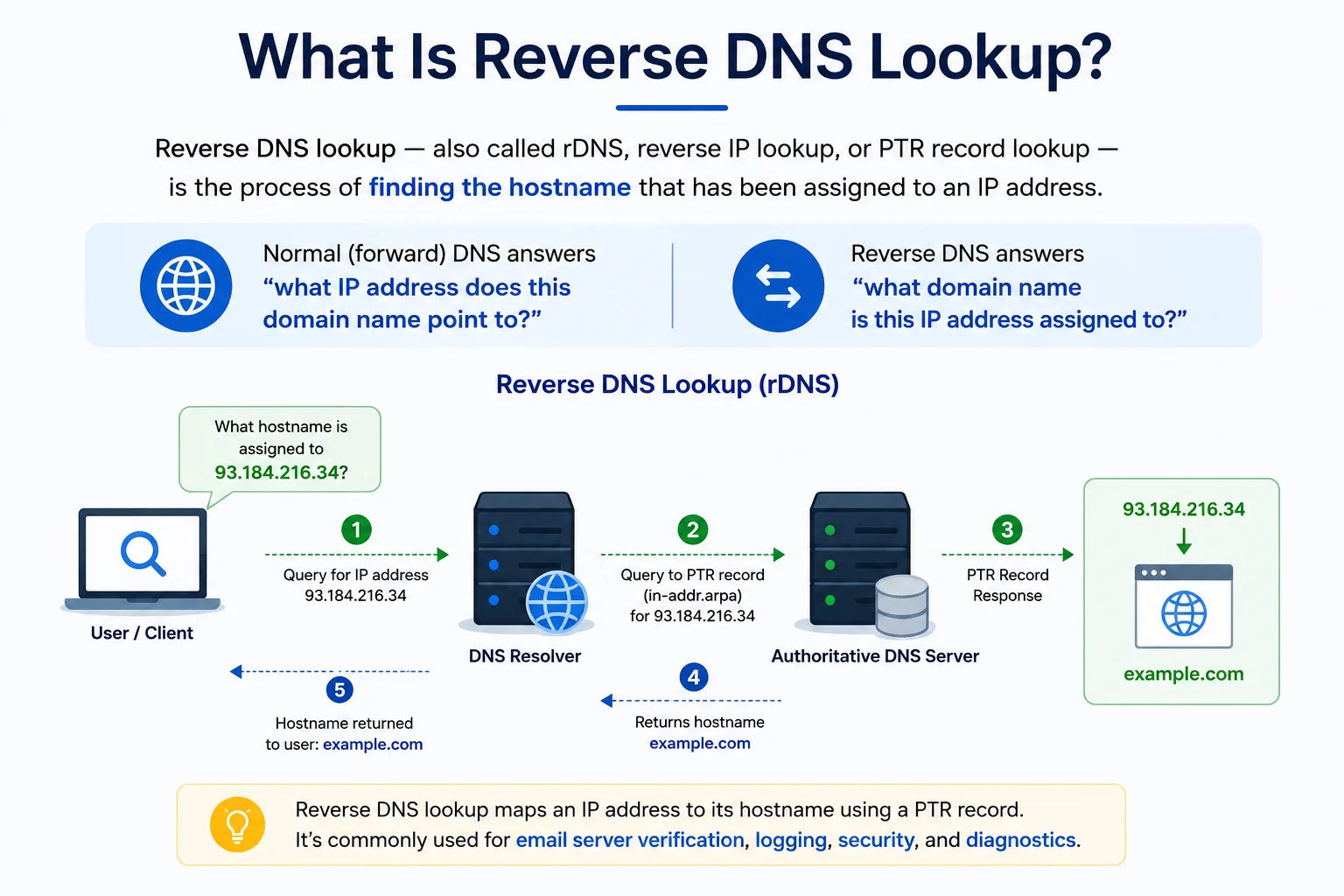
Reverse DNS maps IP addresses back to hostnames - the opposite direction of standard forward DNS resolution
While forward DNS is maintained by domain owners (you add A and CNAME records to your domain's DNS zone), reverse DNS is maintained by whoever owns the IP address block - typically your ISP or hosting provider. This means you cannot set a PTR record by yourself at your domain registrar; you must request it from the organisation that assigned you your IP address. This asymmetry is one of the most misunderstood aspects of DNS configuration.
Reverse DNS vs Reverse IP Lookup: These are different tools. Reverse DNS (this page) retrieves the PTR hostname for an IP address - a DNS query. Our Reverse IP Lookup tool finds all domain names hosted on a given IP address - a web hosting database query. They answer completely different questions and use different data sources.
How PTR Records Work - The in-addr.arpa Zone Explained
PTR records (Pointer records) live in a special DNS zone called in-addr.arpa for IPv4 and ip6.arpa for IPv6. The mechanism uses a reversed IP address format that is one of the most elegant designs in DNS:
Reverse DNS: To look up PTR for 8.8.8.8:
Step 1 - Reverse the octets: 8.8.8.8 → 8.8.8.8
Step 2 - Append .in-addr.arpa: → 8.8.8.8.in-addr.arpa
Step 3 - DNS PTR query: 8.8.8.8.in-addr.arpa PTR
Result: dns.google.
For 220.168.166.35 (Airtel India):
Query: 35.166.168.220.in-addr.arpa PTR
Result: broadband.airtel.net.
For 49.43.112.xx (Jio/Reliance):
Query: xx.112.43.49.in-addr.arpa PTR
Result: (No PTR record - Jio residential IPs typically lack PTR)
IPv6 PTR Records - ip6.arpa
IPv6 reverse DNS works the same way but uses the ip6.arpa zone. Each hexadecimal nibble of the IPv6 address is reversed and dotted. For example, the IPv6 address 2001:4860:4860::8888 (Google's DNS) becomes a 32-nibble reversed query in ip6.arpa. IPv6 PTR records are even more rarely configured than IPv4, but are increasingly important as IPv6 adoption grows - particularly for mail servers running dual-stack.
Who Controls PTR Records?
PTR records for an IP address are controlled by the organisation that owns the IP block - not by the domain owner. The hierarchy is:
- IANA → delegates IP blocks to Regional Internet Registries (APNIC, ARIN, RIPE, LACNIC, AFRINIC)
- RIR → delegates to ISPs and hosting providers (Jio, Airtel, AWS, Hetzner, DigitalOcean)
- ISP/Host → sets PTR records for IPs they assign to customers
- Customer → requests PTR records from their ISP or host, cannot set them independently
This is why a web hosting company's control panel will have a "Reverse DNS" or "PTR Record" configuration option - they own the IP block and can set PTR records for the IPs they assign to your server.
FCrDNS - Forward-Confirmed Reverse DNS and Why It's Critical for Email
FCrDNS (Forward-Confirmed reverse DNS), also called double-reverse DNS or rDNS verification, is a two-step check that many major mail servers - including Gmail and Outlook - use to validate mail server identity:
203.0.113.42 → mail.yourdomain.com
Step 2 - Forward DNS verification (A record lookup):
mail.yourdomain.com → 203.0.113.42 ✓ Matches!
FCrDNS PASS - IP and hostname confirm each other
FCrDNS FAILURE examples:
203.0.113.42 → mail.yourdomain.com → 203.0.113.99 ✗ Mismatch
203.0.113.42 → No PTR record ✗ No rDNS at all
203.0.113.42 → mail.yourdomain.com → NXDOMAIN ✗ No forward record
Why FCrDNS Matters for Email Deliverability
Gmail's Postmaster documentation explicitly states it checks FCrDNS. When a mail server connects to Gmail to deliver email, Gmail looks up the PTR for the connecting IP, then verifies that the resulting hostname resolves back to the same IP. If either step fails, Gmail assigns a higher spam probability to the email. Specifically:
- No PTR record at all: Gmail returns a "550-5.7.25" error: "The IP address sending this message does not have a PTR record" - the email is permanently rejected.
- PTR doesn't resolve back (FCrDNS mismatch): The email may be accepted but with a higher spam score.
- PTR present and FCrDNS passes: One less negative signal - email is evaluated on other factors normally.
Microsoft Outlook (Office 365) applies similar checks. MAILER-DAEMON bounce messages mentioning "reverse DNS" or "PTR" almost always indicate FCrDNS failure.
Common FCrDNS mistake: Setting your PTR record to a hostname that doesn't have an A record, or having the A record point to a different IP. For example: PTR for 203.0.113.42 points to mail.example.com, but mail.example.com has an A record pointing to 203.0.113.99. This fails FCrDNS. The forward and reverse must point to exactly the same IP.
Reading PTR Hostnames - What They Tell You About an IP
PTR hostnames are often structured in a way that encodes useful information about the IP - the ISP, the server's function, the network segment, and sometimes the geographic location. Here is how to interpret the most common PTR hostname formats from major providers:
How to Interpret ISP PTR Patterns
Many ISPs use structured hostnames that encode information about the connection type and location:
- Prefixes like
static.,dedicated., orserver.indicate a fixed IP on a server or business line - Prefixes like
dynamic.,broadband.,cpe.,dsl., orcable.indicate residential or dynamic IPs - The IP address encoded in the hostname (like
c-203-0-113-42) confirms the reverse DNS is configured correctly for that specific IP - Generic hostnames like
broadband.airtel.netorrelay.bsnl.net.inmean the ISP hasn't configured per-IP PTR records - a common limitation with large Indian ISPs
How to Set a PTR Record - Step-by-Step for Every Major Provider
Since PTR records are controlled by the IP block owner (your host or ISP), the process varies by provider. Here is exactly how to configure reverse DNS on the most common platforms:
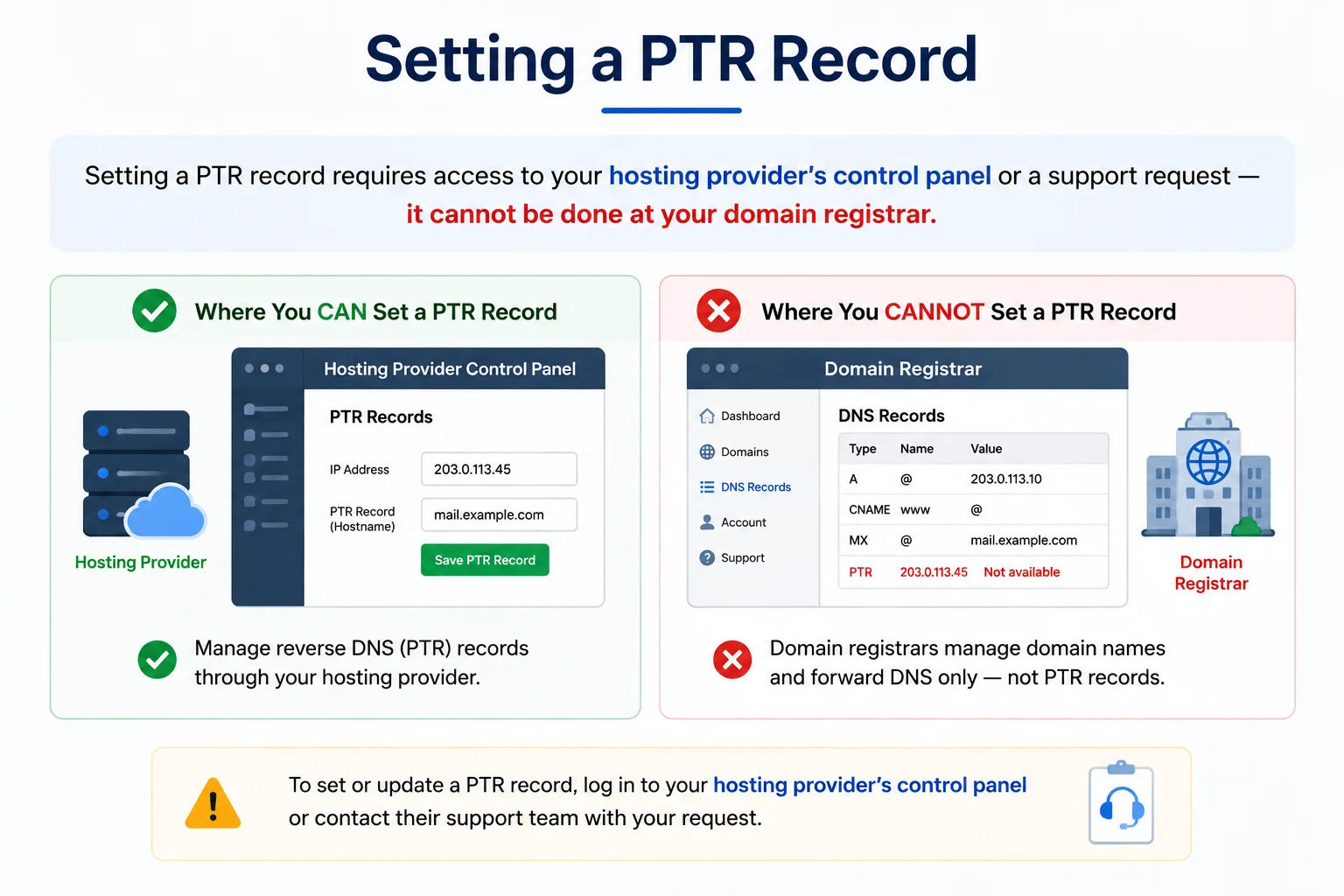
Setting a PTR record requires access to your hosting provider's control panel or a support request - it cannot be done at your domain registrar
- Log in → Droplets → select your Droplet
- Settings tab → scroll to "Rename" section
- Rename your Droplet to the desired hostname (e.g. mail.yourdomain.com)
- PTR record is automatically set to match the Droplet name within a few minutes
- Assign an Elastic IP to your instance
- EC2 Console → Elastic IPs → select your EIP
- Actions → Update Reverse DNS → enter your hostname
- Hostname must resolve forward to the same EIP first - AWS validates this
- Vultr: Instances → Server Info → Reverse DNS field → enter hostname → Save
- Linode: My Linodes → select Linode → Network → Edit rDNS
- Both require the hostname to already have an A record pointing to that IP
- Cloud Console → Servers → select server → Networking tab
- Under Public IPv4, click the pencil icon next to Reverse DNS
- Enter the desired PTR hostname
- Propagates within a few minutes
- OVH Manager → Bare Metal Cloud → IP section
- Find your IP → click the gear icon → Modify Reverse
- Enter hostname → Confirm
- Forward DNS (A record) must exist first pointing to the IP
- Go to VPC Network → External IP Addresses
- Click the IP address → find "Reverse DNS lookup" field
- Enter hostname → Save (no automatic validation but A record should match)
- Or use CLI: gcloud compute addresses update IP_NAME --ptr-record=HOSTNAME
- WHM → Network Setup → Reverse DNS → add a PTR entry
- Or: WHM → DNS Functions → Edit DNS Zone for the in-addr.arpa zone
- Some shared hosting providers don't allow PTR customisation - contact support
- Contact your ISP's business/commercial support (not residential)
- Request a PTR record for your static IP
- Jio residential connections typically cannot have PTR records set - upgrade to a business line
- Airtel broadband: submit via business helpdesk with your account details and desired hostname
Before setting your PTR record: Make sure the hostname you want to use has an A record pointing to the same IP. Many hosting providers validate this before allowing you to set the PTR. Example: if you want PTR for 203.0.113.42 to be mail.yourdomain.com, first add an A record: mail.yourdomain.com → 203.0.113.42. Then set the PTR. Then verify FCrDNS passes by re-running this reverse DNS lookup tool.
Forward DNS vs Reverse DNS - Complete Comparison
Understanding the difference between forward and reverse DNS is essential for correctly configuring any internet service. They use different zones, different record types, and are controlled by different parties:
| Aspect | Forward DNS (A Record) | Reverse DNS (PTR Record) |
|---|---|---|
| This page - rDNS | - | This tool performs PTR lookups |
| Question answered | "What IP does this hostname resolve to?" | "What hostname is assigned to this IP?" |
| DNS zone | Your domain's zone (e.g. example.com) | in-addr.arpa (IPv4) or ip6.arpa (IPv6) |
| Record type | A record (IPv4), AAAA record (IPv6) | PTR record |
| Who controls it | Domain owner (you, via your DNS provider) | IP block owner (your ISP or hosting provider) |
| Where to configure | Your DNS provider (Cloudflare, Route53, GoDaddy) | Your hosting provider's control panel or ISP |
| Propagation time | TTL-dependent (minutes to hours) | Varies by provider (minutes to 24 hours) |
| Required for email | Yes - MX record and A records for mail hostname | Yes - PTR for sending IP must match mail hostname |
| Tool to check | DNS Lookup | This page (Reverse DNS Lookup) |
Who Uses Reverse DNS Lookup - 8 Real-World Use Cases
Reverse DNS is used across network administration, email operations, security research, and development. Here are the eight most common scenarios where a PTR lookup provides immediate value:
Reverse DNS Lookup from the Command Line
While this web tool is the fastest option for most use cases, system administrators and developers frequently need PTR lookups from the command line. Here are the key commands for every platform:
Linux / macOS
dig -x 8.8.8.8 # Full reverse DNS query
dig -x 8.8.8.8 +short # Short output - hostname only
dig -x 1.1.1.1 @8.8.8.8 +short # Ask Google DNS specifically
# host - simplest syntax
host 8.8.8.8 # Returns PTR hostname
host 220.168.166.35 # Airtel India IP
# nslookup - cross-platform
nslookup 8.8.8.8 # Reverse lookup
nslookup -type=PTR 8.8.8.8.in-addr.arpa # Explicit PTR query
# Batch reverse DNS for multiple IPs
for ip in 8.8.8.8 1.1.1.1 9.9.9.9; do echo "$ip: $(dig -x $ip +short)"; done
Windows (PowerShell / Command Prompt)
nslookup 8.8.8.8 :: Basic PTR lookup
nslookup 8.8.8.8 1.1.1.1 :: Ask Cloudflare DNS
:: PowerShell - Resolve-DnsName (modern)
Resolve-DnsName 8.8.8.8 :: Returns PTR record
Resolve-DnsName 8.8.8.8 -Type PTR :: Explicit PTR type
[System.Net.Dns]::GetHostEntry("8.8.8.8").HostName :: .NET method
:: Batch PTR lookups via PowerShell
@("8.8.8.8","1.1.1.1","9.9.9.9") | ForEach-Object { "$_ : $((Resolve-DnsName $_).NameHost)" }
Verify Googlebot Authenticity (Linux)
dig -x 66.249.66.1 +short → crawl-66-249-66-1.googlebot.com.
# Step 2: Forward lookup - must return same IP
dig crawl-66-249-66-1.googlebot.com A +short → 66.249.66.1 ✓
# If both match → confirmed genuine Googlebot
# Valid Googlebot PTR ends in: .googlebot.com or .google.com
Reverse DNS Troubleshooting - Diagnosing Common PTR Problems
When reverse DNS is causing email delivery issues or FCrDNS failures, use this table to diagnose and fix the exact problem:
| Symptom | Likely Cause | How to Fix |
|---|---|---|
| No PTR record | ISP/host has not configured reverse DNS for this IP | Contact your hosting provider to set a PTR record. For ISPs: request via business support. For Jio residential: not possible - use ISP's SMTP relay on port 587 |
| Gmail "550-5.7.25" rejection | No PTR record on the sending IP | Configure PTR via your hosting provider pointing to your mail hostname. Then verify FCrDNS passes with this tool |
| PTR exists but FCrDNS fails | The hostname in PTR doesn't have an A record pointing back to the same IP | Add an A record for the hostname in the PTR. E.g. if PTR says mail.example.com, add: mail.example.com A → your_mail_IP |
| PTR shows wrong hostname | Old PTR record not updated after IP or hostname change | Update PTR via hosting provider control panel. Changes typically propagate in under an hour |
| PTR set but still not working after 24h | DNS propagation delay or old cached PTR at recipient's resolver | Check with dig -x IP +short to confirm new PTR. Ask recipient to flush their resolver cache or wait for TTL to expire |
| Different PTR returned by different DNS resolvers | Conflicting PTR records or in-addr.arpa delegation issue | Verify the PTR with your authoritative nameserver directly: dig @ns.yourhost.com -x IP +short. If inconsistent, contact your host to resolve the delegation |
| IPv6 PTR not resolving | ip6.arpa delegation not configured or IPv6 PTR not set | IPv6 PTR requires the ip6.arpa zone to be delegated to a nameserver that has the PTR entry. Configure via your hosting provider's IPv6 reverse DNS settings |
Frequently Asked Questions - Reverse DNS Lookup
What is reverse DNS and how is it different from regular DNS?
Regular (forward) DNS resolves a domain name to an IP address - e.g., "what is the IP for google.com?" Reverse DNS (rDNS) resolves an IP address to a hostname - e.g., "what hostname is assigned to 8.8.8.8?" They use completely different DNS zones: forward DNS uses your domain's zone (example.com), while reverse DNS uses the in-addr.arpa zone for IPv4 and ip6.arpa for IPv6. They are also controlled by different parties: you control forward DNS for your domain, but reverse DNS for an IP is controlled by whoever owns the IP block - your ISP or hosting provider. You cannot set PTR records at your domain registrar; you must contact your IP block owner.
Why does my IP have no PTR record?
Having no PTR record is very common and has several typical causes: (1) Most residential and mobile ISPs - including Jio in India - do not configure PTR records for residential IP ranges. This is normal for home broadband. (2) Your hosting provider requires you to configure PTR manually - many VPS and dedicated server providers leave it blank until you set it in their control panel. (3) The IP was recently allocated or reassigned and the PTR hasn't been configured yet. (4) Some IP blocks are not fully delegated in in-addr.arpa, making PTR queries impossible. For email servers, not having a PTR record is a serious problem - Gmail and many other providers reject email from IPs without PTR. For general internet use (web browsing, downloading), no PTR has zero impact.
How do I set a PTR record for my server?
PTR records are set by the organisation that owns your IP block - not your domain registrar. For cloud servers (AWS, DigitalOcean, Hetzner, Vultr): look in your provider's control panel for a "Reverse DNS" or "PTR record" setting, usually in the networking section of your instance. Enter the hostname you want (e.g. mail.yourdomain.com). For dedicated servers: usually configured through WHM, your host's control panel, or a support ticket. For home broadband (Jio, Airtel, BSNL): contact your ISP's business/commercial support - residential connections typically cannot have custom PTR records set. Before setting PTR, first create an A record for your desired hostname pointing to the same IP - many providers validate this before allowing PTR configuration.
What is FCrDNS and why does it matter for email?
FCrDNS (Forward-Confirmed reverse DNS) is a two-step check used by Gmail, Outlook, and many enterprise mail servers to verify that a sending IP's PTR hostname correctly points back to the same IP. Step 1: reverse DNS lookup on the connecting IP returns a hostname. Step 2: forward DNS lookup on that hostname must return the same original IP. If Step 2 fails or there is no PTR at all, Gmail returns a 550-5.7.25 error ("The IP address does not have a PTR record") and permanently rejects the email. This is one of the most common causes of new mail server setup failures. Both the PTR record AND a matching A record for the mail hostname are required for Gmail delivery.
What is the in-addr.arpa zone?
The in-addr.arpa zone is the special DNS zone where PTR records for IPv4 addresses are stored. It works by reversing the octets of an IP address and appending .in-addr.arpa. For example, to look up the PTR for 8.8.8.8, a DNS resolver queries "8.8.8.8.in-addr.arpa" for a PTR record. The octets are reversed because DNS delegation works from right to left (most general to most specific), and reversing the IP makes it consistent with how domain zones are organised. IPv6 addresses use ip6.arpa in the same way but with each hexadecimal nibble reversed individually.
What does the PTR hostname tell me about an IP?
A PTR hostname can reveal several things about the IP depending on how the owner has configured it: (1) The owning organisation - "amazonaws.com" means AWS, "hetzner.com" means Hetzner, "airtel.net" means Airtel India. (2) The service type - "ec2" in an AWS PTR means an EC2 virtual machine; "broadband" in an ISP PTR means residential broadband. (3) The region or data centre - AWS PTR hostnames encode the region: "ap-south-1" means Mumbai, "us-east-1" means Northern Virginia. (4) The actual IP encoded in the hostname - many ISPs and hosts encode the IP digits in the PTR hostname for identification. (5) Whether it's a business or residential connection - "static", "server", "dedicated" suggest business lines; "dynamic", "broadband", "cable", "dsl" suggest residential.
Can I have multiple PTR records for one IP?
Technically, the DNS specification allows multiple PTR records for a single IP address. However, in practice, most mail servers and network tools only process the first PTR record returned, and having multiple PTR records for a mail server IP is generally considered bad practice. RFC 1912 recommends that each IP should have exactly one PTR record, and that PTR should match exactly one A record (FCrDNS). For mail server IPs, configure exactly one PTR that matches exactly one A record pointing back to the same IP. Multiple PTR records on a single IP can cause unpredictable behaviour in mail server validation.
How is reverse DNS lookup different from Reverse IP Lookup?
These are two entirely different tools that answer different questions: Reverse DNS Lookup (this page) performs a DNS PTR record query to find the hostname the IP block owner has configured for that specific IP address. It returns one hostname per IP. Reverse IP Lookup (our separate tool) queries web hosting databases to find all domain names that are currently hosted on a given IP address - it can return dozens or hundreds of websites sharing the same server IP. Reverse DNS uses the in-addr.arpa DNS zone; Reverse IP lookup uses web crawl data and hosting databases. Neither is a substitute for the other.
How do I verify Googlebot using reverse DNS?
Google officially recommends this two-step reverse DNS verification to confirm a visitor is genuine Googlebot: (1) Run a reverse DNS lookup on the IP claiming to be Googlebot - the PTR hostname must end in .googlebot.com or .google.com. (2) Run a forward DNS lookup on that hostname - it must resolve back to the original IP. If both steps pass, the visitor is confirmed genuine Googlebot. Command-line method: dig -x [IP] +short to get hostname, then dig [hostname] A +short to verify it returns the same IP. This verification is important because anyone can set their HTTP User-Agent to "Googlebot" - only genuine Google crawlers have the matching PTR records in Google's managed DNS zones.
Is this reverse DNS lookup tool free?
Yes - completely free, unlimited lookups, no account or signup required. The tool performs a live DNS PTR query via Google DNS-over-HTTPS, returning the real-time PTR record for any public IPv4 or IPv6 address. It also performs a forward FCrDNS verification check and fetches ISP, ASN, and geolocation data for additional context. We do not keep a personal lookup history in the app; see our Privacy Policy for analytics, security, and third-party processing.
Related Tools
Technical information
How this tool works, where data comes from, and known limitations. See also our methodology and accuracy & limitations pages.
How this tool works
Performs a PTR lookup for the IP and may enrich results with geolocation fields from ipapi.co when available.
Data source
- Public DNS PTR resolution
- ipapi.co (optional geo enrichment)
Limitations
Many residential and mobile IPs have no PTR. Reverse DNS is controlled by the IP block owner, not the domain registrant.
Content revision 2026-09 (aligned with current tool implementation in this codebase)