
Broadcast Address Calculator
Instantly find the broadcast address for any IPv4 subnet. Enter your IP address and CIDR prefix length to calculate the broadcast address (the last address in the subnet), network address, subnet mask, wildcard mask, and usable host range. All calculations run in your browser - no data sent to any server.
Hero, guides, and sidebar links below work without JavaScript. The interactive checker needs JavaScript enabled in your browser.
What Is a Broadcast Address?
The broadcast address is the last IP address in a subnet - the one where all host bits are set to 1. A packet sent to the broadcast address is delivered to every device on that subnet simultaneously. Routers do not forward directed broadcasts by default (per RFC 2644), so broadcasts are contained within their subnet - a fundamental mechanism for protocols like ARP (Address Resolution Protocol), DHCP discovery, and NetBIOS name resolution.
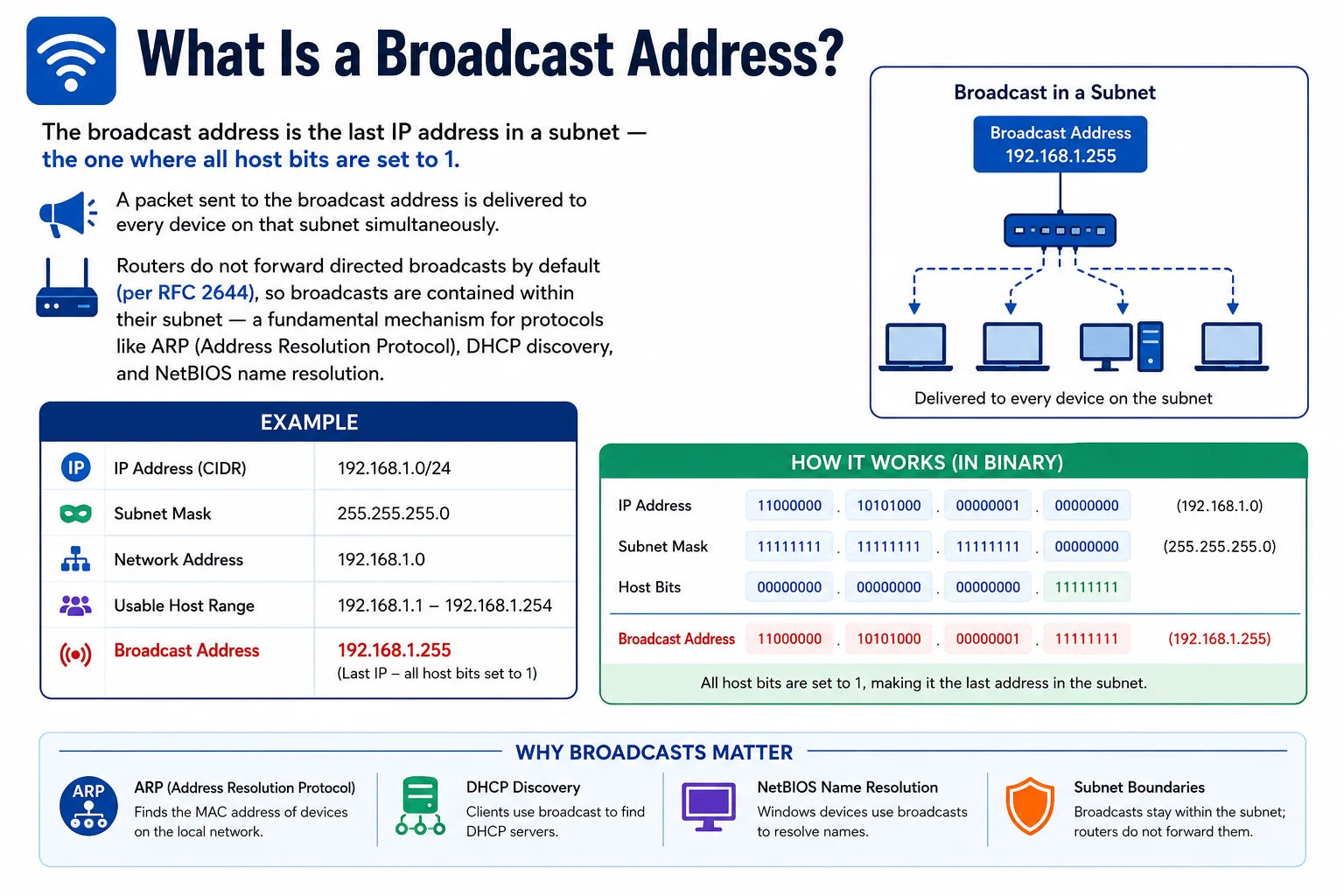
The broadcast address reaches every device on a subnet - sending a packet here is like sending an announcement to everyone in the same room
How the Broadcast Address Is Calculated
The broadcast address is calculated by performing a bitwise OR between the network address and the wildcard mask (the inverse of the subnet mask):
Wildcard mask: 0.0.0.255 = 00000000.00000000.00000000.11111111
OR operation: 11000000.10101000.00000001.11111111
Broadcast address: 192.168.1.255
# Rule: all host bits set to 1
# For /24: last 8 bits = 11111111 = 255 → last octet is always 255
# For /25: last 7 bits = 1111111 → .127 or .255 depending on which half
Broadcast Address Reference Table
| Network | CIDR | Broadcast Address | Last Octet Pattern |
|---|---|---|---|
| 192.168.1.0 | /24 | 192.168.1.255 | Always .255 |
| 192.168.1.0 | /25 | 192.168.1.127 | First /25 ends .127 |
| 192.168.1.128 | /25 | 192.168.1.255 | Second /25 ends .255 |
| 192.168.1.0 | /26 | 192.168.1.63 | .63, .127, .191, .255 |
| 10.0.0.0 | /8 | 10.255.255.255 | All host bits = 1 |
| 172.16.0.0 | /12 | 172.31.255.255 | RFC 1918 Class B range |
Why the Broadcast Address Cannot Be Assigned to a Host
The broadcast address is reserved by the network protocol stack - any device receiving a packet addressed to the broadcast IP processes it as if it were sent to itself. Assigning a device's IP address to the broadcast address would cause every packet sent to that address to be processed by every device on the subnet, creating a denial-of-service condition. Operating systems and routers reject configuration attempts to assign the broadcast address as a device IP.
Broadcast in Cloud Networking
Cloud providers (AWS, Azure, GCP) reserve the broadcast address in every subnet even though traditional broadcasts don't work in virtual networking. AWS reserves the last IP (broadcast address) in every subnet in addition to the network address, VPC router, DNS, and future-use addresses - consuming 5 IPs total from every subnet allocation.
Frequently Asked Questions
How do I find the broadcast address of a subnet?
Perform a bitwise OR between the network address and the wildcard mask (inverse of the subnet mask). For 192.168.1.0/24: wildcard is 0.0.0.255, OR with 192.168.1.0 gives 192.168.1.255. The broadcast address always has all host bits set to 1.
What happens if I ping the broadcast address?
Pinging the broadcast address (e.g., ping 192.168.1.255) sends an ICMP Echo Request to all devices on the subnet. Each device may respond, causing a "broadcast ping" or "smurf" response. Most modern operating systems and routers block replies to broadcast pings by default to prevent smurf attacks.
Is the broadcast address the same as 255.255.255.255?
255.255.255.255 is the limited broadcast address - it reaches all devices on the local network segment without specifying a subnet. The directed broadcast address (like 192.168.1.255) is specific to a subnet. The limited broadcast is used by DHCP clients before they have an IP address assigned.
Why does AWS reserve the broadcast address if cloud networks do not use it?
AWS reserves the last IP in every subnet for future use and to maintain compatibility with the IPv4 standard. Even though virtual networks in AWS do not forward traditional broadcasts, the address is still reserved to prevent assignment to instances. This is why a /24 in AWS provides 251 usable IPs, not 254.
Is this broadcast address calculator free?
Yes - completely free, no signup required. Runs entirely in your browser - no data sent to any server. Enter any IPv4 address and CIDR prefix to instantly get the broadcast address, network address, subnet mask, and all other subnet details.