
HTTP Headers Checker
View all HTTP response headers for any URL. Instantly see server software, security headers (HSTS, CSP, X-Frame-Options), caching configuration, content encoding, CDN status, and redirect destinations. Essential for web developers, security auditors, and DevOps engineers.
Hero, guides, and sidebar links below work without JavaScript. The interactive checker needs JavaScript enabled in your browser.
What Are HTTP Response Headers?
HTTP response headers are metadata sent by a web server alongside the response body. They tell the browser (and anyone inspecting them) critical information about the server, how to cache the response, what security policies to enforce, where redirects point to, and much more. Checking HTTP headers is essential for web developers, security auditors, DevOps engineers, and SEO professionals.
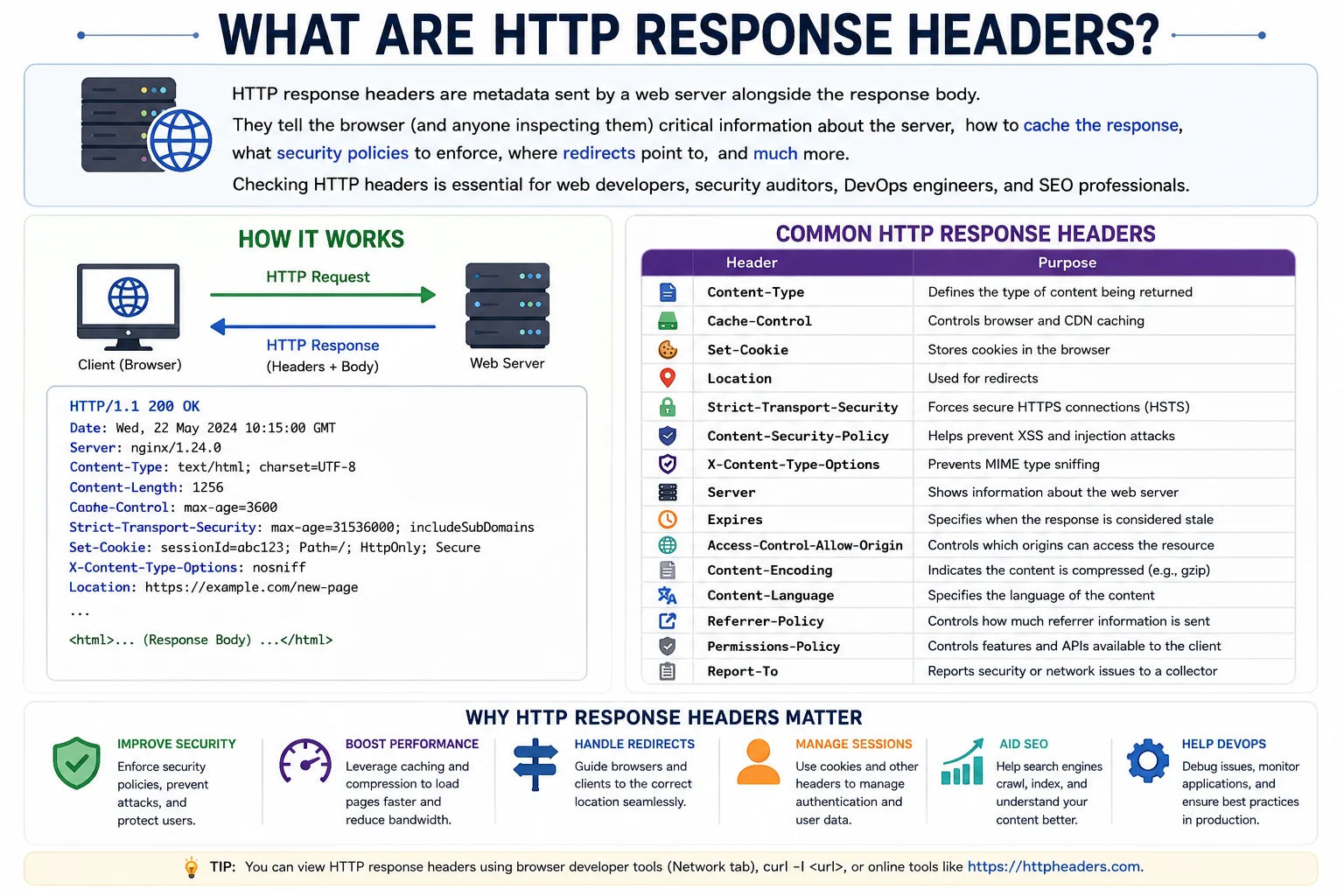
HTTP response headers reveal how a server is configured - from security policies and caching rules to CDN providers and framework information
Most Important HTTP Headers and What They Mean
| Header | Category | What It Shows |
|---|---|---|
| Server | Server Info | Web server software (e.g. nginx/1.24, Apache/2.4, cloudflare). Reveals the server technology stack. |
| Content-Type | Content | MIME type of the response (text/html, application/json, image/webp). Essential for browser rendering. |
| Content-Encoding | Performance | Compression used: gzip, br (Brotli), deflate. br is fastest - verifies compression is enabled. |
| Cache-Control | Caching | How long and how browsers/CDNs should cache the response. max-age=31536000 = 1 year cache. |
| Strict-Transport-Security | Security | HSTS - forces HTTPS. max-age=31536000 with includeSubDomains is the recommended setting. |
| Content-Security-Policy | Security | CSP - restricts what resources (scripts, images, frames) the browser can load. Prevents XSS attacks. |
| X-Frame-Options | Security | DENY or SAMEORIGIN - prevents clickjacking by blocking the page from being embedded in iframes. |
| X-Content-Type-Options | Security | nosniff - prevents MIME-type sniffing attacks. |
| Referrer-Policy | Privacy | Controls how much referrer information is sent with outbound requests. |
| Location | Redirect | The URL being redirected to. Present on 301/302/307/308 responses. |
| CF-Ray / X-Cache | CDN | Cloudflare (CF-Ray) or Varnish/CDN (X-Cache) cache status - shows if CDN is active. |
| Set-Cookie | Session | Cookies being set. Check for Secure, HttpOnly, and SameSite attributes for security compliance. |
Security Header Checklist
Every production web application should have these security headers configured. Use this checker to verify them:
- Strict-Transport-Security: Forces HTTPS - essential for any site with user data
- Content-Security-Policy: Restricts resource loading - prevents XSS attacks
- X-Frame-Options: Prevents clickjacking - use SAMEORIGIN or DENY
- X-Content-Type-Options: Set to nosniff - prevents MIME type attacks
- Referrer-Policy: strict-origin-when-cross-origin is the recommended value
- Permissions-Policy: Restricts browser feature access (camera, microphone, geolocation)
Frequently Asked Questions
What is HTTP response status code 301 vs 302?
301 is a permanent redirect - search engines transfer PageRank/link equity and update their index. 302 is temporary - search engines keep the original URL indexed. 307 and 308 are HTTP/1.1 equivalents that preserve the request method. Always use 301 for permanent SEO-relevant redirects.
What is HSTS and why should my site have it?
HSTS (HTTP Strict-Transport-Security) tells browsers to only connect via HTTPS for a specified period. Prevents SSL stripping attacks where attackers downgrade connections to HTTP. Recommended: Strict-Transport-Security: max-age=31536000; includeSubDomains; preload
What does Content-Security-Policy do?
CSP is a security header that tells the browser which sources are allowed to load scripts, images, styles, and other resources. Prevents XSS (Cross-Site Scripting) attacks by blocking inline scripts and untrusted external sources.
Why does the Server header sometimes not appear?
Many production servers remove the Server header for security - disclosing server software and version gives attackers information for targeted exploits. Cloudflare, Nginx, and Apache can all be configured to omit or mask this header.
Is this HTTP headers checker free?
Yes - completely free, no signup required. Checks any public URL and returns all response headers, status code, response time, and a security header audit.
Related Tools
Technical information
How this tool works, where data comes from, and known limitations. See also our methodology and accuracy & limitations pages.
How this tool works
Requests the target URL over HTTPS/HTTP and displays response headers returned by the remote server (and intermediaries).
Data source
- Live HTTP(S) response from the target URL
Limitations
Headers reflect one request from the checker’s vantage point. CDNs, bot protection, and geo routing can return different headers for other clients.
Content revision 2026-09 (aligned with current tool implementation in this codebase)