
UDP Port Test
UDP testing is fundamentally different from TCP - there is no handshake, no guaranteed response, and no definitive "port open" signal from a silent server. This tool uses protocol-native tests to verify real UDP services: a live DNS query on port 53, an NTP time request on port 123, QUIC/HTTP3 detection on port 443, and connectivity probes for VPN and VoIP ports. Each test uses the actual protocol to confirm the service is working - not just that the port exists.
Hero, guides, and sidebar links below work without JavaScript. The interactive checker needs JavaScript enabled in your browser.
Why UDP Testing Is Different from TCP
UDP (User Datagram Protocol) is connectionless - there is no handshake, no acknowledgement, and no guaranteed delivery. When you send a UDP packet to a port, one of three things happens: the server receives it and sends a response (port open, service responding), the server receives it but doesn't respond (by design - some protocols don't respond to unsolicited packets), or the server's OS sends an ICMP "port unreachable" message (port closed). The critical problem for testing: silence is ambiguous. No response could mean the port is open but the server chose not to reply, the firewall dropped the packet, the packet was lost in transit, or the host is unreachable.
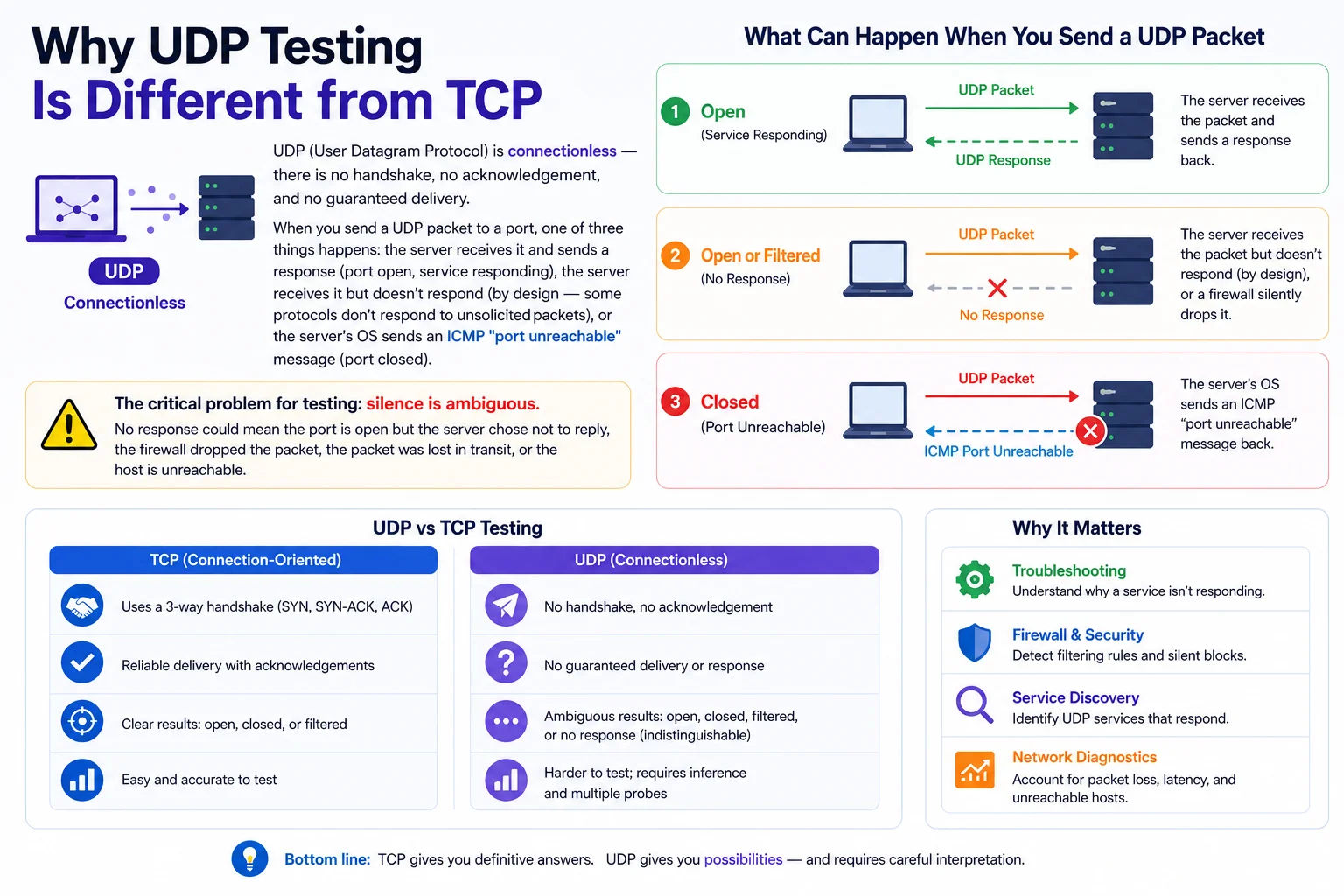
Unlike TCP's definitive SYN/SYN-ACK handshake, UDP's connectionless nature means testing requires sending valid protocol messages and waiting for protocol-specific responses - raw port probes are inherently ambiguous
TCP vs UDP - Fundamental Differences
| Property | TCP | UDP |
|---|---|---|
| Connection | Connection-oriented (3-way handshake) | Connectionless - no handshake |
| Reliability | Guaranteed delivery, retransmission on loss | Best-effort, no retransmission |
| Order | Packets delivered in order | Packets may arrive out of order |
| Error checking | Checksums + acknowledgements | Checksum only (no ack) |
| Speed | Slower - overhead of connection setup | Faster - no connection overhead |
| Port testing | Definitive - SYN-ACK=open, RST=closed | Ambiguous - silence could mean open, filtered, or service-design |
| Typical use | HTTP, HTTPS, SSH, databases, email | DNS, NTP, DHCP, VPNs, VoIP, gaming, video streaming, QUIC/HTTP3 |
| Header size | 20 bytes minimum | 8 bytes - 60% smaller overhead |
| Flow control | Yes - sliding window | No |
| When to use | Reliability matters (web, APIs, file transfer) | Speed matters, some loss acceptable (streaming, gaming, VPN, DNS) |
The UDP Port Testing Problem - nmap's Solution
Because silence is ambiguous in UDP, nmap developed several techniques to distinguish between open and filtered UDP ports. Unlike TCP where nmap's SYN scan takes milliseconds, UDP scanning is slow and unreliable - nmap marks a port as open|filtered when it receives no response, because it genuinely cannot tell which it is:
sudo nmap -sU -p 53,123,161,500 8.8.8.8
# nmap UDP scan output states:
open → Response received (service replied with protocol data)
closed → ICMP port unreachable received (OS explicitly refused)
filtered → ICMP filtered/admin prohibited received
open|filtered → No response - could be either open or filtered
# Scan with version detection (sends protocol-specific probes):
sudo nmap -sU -sV -p 53,123,161,500,1194,51820 target.com
# Version detection sends the right payload for each service:
Port 53 → DNS query for version.bind
Port 123 → NTP version query
Port 161 → SNMP GetRequest
Port 500 → IKE (IPSec) probe
Port 1194 → OpenVPN probe
UDP Protocols - Complete Port Reference
Click any row to test that service:
UDP DDoS Amplification - How Open UDP Ports Become Weapons
UDP's connectionless nature makes it ideal for Distributed Denial-of-Service (DDoS) amplification attacks. An attacker sends a small spoofed UDP packet to a server (spoofing the victim's IP as the source). The server replies with a much larger response - to the victim's IP. The amplification factor is the ratio of response size to request size.
| Protocol / Port | Amplification Factor | Max Attack Size | How to Mitigate |
|---|---|---|---|
| Memcached / 11211 | 51,000× | 1.7 Tbps (GitHub 2018, largest ever) | Disable UDP completely: -U 0 in memcached startup. Firewall UDP/11211. |
| NTP / 123 | 556× | 400 Gbps+ attacks recorded | Disable monlist: noquery in ntp.conf. Restrict to known clients. |
| DNS / 53 | 54× | Most common amplification vector | Disable open recursion. Only allow queries from your own clients. |
| SSDP / 1900 | 70× | Widely abused from IoT devices | Block UDP/1900 on perimeter. Disable UPnP on routers. |
| LDAP (CLDAP) / 389 | 70× | Significant enterprise impact | Block UDP/389 at perimeter. LDAP should be internal only. |
| CharGen / 19 | 358× | Legacy protocol, largely patched | Disable CharGen service - it has no legitimate modern use. |
| QOTD / 17 | 140× | Legacy amplification vector | Disable Quote of the Day service - no modern use. |
| RIPv1 / 520 | 131× | Legacy routing protocol | Disable RIPv1. Use RIPv2 with authentication or OSPF. |
| SNMP v2 / 161 | 650× | Enterprise network risk | Use SNMPv3 with auth. Restrict to monitoring hosts. Change community string. |
| TFTP / 69 | Up to 60× | Device provisioning environments | Restrict to provisioning VLANs only. Never internet-facing. |
How to Protect Your UDP Services from Being Used in Amplification
# /etc/ntp.conf
restrict default nomodify notrap nopeer noquery
restrict 127.0.0.1
disable monitor # Disables monlist command (CVE-2013-5211)
# DNS - disable open recursion (restrict to own clients):
# /etc/named.conf (BIND)
options {
recursion yes;
allow-recursion { 192.168.0.0/16; 10.0.0.0/8; localhost; };
allow-query { any; }; # Can answer authoritative queries for own zones
};
# Memcached - completely disable UDP:
memcached -U 0 # -U 0 disables UDP listener entirely
# Or in systemd service file:
ExecStart=/usr/bin/memcached -U 0 -m 512 -c 1024
# iptables - rate-limit UDP to block amplification:
iptables -A INPUT -p udp --dport 53 -m limit --limit 100/s --limit-burst 200 -j ACCEPT
iptables -A INPUT -p udp --dport 53 -j DROP
QUIC and HTTP/3 - UDP Takes Over the Web
QUIC (Quick UDP Internet Connections) is a transport protocol built on UDP that replaces TCP+TLS for HTTP/3. Google developed QUIC internally around 2012 before it was standardised as RFC 9000 in 2021. As of 2024, over 60% of Google's traffic uses QUIC, and HTTP/3 is supported by Chrome, Firefox, Safari, and Edge. QUIC runs on UDP/443 alongside HTTPS TCP/443.
Why QUIC Uses UDP Instead of TCP
TCP was designed in the 1970s and has several fundamental limitations that QUIC solves:
| Problem in TCP | QUIC Solution | Benefit |
|---|---|---|
| Connection setup: 1–2 round trips (SYN, TLS handshake) | 0-RTT or 1-RTT connection using combined TLS 1.3 | Faster page loads - 0-RTT reconnects to known servers instantly |
| Head-of-line blocking: one lost packet stalls the entire connection | Independent stream multiplexing - streams don't block each other | No page stalls from packet loss - critical on mobile networks |
| IP mobility: connection breaks when IP changes (Wi-Fi to 4G) | Connection ID-based - survives IP change without reconnecting | Seamless handoff between Wi-Fi and mobile data |
| Middlebox ossification: TCP headers are visible to firewalls | Encrypted headers - only source/dest IP visible to middleboxes | Harder to intercept, throttle, or manipulate |
| Congestion control: fixed in kernel, slow to update | Congestion control in userspace, per-connection tunable | Faster improvements to performance algorithms |
curl --http3 https://www.google.com -I 2>/dev/null | head -5
# HTTP/3 200
# Look for Alt-Svc header announcing QUIC support:
curl -I https://www.youtube.com 2>/dev/null | grep -i alt-svc
# alt-svc: h3=":443"; ma=2592000,h3-29=":443"; ma=2592000
# h3=":443" means HTTP/3 (QUIC) available on port 443
# ma=2592000 = max-age in seconds (30 days)
# Chrome/Firefox - check if QUIC is being used:
Open DevTools → Network tab → Protocol column
h3 = HTTP/3 (QUIC) h2 = HTTP/2 (TCP) http/1.1 = HTTP/1.1 (TCP)
# If ISP blocks UDP/443 (preventing QUIC):
Chrome falls back to HTTP/2 over TCP automatically
Jio and some Indian ISPs have blocked UDP/443 on certain networks
WireGuard - Why It Tests as Filtered
WireGuard has a distinctive security property: it does not respond to unauthenticated packets at all. Unlike OpenVPN which sends an error response, WireGuard silently drops any packet that doesn't include a valid cryptographic handshake. This means a port probe to WireGuard's port (default 51820) gets no response - making it appear "filtered" even when WireGuard is running correctly. The only way to confirm WireGuard is working is to attempt an actual authenticated connection with a valid private key and peer configuration.
sudo wg-quick up wg0 # Bring up the interface
sudo wg show # Show handshake status
ping 10.0.0.1 # Ping the WireGuard peer
# Check WireGuard handshake (last-handshake-time updates when working):
sudo wg show wg0 latest-handshakes
# 0 seconds ago = active connection
# Never = no handshake occurred - connection problem
# Verify WireGuard is listening on the server:
sudo ss -ulnp | grep 51820
# UNCONN 0 0 0.0.0.0:51820 0.0.0.0:* users:(("wireguard",pid=...))
VoIP and SIP - UDP Port Testing for Voice Networks
VoIP (Voice over IP) systems use UDP for both signalling (SIP) and media (RTP). Understanding the ports involved is essential for troubleshooting one-way audio, call drops, and registration failures:
| Port / Range | Protocol | Purpose | Common Issue |
|---|---|---|---|
| 5060 | SIP (UDP/TCP) | Call signalling - REGISTER, INVITE, BYE messages | Blocked by firewall → phone can't register with PBX. SIP ALG on router causes registration loops. |
| 5061 | SIPS (TLS) | Encrypted SIP signalling | Certificate mismatch → TLS handshake failure |
| 16384–32767 | RTP (UDP) | Audio media streams (voice packets) | Blocked → one-way audio (can hear but not be heard, or vice versa). Most common VoIP issue. |
| 3478 | STUN (UDP) | NAT traversal - discovers public IP for SIP/RTP | Blocked → calls fail to connect when behind NAT |
| 3478 | TURN (UDP/TCP) | Media relay when STUN NAT traversal fails | Blocked → WebRTC calls fail with no fallback |
Why VoIP Has One-Way Audio - The #1 VoIP Problem
One-way audio (you can hear the remote party but they can't hear you, or vice versa) is almost always a NAT or firewall problem affecting RTP media ports. The SIP signalling may complete successfully (call connects) but the RTP media stream is blocked or misrouted:
1. SIP INVITE sent → call connects (SIP port 5060 is open)
2. SDP in INVITE contains private IP for RTP: 192.168.1.100:16384
3. Remote party tries to send audio to 192.168.1.100 (private IP)
4. Private IP unreachable from internet → one-way audio
# Solutions:
1. Enable STUN on SIP client to discover public IP
2. Disable SIP ALG on router (causes NAT table corruption)
3. Configure SIP proxy/PBX to fix RTP IP in SDP (media proxy)
4. Forward RTP port range on router: 16384-32767 UDP
# Asterisk/FreePBX - check RTP ports in /etc/asterisk/rtp.conf:
rtpstart=16384
rtpend=32767
stunaddr=stun.l.google.com:19302
DNS Port 53 - UDP vs TCP and Modern Alternatives
DNS historically used UDP exclusively because it was fast and DNS responses fit in 512 bytes (the UDP packet limit at the time). Modern DNS has evolved significantly:
| DNS Protocol | Port & Transport | Encryption | Use Case & Support |
|---|---|---|---|
| Classic DNS | 53 UDP + TCP | None - plaintext | Default everywhere. ISPs can see, log, and manipulate your queries. Fast but no privacy. |
| DNS over TLS (DoT) | 853 TCP | TLS 1.2+ | Android Private DNS, systemd-resolved, Unbound. Encrypted but DoT traffic is identifiable (port 853). |
| DNS over HTTPS (DoH) | 443 TCP/UDP | TLS 1.2+ (HTTPS) | Chrome, Firefox, Edge, Brave built-in. Indistinguishable from HTTPS - ISPs cannot selectively block. Default in Firefox since 2019. |
| DNS over QUIC (DoQ) | 853 UDP | QUIC (TLS 1.3) | Emerging - AdGuard, Cloudflare (1.1.1.1). Fastest encrypted DNS. RFC 9250 (2022). |
| DNSCrypt | 443 or custom | X25519+XSalsa20 | DNSCrypt-proxy clients. Strong authentication prevents man-in-the-middle attacks. |
ISP DNS Blocking in India - How to Test and Bypass
Indian ISPs including Jio, Airtel, and BSNL implement DNS-based content blocking ordered by Indian courts. They intercept DNS queries to their own resolvers and return NXDOMAIN or a block page IP for blocked domains. Testing with alternative DNS resolvers reveals whether content is actually unavailable or merely DNS-blocked:
nslookup blocked-domain.com # Uses ISP DNS → may return NXDOMAIN
nslookup blocked-domain.com 8.8.8.8 # Uses Google DNS → real answer
nslookup blocked-domain.com 1.1.1.1 # Uses Cloudflare DNS
# If ISP returns block page IP but Google/Cloudflare returns real IP:
→ Domain is DNS-blocked by ISP, not actually down
# Jio DNS resolver (to check what Jio users see):
nslookup domain.com 121.242.190.104 # Jio primary DNS
nslookup domain.com 121.242.190.105 # Jio secondary DNS
# Airtel DNS:
nslookup domain.com 61.16.0.01 # Airtel DNS
# Configure DoH in Firefox to bypass ISP DNS blocking:
Settings → Privacy & Security → DNS over HTTPS → Cloudflare or Custom
Custom: https://dns.google/dns-query (or https://1.1.1.1/dns-query)
Who Uses UDP Port Testing - Real Scenarios
Frequently Asked Questions - UDP Port Test
Why does nmap show UDP ports as "open|filtered"?
nmap marks a UDP port as open|filtered when it receives no response to its probe - which is ambiguous. Silence could mean the port is open (service doesn't reply to unexpected packets), the packet was dropped by a firewall (filtered), or the packet was lost in transit. nmap uses protocol-specific probes to resolve this: if it knows the protocol on a given port (e.g. DNS on 53), it sends a valid protocol request. If that gets a real DNS response, the port is definitively "open". Without a protocol-specific probe, UDP ports remain ambiguous. Use sudo nmap -sU -sV -p <ports> target for the most accurate UDP scan.
Why can't browsers send raw UDP packets for testing?
Web browsers run JavaScript in a sandboxed environment that cannot create raw network sockets. JavaScript's networking is limited to: HTTP/HTTPS fetch requests, WebSockets (TCP-based), and WebRTC (which can use UDP but only through the WebRTC API, not arbitrary UDP). This is a deliberate security boundary - raw socket access would let any website perform port scanning, send spoofed packets, or participate in DDoS attacks. This is why browser-based UDP testing must use indirect methods: DNS tests use DNS-over-HTTPS (HTTP), NTP tests use HTTP time APIs, and WireGuard cannot be tested at all from a browser. For true UDP testing use nmap, netcat (nc -u), or dig.
My VoIP calls connect but have one-way audio - which UDP ports to check?
One-way audio means SIP signalling (port 5060) is working but RTP media (UDP 16384–32767) is blocked or misconfigured. Check: (1) Your firewall/router is forwarding UDP 16384–32767 to the SIP device or PBX. (2) SIP ALG is disabled on your router - SIP ALG (Application Layer Gateway) modifies SIP/SDP packets and often breaks NAT traversal, causing private IPs to appear in the SDP instead of the public IP. (3) Your PBX/SIP proxy is configured with STUN or a public IP for the SDP media line. (4) Your firewall stateful inspection is treating UDP RTP as established flows. The most common fix: disable SIP ALG and configure STUN.
How do I test if my DNS server is an open resolver (vulnerable to amplification)?
An open resolver answers DNS queries from any IP, not just your own clients. To test: dig @your-dns-server-ip google.com - if it returns an answer from a machine that should only serve your internal network, it's an open resolver and can be abused for DNS amplification attacks. Fix in BIND: set allow-recursion { your-network; }; in named.conf. Fix in Unbound: set access-control: 192.168.0.0/16 allow. Fix at firewall: block port 53 UDP/TCP inbound from all IPs except your clients. You can also test your server at openresolver.com or with the OpenResolver Project.
Why is QUIC on UDP/443 blocked by some corporate firewalls?
Corporate firewalls and network inspection appliances are designed around TCP. UDP/443 traffic carrying QUIC is encrypted and looks like random data to a DPI (Deep Packet Inspection) firewall - it cannot inspect the contents. Some enterprise firewalls block UDP/443 to force all HTTPS traffic over TCP/443 where it can be inspected via SSL inspection proxies. The result: QUIC connections fail and browsers fall back to HTTP/2 over TCP. In highly controlled corporate environments and some government networks in India, UDP/443 may be blocked as policy. Servers can detect this using the Alt-Svc and Accept-CH headers.
What is the difference between STUN and TURN for NAT traversal?
STUN (Session Traversal Utilities for NAT) is a discovery protocol - it helps a device behind NAT discover its public IP and port mapping. The STUN server on port 3478 UDP simply reflects the source IP and port back to the client. This works for most NAT types (full cone, restricted cone) but fails with symmetric NAT (used by many corporate firewalls). TURN (Traversal Using Relays around NAT) is a relay server - when STUN fails, media is relayed through the TURN server. TURN always works but adds latency and server bandwidth cost. WebRTC uses ICE (Interactive Connectivity Establishment) to try direct connection first (no STUN/TURN), then STUN, then TURN as fallback.
How is WireGuard different from OpenVPN in terms of UDP port behaviour?
The critical difference is how they handle unauthenticated connections. OpenVPN sends an error response to any connection attempt - so a port probe can confirm OpenVPN is running on that port. WireGuard silently drops all unauthenticated packets and never responds - making it completely invisible to port scanners. This is a deliberate security design called "stealth mode" - an attacker cannot confirm WireGuard is running, cannot fingerprint the VPN software, and cannot begin any attack without valid credentials. The downside: you cannot verify WireGuard is working from a port test - you must attempt an actual authenticated VPN connection.