
TCP Port Test
Check whether any TCP port is open, closed, or filtered on any host or IP address - tested from our server, not your local machine. Enter a hostname or IP and port number, or use the bulk scanner to check all common ports at once. The test performs a real TCP SYN connection attempt, distinguishing between open ports, closed ports (RST response), and filtered ports (no response / firewall drop). Includes a complete reference of all well-known ports and their services.
Hero, guides, and sidebar links below work without JavaScript. The interactive checker needs JavaScript enabled in your browser.
What Is a TCP Port Test?
A TCP port test checks whether a specific network port on a host is accepting connections - open (service listening and accepting), closed (host reachable but no service on this port), or filtered (firewall blocking connections, no response). Port testing is fundamental to network troubleshooting, server configuration verification, firewall auditing, and security assessment.
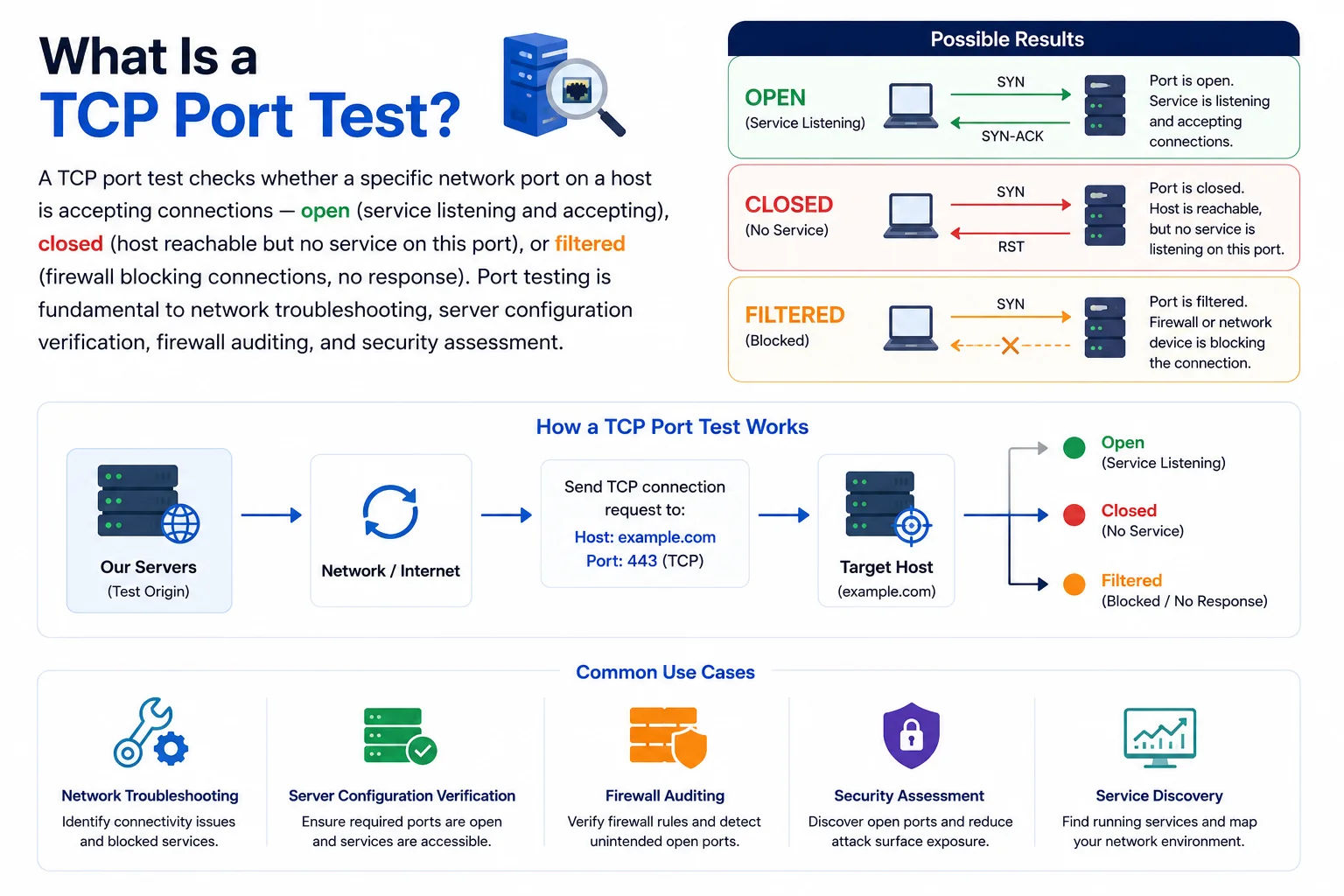
Every service on the internet listens on a specific TCP or UDP port - testing port connectivity confirms the service is running, the firewall allows traffic, and the network path is clear
TCP Three-Way Handshake - How Port Testing Works
A TCP port test works by attempting the start of a TCP connection. TCP uses a three-way handshake to establish connections:
│── SYN ─────────────────→ │
│ (I want to connect) │
│ │
│← SYN-ACK ──────────────── │ ← Port OPEN
│ (OK, go ahead) │
│ │
│── ACK ─────────────────→ │
│ (Connected!) │
# Port CLOSED response:
Client Server
│── SYN ─────────────────→ │
│← RST-ACK ──────────────── │ ← Port CLOSED (RST = Reset)
│ (Refused - no service) │
# Port FILTERED (firewall drops SYN):
Client Server
│── SYN ─────────────────→ │
│ (dropped) │ ← Port FILTERED (no response)
│ (timeout after ~10s) │
Open vs Closed vs Filtered - Key Differences
| Status | TCP Response | What It Means | Common Causes |
|---|---|---|---|
| Open ✓ | SYN-ACK received | A service is actively listening on this port and accepting connections from the internet | Web server (80/443), SSH (22), database exposed to internet (security risk if unintended) |
| Closed ✗ | RST-ACK received | Host is reachable but no service is listening on this port. The OS is actively refusing the connection. | Service stopped, wrong port number, service bound to localhost only |
| Filtered ⚠ | No response (timeout) | Firewall or network device is dropping the SYN packet. Host may or may not exist behind the firewall. | Firewall dropping inbound connections, cloud security group blocking the port, ISP filtering |
| Timeout ⏱ | No response after ~10s | Same as filtered - connection attempt timed out with no response. | Firewall DROP rule, network unreachable, host offline, incorrect IP/hostname |
Why Test from an External Server?
Testing a port from your own machine may give misleading results. If your service is bound to 127.0.0.1 (localhost), it appears open when tested locally but is inaccessible from the internet. Similarly, your local firewall might allow the port while the cloud security group or ISP blocks it externally. This tool tests from our servers on the public internet, showing exactly what external clients see - the same result Google, your customers, and potential attackers would get.
Well-Known TCP Port Numbers - Complete Reference
Ports 0–1023 are "well-known" ports assigned by IANA (Internet Assigned Numbers Authority). Ports 1024–49151 are "registered" ports used by specific applications. Click any row to test that port:
| Port | Protocol | Service | Description | Security Note |
|---|---|---|---|---|
| 80 | TCP | HTTP | Unencrypted web traffic. Should redirect to HTTPS (443) in production. | Expose with redirect |
| 443 | TCP | HTTPS | Encrypted web traffic (TLS). The standard for all modern web services. | Expose publicly |
| 8080 | TCP | HTTP Alt | Alternative HTTP port. Used by development servers, Jenkins, Tomcat, and proxies. | Development only |
| 8443 | TCP | HTTPS Alt | Alternative HTTPS port. Used by cPanel, Tomcat with SSL, and various apps. | Check if needed |
| 25 | TCP | SMTP | Server-to-server email delivery (MTA-to-MTA). Port 25 outbound is blocked by most residential ISPs including Jio and Airtel to prevent spam. | ISP often blocks |
| 587 | TCP | SMTP Submission | Email submission from mail clients (STARTTLS). Preferred for sending email from applications and email clients. Not blocked by ISPs. | Recommended |
| 465 | TCP | SMTPS | SMTP over implicit SSL/TLS. Deprecated but still used by many providers including Gmail for legacy clients. | Legacy support |
| 110 | TCP | POP3 | Post Office Protocol v3. Downloads email to local client. Downloads and deletes from server (unlike IMAP). | Use IMAPS/995 instead |
| 143 | TCP | IMAP | Internet Message Access Protocol. Keeps email on server, syncs across devices. Unencrypted - use IMAPS (993). | Unencrypted |
| 993 | TCP | IMAPS | IMAP over implicit SSL/TLS. Secure email retrieval. The correct choice for mail clients in 2024. | Recommended |
| 995 | TCP | POP3S | POP3 over implicit SSL/TLS. Secure version of POP3. | If POP3 required |
| 22 | TCP | SSH | Secure Shell. Remote terminal access, SFTP, and SSH tunnels. Most-scanned port on the internet. Change the default port or use key-only auth with fail2ban. | Harden if exposed |
| 23 | TCP | Telnet | Unencrypted remote terminal access. Never expose Telnet to the internet - all data including passwords is transmitted in plain text. | Never expose |
| 3389 | TCP/UDP | RDP | Windows Remote Desktop Protocol. One of the most attacked services on the internet. Never expose RDP directly - use VPN or bastion host. | Never expose |
| 5900 | TCP | VNC | Virtual Network Computing. Remote desktop for Linux/Mac. Often lacks strong authentication. Use SSH tunnel for VNC. | Tunnel via SSH |
| 53 | TCP/UDP | DNS | Domain Name System. UDP for standard queries, TCP for zone transfers and large responses. Open resolver on internet is a security risk (used for DDoS amplification). | Restrict to clients |
| 123 | UDP | NTP | Network Time Protocol. Time synchronisation. Open NTP servers used in DDoS amplification attacks. | Restrict or block |
| 21 | TCP | FTP | File Transfer Protocol control channel. Unencrypted - credentials and data in plain text. Use SFTP (port 22) or FTPS (port 990) instead. | Use SFTP instead |
| 445 | TCP | SMB | Windows file sharing (Samba/CIFS). The WannaCry ransomware spread via port 445. Never expose SMB to the internet. | Never expose |
| 2049 | TCP/UDP | NFS | Network File System. For Linux/Unix file sharing. Never expose NFS to the internet - no authentication by default in older versions. | Internal only |
| 3306 | TCP | MySQL / MariaDB | Default MySQL and MariaDB database port. Should never be exposed to the internet - one of the most attacked database ports. Bind to 127.0.0.1. | Bind to localhost |
| 5432 | TCP | PostgreSQL | Default PostgreSQL port. Same as MySQL - must never be internet-facing. Use SSH tunnel or VPN for remote access. | Bind to localhost |
| 1433 | TCP | Microsoft SQL Server | SQL Server default port. Constantly scanned by attackers. Restrict with Windows Firewall and only allow specific source IPs. | Restrict strictly |
| 27017 | TCP | MongoDB | Default MongoDB port. Older MongoDB installs had no authentication by default - exposed databases were mass-wiped by attackers. Always enable auth and bind to localhost. | Bind to localhost |
| 6379 | TCP | Redis | Default Redis port. Redis has no authentication by default. Countless exposed Redis instances have been compromised for cryptomining. Never expose to internet. | Bind to localhost |
| 5672 | TCP | RabbitMQ (AMQP) | RabbitMQ message broker. Management UI on 15672. Restrict to internal network or VPN. | Internal only |
| 9200 | TCP | Elasticsearch | Elasticsearch REST API. Like MongoDB and Redis, exposed Elasticsearch instances are commonly mass-compromised. Bind to localhost or VPN only. | Never expose |
| 2376 | TCP | Docker API | Docker daemon remote API. An exposed Docker API gives attackers full control of the host. Enable TLS and restrict access. | Never expose |
| 6443 | TCP | Kubernetes API | Kubernetes API server. Restrict to VPN or specific source IPs. Use RBAC and mTLS. | Restrict strictly |
| 389 | TCP/UDP | LDAP | Lightweight Directory Access Protocol. Active Directory, OpenLDAP. Unencrypted - use LDAPS (636). Never expose to internet. | Internal only |
| 636 | TCP | LDAPS | LDAP over SSL/TLS. Encrypted directory access. Should be internal only. | Internal only |
Firewall Port Configuration - Nginx, iptables, UFW & Cloud
After testing a port and finding it closed or filtered, here are the configuration commands to open it - or if a port is unexpectedly open, how to close it:
UFW (Ubuntu Firewall) - Most Common for VPS
sudo ufw allow 80/tcp # Allow HTTP from anywhere
sudo ufw allow 443/tcp # Allow HTTPS from anywhere
sudo ufw allow 22/tcp # Allow SSH (do this FIRST before enabling UFW)
sudo ufw allow from 203.0.113.10 to any port 3306 # MySQL from specific IP only
# Deny a port:
sudo ufw deny 23/tcp # Block Telnet
sudo ufw deny 3306/tcp # Block MySQL from internet
# Check status:
sudo ufw status verbose
sudo ufw enable # Enable UFW (WARNING: ensure SSH is allowed first)
iptables - Lower-Level Linux Firewall
sudo iptables -A INPUT -p tcp --dport 80 -j ACCEPT
sudo iptables -A INPUT -p tcp --dport 443 -j ACCEPT
# Allow port from specific IP only (e.g. MySQL from your office):
sudo iptables -A INPUT -p tcp -s 203.0.113.0/24 --dport 3306 -j ACCEPT
sudo iptables -A INPUT -p tcp --dport 3306 -j DROP # Block all other MySQL
# Check existing rules:
sudo iptables -L -n -v --line-numbers
# Save rules (Ubuntu/Debian):
sudo netfilter-persistent save
AWS Security Groups - Cloud Port Management
Type Protocol Port Range Source
HTTP TCP 80 0.0.0.0/0 # Allow all HTTP
HTTPS TCP 443 0.0.0.0/0 # Allow all HTTPS
SSH TCP 22 YOUR_IP/32 # SSH from your IP only
Custom TCP TCP 3306 10.0.0.0/16 # MySQL from VPC only
# Check why a port is filtered despite security group allowing it:
1. Check Network ACLs (NACL) - stateless, requires both inbound and outbound rules
2. Check if instance security group is attached to the right network interface
3. Check if service is listening: sudo ss -tlnp | grep :3306
4. Check if OS firewall (iptables/ufw) is blocking: sudo ufw status
Check Which Ports Are Listening on Your Server
sudo ss -tlnp # Modern (replaces netstat)
sudo netstat -tlnp # Legacy alternative
# Typical output:
State Recv-Q Send-Q Local Address:Port Process
LISTEN 0 128 0.0.0.0:80 nginx
LISTEN 0 128 0.0.0.0:443 nginx
LISTEN 0 128 127.0.0.1:3306 mysqld ← bound to localhost
LISTEN 0 128 0.0.0.0:22 sshd
# Windows - show listening ports:
netstat -ano | findstr LISTENING
Get-NetTCPConnection -State Listen | Select LocalPort,OwningProcess | Sort LocalPort
Most Dangerous Open Ports - Security Reference
Certain ports on internet-facing servers are actively targeted by automated scanners, botnets, and ransomware. If your server has these ports open to the internet, action is needed immediately:
| Port / Service | Attack Type | Real-World Incidents | Remediation |
|---|---|---|---|
| 22 / SSH | Brute-force password attacks, credential stuffing | Thousands of login attempts per day on exposed SSH servers. Mirai botnet spreads via weak SSH credentials. | Disable password auth (key only), change port, use fail2ban, restrict to known IPs |
| 3389 / RDP | Brute-force, BlueKeep (CVE-2019-0708), ransomware delivery | BlueKeep wormable vulnerability. Most ransomware infections enter via exposed RDP with weak passwords. | NEVER expose RDP to internet. Use VPN or Azure Bastion. Enforce NLA + MFA. |
| 3306 / MySQL | Brute-force, SQL injection, data exfiltration | Constant scanning for exposed MySQL. Data breaches from misconfigured databases are one of the most common breach types. | Bind to 127.0.0.1. Use SSH tunnel for remote access. Never expose to internet. |
| 6379 / Redis | Unauthorized access (no auth default), cryptomining, ransomware | Hundreds of thousands of Redis instances have been compromised for cryptomining. Attackers write SSH keys to Redis data directory to take root access. | requirepass in redis.conf, bind 127.0.0.1. Never expose to internet. |
| 27017 / MongoDB | Ransom attacks - databases wiped and held for ransom | In 2017, 28,000 MongoDB instances were wiped and held for ransom in one week because they had no authentication and were internet-facing. | Enable auth, bind to localhost, use VPN for remote management. |
| 9200 / Elasticsearch | Data exfiltration, index deletion ransom | Thousands of companies have had sensitive Elasticsearch data stolen or ransomed because the cluster was accidentally internet-accessible. | No built-in auth in basic tier. Use X-Pack or OpenSearch Security. Restrict with firewall. |
| 445 / SMB | EternalBlue exploit, WannaCry, NotPetya worms | WannaCry ransomware (2017) infected 200,000+ machines across 150 countries via exposed SMB port 445. | Block 445 at perimeter firewall. Apply all Windows security patches. Use Windows Firewall. |
| 23 / Telnet | Credential capture, Mirai botnet propagation | Mirai botnet infected millions of IoT devices via Telnet with default credentials (admin/admin, root/root). | Disable Telnet completely. Use SSH. Never deploy devices with Telnet enabled. |
Who Uses a TCP Port Test - 8 Real Scenarios
Frequently Asked Questions - TCP Port Test
Why does my port show as open here but not work in my browser/app?
An "open" result means the TCP connection was accepted - a SYN-ACK was received. But the port could be open without the expected service working correctly: (1) The service may have started but crashed or entered an error state - it accepted the TCP handshake but isn't processing requests. (2) The service may be running a different application than expected on that port. (3) SSL/TLS configuration may be broken - port 443 can be open but HTTPS still fails if the certificate is invalid. (4) For databases, the port may be open but authentication or network access controls are rejecting your specific connection. Use the HTTP Response Test for web services and check application logs for services.
What is the difference between a port being closed and filtered?
Closed means the host is reachable but no service is listening - the OS sends a TCP RST (reset) packet, which is an explicit refusal. This is immediate and definitive. Filtered means no response was received within the timeout period - a firewall or network device is silently dropping (not rejecting) the SYN packet. The key practical difference: closed is faster (RST comes back immediately), filtered takes the full timeout period (typically 5–10 seconds). From a security perspective, some security professionals prefer "filtered" (DROP) over "closed" (REJECT) because it reveals less information about the host, though others prefer the faster response of REJECT for better user experience.
Why is port 25 blocked by Jio, Airtel, and other ISPs?
Port 25 (SMTP) outbound is blocked by virtually all Indian ISPs including Jio and Airtel on residential and mobile connections. This is a deliberate anti-spam measure - residential IPs sending email directly on port 25 are almost always infected machines sending spam. Instead, use port 587 (SMTP submission with STARTTLS) with your email provider (Gmail, Zoho, Mailgun, SendGrid) which authenticates your connection before allowing email delivery. If you run your own mail server, you need a business-grade IP (not residential) and must configure port 587 for your client-to-server submission while port 25 is used server-to-server - ask your hosting provider to confirm port 25 inbound is open for your mail server to receive email.
My database port (3306/5432) is showing as open - is this a problem?
Yes - this is a critical security issue. Database ports should NEVER be accessible from the internet. An open MySQL (3306), PostgreSQL (5432), MongoDB (27017), or Redis (6379) port is one of the most dangerous misconfigurations possible. Attackers continuously scan for these ports and attempt brute-force logins. Immediately: (1) Restrict the port in your cloud security group or firewall to allow only your application server's internal IP. (2) In MySQL: BIND-ADDRESS = 127.0.0.1 in /etc/mysql/my.cnf. In Redis: bind 127.0.0.1 in /etc/redis/redis.conf. (3) Use an SSH tunnel or VPN for remote database access instead of exposing the port. (4) Check if data has already been accessed - enable database access logging.
How do I open a port on my home router (port forwarding)?
Port forwarding tells your router to send incoming connections on a specific port to a specific device on your internal network. Steps: (1) Log into your router admin panel (typically 192.168.0.1, 192.168.1.1, or the IP shown on the router label). (2) Find "Port Forwarding," "Virtual Server," or "NAT" settings. (3) Enter: External Port (the port internet users connect to), Internal IP (your device's local IP, e.g. 192.168.1.100), Internal Port (same or different), Protocol (TCP). (4) Save and test with this tool. Note: if your ISP uses CGNAT (Jio residential connections often do), port forwarding won't work - the 100.64.x.x address assigned to you is not a public IP. Upgrade to a business plan with a static public IP for hosting services.
What is the maximum number of TCP ports?
TCP (and UDP) use 16-bit port numbers, giving a range of 0–65535 (65,536 possible ports). These are divided into three ranges: Well-known ports (0–1023) - assigned by IANA, require root/admin privilege to bind (HTTP 80, HTTPS 443, SSH 22). Registered ports (1024–49151) - assigned to specific applications, don't require root (MySQL 3306, PostgreSQL 5432, Redis 6379). Dynamic/ephemeral ports (49152–65535) - used by the OS for outbound connections (the "source port" of your TCP connections). When you browse a website, your browser uses a random ephemeral port as the source port and connects to port 80 or 443 on the server.
What is the difference between TCP and UDP ports?
TCP (Transmission Control Protocol) establishes a reliable, ordered connection with handshaking, error correction, and retransmission. Most application-layer protocols use TCP: HTTP, HTTPS, SSH, FTP, SMTP, database connections. TCP ports can be definitively tested with a connection attempt. UDP (User Datagram Protocol) is connectionless - packets are fired without handshaking or guaranteed delivery. Used for latency-sensitive applications: DNS (53), NTP (123), DHCP (67/68), VoIP, video streaming, gaming, and VPNs (WireGuard 51820, OpenVPN 1194). UDP ports cannot be reliably tested with a TCP connection attempt - this tool tests TCP only. To test UDP, use tools like nmap -sU or specific UDP client tools for each service.