
What Is My IP Address? See It Instantly - IPv4 & IPv6
Your public IPv4 and IPv6 addresses are detected the moment this page loads - along with your ISP, location, and network details. Free, browser-based, HTTPS secured, and available worldwide with no signup.
What Is My IP Address?
Your IP address is the numeric label your Internet Service Provider assigns to your connection. Every phone, laptop, tablet, and router that goes online receives at least one address. When you open a website, send email, or stream video, your IP tells servers where to send the reply.

Every internet connection carries a public IP - this is the address websites and online services see when you connect
This page shows your public IP address - the one visible on the open internet. It is not the same as your private IP (such as 192.168.1.x or 10.0.0.x), which only exists on your home or office LAN and is hidden behind your router.
The address at the top of this page is your live public IP. If you use a VPN, you will see the VPN server's IP instead of your home connection. No installation is required - the checker runs in your browser over HTTPS, works on desktop and mobile, supports IPv4 and IPv6, and does not ask for signup.
How to Find My Public IP Address Instantly
Your public IP is already displayed at the top of this page. Our tool detects IPv4 and IPv6 automatically when the page loads - no form to submit, no app to install, and no account to create. Results refresh every 10 minutes, or you can click Refresh for an immediate update.
Other ways people look up an IP address:
ipconfig → look for "IPv4 Address" under your active adapter
# macOS / Linux - Terminal (private IP only)
ifconfig → look for "inet" under en0 (Wi-Fi) or eth0
ip addr show → Linux alternative
# Public IP from terminal (Linux/macOS)
curl ifconfig.me → returns your public IPv4
Important: Commands like ipconfig and phone Wi-Fi settings show your private local IP, not the public address websites see. This page is the reliable way to view your real public IPv4 and IPv6.
IPv4 vs IPv6 - What Is the Difference?
Two address formats are in use today. Most modern networks assign both at the same time in a setup called dual-stack:
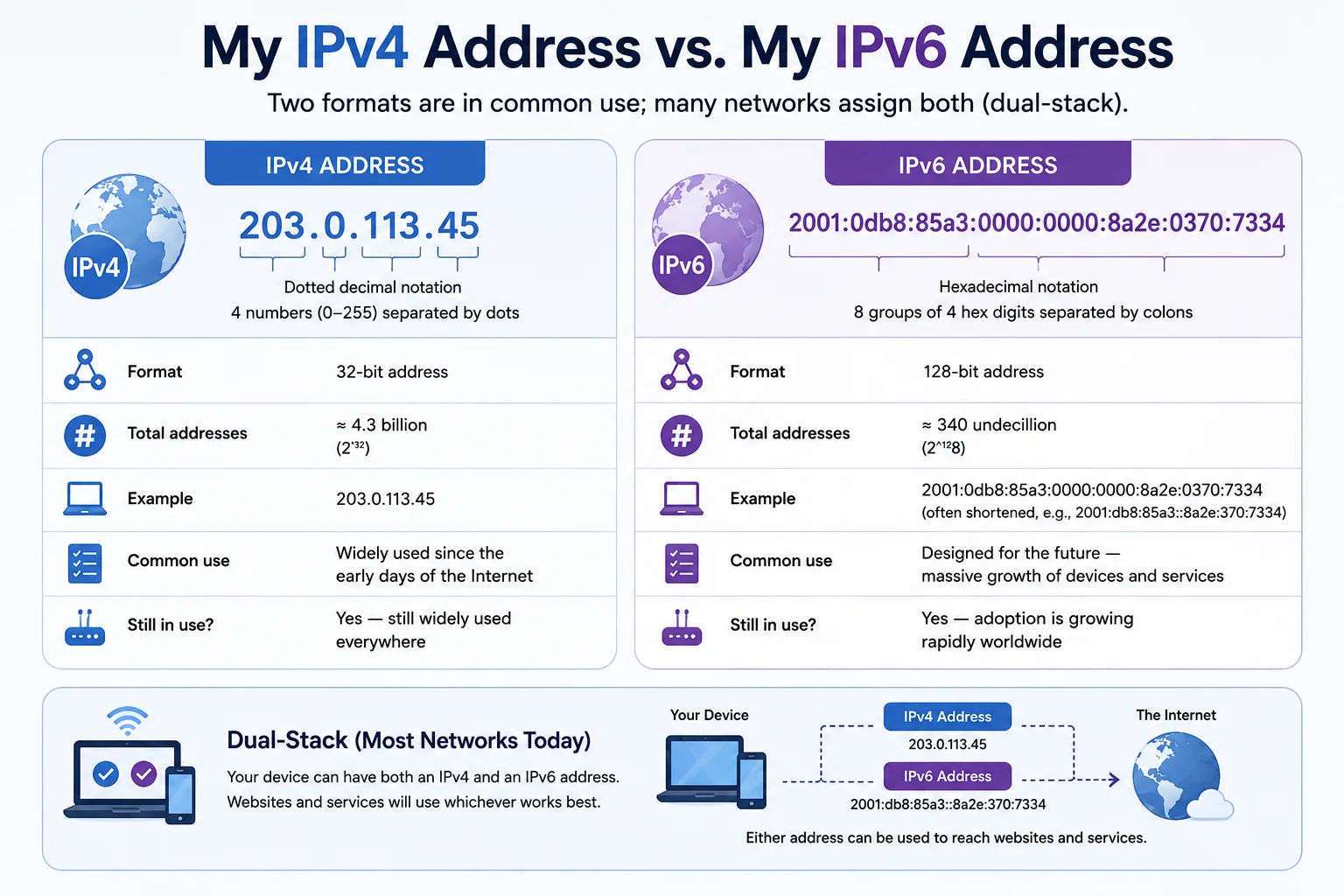
Dual-stack networks run IPv4 and IPv6 side by side on the same connection
IPv4 - The Established Standard
IPv4 uses four numbers, such as 203.0.113.45. The format supports about 4.3 billion addresses. Because demand exceeded supply, ISPs use NAT (Network Address Translation) so many devices at home share one public IPv4.
IPv6 - Built for Scale
IPv6 uses hexadecimal groups, such as 2001:0db8:85a3::8a2e:0370:7334. The address space is enormous, which is why carriers in the US, UK, EU, Australia, and the Gulf have expanded IPv6 rollout. This tool shows both formats so you know what each server sees.
Only see IPv4 and no IPv6? Your ISP or home router may not have IPv6 enabled yet. Run our IPv6 compatibility test to check whether your network supports the newer protocol.
What Is My IP Address Location?
IP geolocation estimates where an IP block is registered - not your precise GPS position. This page shows approximate city, region, country, ISP, and a map pin based on your current address. Accuracy depends on how your provider routes traffic:
| Level | Typical Accuracy | Why It Varies |
|---|---|---|
| Country | ~95–99% | IP ranges are registered to countries in regional databases |
| State / Region | ~85–90% | Large ISP blocks can span several states or provinces |
| City | Often within 25–50 miles | Traffic may exit through a regional hub in a nearby city |
| Street address | Not available | Only your ISP can map an IP to a household under legal process |
Sites use IP location for language, regional content, fraud checks, and licensing. If the city looks wrong, common causes include an active VPN, your ISP routing through a hub city, or a mobile carrier gateway that shares addresses across a wide area. For deeper detail, try our IP lookup or IP location finder.
Why Does My IP Address Keep Changing?
Most home and mobile plans use dynamic IP addressing. Your ISP draws from a shared pool, and your address may change when:
- Your router restarts or reconnects
- Your DHCP lease expires - often every 24–48 hours on residential broadband
- You switch between Wi-Fi, Ethernet, and mobile data
- Your provider performs maintenance or upgrades network gear
Dynamic IPs are normal for everyday use. If you need a fixed address for a server, remote desktop, firewall whitelist, or game host, ask your ISP about a static IP - usually available as a paid business option.
This checker refreshes every 10 minutes. After toggling a VPN or changing networks, click Refresh for an instant update.
What Does My IP Address Reveal?
Your IP does not directly expose your name, phone number, or home address. It can reveal:
- Your approximate location - usually city or region level
- Your ISP or network operator - such as Comcast, BT, Deutsche Telekom, or Telstra
- Whether you are on a residential, mobile, business, or datacentre connection
- Whether traffic appears to come from a VPN, proxy, or Tor exit node
- Your connection's ASN (Autonomous System Number) and network organisation
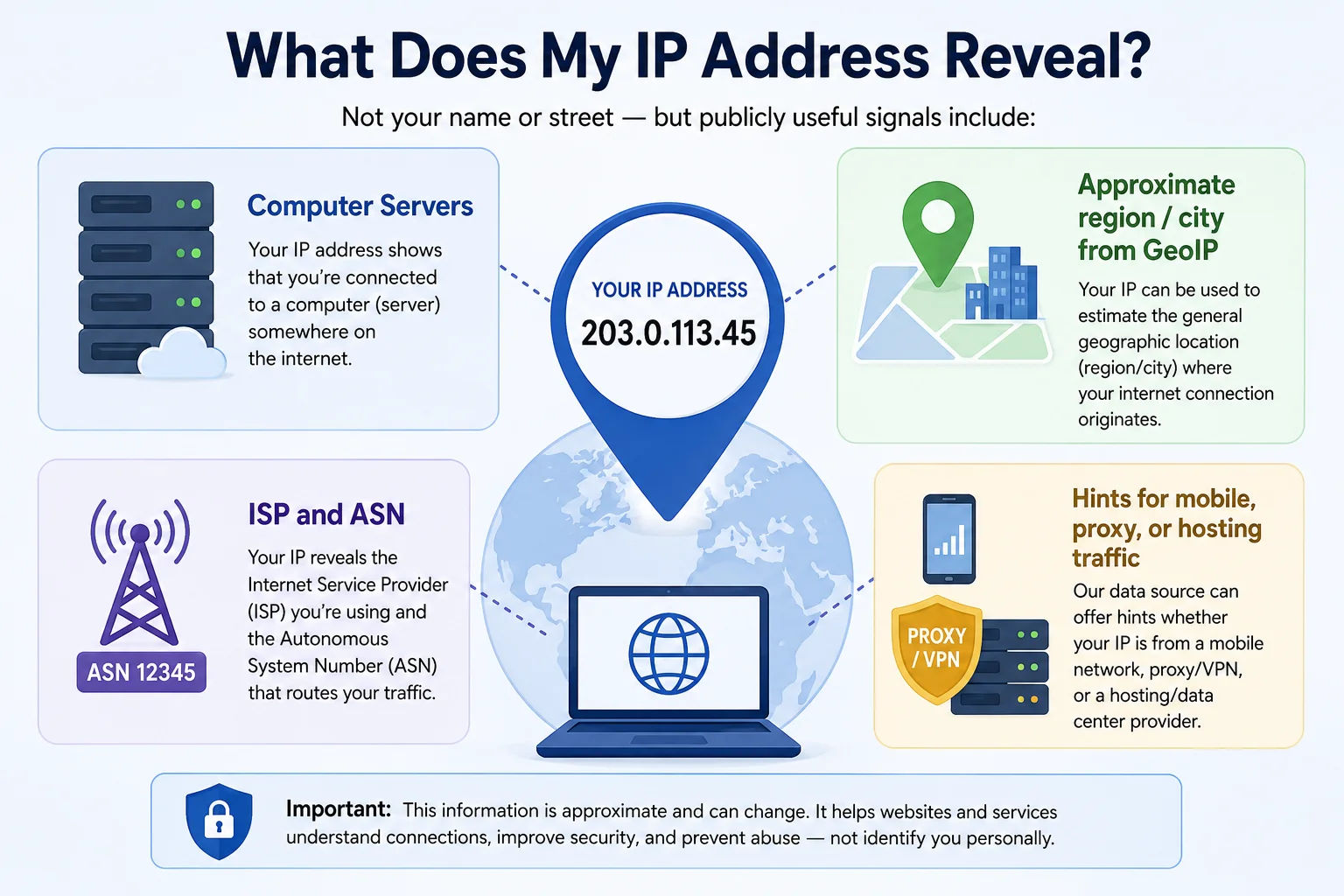
Websites use IP data for security, personalisation, and regional rules - here is what they can and cannot see
Combined with cookies and browser data, IPs can contribute to profiling over time. A VPN replaces your visible IP with the server's address. Use our VPN detection tool if you want to confirm nothing is leaking.
How to Hide My IP Address
Three common ways to mask your public IP, each with different trade-offs:
After connecting to a VPN, return here and click Refresh. If your original IP still shows, your VPN may be leaking. Run our VPN leak detector to diagnose it.
Public IP vs Private IP Address
These addresses serve different roles. That is why your phone settings and this page can show different numbers:
| Public IP | Private IP | |
|---|---|---|
| Who assigns it? | Your ISP | Your router (DHCP) |
| Who can see it? | The entire internet | Devices on your local network only |
| Example | 203.0.113.45 | 192.168.1.x or 10.0.0.x |
| Globally unique? | ✓ Yes | ✗ No - reused on millions of LANs |
| Shown on this page? | ✓ Yes | ✗ No |
Your router holds one public IP and uses NAT to give each phone, laptop, and smart device its own private address. To the outside world, they all share that single public IP.
Works Worldwide
Our free IP checker works from anywhere in the world including the United States, Canada, United Kingdom, Ireland, Germany, France, Netherlands, Belgium, Spain, Italy, Sweden, Norway, Denmark, Finland, Poland, Australia, New Zealand, United Arab Emirates, Saudi Arabia, Qatar, Kuwait, Bahrain and Oman.
The tool runs entirely in your browser - no download, no signup, and no stored lookups. Whether you are on fibre in London, cable in Toronto, LTE in Sydney, or 5G in Dubai, your public IPv4 and IPv6 are detected through fast global lookup servers with HTTPS encryption.
Country Support
This IP address checker is available in every country listed below. Open the page from any supported region - your results appear instantly.
| Country | Supported |
|---|---|
| USA | ✓ Supported |
| Canada | ✓ Supported |
| United Kingdom | ✓ Supported |
| Ireland | ✓ Supported |
| Germany | ✓ Supported |
| France | ✓ Supported |
| Spain | ✓ Supported |
| Italy | ✓ Supported |
| Netherlands | ✓ Supported |
| Belgium | ✓ Supported |
| Switzerland | ✓ Supported |
| Austria | ✓ Supported |
| Sweden | ✓ Supported |
| Norway | ✓ Supported |
| Denmark | ✓ Supported |
| Finland | ✓ Supported |
| Portugal | ✓ Supported |
| Poland | ✓ Supported |
| Czech Republic | ✓ Supported |
| Australia | ✓ Supported |
| New Zealand | ✓ Supported |
| UAE | ✓ Supported |
| Saudi Arabia | ✓ Supported |
| Qatar | ✓ Supported |
| Kuwait | ✓ Supported |
| Bahrain | ✓ Supported |
| Oman | ✓ Supported |
Who Uses This Tool?
Anyone who needs a quick, accurate read on their public IP - from home users to enterprise teams:
Common Uses
Practical reasons people check their IP address every day:
Why Trust This IP Checker?
IP Tracker Tools is built for speed, clarity, and privacy. This checker is browser-based, served over HTTPS, and free with no signup. It supports IPv4 and IPv6, works on desktop, tablet, and mobile, and uses accurate geolocation databases updated regularly. We do not require an account and we do not store your IP address after your session ends.
- No installation - runs in Chrome, Safari, Firefox, Edge, and mobile browsers
- HTTPS secured - encrypted connection for every lookup
- Privacy friendly - no signup, no account, no IP logging
- IPv4 and IPv6 - dual-stack detection on supported networks
- Fast global servers - results in seconds from the US, Europe, Australia, and the Gulf
- Accurate geolocation - country, region, city, ISP, and ASN details
Frequently Asked Questions
Answers to common questions about IP addresses, privacy, VPNs, and how this free worldwide checker works:
What is my IP address?
Your IP address is the public network address assigned to your internet connection. Websites, apps, and online services use it to send responses back to you. This page shows the public IPv4 and IPv6 addresses that remote servers see when you load it—not the private address your router gives your phone or computer.
What is a public IP address?
A public IP address is routable on the open internet and is assigned by your ISP (or by a VPN or proxy if you use one). Other networks need that address to communicate with your connection. It is different from a private IP, which only works inside your home or office network.
What is the difference between IPv4 and IPv6?
IPv4 uses 32-bit addresses written as four numbers separated by dots (for example, 203.0.113.45). IPv6 uses 128-bit addresses written as hexadecimal groups (for example, 2001:db8::1). IPv6 was introduced because IPv4 address space is limited. Many networks run dual-stack and assign both; this page shows whichever public addresses your connection currently presents.
Can my IP address reveal my exact physical location?
No. An IP address can usually suggest an approximate location such as a country, region, or sometimes a city. It generally cannot identify your exact street address by itself. Mobile carriers, CGNAT, VPNs, and ISP routing often place the registered location far from where you actually are.
What information can someone get from my IP address?
From an IP alone, someone can typically look up the ISP or organization that holds the address block, a rough geographic estimate, and related network registration details (such as ASN). They cannot reliably learn your name, phone number, or exact home address from the IP by itself. More personal data would require other sources or legal requests to the ISP.
Why does my IP address change?
Most home and mobile plans use dynamic public IPs. Your address can change when your modem or phone reconnects, a DHCP lease renews, you switch between Wi-Fi and cellular, or your ISP reassigns addresses from its pool. Business static IPs stay the same until the provider or account holder changes them.
Does my IP address change when I use a VPN?
Yes. A VPN sends your traffic through a remote server, so websites usually see the VPN exit IP instead of your home or mobile IP. After you connect or disconnect, reload or refresh this page to confirm which public address is currently visible. If your real ISP IP still appears, the VPN session may not be covering that traffic.
Can my ISP see my IP address?
Yes. Your ISP assigns and routes your public IP (or the shared address used for your connection under CGNAT). The ISP can associate that address with your account for network management, abuse handling, and—where legally required—disclosure. Using a VPN hides your destination traffic from the ISP’s normal view of sites you visit, but the ISP still sees that you are connected to the VPN service.
Can two people have the same public IP address?
Yes, in common setups. With carrier-grade NAT (CGNAT) or home NAT, many devices and even many customers can share one public IPv4 address. On a dual-stack network you may also share public IPv4 while each device has a distinct IPv6 address. Shared public IPv4 is normal on mobile networks and some residential broadband.
What is the difference between a public IP and a private IP?
A public IP is visible on the internet and is what this page detects. A private IP (for example 192.168.1.10 or 10.0.0.5) is used only on your local network and is assigned by your router or device. NAT translates between private addresses on your LAN and the public address your ISP provides.
Is my IP address unique?
Not necessarily. A public IPv4 address is unique on the global internet at a given time as a routing endpoint, but many people can share that same public IPv4 through NAT or CGNAT. IPv6 addresses are far more plentiful, so devices often receive addresses that are unique for practical purposes, though temporary and privacy addresses can still change.
How accurate is IP geolocation?
Country-level estimates are often reliable, but region and city results can be wrong by a large margin. Accuracy depends on the geolocation database, how the ISP registers address blocks, mobile gateways, VPNs, proxies, and CDN or hosting ranges. Treat city and coordinates as approximate—not as a precise physical location.
Related Free Network Tools
Pair this IP checker with our other browser-based tools for a complete picture of your connection and network:
HTTP Headers also displays your browser's User-Agent string and request headers - useful for debugging how servers identify your device.
Technical information
How this tool works, where data comes from, and known limitations. See also our methodology and accuracy & limitations pages.
How this tool works
Detects your public IP from the client connection path and looks up geolocation/ISP fields through the same IP lookup services used elsewhere on the site.
Data source
Limitations
Shows your public (WAN) address as seen by external services, which may be a VPN exit, CGNAT, or carrier gateway rather than a device-local address.
Content revision 2026-09 (aligned with current tool implementation in this codebase)